مقدمة
This manual provides detailed instructions for the setup, operation, and maintenance of your Audiovox CE-122 Personal CD Player with Car Kit. Please read this manual thoroughly before using your device to ensure proper functionality and to maximize your listening experience.
The Audiovox CE-122 is a portable CD player designed for versatile use, featuring a Digital Anti-Shock System (DASS) for uninterrupted playback during movement, a 22-track programmable memory, and a bass boost function. It includes a complete car kit for in-vehicle use.
محتويات الحزمة
تأكد من تضمين جميع العناصر المدرجة أدناه في الحزمة الخاصة بك:
- Audiovox CE-122 Portable CD Player
- سماعات الرأس
- محول التيار المتردد
- محول السيارة
- محول كاسيت
- دليل المستخدم (هذه الوثيقة)
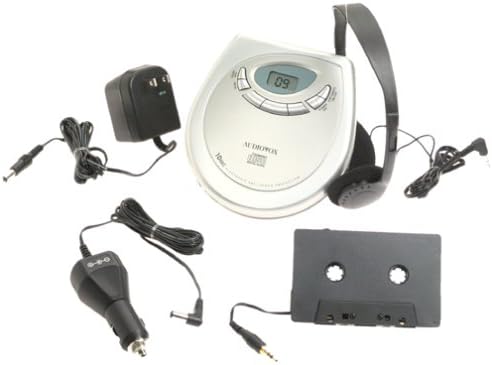
صورة: The Audiovox CE-122 portable CD player shown with all its accessories, including headphones, AC adapter, car adapter, and cassette adapter.
مميزات المنتج
- Plays audio CD and CD-R/RW discs.
- AC/DC operation for home and portable use.
- Complete car kit included for in-vehicle audio.
- Digital Anti-Shock System (DASS) provides up to 20 seconds of skip protection.
- 22-track programmable memory for custom playback sequences.
- Bass boost feature for enhanced audio.
- Forward and reverse search functions.
- Repeat and pause functions.
- Key hold switch to prevent accidental button presses.
- Line out jack for connecting to external audio systems.
- Auto power off function to conserve battery life.
- Dual stereo headphone jack for shared listening.
- Built-in charger for rechargeable batteries (rechargeable batteries not included).
يثبت
1. إدخال البطاريات
The CD player operates on 4 AA batteries (included). For rechargeable batteries (not included), ensure they are inserted correctly for charging.
- افتح غطاء حجرة البطارية الموجود في الجزء السفلي من الوحدة.
- أدخل 4 بطاريات AA، مع مراعاة القطبية الصحيحة (+/-) كما هو موضح داخل الحجرة.
- أغلق غطاء حجرة البطارية جيدًا.
2. Connecting Power (AC Adapter)
For home use or to charge rechargeable batteries:
- Plug the small end of the AC adapter into the DC IN 4.5V jack on the CD player.
- قم بتوصيل الطرف الآخر من محول التيار المتردد بمنفذ حائط قياسي.
- If using rechargeable batteries, select the 'charge' function (if available on your model) to begin charging.
3. توصيل سماعات الرأس
Plug the headphones into one of the two headphone jacks on the side of the CD player.

صورة: لقطة مقرّبة view of the headphones included with the Audiovox CE-122 CD player.
4. Car Kit Setup
To use the CD player in your vehicle:
- Plug the car adapter into your vehicle's cigarette lighter or 12V power outlet.
- Connect the small end of the car adapter to the DC IN 4.5V jack on the CD player.
- Insert the cassette adapter into your vehicle's cassette player.
- Connect the audio cable from the cassette adapter to the LINE OUT jack on the CD player.
- Ensure your car stereo is set to the cassette function to hear the CD player's audio.
تعليمات التشغيل
1. إدخال قرص مضغوط
- اضغط على زر الفتح لفتح غطاء حجرة الأقراص المضغوطة.
- Place a CD (audio CD or CD-R/RW) onto the center spindle with the label side facing up.
- اضغط برفق على القرص المضغوط لأسفل حتى يستقر في مكانه.
- أغلق غطاء حجرة الأقراص المضغوطة بإحكام حتى يتم تثبيته.

صورة: The Audiovox CE-122 portable CD player with its lid open, revealing the disc compartment where a CD is placed.
2. التشغيل الأساسي
- يلعب: اضغط على تشغيل/إيقاف مؤقت button to start playback. The track number will appear on the display.
- يوقف: اضغط على تشغيل/إيقاف مؤقت اضغط على الزر أثناء التشغيل لإيقاف التشغيل مؤقتًا. اضغط عليه مرة أخرى لاستئناف التشغيل.
- توقف: اضغط على قف زر لإيقاف التشغيل.
3. تتبع الملاحة
- تخطي المسار: اضغط على القفز إلى الأمام (►►) أو تخطي للخلف (◄◄) buttons to move to the next or previous track.
- يبحث: اضغط مع الاستمرار على القفز إلى الأمام (►►) أو تخطي للخلف (◄◄) buttons during playback to fast forward or rewind within a track.
4. كرر الوظيفة
اضغط على يكرر button to cycle through repeat modes:
- كرر 1: يكرر المسار الحالي.
- كرر الكل: يكرر جميع المسارات الموجودة على القرص.
- كرر إيقاف: Disables repeat function.
5. Programmable Memory
You can program up to 22 tracks to play in a specific order:
- مع إيقاف تشغيل القرص المضغوط، اضغط على برنامج زر.
- استخدم القفز إلى الأمام (►►) أو تخطي للخلف (◄◄) أزرار لاختيار المسار المطلوب.
- يضعط برنامج again to add the track to the memory.
- كرر الخطوتين 2 و 3 لما يصل إلى 22 مسارًا.
- يضعط تشغيل/إيقاف مؤقت لبدء تشغيل التسلسل المبرمج.
6. تعزيز الجهير
اضغط على تعزيز الجهير زر لتفعيل أو تعطيل ميزة تحسين الصوت الجهير.
7. Key Hold Switch
حرك يمسك switch to the ON position to disable all buttons, preventing accidental operation during transport.
8. Digital Anti-Shock System (DASS)
The DASS provides up to 20 seconds of skip protection. This feature is automatically active during playback to ensure smooth audio even during movement.
9. إيقاف التشغيل التلقائي
The unit will automatically power off after a period of inactivity or when a CD finishes playing to conserve battery life.

صورة: The Audiovox CE-122 portable CD player, a silver-colored device with a digital display and control buttons, shown alongside its black over-ear headphones.
صيانة
1. Cleaning the CD Player
- امسح الجزء الخارجي من الوحدة بقطعة قماش ناعمة وجافة. لا تستخدم منظفات أو مذيبات كاشطة.
- To clean the lens, use a specialized CD lens cleaner disc. Do not touch the lens directly.
2. العناية بالبطارية
- قم بإزالة البطاريات إذا لم يتم استخدام الوحدة لفترة طويلة لمنع التسرب.
- استبدل جميع البطاريات في نفس الوقت؛ لا تخلط البطاريات القديمة والجديدة أو أنواع البطاريات المختلفة.
3. التخزين
قم بتخزين مشغل الأقراص المدمجة في مكان بارد وجاف بعيدًا عن أشعة الشمس المباشرة ودرجات الحرارة القصوى.
استكشاف الأخطاء وإصلاحها
If you encounter issues with your Audiovox CE-122, please refer to the following common problems and solutions:
- لا يوجد طاقة:
• Check if batteries are inserted correctly and are not depleted. Replace if necessary.
• Ensure the AC adapter or car adapter is securely connected and the power source is active. - CD Not Playing / Disc Error:
• Ensure the CD is inserted correctly with the label side up.
• Check if the CD is scratched or dirty. Clean the CD with a soft, lint-free cloth.
• Make sure the CD compartment lid is fully closed.
• The disc format may not be supported (e.g., data CD instead of audio CD or CD-R/RW). - Skipping During Playback:
• While the DASS provides protection, severe shocks or vibrations can still cause skipping. Try to keep the player stable.
• Ensure the CD is clean and free of scratches.
• Low battery power can sometimes affect anti-shock performance. Replace or recharge batteries. - لا يوجد صوت:
• Check headphone connection and ensure they are fully plugged in.
• ضبط مستوى الصوت.
• If using the car kit, ensure the car stereo is set to the correct input (cassette function) and volume is up. - الأزرار لا تستجيب:
• تحقق مما إذا كان يمسك switch is in the ON position. Slide it to OFF to enable buttons.
تحديد
| رقم الموديل | CE-122 |
| تنسيقات الأقراص المدعومة | Audio CD, CD-R/RW (MP3 compatible) |
| حماية ضد الصدمات | 20 seconds (Digital Anti-Shock System) |
| ذاكرة قابلة للبرمجة | 22 مسارات |
| مصدر الطاقة | 4 x AA batteries, AC adapter (4.5V DC), Car adapter (12V DC) |
| الاتصال | Auxiliary (Line Out), Dual Headphone Jacks |
| الأبعاد (تقريبًا) | 11.1 × 7.8 × 3.2 بوصة (الحزمة) |
| الوزن (تقريبا) | 1.5 رطل |
الضمان والدعم
For warranty information and customer support, please refer to the documentation provided at the time of purchase or contact Audiovox customer service. Keep your proof of purchase for warranty claims.


