1. Introduction to Samsung Galaxy Devices
Samsung Galaxy devices are designed with advanced technology and sleek aesthetics. This manual provides detailed instructions to help you understand and utilize the full capabilities of your device. From initial setup to advanced features and troubleshooting, this guide aims to enhance your user experience.
Smartphones and tablets are sophisticated devices. Their design combines aesthetic appeal with robust functionality. The sheer amount of functionality integrated into their compact units is remarkable. This guide will outline exactly why you'll find it hard to put your Galaxy device down.
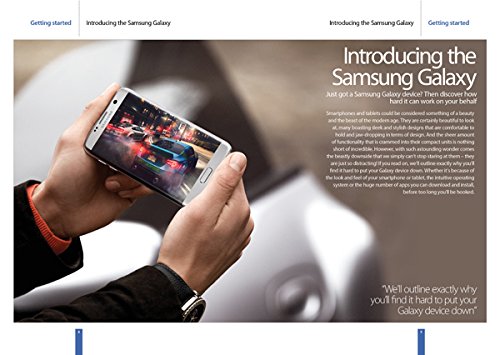
Figure 1.1: A Samsung Galaxy device showcasing its display. This image illustrates the device's design and screen quality.
2. الإعداد الأولي
This section guides you through the initial steps to power on and configure your Samsung Galaxy device for first-time use.
- تشغيل الطاقة: اضغط مع الاستمرار على زر الطاقة حتى يظهر شعار Samsung.
- اختيار اللغة: Choose your preferred language from the list and tap "Start".
- اتصال واي فاي: Select your Wi-Fi network and enter the password if prompted. Tap "Connect".
- الشروط والأحكام: Read and accept the End User License Agreement and Privacy Policy to proceed.
- إعداد حساب Google: Sign in with your Google account or create a new one. This is essential for accessing Google services and the Play Store.
- نقل البيانات (اختياري): If you have a previous device, follow the on-screen instructions to transfer data.
- إعداد الأمان: Set up a screen lock (PIN, pattern, password, fingerprint, or face recognition) for device security.
- الإعداد الكامل: Follow any remaining prompts to finalize the setup process. Your device is now ready for use.
3. تشغيل جهازك
This section covers the basic operations and navigation of your Samsung Galaxy device.
3.1. أساسيات الملاحة
- الشاشة الرئيسية: المركز الرئيسي لتطبيقاتك وأدواتك. اسحب لليسار أو لليمين للوصول إلى شاشات إضافية.
- درج التطبيقات: اسحب لأعلى من الشاشة الرئيسية إلى view جميع التطبيقات المثبتة.
- لوحة الإشعار: مرر لأسفل من أعلى الشاشة للوصول إلى الإشعارات والإعدادات السريعة.
- التطبيقات الأخيرة: انقر على زر التطبيقات الأخيرة (عادةً ما يكون رمزًا مربعًا) لـ view والتبديل بين التطبيقات المستخدمة مؤخرًا.
- زر الرجوع: Tap the Back button (usually a triangle or arrow icon) to return to the previous screen.
4. إدارة التطبيقات
Your Samsung Galaxy device comes with a variety of pre-installed applications, and you can download many more from the Google Play Store. This section explains how to manage them.
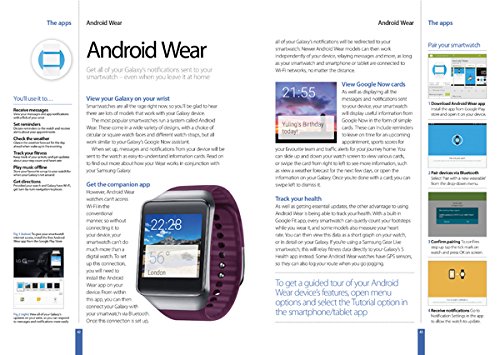
الشكل 4.1: أكثر منview of app management and Android Wear integration on Samsung Galaxy.
4.1. Installing and Uninstalling Apps
- ثَبَّتَ: Open the "Play Store" app, search for the desired app, and tap "Install".
- إلغاء التثبيت: Go to "Settings" > "Apps", select the app, and tap "Uninstall". Alternatively, long-press the app icon on the home screen or app drawer and drag it to the "Uninstall" option.
4.2. App Permissions
Manage what information and device features apps can access. Go to "Settings" > "Apps", select an app, then tap "Permissions" to review and adjust access.
5. Android Wear Integration
Your Samsung Galaxy device can seamlessly integrate with Android Wear smartwatches, allowing you to receive notifications and manage certain functions directly from your wrist.
5.1. Getting Started with Android Wear
- تنزيل التطبيق: Download the "Android Wear" app from the Google Play Store on your Galaxy device.
- الاقتران: Open the Android Wear app and follow the on-screen instructions to pair your smartwatch via Bluetooth. Ensure Bluetooth is enabled on both devices.
- إشعارات: Once paired, all notifications from your Galaxy device will be redirected to your smartwatch. This includes calls, messages, and app alerts.
5.2. الميزات الرئيسية
- View Google Now Cards: Receive timely information such as weather updates, traffic alerts, and calendar reminders directly on your smartwatch.
- Track Your Health: Many Android Wear devices include fitness tracking capabilities. Sync your smartwatch with Google Fit or other health apps on your Galaxy device to monitor steps, heart rate, and more.
- Respond to Messages: Reply to messages using voice commands or pre-set responses directly from your wrist.
6. صيانة الجهاز
Proper maintenance ensures the longevity and optimal performance of your Samsung Galaxy device.
- تحديثات البرامج: Regularly check for and install software updates. Go to "Settings" > "Software update" > "Download and install".
- العناية بالبطارية: Avoid extreme temperatures. Do not let the battery drain completely often, and avoid overcharging.
- تنظيف: استخدم قطعة قماش ناعمة وخالية من الوبر لتنظيف الشاشة وجسم الجهاز. تجنب المواد الكيميائية القاسية.
- ادارة التخزين: قم بإزالة غير الضروري بشكل دوري files and uninstall unused apps to free up storage space. Go to "Settings" > "Device care" > "Storage".
- النسخ الاحتياطي للبيانات: قم بعمل نسخ احتياطية منتظمة لبياناتك المهمة على Samsung Cloud أو Google Drive أو جهاز كمبيوتر لمنع فقدان البيانات.
7. استكشاف المشكلات الشائعة وإصلاحها
يتناول هذا القسم المشاكل الشائعة التي قد تواجهها ويقدم حلولاً لها.
7.1. الجهاز لا يستجيب
- إعادة تشغيل: اضغط مع الاستمرار على زر التشغيل وزر خفض الصوت في نفس الوقت لمدة تتراوح بين 7 و10 ثوانٍ لإعادة تشغيل الجهاز بالقوة.
- تكلفة: Ensure the device has sufficient battery charge. Connect it to a charger and wait a few minutes before attempting to power on.
7.2. مشاكل الاتصال بشبكة الواي فاي
- تبديل Wi-Fi: Turn Wi-Fi off and then on again from the Quick Settings panel.
- إعادة تشغيل جهاز التوجيه: أعد تشغيل جهاز توجيه Wi-Fi الخاص بك.
- انسى الشبكة: Go to "Settings" > "Connections" > "Wi-Fi", tap the gear icon next to the problematic network, and select "Forget". Then, reconnect.
7.3. App Crashing
- مسح ذاكرة التخزين المؤقت: Go to "Settings" > "Apps", select the problematic app, then "Storage" > "Clear cache".
- تحديث التطبيق: Ensure the app is updated to its latest version via the Google Play Store.
- إعادة تثبيت التطبيق: قم بإلغاء تثبيت التطبيق ثم أعد تثبيته.
8. مواصفات المنتج
Key technical details for the Samsung Galaxy: The Complete Manual.
| ميزة | التفاصيل |
|---|---|
| الناشر | Imagine Publishing Ltd |
| طبعة | الطبعة السادسة |
| لغة | إنجليزي |
| رقم الكتاب الدولي المعياري 10 | 1785464140 |
| رقم الكتاب الدولي المعياري 13 | 978-1785464140 |
| وزن العنصر | 7.1 أونصات |
9. الضمان والدعم
For specific warranty information regarding your Samsung Galaxy device, please refer to the documentation included with your product at the time of purchase or visit the official Samsung support webموقع.
دعم العملاء: If you encounter issues not covered in this manual or require further assistance, please contact Samsung customer support through their official website or designated service centers. Have your device's model number and serial number ready for faster service.
الموارد المتاحة على الإنترنت: Additional guides, FAQs, and software downloads are often available on the official Samsung support portal.


