
1. المقدمة
This manual provides essential instructions for the proper use, setup, and maintenance of your Generic T8 Pro Smart Watch. Please read this manual thoroughly before using the device to ensure optimal performance and safety. The T8 Pro Smart Watch is designed to be a versatile companion for active lifestyles, offering features such as Bluetooth calling, heart rate monitoring, step tracking, sleep analysis, and 5ATM water resistance.

Figure 1: Generic T8 Pro Smart Watch (Black, Silver, Gray variant). The watch features a round display showing time, date, and various health metrics.
2. معلومات السلامة
- Do not attempt to disassemble or modify the watch. This may void the warranty and cause damage.
- احتفظ بالساعة بعيدًا عن درجات الحرارة العالية وأشعة الشمس المباشرة والسوائل المسببة للتآكل.
- تجنب الصدمات القوية أو إسقاط الجهاز.
- Consult a medical professional before starting any new exercise regimen, especially if you have pre-existing health conditions. The heart rate and other fitness data provided by this device are for reference only and should not be used for medical diagnosis or treatment.
- تأكد من أن نقاط التلامس الخاصة بالشحن نظيفة وجافة قبل الشحن لمنع التآكل أو التلف.
- This device contains a lithium-ion battery. Dispose of it responsibly according to local regulations.
3. محتويات العبوة
تأكد من وجود جميع العناصر في الحزمة الخاصة بك:
- T8 Pro Smart Watch
- كابل الشحن (USB)
- دليل المستخدم (هذا المستند)
4. الإعداد
4.1. شحن الساعة الذكية
Before initial use, fully charge your T8 Pro Smart Watch. Connect the magnetic charging cable to the charging contacts on the back of the watch and plug the USB end into a standard USB power adapter (not included) or a computer's USB port.
- تستغرق عملية الشحن الكامل عادةً حوالي 2 ساعة.
- ستعرض شاشة الساعة مؤشر الشحن.
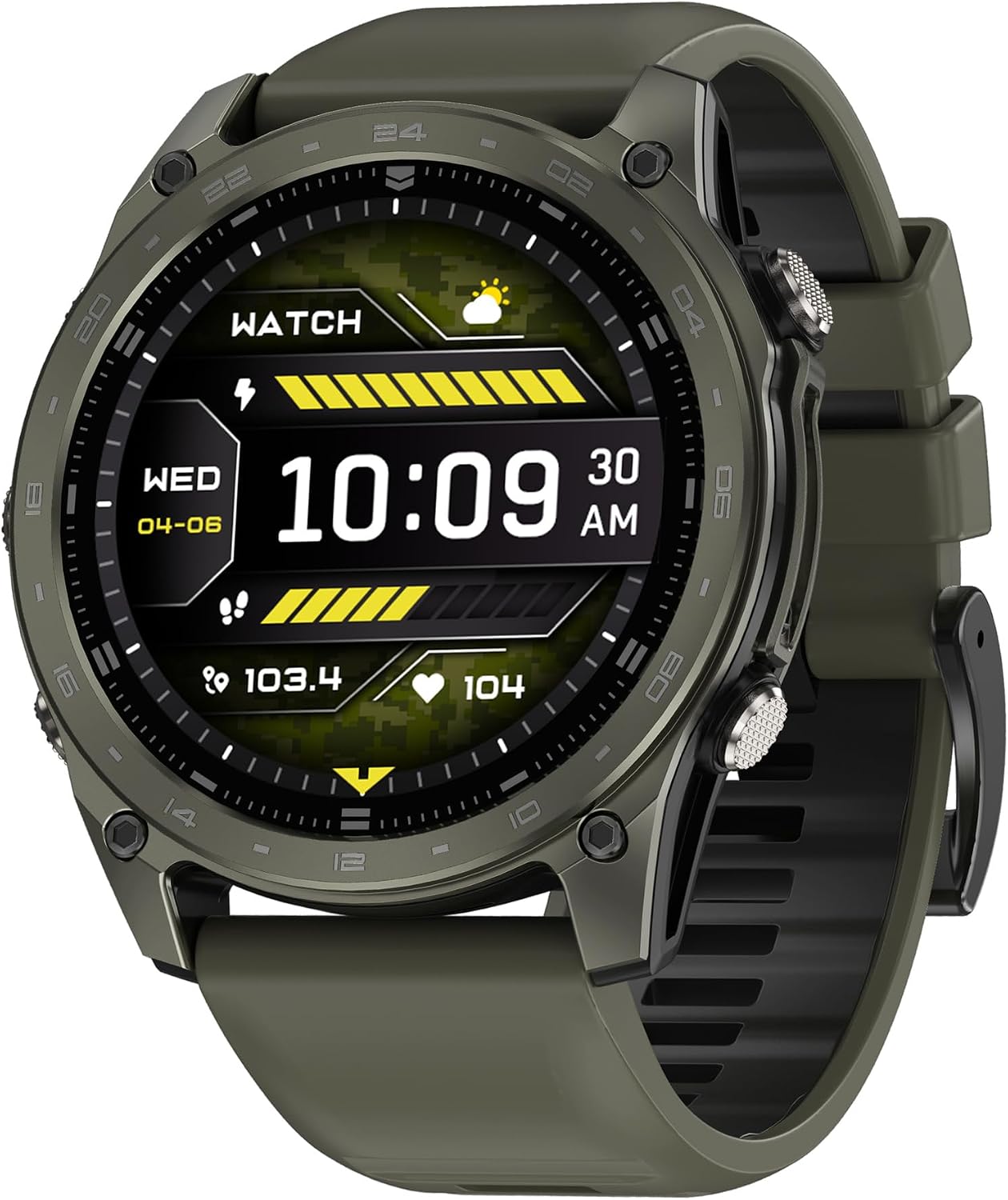
الشكل 2: الجانب view of the T8 Pro Smart Watch, highlighting the control buttons.
4.2. تشغيل / إيقاف التشغيل
- تشغيل الطاقة: Press and hold the top physical button for a few seconds until the screen lights up.
- إيقاف التشغيل: From the watch face, swipe down to access the quick settings, then tap the power icon, or navigate to Settings > System > Power Off. Confirm your selection.
4.3. الاقتران بهاتفك الذكي
To unlock the full functionality of your T8 Pro Smart Watch, you need to pair it with your smartphone via Bluetooth and the dedicated companion application.
- تنزيل التطبيق: Scan the QR code provided in the watch's packaging or search for the "T8 Pro" companion app in your smartphone's app store (Google Play Store for Android, Apple App Store for iOS). Install the application.
- تمكين البلوتوث: تأكد من تمكين Bluetooth على هاتفك الذكي.
- افتح التطبيق: Launch the T8 Pro companion app on your smartphone and follow the on-screen instructions to create an account or log in.
- إضافة جهاز: In the app, navigate to the "Device" or "Add Device" section. The app will search for available smartwatches. Select "T8 Pro" from the list.
- تأكيد الاقتران: سيظهر طلب اقتران على كل من هاتفك وساعتك. قم بتأكيد الاقتران على كلا الجهازين.
- الإعداد الكامل: Follow any remaining prompts in the app to complete the setup, including granting necessary permissions for notifications, health data, etc.
5. تعليمات التشغيل
5.1. التنقل الأساسي
- شاشة تعمل باللمس: مرر لليسار، لليمين، للأعلى، وللأسفل للتنقل بين القوائم والميزات. انقر للتحديد.
- الزر الأعلى: Press to return to the watch face or wake the screen. Long press to power on/off.
- الزر السفلي: Customizable shortcut button (can be set in app settings).

Figure 3: T8 Pro Smart Watch worn on a wrist, demonstrating its fitness tracking capabilities.
5.2. مكالمات البلوتوث
بمجرد إقرانها بهاتفك الذكي، يمكنك إجراء واستقبال المكالمات مباشرة من ساعتك.
- إجراء مكالمة: Access the "Dialer" or "Contacts" app on your watch. You can dial a number directly or select a contact from your synced phonebook.
- استقبال مكالمة: عند ورود مكالمة، ستعرض الساعة هوية المتصل. انقر على الرمز الأخضر للرد أو الرمز الأحمر لرفض المكالمة.
5.3. Heart Rate Tracking
The T8 Pro Smart Watch continuously monitors your heart rate. To view your current heart rate or historical data:
- Swipe to the Heart Rate widget on your watch face or open the Heart Rate app.
- تأكد من ارتداء الساعة بإحكام على معصمك للحصول على قراءات دقيقة.
- Detailed historical data is available in the companion app.
5.4. Step Tracking
The watch automatically tracks your steps, distance, and calories burned throughout the day.
- View your daily progress on the watch face or in the Activity app.
- Set daily step goals within the companion app.
5.5. مراقبة النوم
Wear the watch to bed, and it will automatically monitor your sleep patterns, including deep sleep, light sleep, and awake times.
- Access sleep data on the watch's Sleep app or in the companion app for detailed analysis.
5.6. أوضاع الرياضة
The T8 Pro offers multiple sport modes for tracking various activities.
- Open the "Workout" or "Sport" app on your watch.
- Select your desired activity (e.g., Running, Cycling, Hiking).
- Tap "Start" to begin tracking. The watch will record duration, heart rate, calories, and other relevant metrics.
- Tap "Pause" or "End" to stop the workout. Data will sync to your companion app.
5.7. تخصيص واجهات الساعة
قم بتخصيص ساعتك عن طريق تغيير وجه الساعة.
- على المراقبة: Long-press the watch face, then swipe left or right to browse available faces. Tap to select.
- عبر التطبيق: The companion app offers a wider selection of watch faces and customization options.
5.8. 5ATM Waterproof Rating
The T8 Pro Smart Watch has a 5ATM waterproof rating, meaning it can withstand pressures equivalent to a depth of 50 meters. This makes it suitable for:
- Showering and bathing (avoid hot water and steam).
- السباحة في المياه الضحلة.
- مطر ورذاذ.
مهم: Do not press any buttons while the watch is submerged in water. Avoid exposing the watch to high-velocity water or extreme temperature changes, as this may compromise the water seal.
6. الصيانة
6.1. التنظيف
- امسح شاشة الساعة وجسمها بقطعة قماش ناعمة وخالية من الوبر.
- بالنسبة للأوساخ العنيدة، قم بإزالة الأوساخ برفق.ampاغسل قطعة القماش بالماء. لا تستخدم مواد كيميائية قاسية أو منظفات كاشطة.
- Clean the charging contacts regularly with a dry cloth to ensure proper charging.
- اشطف الساعة بالماء العذب بعد تعرضها للماء المالح أو الماء المعالج بالكلور، ثم جففها جيداً.
6.2. التخزين
- قم بتخزين الساعة في مكان بارد وجاف عندما لا تكون قيد الاستخدام.
- تجنب تخزين المنتج في ضوء الشمس المباشر أو في المناطق ذات الرطوبة العالية.
6.3. العناية بالبطارية
- لإطالة عمر البطارية، تجنب تفريغ البطارية بالكامل بشكل متكرر.
- Charge the watch regularly, even if not in daily use, to prevent deep discharge.
7. استكشاف الأخطاء وإصلاحها
| مشكلة | الحل المحتمل |
|---|---|
| الساعة لا تعمل. | تأكد من شحن الساعة بالكامل. وصلها بالشاحن لمدة 30 دقيقة على الأقل. |
| لا يمكن الاقتران بالهاتف الذكي. |
|
| Inaccurate heart rate/step data. |
|
| عدم ظهور الإشعارات. |
|
| شاشة الساعة لا تستجيب. | Try restarting the watch by long-pressing the top button. If unresponsive, allow the battery to fully drain and then recharge. |
8. المواصفات
| ميزة | التفاصيل |
|---|---|
| اسم الموديل | تي 8 برو |
| ماركة | نوعي |
| حجم الشاشة | 1.77 بوصة |
| نوع العرض | أموليد |
| تكنولوجيا الاتصال | بلوتوث |
| نظام التشغيل | أندرويد (متوافق) |
| سعة تخزين الذاكرة | 4 جيجا بايت |
| تم تثبيت ذاكرة الوصول العشوائي (RAM) | 256 جيجا بايت |
| سعة البطارية | 180 مللي أمبير |
| نوع البطارية | أيون الليثيوم |
| متوسط عمر البطارية | 6 يوما |
| وقت شحن البطارية | 2 ساعات |
| تصنيف مقاومة الماء | مقاومة للماء حتى 5 ضغط جوي (IP68) |
| مادة العلبة | الألومنيوم |
| مادة الفرقة | سيليكون |
| وزن العنصر | 219.99 جرام |
| المميزات الخاصة | Bluetooth Calling, Heart Rate Monitor, GPS |
| الأجهزة المتوافقة | الهواتف الذكية التي تعمل بنظام أندرويد |
9. الضمان والدعم
This product comes with a standard manufacturer's warranty. Please refer to the warranty card included in your package or contact your retailer for specific warranty terms and conditions. For technical support, troubleshooting assistance, or service inquiries, please contact the vendor or refer to the official product webموقع.
احتفظ بإيصال الشراء الخاص بك كدليل على الشراء في حالة مطالبات الضمان.