
1. المقدمة
This manual provides essential information for setting up, operating, maintaining, and troubleshooting your Lenovo IdeaCentre AIO 27 All-in-One Desktop PC. Please read this manual thoroughly before using your device to ensure proper functionality and to maximize its lifespan.

Figure 1: Lenovo IdeaCentre AIO 27 All-in-One Desktop PC
2. محتويات العبوة
تأكد من وجود جميع العناصر في عبوة المنتج الخاص بك:
- Lenovo IdeaCentre AIO 27 Desktop PC
- محول الطاقة (90 واط)
- Keyboard (may be wired or wireless, depending on configuration)
- Mouse (may be wired or wireless, depending on configuration)
- الوثائق (دليل البدء السريع، معلومات الضمان)
3. انتهى المنتجview
3.1 مكونات رئيسية
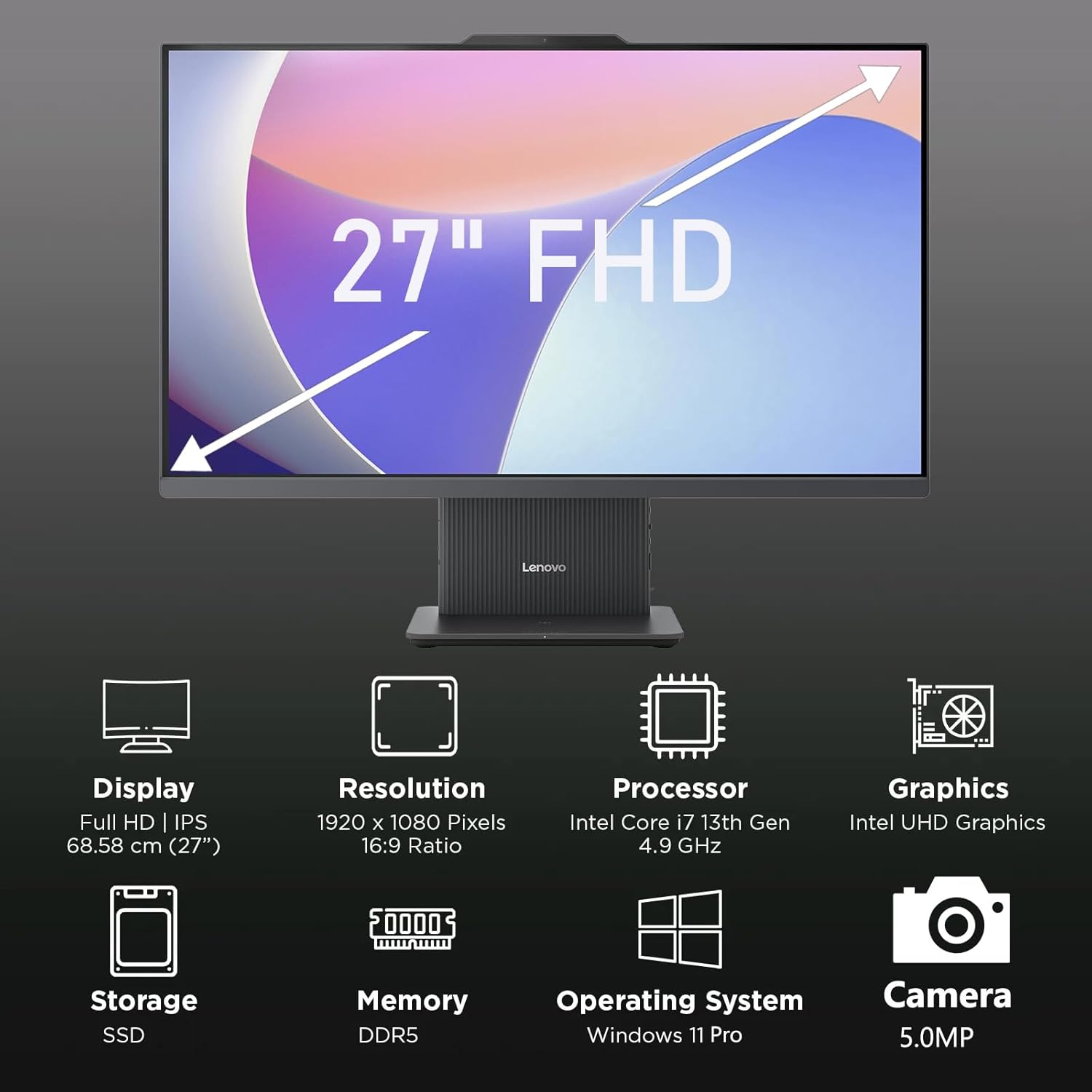
الشكل 2: انتهىview of key features including Display, Resolution, Processor, Graphics, Storage, Memory, Operating System, and Camera.
- عرض: 27-inch Full HD (1920x1080) IPS, 300 nits, anti-glare.
- Webكام: Integrated 5.0MP webcam with dual microphones.
- المتحدثون: Integrated 3W x2 HARMAN speakers.
- المعالج: Intel Core i7-13620H.
- ذاكرة: DDR5 RAM.
- تخزين: PCIe NVMe SSD.
3.2 المنافذ والموصلات

Figure 3: Detailed diagram of ports and connectors on the Lenovo IdeaCentre AIO 27.
- E-shutter (for webخصوصية الكاميرا)
- زر الطاقة
- مدخل HDMI 1.4
- تيار مستمر في الطاقة
- USB-A 480Mbps (USB 2.0)
- إيثرنت (RJ-45)
- USB-A 480Mbps (USB 2.0)
- USB-A بسرعة 10 جيجابت في الثانية (USB 3.2 الجيل الأول)
- مخرج HDMI 2.1 TMDS
- USB-C 10Gbps (data transfer only)
- مقبس مشترك لسماعة الرأس والميكروفون
4. الإعداد
4.1 فك الصندوق ووضعه في مكانه
- Carefully remove the AIO PC and all accessories from the packaging.
- Place the AIO PC on a stable, flat surface with adequate ventilation around the device.
4.2 توصيل الطاقة
- Connect the power adapter cable to the DC-in port (4) on the rear of the AIO PC.
- قم بتوصيل محول الطاقة بمأخذ كهربائي مؤرض.
4.3 توصيل الأجهزة الطرفية
- Connect your keyboard and mouse to the available USB-A ports (5, 7, 8) on the rear of the AIO PC.
- If using wired Ethernet, connect the cable to the RJ-45 port (6).
- For external displays, use the HDMI-out port (9). To use the AIO as a display for another device, use the HDMI-in port (3).
4.4 التمهيد الأولي وإعداد Windows
- Press the power button (2) to turn on the PC.
- اتبع الإرشادات التي تظهر على الشاشة لإكمال الإعداد الأولي لنظام التشغيل Windows 11 Pro، بما في ذلك اللغة والمنطقة واتصال الشبكة وإنشاء حساب المستخدم.
4.5 ضبط الحامل

Figure 4: The AIO stand allows for ergonomic tilt adjustment.
The integrated stand allows for tilt adjustment from -5° to 15° to optimize your viewing angle and posture. Gently adjust the display to your preferred position.
5. تشغيل جهاز الكمبيوتر الخاص بك
5.1 التشغيل الأساسي
- تشغيل/إيقاف التشغيل: Press the power button (2) to turn on. To shut down, click Start > Power > Shut down in Windows.
- وضع السكون: Press the power button briefly or select Sleep from the Start menu.
5.2 باستخدام ملف Webالكاميرا والصوت

Figure 5: The 5MP webcam and Harman audio enhance video conferencing.
- Webكام: الكاميرا المدمجة بدقة 5.0 ميجابكسل webcam is ideal for video conferencing and online communication. Use the E-shutter (1) to physically block the camera for privacy.
- الميكروفونات: Dual microphones provide clear audio input.
- المتحدثون: HARMAN speakers deliver high-quality audio output.
5.3 الاتصال
- واي فاي 6: اتصل بالشبكات اللاسلكية للوصول إلى الإنترنت عالي السرعة.
- بلوتوث شنومكس: قم بإقرانه مع الأجهزة التي تدعم تقنية البلوتوث مثل سماعات الرأس أو مكبرات الصوت أو الهواتف المحمولة.
- منافذ USB: Utilize the various USB-A and USB-C ports for connecting external drives, printers, and other peripherals.
5.4 ميزات نظام التشغيل Windows 11 Pro
Your AIO PC comes pre-installed with Windows 11 Pro, offering advanced features for productivity and security:
- BitLocker: For advanced data encryption.
- سطح المكتب البعيد: Access your PC from another device.
- Domain Join: الاندماج في شبكات الشركات.
- ويندوز هيلو: Secure and fast login using facial recognition (if IR camera is present) or PIN.
6. الصيانة
6.1 Cleaning Your PC
- عرض: استخدم قطعة قماش ناعمة وخالية من الوبر وامسحها برفق.ampيُنظف بالماء أو بمنظف شاشات غير كاشط. لا ترش السائل مباشرة على الشاشة.
- الشاسيه: Wipe with a soft, dry cloth. Avoid harsh chemicals or abrasive materials.
- تهوية: تأكد من أن فتحات التهوية خالية من الغبار والعوائق لمنع ارتفاع درجة الحرارة.
6.2 تحديثات البرامج
Regularly check for and install Windows updates and driver updates to ensure optimal performance and security. Go to Settings > Windows Update to check for updates.
6.3 النسخ الاحتياطي للبيانات
قم بعمل نسخ احتياطية دورية لبياناتك المهمة على محرك أقراص خارجي أو تخزين سحابي لمنع فقدان البيانات.
7. استكشاف الأخطاء وإصلاحها
This section addresses common issues you might encounter with your IdeaCentre AIO 27.
| مشكلة | الحل المحتمل |
|---|---|
| الكمبيوتر لا يعمل | تأكد من توصيل محول الطاقة بإحكام بكل من جهاز الكمبيوتر ومأخذ كهربائي يعمل. اختبر المأخذ بجهاز آخر. |
| لا يوجد عرض على الشاشة | Check power connection. Ensure the PC is powered on. If using HDMI-in, verify the external device is on and correctly connected. |
| لا يوجد اتصال بالإنترنت (واي فاي) | Check if Wi-Fi is enabled in Windows settings. Verify your router is working. Reconnect to the Wi-Fi network. |
| لا يوجد صوت | Check volume levels in Windows. Ensure speakers are not muted. Verify audio drivers are up to date. |
| Webالكاميرا لا تعمل | Ensure the E-shutter (1) is open. Check privacy settings in Windows. Verify webcam drivers are installed and up to date. |
8. المواصفات

Figure 6: Details of the Intel Core i7-13620H processor.

Figure 7: The 27-inch FHD display offers comfortable viewعمل.
| ميزة | مواصفة |
|---|---|
| ماركة | لينوفو |
| اسم الموديل | مركز أيديا آيو 27 |
| نظام التشغيل | ويندوز 11 برو |
| المعالج | معالج Intel Core i7-13620H (10 نواة، 16 خيط معالجة، تصل سرعته إلى 4.9 جيجاهرتز) |
| الرسومات | بطاقة رسومات Intel UHD مدمجة |
| عرض | 27-inch FHD (1920x1080) IPS, 300 nits, Anti-glare, 99% sRGB |
| ذاكرة | 32GB DDR5 RAM (5200 MT/s) |
| تخزين | 1TB M.2 PCIe 4.0x4 NVMe SSD |
| صوتي | High Definition (HD) Audio, Realtek ALC233-CG codec, 3W x2 HARMAN speakers |
| Webكاميرا | 5.0MP with Dual Microphones |
| الاتصال اللاسلكي | واي فاي 6 (802.11ax 2x2)، بلوتوث 5.2 |
| المنافذ (الخلفية) | 1x USB-A 10Gbps, 2x USB-A 480Mbps, 1x HDMI-in 1.4, 1x HDMI-out 2.1 TMDS, 1x RJ-45, 1x Power Connector |
| Ports (Left) | 1x USB-C 10Gbps (data transfer only), 1x 3.5mm combo audio jack |
| شريحة الأمان | البرامج الثابتة TPM 2.0 |
| محول الطاقة | 90W 89% adapter |
| الأبعاد (العرض × العمق × الارتفاع) | 611.72 × 192 × 473.16 ملم (24.08 × 7.55 × 18.62 بوصة) |
| وزن | حوالي 7.1 كجم (15.65 رطلاً) |
9. معلومات الضمان
Your Lenovo IdeaCentre AIO 27 PC comes with a standard manufacturer's warranty. The specific terms and duration of your warranty may vary by region and purchase agreement. Please refer to the warranty documentation included in your product packaging or visit the official Lenovo support webالموقع للحصول على معلومات مفصلة.
Typically, the warranty covers defects in materials and workmanship under normal use. It does not cover damage caused by misuse, accidents, unauthorized modifications, or external factors.
10. معلومات الدعم والاتصال
For technical support, service, or additional information, please contact Lenovo customer support through the following channels:
- دعم Lenovo Webموقع: يزور support.lenovo.com للسائقين، والأدلة، وأدلة استكشاف الأخطاء وإصلاحها.
- دعم الهاتف: Refer to your warranty card or the Lenovo support webموقع لأرقام الاتصال الإقليمية.
- دردشة على الإنترنت: Available on the Lenovo support webالموقع للحصول على المساعدة في الوقت الحقيقي.
Please have your product's serial number ready when contacting support. The serial number is typically located on a label on the back or bottom of your AIO PC.