
1. المقدمة
This manual provides essential information for the safe and efficient installation, operation, and maintenance of the HPUHROTSJK FX3U-40MR Programmable Logic Controller (PLC). Please read this manual thoroughly before using the product and retain it for future reference.
The FX3U-40MR is a robust industrial control device designed for various automation applications, featuring 40 input/output points with relay outputs.
2. احتياطات السلامة
يرجى دائمًا مراعاة احتياطات السلامة التالية لمنع الإصابة الشخصية أو تلف المعدات.
- تأكد من فصل الطاقة قبل إجراء أي أعمال توصيل أو صيانة.
- يجب أن يقوم فقط الأفراد المؤهلون بتركيب هذا الجهاز وتشغيله وصيانته.
- Do not operate the PLC in environments exceeding its specified temperature, humidity, or vibration limits.
- Ground the PLC properly to prevent electrical shock and ensure stable operation.
- Verify all wiring connections are correct before applying power.
3. الإعداد والتثبيت
3.1 فك العبوة والتفتيش
Upon receiving the FX3U-40MR, carefully unpack it and inspect for any signs of damage during transit. Verify that all components are present according to the packing list.
3.2 التركيب
The FX3U-40MR can be mounted on a standard DIN rail or directly to a panel using screws. Ensure adequate ventilation space around the unit.
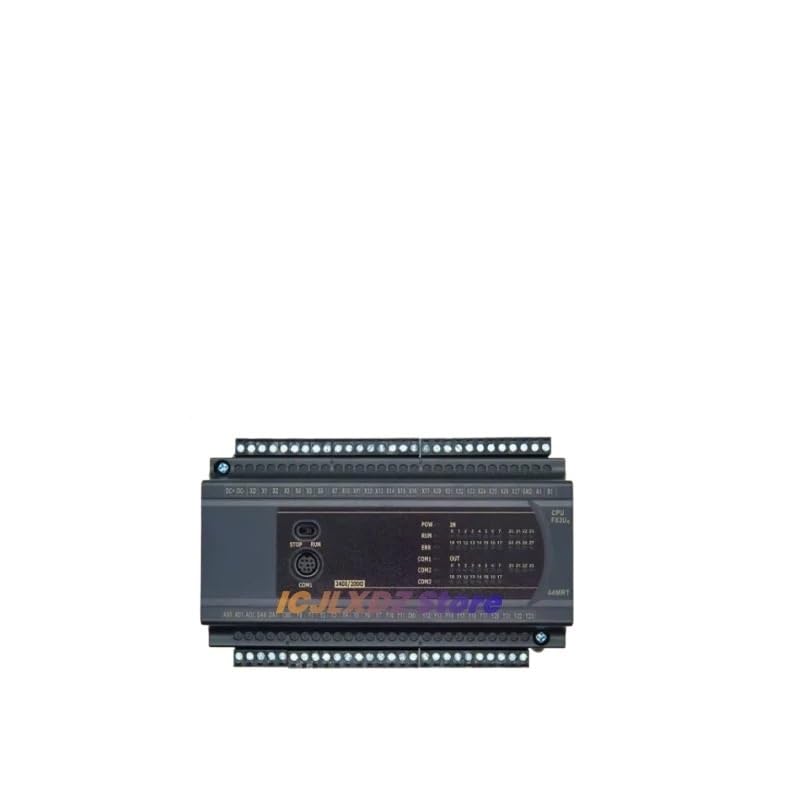
الشكل 1: الجبهة view of the FX3U-40MR Programmable Logic Controller. This image displays the compact design, input/output terminals, and status indicators, illustrating the typical appearance of the unit for mounting and wiring.
3.3 الأسلاك
Connect the power supply, inputs, and outputs as per your application requirements. Refer to the wiring diagram provided in the product documentation for detailed connections. Ensure all connections are secure and correctly polarized.
- مزود الطاقة: Connect the appropriate DC power supply to the designated terminals.
- المدخلات: Wire sensors, switches, and other input devices to the input terminals.
- المخرجات: Connect actuators, relays, and other output devices to the relay output terminals.
- تواصل: Use the designated communication port (e.g., RS232, RS485) for programming and monitoring.
4. تعليمات التشغيل
4.1 التشغيل
After completing all wiring and safety checks, apply power to the PLC. The power indicator LED should illuminate, indicating successful power-up.
4.2 البرمجة
The FX3U-40MR is programmed using compatible PLC programming software (e.g., GX Works2 or GX Developer). Connect the PLC to your computer via the communication port. Develop your control logic using ladder diagram or other supported programming languages.
- اتصال البرنامج: Establish communication between the programming software and the PLC.
- تحميل البرنامج: Transfer the compiled program from the software to the PLC's memory.
- وضع التشغيل: Switch the PLC to RUN mode to execute the loaded program.
4.3 Input/Output Functionality
Monitor the status of inputs and outputs through the programming software or by observing the indicator LEDs on the PLC unit. Ensure that input signals are correctly detected and output devices respond as programmed.
5. الصيانة
Regular maintenance ensures the longevity and reliable operation of your FX3U-40MR PLC.
- تنظيف: Periodically clean the exterior of the PLC with a soft, dry cloth. Do not use solvents or abrasive cleaners. Ensure ventilation openings are free from dust and debris.
- الفحص البيئي: تأكد من أن بيئة التشغيل تظل ضمن نطاقات درجة الحرارة والرطوبة المحددة.
- فحص الأسلاك: Routinely check all wiring connections for tightness and signs of wear or corrosion.
- تحديثات البرامج الثابتة: تحقق من الشركة المصنعة webابحث في الموقع عن أي تحديثات متاحة للبرامج الثابتة التي قد تُحسّن الأداء أو تُضيف ميزات جديدة. اتبع تعليمات التحديث بدقة.
6. استكشاف الأخطاء وإصلاحها
This section provides solutions to common issues encountered during operation.
| مشكلة | السبب المحتمل | حل |
|---|---|---|
| لا يتم تشغيل PLC. | عدم وجود مصدر للطاقة، الأسلاك غير صحيحة، مصدر الطاقة معيب. | Check power connections, verify power supply voltage, ensure correct polarity. |
| المدخلات لا تستجيب. | أسلاك الإدخال غير صحيحة، مستشعر معيب، خطأ في منطق البرنامج. | Verify input wiring, test sensor functionality, check PLC program logic. |
| المخرجات غير نشطة. | Incorrect output wiring, faulty actuator, program logic error, overloaded output. | Check output wiring, test actuator, review program logic, ensure output current limits are not exceeded. |
| حدث خطأ في الاتصال بجهاز الكمبيوتر. | Incorrect cable, wrong communication settings, driver issues. | Use correct programming cable, verify COM port and baud rate settings, install/update communication drivers. |
7. المواصفات
Key technical specifications for the HPUHROTSJK FX3U-40MR PLC:
- نموذج: FX3U-40MR
- Input/Output Points: 40 (e.g., 24 digital inputs, 16 relay outputs)
- نوع الإخراج: Relay (MR)
- مزود الطاقة: DC (specific voltage range should be confirmed from product label)
- الشركة المصنعة: HPUHROTSJK
- الخصائص الجسدية: Compact industrial design.
- بلد المنشأ: الصين
- سمات: Programmable Logical Controller, suitable for various industrial automation applications.
8. معلومات الضمان
This product comes with a standard manufacturer's warranty. Please refer to the warranty card included with your purchase or visit the official HPUHROTSJK webللاطلاع على الشروط والأحكام التفصيلية المتعلقة بتغطية الضمان والمطالبات، يرجى زيارة الموقع الإلكتروني.
9. الدعم الفني
For technical assistance, troubleshooting beyond this manual, or inquiries about product functionality, please contact HPUHROTSJK customer support. Contact details can typically be found on the manufacturer's official webالموقع أو على عبوة المنتج.
Note: Always provide your product model number (FX3U-40MR) and any relevant error codes when contacting support.