
1. المقدمة
This manual provides instructions for the DORHEA DC-DC Buck Boost Converter Module, model DAD12748-1. This versatile module functions as an adjustable step-up/down voltage regulator, capable of both boosting and bucking input voltage to achieve a desired output. It features an integrated LCD digital voltmeter and ammeter for real-time monitoring of input/output voltage, current, and power. Designed for various applications requiring precise voltage and current control, this module offers stable and reliable performance.
2. معلومات السلامة
WARNING: Electrical Shock Hazard. Improper use can result in serious injury or death.
- Always ensure power is disconnected before making any connections or adjustments to the module.
- لا تتجاوز حجم الإدخال المحددtagه ، الإخراج المجلدtage, or current limits.
- Ensure proper heat dissipation, especially when operating at higher currents or power levels.
- Avoid short circuits. Although the module has short-circuit protection, repeated or prolonged short circuits can damage the device.
- Keep the module away from moisture, dust, and extreme temperatures.
- This module is intended for use by individuals with adequate knowledge of electronics and electrical safety.
3. انتهى المنتجview
The DORHEA DC-DC Buck Boost Converter Module is built with a boost and buck chip as the main controller, external 60V 75A MOS tube, and double 60V 5A SS56 Schottky rectifiers for enhanced stability. It features an LCD display for clear readings and user-friendly buttons for control.
المميزات الرئيسية:
- Adjustable input voltagالنطاق الإلكتروني: تيار مستمر 5.5-30 فولت
- حجم الإخراج قابل للتعديلtagالنطاق الإلكتروني: تيار مستمر 0.5-30 فولت
- Adjustable output current: 0-4A (with enhanced heat dissipation)
- Maximum output power: 35W (50W with enhanced heat dissipation)
- Integrated LCD display for voltage, current, and power monitoring
- Button controls for display switching and output ON/OFF
- المجلدtage display resolution: 0.05V
- Current display resolution: 0.005A
- Safety protections: Soft Start, Input Reverse Protection, Output Anti-Backflow, Short Circuit Protection, Low-Voltagالحماية
تحديد المكون:
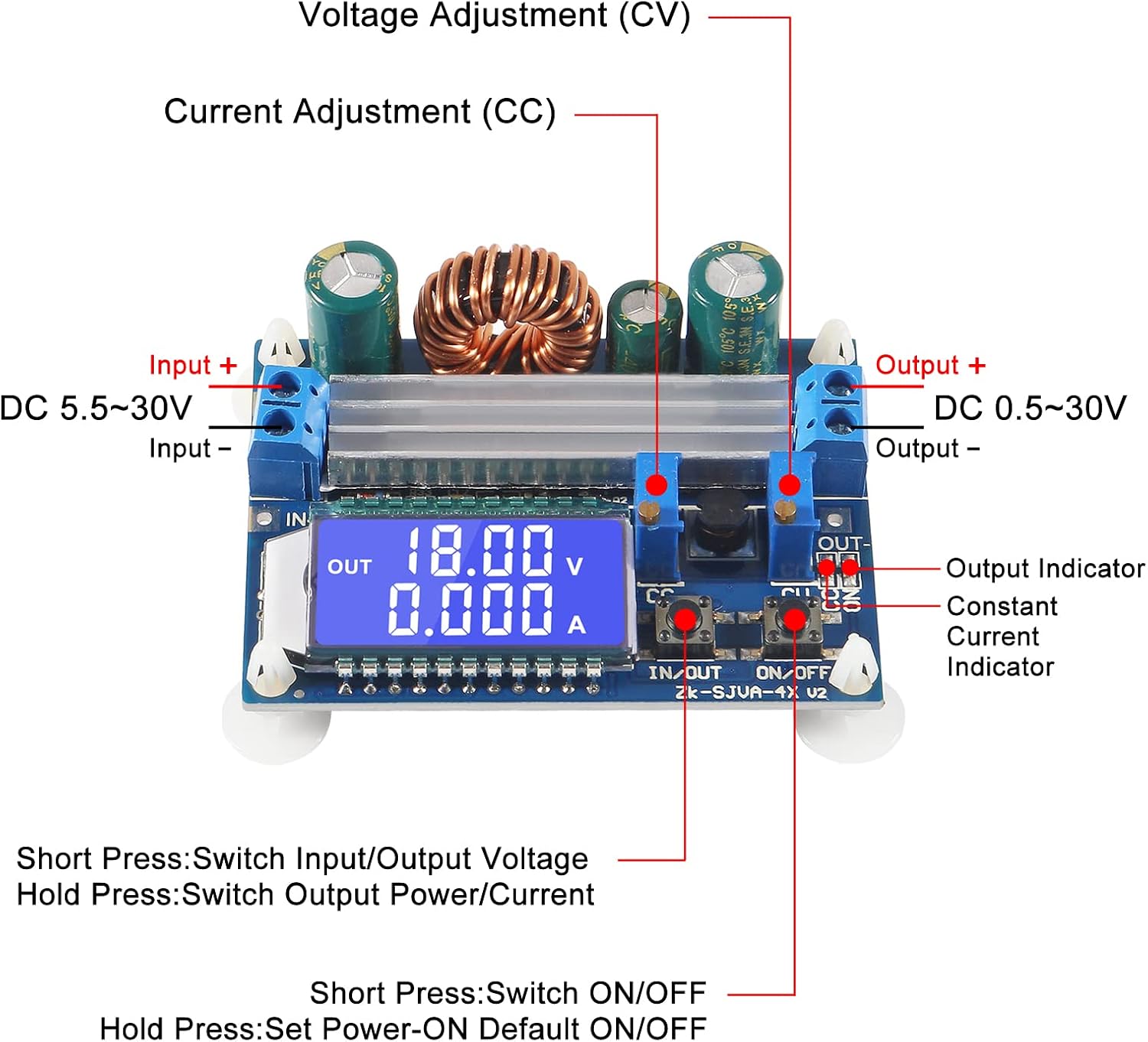
Figure 3.1: Labeled diagram of the module's main components.
This image illustrates the key connection points and controls on the module. Observe the "Input +" and "Input -" terminals for power input, and "Output +" and "Output -" for power output. The "CV" (Constant Voltage) and "CC" (Constant Current) potentiometers are used for adjustment. The "IN/OUT" and "ON/OFF" buttons control display and output respectively. The LCD screen displays operational parameters.

الشكل 3.2: الجبهة view of the module with LCD display.
هذا view provides a clear look at the module's front, highlighting the LCD display which shows the output voltage and current. The input and output terminals are visible on the left and right sides, respectively. The two control buttons are located below the LCD screen.
4. المواصفات
| المعلمة | قيمة |
|---|---|
| حجم الإدخالtage المدى | DC 5.5V - 30V (Note: Input voltage below 4.7V triggers low-voltagحماية ه) |
| حجم الإخراجtage المدى | DC 0.5V - 30V (Adjustable) |
| تيار الخرج | 3A (stable long-term), up to 4A (with enhanced heat dissipation) |
| طاقة الإخراج | 35W (natural heat dissipation), up to 50W (with enhanced heat dissipation) |
| المجلدtagه دقة العرض | 0.05 فولت |
| Current Display Resolution | 0.005 أمبير |
| كفاءة النقل | تقريبا. 88٪ |
| تردد التشغيل | 180 كيلو هرتز |
| الأبعاد (الطول × العرض × الارتفاع) | 66 مم × 48 مم × 21 مم |
| تركيب قطر الفتحة | 4 ملم |
| بداية ناعمة | Yes (Note: High power load module may fail when started without soft start) |
| حماية الإدخال العكسي | نعم |
| Output Anti-Backflow | Yes (No additional anti-backflow diode required for battery charging) |
| حماية من الدوائر القصيرة | Yes (Module automatically shuts down output, restored after re-energizing) |
| حجم منخفضtagالحماية | Default approx. 4.7V (Output disconnected if input is less than 4.7V) |
5. الإعداد
Follow these steps to set up your DC-DC Buck Boost Converter Module:
- تجهيز الاتصالات: Ensure all power sources are disconnected before making any wiring.
- اتصال الإدخال: Connect your DC power source to the "Input +" and "Input -" terminals. Observe polarity: positive to "Input +" and negative to "Input -". The module has input reverse protection, but correct connection is always recommended.
- اتصال الإخراج: Connect your load or device to the "Output +" and "Output -" terminals. Observe polarity: positive to "Output +" and negative to "Output -".
- الطاقة الأولية: Once all connections are secure, apply power to the input terminals. The LCD display should illuminate, showing the current input or output voltage.
- تبديد الحرارة: For continuous operation at higher currents (above 3A) or power (above 35W), ensure adequate heat dissipation. This may involve attaching the included heatsink or providing active cooling.

Figure 5.1: Module with heatsink for enhanced heat dissipation.
This image shows the module alongside an aluminum heatsink. For operations requiring higher current or power, attaching this heatsink to the main power components on the module is recommended to prevent overheating and ensure stable performance.
6. تعليمات التشغيل
The module features two buttons and two potentiometers for control and adjustment.
وظائف الأزرار:
- زر الدخول/الخروج:
- الصحافة القصيرة: Switches the LCD display between input voltagه والإخراج المجلدtage.
- ضغطة طويلة: Switches the LCD display between output current and output power.
- زر التشغيل/الإيقاف:
- الصحافة القصيرة: Toggles the output ON or OFF.
- ضغطة طويلة: Sets the default output state (ON or OFF) for the next power-up. The setting is saved.
Potentiometer Adjustments:

Figure 6.1: Close-up of adjustment potentiometers and LCD.
توفر هذه الصورة تفصيلاً view of the two potentiometers, labeled "CV" and "CC", located near the output terminals. These are used for fine-tuning the output voltagه والحدود الحالية.
- السيرة الذاتية (المجلد الثابتtage) Potentiometer:
- Rotate clockwise to increase the output voltage.
- Rotate counter-clockwise to decrease the output voltage.
- Adjust this to set your desired output voltage.
- CC (Constant Current) Potentiometer:
- Rotate clockwise to increase the current limit.
- Rotate counter-clockwise to decrease the current limit.
- When the load current reaches the set current, the module enters constant current (CC) mode, and the red "CC" indicator light will illuminate. This protects the load and the module from overcurrent.
مهم: Always adjust the CV potentiometer first to set the desired voltage, then adjust the CC potentiometer to set the maximum current limit for your application. If charging a battery, set the voltage slightly higher than the battery's full charge voltage and the current to the desired charging current. The module will automatically switch to constant voltage mode when the battery is nearly full.
7. الصيانة
- تنظيف: Keep the module clean and free from dust. Use a soft, dry cloth to wipe the surface. Do not use liquids or abrasive cleaners.
- تبديد الحرارة: Regularly check that the heatsink (if installed) is free from dust and debris to ensure efficient cooling. Ensure adequate airflow around the module, especially during high-power operation.
- الاتصالات: قم بفحص جميع توصيلات الأسلاك بشكل دوري للتأكد من أنها آمنة وخالية من التآكل.
- تخزين: When not in use, store the module in a dry, cool environment, away from direct sunlight and extreme temperatures.
8. استكشاف الأخطاء وإصلاحها
| مشكلة | السبب المحتمل | حل |
|---|---|---|
| No display/No output | No input power, incorrect wiring, input voltagهـ منخفضة جدًا. | Check input power supply. Verify input wiring polarity. Ensure input voltage is within 5.5V-30V range. Check if low-voltage protection is active (input below 4.7V). |
| Output shuts down unexpectedly | Short circuit, overcurrent, low-voltagأطلقت الحماية الإلكترونية. | Check for short circuits in the output. Reduce load to stay within current limits. Re-energize the module after clearing a short circuit. Ensure input voltage is stable and above 4.7V. |
| إخراج المجلدtagلا يمكن تعديل التيار الكهربائي | Potentiometers at limit, faulty potentiometer. | Rotate potentiometers fully in both directions to check range. Ensure the module is powered on and not in a protection state. |
| مجلد غير دقيقtagقراءات التيار الكهربائي | حجم الإدخالtage too low (for input measurement), calibration issue. | تأكد من حجم الإدخالtage is above 5V for accurate input measurement. If persistent, compare with an external multimeter. |
| Module gets hot during operation | Operating at high current/power without sufficient heat dissipation. | Install the provided heatsink. Ensure adequate airflow. Reduce load if necessary. |
| High power load module may fail when started | Sudden high current draw during startup. | The module has a soft start feature. If issues persist with very high inductive or capacitive loads, consider adding an external soft-start circuit or gradually increasing الحمل. |
9. الضمان والدعم
For warranty information and technical support, please refer to the product's purchase documentation or contact the seller/manufacturer directly. Keep your purchase receipt as proof of purchase.
الشركة المصنعة: DORHEA
رقم الموديل: DAD12748-1