
مقدمة
This manual provides essential information for setting up, operating, maintaining, and troubleshooting your TCL TAB A1 Plus Android Tablet. The tablet features a 12.2-inch 2.4K 120Hz display, a Snapdragon 4 Gen 2 processor, 6GB RAM, and 128GB internal storage, expandable up to 2TB. It is equipped with an 8000mAh battery, quad stereo speakers, and 5MP front and 8MP rear cameras.
For optimal performance and longevity, please read these instructions carefully before using your device.
1. الإعداد
1.1 فك الصندوق والفحص الأولي
Carefully remove all components from the packaging. Verify that all items listed in the "What's in the Box?" section are present and undamaged.

Image: The TCL TAB A1 Plus tablet, a USB-C cable, a Quick Guide & PSI document, and a SIM Pin are shown, illustrating the contents of the box.
- TCL TAB A1 Plus Android Tablet: الجهاز الرئيسي.
- كابل Type-C: للشحن ونقل البيانات.
- QG & PSI: Quick Guide and Product Safety Information.
- SIM Pin: For accessing the SIM/microSD card tray.
1.2 شحن الجهاز اللوحي
Before first use, fully charge the tablet.
- Connect the Type-C cable to the tablet's USB-C port.
- Connect the other end of the cable to a compatible power adapter (not included) and plug it into a wall outlet.
- سيظهر مؤشر البطارية على الشاشة حالة الشحن.

Image: A person is using the TCL TAB A1 Plus tablet while it is charging, with a visual representation of the 8000mAh battery and 20W fast charging capability.
The tablet supports 20W fast charging for quick power restoration.
1.3 تشغيل/إيقاف التشغيل
- لتشغيل: اضغط مع الاستمرار على زر التشغيل حتى يظهر شعار TCL.
- لإيقاف التشغيل: اضغط مع الاستمرار على زر الطاقة، ثم حدد "إيقاف التشغيل" من الخيارات الموجودة على الشاشة.
1.4 الإعداد الأولي
اتبع التعليمات التي تظهر على الشاشة لإكمال الإعداد الأولي، بما في ذلك:
- اختيار اللغة الخاصة بك.
- الاتصال بشبكة Wi-Fi.
- تسجيل الدخول باستخدام حسابك على جوجل.
- Setting up security features (PIN, pattern, fingerprint).
2. تعليمات التشغيل
2.1 ميزات العرض
The TCL TAB A1 Plus features a 12.2-inch 2.4K display with a 120Hz refresh rate and 100% sRGB color. TCL NXTVISION technology enhances visuals for richer colors and sharper clarity.

Image: A user relaxing on a couch, holding the TCL TAB A1 Plus tablet which displays a vibrant image, highlighting its 12.2" 2.4K display, 120Hz refresh rate, 550 nits brightness, and 100% sRGB color.
2.2 الأداء والتخزين
Powered by Snapdragon 4 Gen 2 with 6GB RAM (expandable to 16GB total with RAM Expansion) and 128GB storage (expandable to 2TB via microSD), the tablet offers smooth performance for various tasks.

Image: A graphic illustrating the Snapdragon 4 Gen 2 processor, emphasizing its 4nm process and LPDDR5 memory for fast and smooth performance.

Image: The TCL TAB A1 Plus tablet displaying multiple open applications, with icons indicating 16GB RAM, 128GB ROM, and 2TB expandable storage.
2.3 Multitasking Features
The tablet supports several multitasking modes to enhance productivity:
- تقسيم الشاشة: Run two applications side-by-side.
- النوافذ العائمة: Keep apps visible in resizable windows while working on other tasks.
- تمديد الوضع: Use the tablet as a second screen for your laptop.
- وضع المرآة: Mirror your PC screen to the tablet for presentations or document review.

Image: A visual representation of the TCL TAB A1 Plus tablet's multitasking capabilities, including Split Screen, Floating Window, Extend Mode (tablet as second screen), and Mirror Mode (PC screen mirrored to tablet).
2.4 AI Productivity Tools
Leverage built-in AI tools for enhanced productivity:
- جوجل جيميني للذكاء الاصطناعي: For summarizing, generating ideas, and instant assistance.
- دائرة للبحث: Quickly search for information by circling content on your screen.
- Writing Assist: Get AI help for emails, essays, and notes.
- Text Assist: Translate, rewrite, or summarize text instantly.
- Smart Translator: Real-time translation of text, images, or voice.
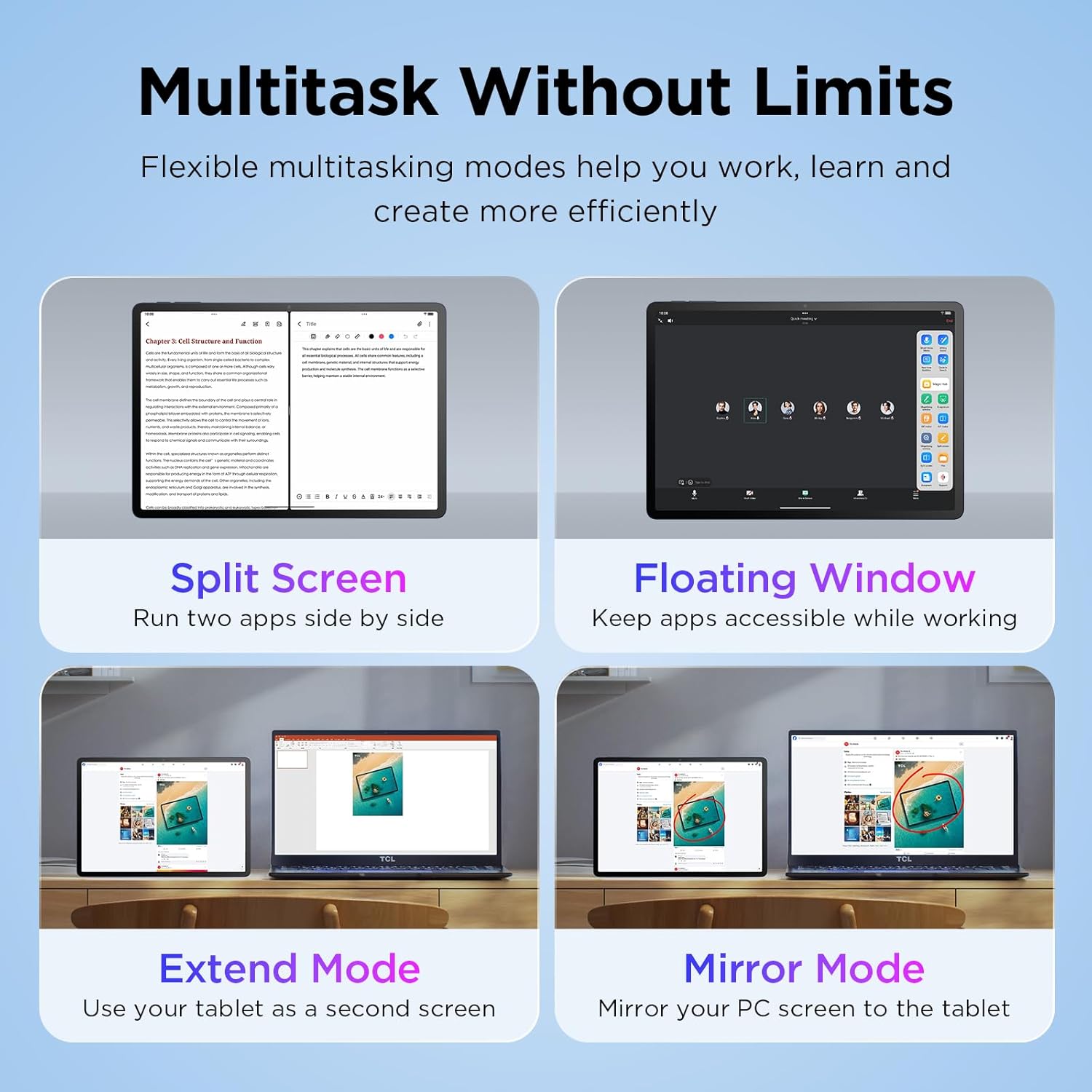
Image: The TCL TAB A1 Plus tablet displaying a search result for a landmark, with icons representing Google Gemini, Circle to Search, Writing Assist, Text Assist, and Smart Translator.
2.5 الصوت والكاميرا
The tablet features quad stereo speakers for rich audio and 5MP front and 8MP rear cameras for clear video calls and photography.

Image: A split image showing the TCL TAB A1 Plus tablet with sound waves emanating from its quad speakers on one side, and the tablet's front and rear cameras (5MP front, 8MP rear) with examples of video calls and photos on the other.
Video: This official video from TCL showcases the smart performance and simple operation of the TCL TAB A1 Plus, demonstrating its key features and user experience.
3. الصيانة
3.1 تنظيف الجهاز اللوحي
- استخدم قطعة قماش ناعمة وخالية من الوبر لتنظيف الشاشة والجسم.
- Avoid using abrasive cleaners, alcohol, or solvents, as these can damage the screen and finish.
- بالنسبة للبقع العنيدة، استخدمي القليل منampفي القماش مع الماء.
3.2 تحديثات البرامج
قم بالتحقق من تحديثات البرامج وتثبيتها بانتظام لضمان الأداء الأمثل والأمان والوصول إلى الميزات الجديدة.
- اذهب الى إعدادات.
- مقبض نظام > تحديث النظام.
- اتبع الإرشادات التي تظهر على الشاشة لتنزيل أي تحديثات متوفرة وتثبيتها.
3.3 العناية بالبطارية
- تجنب تعريض الجهاز اللوحي لدرجات حرارة شديدة.
- لا تترك البطارية تنفد بالكامل بشكل متكرر.
- استخدم كابل Type-C المرفق للشحن.
4. استكشاف الأخطاء وإصلاحها
4.1 الجهاز اللوحي لا يعمل
- Ensure the battery is charged. Connect the tablet to a power source and wait a few minutes before attempting to power on again.
- حاول إعادة التشغيل القسري بالضغط على زر الطاقة لمدة 10-15 ثانية.
4.2 الشاشة لا تستجيب
- أعد تشغيل الجهاز اللوحي.
- تأكد من أن الشاشة نظيفة وخالية من الرطوبة والحطام.
4.3 مشاكل اتصال Wi-Fi
- قم بإيقاف تشغيل الواي فاي ثم تشغيله في الإعدادات.
- أعد تشغيل جهاز توجيه Wi-Fi الخاص بك.
- انسى الشبكة وأعد الاتصال بها، وأدخل كلمة المرور مرة أخرى.
4.4 تعطل التطبيقات أو تجميدها
- أغلق التطبيق ثم أعد فتحه.
- مسح ذاكرة التخزين المؤقت والبيانات للتطبيق في إعدادات > التطبيقات > [اسم التطبيق] > تخزين.
- تأكد من تحديث التطبيق إلى الإصدار الأحدث.
- If issues persist, uninstall and reinstall the app.
5. المواصفات
| ماركة | تي سي إل |
| اسم الموديل | TCL TAB A1 Plus |
| حجم الشاشة | 12.2 بوصة |
| دقة العرض | 2400 × 1600 بكسل (2.4K) |
| معدل التحديث | 120 هرتز |
| المعالج | سناب دراجون 4 الجيل الثالث |
| كبش | 6 جيجابايت (قابلة للتوسيع إلى 16 جيجابايت) |
| تخزين | 128 جيجابايت (قابلة للتوسيع حتى 2 تيرابايت عبر بطاقة microSD) |
| نظام التشغيل | Android 16 (Upgradable to Android 17), 3 Years Security Updates |
| سعة البطارية | 8000 مللي أمبير |
| الكاميرا الأمامية | 5 ميجا بكسل |
| الكاميرا الخلفية | 8 ميجا بكسل |
| الأبعاد (الطول × العرض × السماكة) | 10.85 بوصة طول × 7.45 بوصة عرض × 0.26 بوصة سمك |
| وزن | 1.19 رطل |
| الاتصال | Bluetooth, Wi-Fi (802.11ac, 802.11ax), USB Type C |
| المميزات الخاصة | AI-Powered Productivity Tools, Advanced Multitasking Modes, NXTVISION Display |
6. معلومات الضمان
The TCL TAB A1 Plus Android Tablet comes with a ضمان الشركة المصنعة لمدة عامين. This warranty covers defects in materials and workmanship under normal use. Please refer to the included Product Safety Information (PSI) document for full terms and conditions.
احتفظ بإثبات الشراء الخاص بك لمطالبات الضمان.
7. الدعم
لمزيد من المساعدة أو الدعم الفني أو view frequently asked questions, please visit the official TCL support webالموقع أو الاتصال بخدمة العملاء.
- الدعم عبر الإنترنت: قم بزيارة متجر TCL الرسمي على أمازون للحصول على معلومات المنتج وموارد الدعم.
- اتصل بخدمة العملاء: Refer to the contact information provided in your Quick Guide or on the TCL official webموقع.