باور ايه أدفانtage Wireless Controller for Nintendo Switch 2 - Mario & Yoshi
Model: NSGP0569-01V
مقدمة
This manual provides comprehensive instructions for the PowerA Advantage Wireless Controller, designed for use with the Nintendo Switch family of devices. It covers setup, operation, maintenance, and troubleshooting to ensure optimal performance and longevity of your controller.
الميزات الرئيسية
Hall Effect Modules: Equipped with contact-free magnetic sensors in the thumbsticks to prevent stick drift, offering smoother control, enhanced precision, and increased longevity.
أزرار ألعاب متطورة: Two mappable buttons can be programmed on the fly during gameplay without needing to access system settings.
Intuitive Motion Controls: Experience fluid and responsive motion controls for aiming, steering, flying, and other in-game actions.
زر ج: Provides quick access to GameChat features.
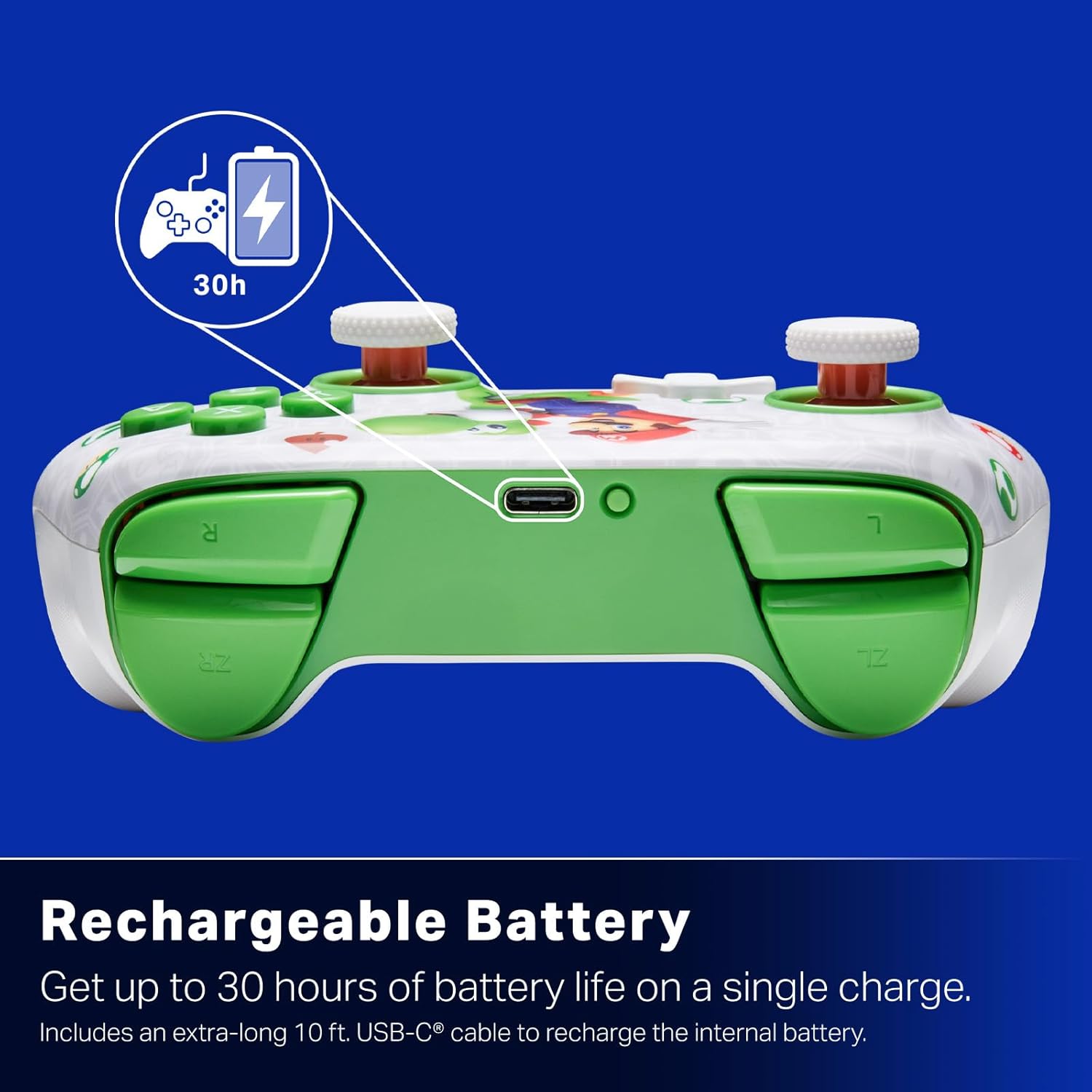
بطارية قابلة لإعادة الشحن: Offers up to 30 hours of gameplay on a single charge. Includes a 10 ft. (3m) USB-C cable for recharging.
تصميم مريح: Crafted for comfort during extended gaming sessions, utilizing cutting-edge ergonomics and high-quality materials.
Nintendo Family Compatibility: Compatible with Nintendo Switch 2, Nintendo Switch, Nintendo Switch – OLED Model, and Nintendo Switch Lite.
مرخص بشكل رسمي: PowerA products undergo rigorous testing by Nintendo to ensure compatibility and quality.
تعليمات الإعداد
1. الشحن الأولي
Before first use, fully charge your PowerA Advantage Wireless Controller. Connect the included 10 ft. (3m) USB-C cable to the controller's USB-C port and the other end to a powered USB port on your Nintendo Switch dock or a USB wall adapter.
Figure 1: Controller connected via USB-C for charging, highlighting the rechargeable battery feature.
2. الاقتران بجهاز نينتندو سويتش
تأكد من تشغيل جهاز Nintendo Switch الخاص بك وتحديثه إلى أحدث إصدار من برامج النظام.
من قائمة HOME ، حدد وحدات التحكم، ثم تغيير القبضة/الترتيب.
On the PowerA Advantage Wireless Controller, press and hold the زر المزامنة located on the top edge of the controller for at least three seconds. The player indicator LEDs on the bottom of the controller will begin to flash.
Once the controller successfully pairs, the player indicator LED(s) corresponding to the controller number will remain lit.
اضغط على الزر to confirm and exit the pairing screen.
For subsequent uses, simply press the HOME button on the controller to wake it up and automatically reconnect to your Switch console.
تعليمات التشغيل
عناصر التحكم الأساسية
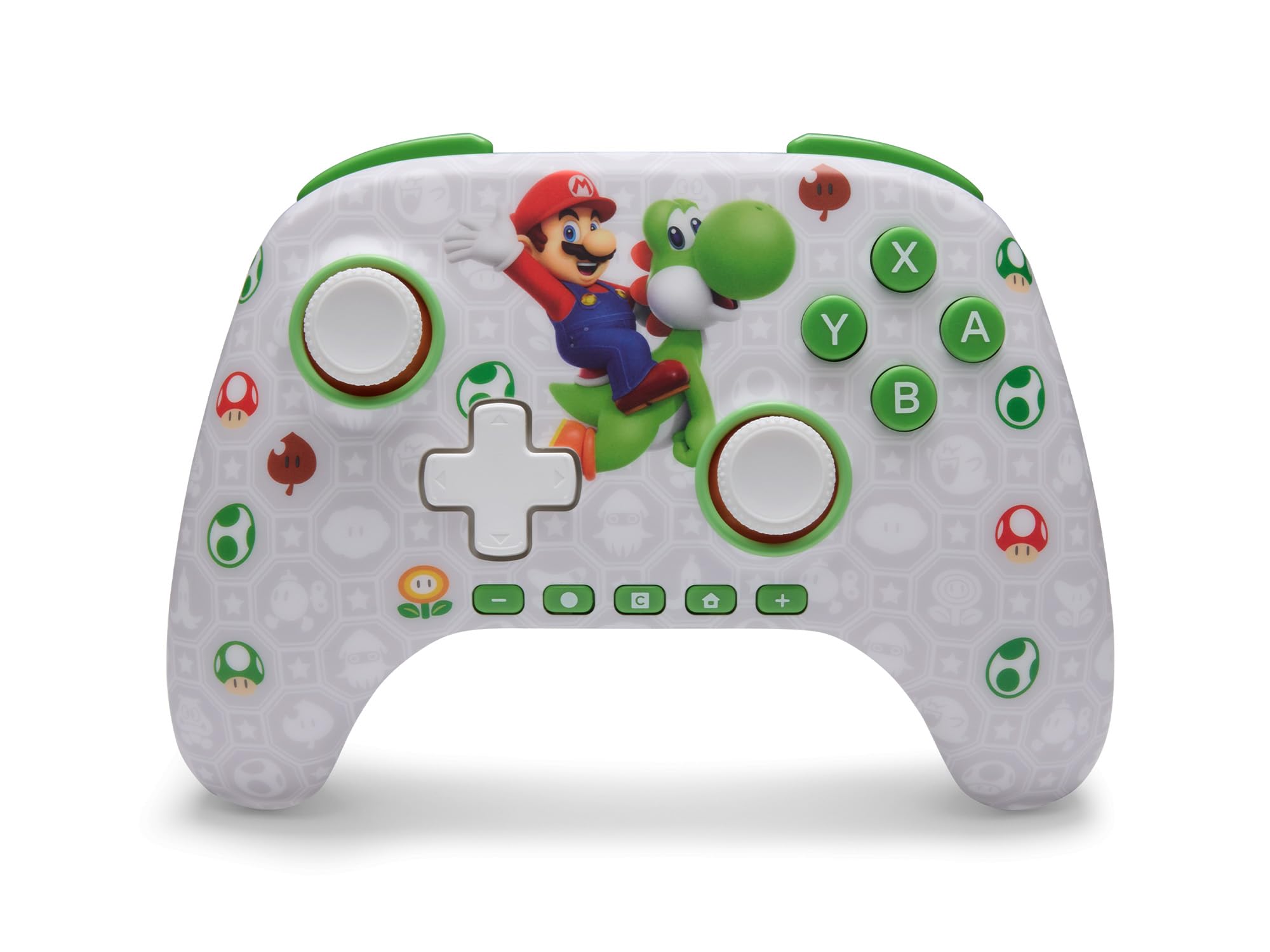
باور ايه أدفانtage Wireless Controller features standard Nintendo Switch button layouts, including A, B, X, Y buttons, L/R and ZL/ZR shoulder buttons, a D-pad, and dual analog sticks. Familiarize yourself with these controls for general gameplay.
الشكل 2: الجبهة view of the PowerA Advantage Wireless Controller, highlighting the Mario and Yoshi design and button layout.
أزرار الألعاب المتقدمة (AGB)
The controller includes two mappable Advanced Gaming Buttons (AGR and AGL) on the back. These buttons can be assigned to replicate any other button on the controller for quick access during gameplay.
اضغط على Program Button (PRGM) on the back of the controller. The Program LED will flash.
اضغط على زر الألعاب المتقدم (AGR or AGL) you wish to map. The Program LED will flash rapidly.
اضغط على زر you want to assign to the Advanced Gaming Button (e.g., A, B, X, Y, L, R, ZL, ZR, D-pad directions). The Program LED will stop flashing, indicating successful mapping.
To clear a mapped button, repeat steps 1-2, then press the زر البرنامج مرة أخرى.
Figure 3: Advanced Gaming Buttons (AGB) on the back of the controller, with an illustration of mappable functions.
عناصر التحكم في الحركة
The controller supports motion controls, allowing for intuitive interaction in compatible games. These controls are automatically enabled when supported by the game.
Figure 4: Controller demonstrating motion control capabilities through tilting.
C Button (GameChat)
The dedicated C Button provides quick access to GameChat features in supported titles, enhancing your multiplayer experience.
Figure 5: The 'C' button, used for GameChat features.
صيانة
تنظيف: استخدم قطعة قماش ناعمة وجافة لتنظيف وحدة التحكم. تجنب استخدام المواد الكيميائية القاسية أو المواد الكاشطة.
تخزين: قم بتخزين وحدة التحكم في مكان بارد وجاف بعيدًا عن أشعة الشمس المباشرة ودرجات الحرارة القصوى.
العناية بالبطارية: لإطالة عمر البطارية، تجنب تفريغ وحدة التحكم بالكامل بشكل متكرر. اشحنها بانتظام، حتى لو لم تكن قيد الاستخدام المستمر.
العناية بالكابلات: Handle the USB-C charging cable with care. Avoid bending or twisting it excessively.
استكشاف الأخطاء وإصلاحها
وحدة التحكم غير متصلة/مقترنة
تأكد من أن وحدة التحكم مشحونة بالكامل.
تأكد من تحديث جهاز نينتندو سويتش إلى أحدث إصدار من برامج النظام.
Repeat the pairing process (see "Pairing with Nintendo Switch" in Setup Instructions).
إذا استمرت المشاكل، فحاول إعادة تشغيل كل من وحدة التحكم وجهاز نينتندو سويتش.
Stick Drift
باور ايه أدفانtage Controller features Hall Effect modules designed to prevent stick drift. If you experience any unintended input, ensure the controller's firmware is up to date (check PowerA's official webالموقع للحصول على التحديثات).
Recalibrate the joysticks through the Nintendo Switch system settings if necessary (System Settings > Controllers and Sensors > Calibrate Control Sticks).
عمر البطارية قصير
Ensure the controller is fully charged before each use.
Battery life can vary based on game usage and features enabled.
استخدم كابل USB-C المقدم للشحن الأمثل.
تحديد
ميزة
التفاصيل
رقم الموديل
NSGP0569-01V
الاتصال
Wireless (Bluetooth), USB-C (for charging)
الأجهزة المتوافقة
Nintendo Switch 2, Nintendo Switch, Nintendo Switch – OLED Model, Nintendo Switch Lite
عمر البطارية
ما يصل إلى 30 ساعات (يختلف مع الاستخدام)
طول الكابل
10 ft. (3m) USB-C
أبعاد
5.88 × 4.21 × 2.36 بوصة
وزن
0.66 رطل
المميزات الخاصة
Hall Effect Thumbsticks, Mappable Advanced Gaming Buttons, Motion Controls, C Button
الضمان والدعم
باور ايه أدفانtage Wireless Controller comes with a ضمان محدود لمدة عامين. For detailed warranty information, product support, or to register your product, please visit the official PowerA webالموقع في PowerA.com/الدعم.
Figure 6: Official Nintendo Licensed Product badge, ensuring quality and compatibility.
Ask a question about this manual
Ask about setup, troubleshooting, compatibility, parts, safety, or missing instructions. Manuals+ will review the question and use this page’s manual context to help answer it.