
1. المقدمة
Thank you for choosing the Sharp 40HF2265E Full HD Google TV. This manual provides essential information for setting up, operating, and maintaining your television. Featuring integrated Google TV, HDR10 support, Dolby Digital audio, and Bluetooth connectivity, your new TV offers a rich entertainment experience. Please read this manual thoroughly before use to ensure proper operation and to maximize your viewمتعة.

الصورة 1.1: الجبهة view of the Sharp 40HF2265E Full HD Google TV.
2. ماذا يوجد في الصندوق
قم بفك تغليف جهاز التلفزيون بعناية وتأكد من وجود جميع العناصر التالية:
- Sharp 40HF2265E Television
- كابل الطاقة
- جهاز تحكم عن بعد (يتطلب بطاريتين AAA، غير مرفقتين دائمًا)
- دليل المستخدم (هذا المستند)
- بطاقة الضمان
If any items are missing or damaged, please contact your retailer or Sharp customer support immediately.
3. الإعداد
3.1 تركيب الحامل
To install the TV stand, place the TV screen-down on a soft, flat surface to prevent scratches. Align the stand feet with the corresponding slots on the bottom of the TV and secure them with the provided screws. Ensure the stand is firmly attached before placing the TV upright.

الصورة 3.1: الجبهة view of the TV with stand feet attached.
3.2 التركيب على الحائط
If you prefer to wall-mount your TV, you will need a VESA-compatible wall mount (not included). The Sharp 40HF2265E supports a VESA mounting standard of 200 x 200 mm. Refer to the wall mount's instructions for installation. Always ensure the wall can support the weight of the TV and the mount.

الصورة 3.2: خلفي view of the TV, highlighting VESA mounting points and ports.
3.3 توصيل الأجهزة الطرفية
Connect your external devices to the appropriate ports on the back and side of the TV. The TV features multiple HDMI, USB, and other connectivity options.
- منافذ HDMI: لتوصيل مشغلات بلو راي، وأجهزة ألعاب الفيديو، وأجهزة الاستقبال الرقمية، وما إلى ذلك.
- منافذ USB: لتوصيل أجهزة تخزين USB لتشغيل الوسائط أو لتحديثات البرامج.
- منفذ إيثرنت: للاتصال بالإنترنت السلكي.
- مدخل الهوائي/الكابل: لتوصيل هوائي أو إشارة تلفزيون الكابل.
- مخرج الصوت: لتوصيل أنظمة الصوت الخارجية.
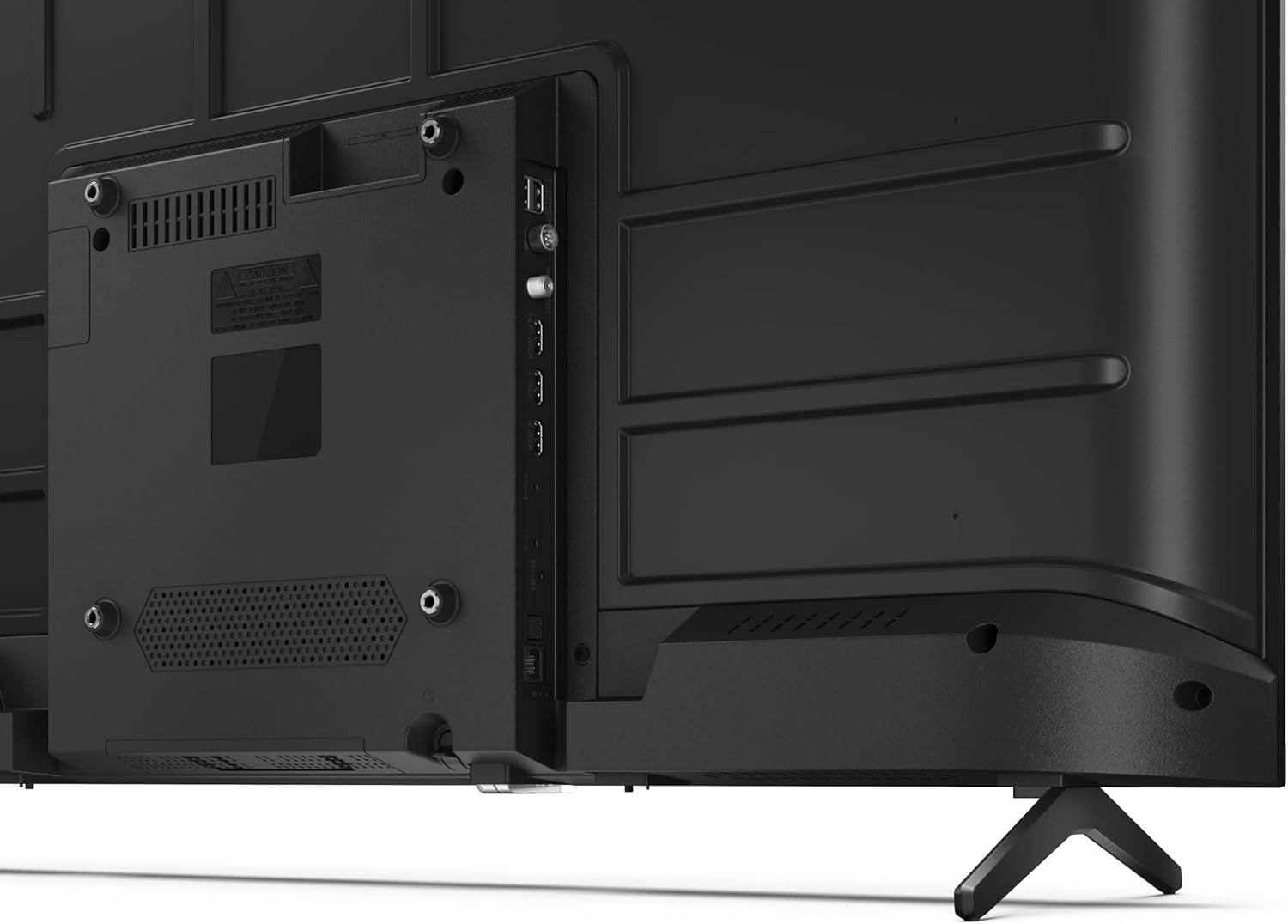
الصورة 3.3: تفصيلية view من منافذ الاتصال الخاصة بالتلفزيون.
3.4 التشغيل الأولي وإعداد Google TV
After connecting all necessary cables, plug the power cable into an electrical outlet. Press the power button on the remote control or on the TV. Follow the on-screen instructions to complete the initial setup, including network connection, Google account login, and channel scanning.
4. التشغيل
4.1 وظائف التحكم عن بعد
The remote control allows you to navigate the TV's features. Common buttons include Power, Volume Up/Down, Channel Up/Down, Input Source, Home (Google TV), Navigation (directional arrows, OK), Back, and Google Assistant.
4.2 واجهة Google TV
Your Sharp TV runs on Google TV, providing a personalized home screen with content recommendations from your subscriptions. Use the remote's navigation buttons to browse movies, shows, apps, and your library.

Image 4.1: The Google TV home screen on the Sharp 40HF2265E.
4.3 اختيار المدخلات
To switch between connected devices (e.g., HDMI 1, HDMI 2, TV tuner), press the 'Input' or 'Source' button on your remote control and select the desired input from the on-screen menu.
4.4 إعدادات الصورة والصوت
Access the TV's settings menu to adjust picture modes (Standard, Vivid, Cinema, Game), brightness, contrast, color, and sound modes (Standard, Music, Movie, Speech). The TV supports HDR10 for enhanced contrast and color, and Dolby Digital for rich audio.

Image 4.2: Visual representation of HDR (High Dynamic Range) technology.
4.5 مساعد جوجل وكروم كاست
Use the built-in Google Assistant for voice control. Press the Google Assistant button on your remote and speak your commands, such as searching for content, controlling smart home devices, or getting information. Chromecast allows you to cast content directly from compatible devices like smartphones or tablets to your TV.

Image 4.3: Google Assistant integration for voice commands.
4.6 اتصال البلوتوث
Pair Bluetooth-enabled devices such as headphones or soundbars with your TV for a wireless audio experience. Navigate to the TV's settings menu, select 'Remotes & Accessories', and then 'Pair new device' to connect.
5. الصيانة
5.1 تنظيف التلفزيون
Always unplug the TV before cleaning. Use a soft, dry cloth to wipe the screen and TV body. For stubborn marks, lightly dampen the cloth with water or a specialized screen cleaner. Never use abrasive cleaners, waxes, or solvents.
5.2 تحديثات البرامج
Your Google TV may receive automatic software updates. Ensure your TV is connected to the internet to receive these updates, which can improve performance and add new features. You can also manually check for updates in the settings menu.
6. استكشاف الأخطاء وإصلاحها
إذا واجهت مشكلات مع التلفزيون الخاص بك، فراجع الحلول الشائعة التالية:
- لا يوجد طاقة: تأكد من توصيل كابل الطاقة بإحكام بالتلفزيون ومقبس الكهرباء. تأكد من أن المقبس يعمل.
- لا صورة/صوت: تأكد من تحديد مصدر الإدخال الصحيح. تحقق من جميع توصيلات الكابلات (HDMI، الهوائي). حاول إعادة تشغيل التلفزيون.
- جهاز التحكم عن بعد لا يعمل: استبدل البطاريات (بطاريتان AAA). تأكد من عدم وجود عوائق بين جهاز التحكم عن بُعد ومستشعر الأشعة تحت الحمراء الخاص بالتلفزيون.
- مشاكل الاتصال بالشبكة: For Wi-Fi, check your router and ensure the TV is within range. For wired connections, check the Ethernet cable. Try restarting your router and the TV.
- مشاكل جودة الصورة: اضبط إعدادات الصورة (السطوع، التباين، الحدة). تأكد من أن مصدر الإدخال يوفر إشارة عالية الجودة.
For more complex issues, consult the comprehensive troubleshooting section in the full digital manual or contact Sharp customer support.
7. المواصفات
Below are the technical specifications for the Sharp 40HF2265E Full HD Google TV:

Image 7.1: Dimensions of the Sharp 40HF2265E TV.
| ميزة | مواصفة |
|---|---|
| ماركة | حاد |
| رقم الموديل | 40HF2265E |
| اسم الموديل | سلسلة HF |
| سنة الموديل | 2025 |
| حجم الشاشة | 40 بوصات (81 سنتيمترًا) |
| تكنولوجيا العرض | قاد |
| دقة | 1080 بكسل (عالي الدقة بالكامل) |
| معدل التحديث | 60 هرتز |
| نسبة العرض إلى الارتفاع | 16:9 |
| نسبة التباين | 100000:1 |
| Screen Finish | مطفي |
| وقت الاستجابة | 8 ميلي ثانية |
| تقنية الإضاءة الخلفية | قاد |
| Supported HDR Format | HDR10، HLG |
| تحسين جودة الصورة | Dynamic Contrast, HDR10, HLG |
| Motion Enhancement Technology | استيفاء الحركة |
| نظام التشغيل | جوجل تي في |
| Internet Applications | Apple TV, Google TV, Hulu, Prime Video, YouTube |
| المميزات الخاصة | Bluetooth, Chromecast, Dolby Digital, HD Tuner |
| تكنولوجيا الاتصال | إيثرنت، USB، واي فاي |
| التكنولوجيا اللاسلكية | بلوتوث |
| نسخة البلوتوث | 5.0 |
| Screen Mirroring Technology | Chromecast, Google Cast |
| إجمالي منافذ HDMI | 3 |
| Total USB 2.0 Ports | 2 |
| Number of Composite Video Inputs | 1 |
| مدخل الصوت | Mini composite/CVBS + audio input |
| Total Audio Output Ports | 2 |
| وضع إخراج الصوت | ستيريو |
| ترميز الصوت | DD |
| Integrated Surround Sound Format | Dolby AC-4, Dolby Digital, Dolby Digital Plus |
| أقصى طاقة خرج للسماعة | 16 Watts (2x8W) |
| عدد قنوات الصوت | 2.0 |
| نظام البث | DVB-T2/C/S/S2 |
| ترميز الفيديو | إم كيه في |
| أبعاد المنتج (عمق×عرض×ارتفاع) | 8.4P x 89.2lx 50.9H سم |
| وزن العنصر | 5.4 كيلوغرام |
| الوزن بدون حامل | 5.4 كيلوغرام |
| عرض القاعدة | 765 مليمتر |
| معيار التثبيت VESA | 200 × 200 ملم |
| استهلاك الطاقة | 37 واط |
| المجلدtage | 230 فولت |
| Remote Control Battery Size | أأ أأ |
| Remote Control Battery Quantity | 2 |
| Parental Control Technology | Kindersicherung Über Google Tv |
| توافر قطع الغيار في الاتحاد الأوروبي | 7 سنة |
8. الضمان والدعم
8.1 ضمان المنتج
The Sharp 40HF2265E television comes with a 2-year manufacturer's warranty. Please refer to the included Warranty Card for detailed terms and conditions regarding coverage and service. Keep your proof of purchase for warranty claims.
8.2 دعم العملاء
If you require further assistance, have questions not covered in this manual, or need technical support, please contact Sharp customer service. Contact information can typically be found on the Warranty Card or the official Sharp webموقع.