
Antec Antec 900
Antec 900 Full Tower Case Instruction Manual
Model: Antec 900
1. المقدمة
The Antec 900 is a full-tower computer chassis designed for high-performance computing, including AI workstations and 8K gaming systems. It supports a wide range of motherboard form factors and offers extensive cooling and storage capabilities. This manual provides detailed instructions for assembly, installation, operation, and maintenance of your Antec 900 case.

Figure 1.1: The Antec 900 Full Tower Case, showcasing its modern design and internal layout.
2. الميزات الرئيسية
- AI Workstation Ready: Supports E-ATX, SSI-EEB, Threadripper, and Back-Connect motherboards. Accommodates dual GPUs up to 495mm long and 160mm thick.
- Superior Cooling System: Includes 6 pre-installed PWM fans (3x140mm Front, 2x120mm Reverse on PSU shroud, 1x140mm Rear) for optimized airflow.
- Extreme Radiator Support: Front radiator support up to 420mm, top radiator support up to 360mm.
- Massive Storage & Fast Connectivity: Features 9 drive bays (4x 3.5"/2.5" combo, 5x 2.5") and a USB Type-C 3.2 Gen 2 (10Gbps) port.
- Tool-Free Access & Easy Maintenance: 4mm tempered glass side panel, full dust filtration (front/top/bottom), and reusable PCIe slot covers.
3. الإعداد وتثبيت المكونات
Before beginning installation, ensure you have all necessary components and tools. Work on a clean, static-free surface.
3.1. إعداد القضية
The Antec 900 features a tool-free design for easy access to internal components.
- Remove the 4mm tempered glass side panel by unfastening the thumb screws and gently pulling it away.
- Remove the right metal panel to access the cable management area.
- The top and front panels can also be removed for easier access during installation or for cleaning dust filters.

Figure 3.1: Tool-free panel design for easy access to internal components.

الشكل 3.2: انفجرت view illustrating the various removable components of the Antec 900 chassis.
3.2. تركيب اللوحة الأم
The Antec 900 supports E-ATX, SSI-EEB, Threadripper, and Back-Connect motherboards.
- Install the necessary standoffs for your motherboard form factor onto the motherboard tray.
- قم بوضع اللوحة الأم بعناية على الحوامل، مع محاذاة فتحات البراغي.
- قم بتأمين اللوحة الأم بالمسامير.
- For back-connect motherboards, route cables through the designated cutouts behind the motherboard tray for a cleaner build and improved airflow.

Figure 3.3: Motherboard installation area, highlighting support for various form factors including E-ATX and Threadripper.

Figure 3.4: Illustration of cable routing for back-connect motherboards, enabling a clean front interior.
3.3. GPU and Expansion Card Installation
The chassis supports dual GPUs up to 495mm long and 160mm thick, and features 8 reusable PCIe slots.
- Remove the necessary reusable PCIe slot covers from the rear of the case.
- Insert your GPU or other expansion cards into the appropriate PCIe slots on the motherboard.
- قم بتأمين البطاقات باستخدام البراغي.

Figure 3.5: AI-optimized GPU support, demonstrating space for multiple high-performance graphics cards.

Figure 3.6: The 8 reusable PCIe slots, providing flexibility for various expansion cards.
3.4. تثبيت محرك الأقراص
The Antec 900 offers 9 drive bays: 4x 3.5"/2.5" combo bays and 5x 2.5" bays.
- Locate the drive cages and mounting points within the case.
- For 3.5" drives, slide the drive into the appropriate bay and secure it.
- For 2.5" SSDs, mount them to the dedicated 2.5" trays or use adapters in the 3.5" bays.
- Connect SATA data and power cables to each installed drive.

Figure 3.7: Storage and data readiness, illustrating the placement of 2.5" and 3.5" drive bays.

الشكل 3.8: انتهىview of the 9 total drive bays, including 5x 2.5" and 4x 3.5" (convertible) options.
3.5. تركيب وحدة إمداد الطاقة (PSU)
The Antec 900 supports bottom-mount PSUs and an optional iShift 90-degree side mount.
- قم بإدخال وحدة إمداد الطاقة في الحجرة المخصصة لها في الجزء الخلفي السفلي من العلبة.
- قم بتأمين وحدة إمداد الطاقة باستخدام البراغي من الجزء الخلفي للعلبة.
- If using the optional iShift side-mount PSU bracket, follow its specific installation instructions to mount the PSU at a 90-degree angle.
- Connect the necessary power cables to your motherboard, GPU, and drives.
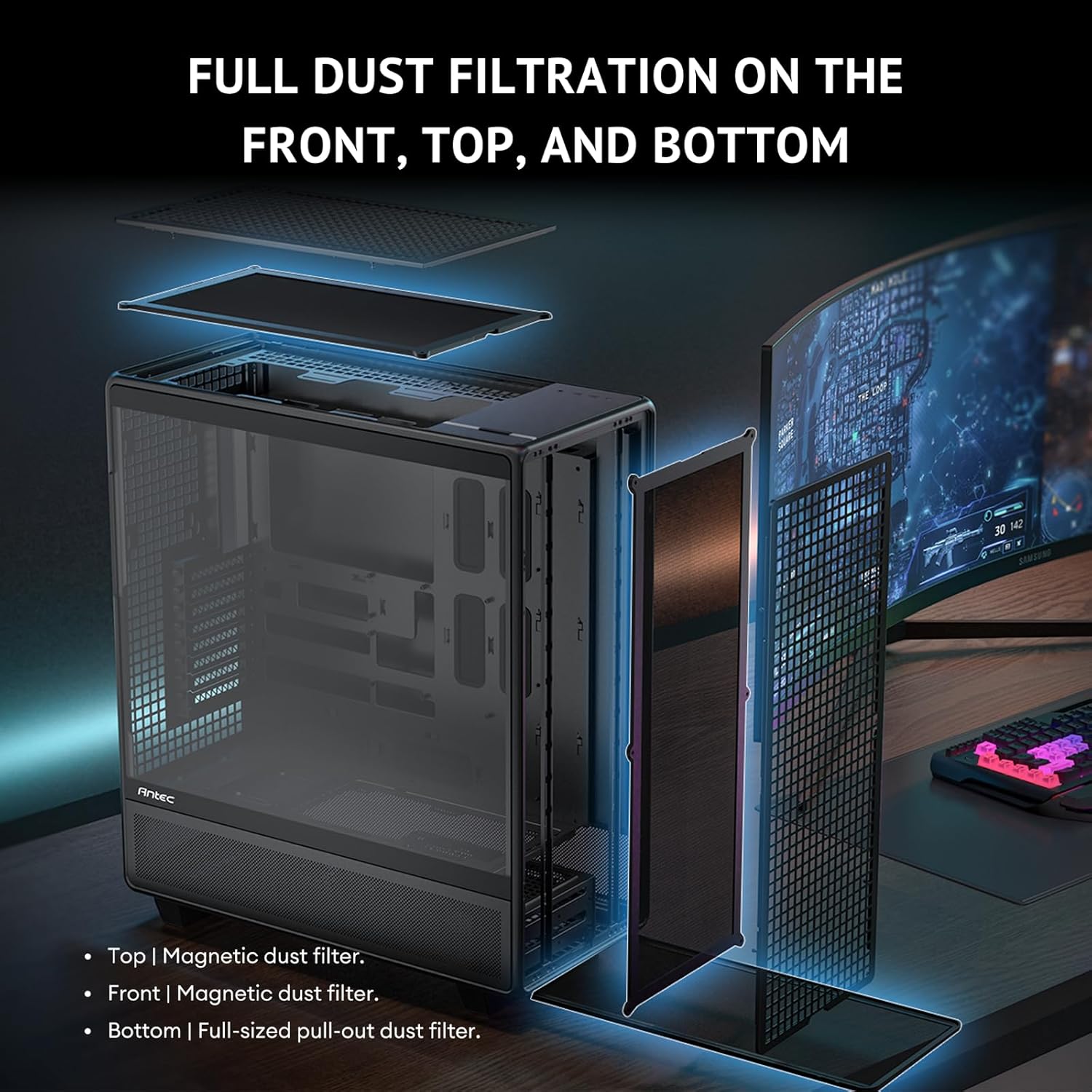
Figure 3.9: Innovative iShift PSU 90-degree mount, offering alternative power supply orientation (requires optional bracket).
3.6. تركيب المروحة والرادياتير
The case comes with 6 pre-installed PWM fans and supports extensive radiator configurations.
- The Antec 900 includes 3x 140mm front intake fans, 2x 120mm reverse fans on the PSU shroud, and 1x 140mm rear exhaust fan.
- For additional cooling, radiators up to 420mm can be installed in the front and up to 360mm on the top.
- The top cooling bracket is removable for easier installation of fans or radiators.
- Utilize the adjustable fan bracket to support various fan sizes (e.g., 200mm, 140mm, 120mm) in the front.

Figure 3.10: Powerful airflow path design, illustrating optimal air intake and exhaust for efficient cooling.
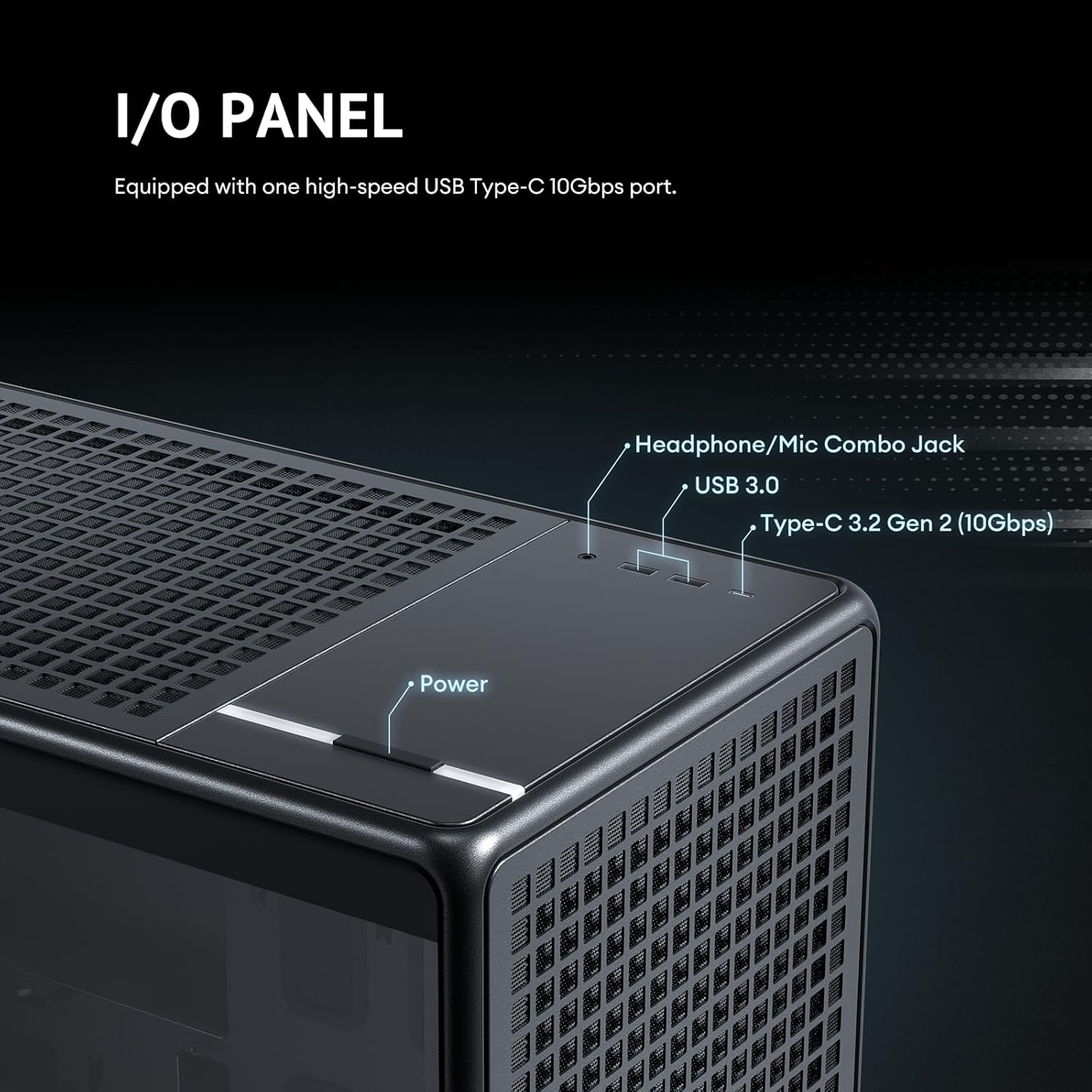
Figure 3.11: Details of the 6 pre-installed high-performance PWM fans, including their speed, airflow, and noise levels.
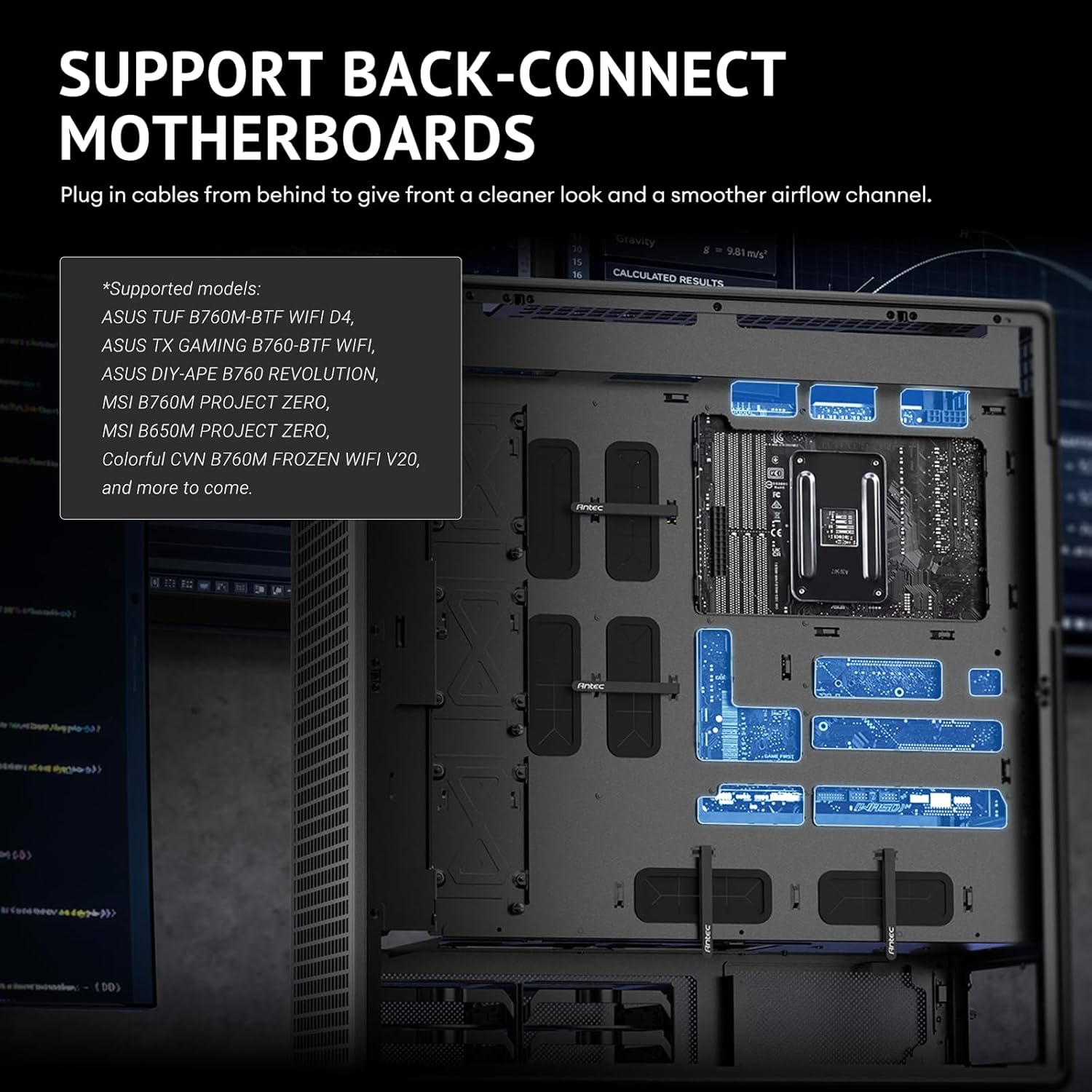
Figure 3.12: Adjustable fan bracket supporting multiple fan sizes (200mm, 140mm, 120mm) for front intake.

Figure 3.13: Comprehensive fan and radiator support diagrams for various mounting locations.

Figure 3.14: Removable top cooling bracket for simplified installation of fans or radiators.
3.7. إدارة الكابلات
The Antec 900 is designed for optimal cable routing to ensure a clean build and unobstructed airflow.
- Utilize the numerous cable tie-down points and cutouts behind the motherboard tray.
- Route power supply cables and data cables neatly to their respective components.
- Ensure cables do not obstruct fan blades or airflow paths.
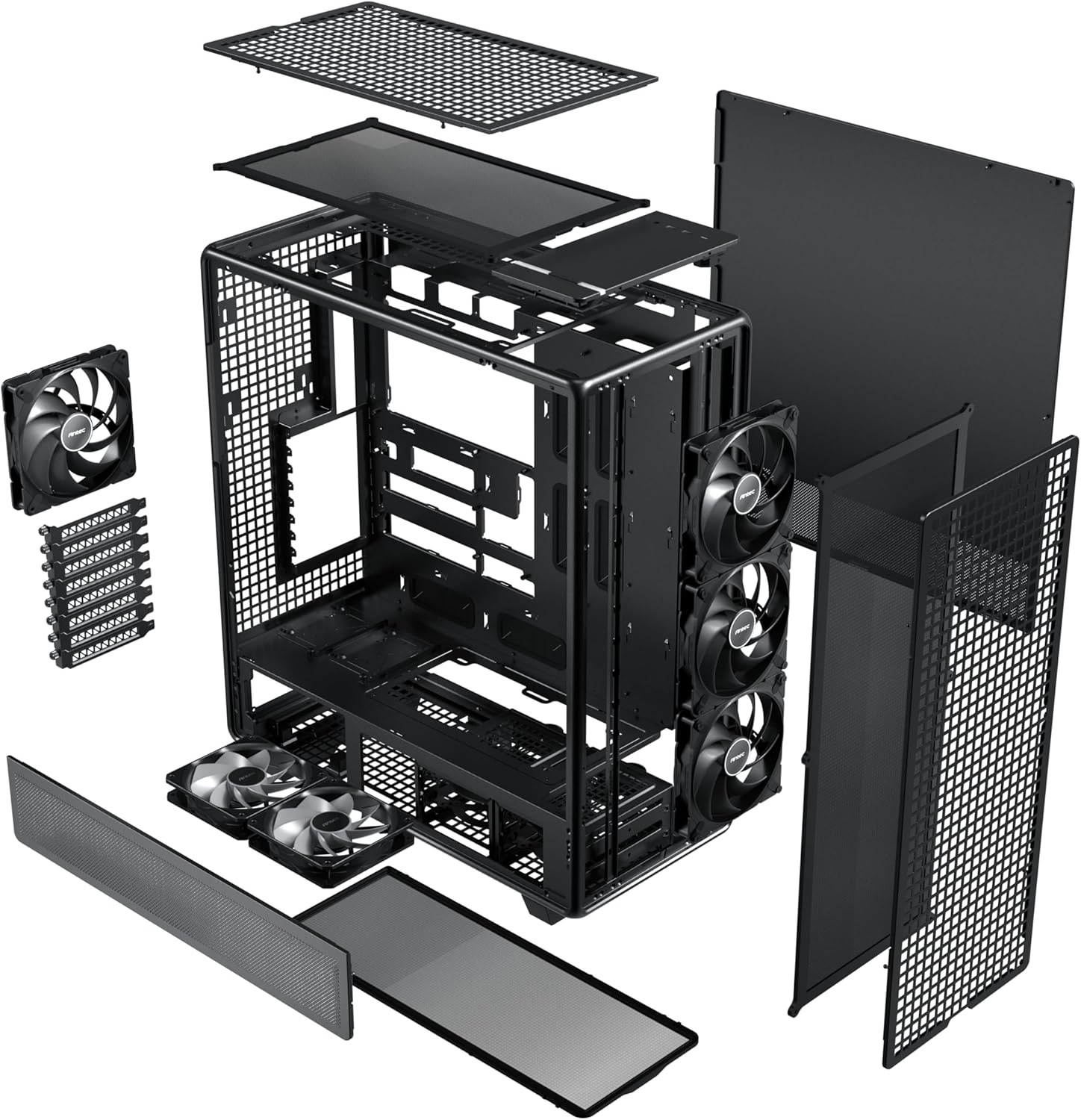
Figure 3.15: Optimal cable routing experience, showing suggested paths for various cables for both regular and iShift PSUs.
4. تعليمات التشغيل
Once all components are installed and secured, and cables are connected, you can begin operating your system.
4.1. تشغيل
- تأكد من أن مفتاح مصدر الطاقة في وضع "التشغيل".
- Press the power button located on the top I/O panel of the case.
4.2. لوحة الإدخال/الإخراج الأمامية
The front I/O panel provides convenient access to essential ports.
- زر الطاقة: لتشغيل النظام أو إيقافه.
- مقبس سماعة الرأس/الميكروفون: لإدخال وإخراج الصوت.
- منفذ USB 3.0: لنقل البيانات بسرعة عالية مع الأجهزة المتوافقة.
- Type-C 3.2 Gen 2 (10Gbps) Port: For ultra-fast data transfer and connectivity with modern USB-C devices.

Figure 4.1: Front I/O panel, detailing the location of the power button, audio jack, USB 3.0, and USB Type-C 3.2 Gen 2 ports.
5. الصيانة
Regular maintenance ensures optimal performance and longevity of your Antec 900 case and its components.
5.1. Dust Filtration
The Antec 900 features full dust filtration on the front, top, and bottom to prevent dust buildup inside the system.
- Front and Top Filters: These are magnetic dust filters. Gently pull them off for cleaning.
- فلتر سفلي: This is a full-sized pull-out dust filter. Slide it out from the rear or side for cleaning.
- Clean the dust filters regularly (e.g., monthly) using compressed air or by rinsing with water (ensure they are completely dry before re-installation).

Figure 5.1: Full dust filtration system, showing the magnetic top and front filters, and the pull-out bottom filter.
5.2 تنظيف بشكل عام
- استخدم قطعة قماش ناعمة وجافة لمسح الجزء الخارجي من العلبة.
- بالنسبة للوحة الزجاجية المقسّاة، استخدم منظف الزجاج وقطعة قماش من الألياف الدقيقة لتجنب ظهور الخطوط.
- Periodically use compressed air to clear dust from internal components, especially heatsinks and fan blades, after removing the side panels.
6. استكشاف الأخطاء وإصلاحها
This section addresses common issues that may arise during or after system assembly.
| مشكلة | السبب المحتمل | حل |
|---|---|---|
| لا يتم تشغيل النظام. | Power supply switch off, loose power cables, front panel connector issue. | Ensure PSU switch is ON. Check all power connections (24-pin ATX, CPU, GPU). Verify front panel power button connector is correctly attached to the motherboard. |
| المراوح لا تدور. | Loose fan cables, incorrect fan header connection, faulty fan. | Check fan connections to motherboard headers or fan controller. Ensure fans are properly seated. Test with another fan if possible. |
| تدفق الهواء ضعيف أو درجات الحرارة مرتفعة. | انسداد مرشحات الغبار، وضعية المروحة غير الصحيحة، عدم كفاية التبريد. | Clean all dust filters. Verify fan orientation (intake/exhaust). Ensure sufficient fans/radiators are installed for your components. |
| منافذ الإدخال/الإخراج الأمامية لا تعمل. | وصلات الكابلات الداخلية غير المحكمة. | Check the USB 3.0, USB Type-C, and audio header connections from the front panel to the motherboard. |
If you encounter issues not listed here, please refer to the Antec support webالموقع أو الاتصال بخدمة العملاء.
7. المواصفات
Detailed technical specifications for the Antec 900 Full Tower Case.
| ميزة | التفاصيل |
|---|---|
| ماركة | أنتيك |
| اسم الموديل | Antec 900 |
| نوع الحالة | برج كامل |
| التوافق مع اللوحة الأم | E-ATX, SSI-EEB, Threadripper, Back-Connect MB |
| دعم طول وحدة معالجة الرسومات | Up to 495mm (465mm with front fans installed) |
| GPU Thickness Support | حتى 160 ملم |
| ارتفاع مبرد وحدة المعالجة المركزية | حتى 190 ملم |
| فتحات التوسعة | 8 (Reusable) |
| Drive Bays (3.5"/2.5" Combo) | 4 |
| Drive Bays (2.5") | 5 |
| مراوح مثبتة مسبقًا | 3x 140mm Front, 2x 120mm Reverse (PSU Shroud), 1x 140mm Rear |
| دعم الرادياتير الأمامي | Up to 420mm (≤ 52mm thickness) |
| أعلى دعم المبرد | Up to 360mm (≤ 52mm thickness) |
| منافذ الإدخال / الإخراج الأمامية | 1x USB 3.0, 1x USB Type-C 3.2 Gen 2 (10Gbps), Headphone/Mic Combo Jack |
| مواد | فولاذ، زجاج مقسّى |
| الأبعاد (D x W x H) | 21.54 بوصة عمق × 9.84 بوصة عرض × 24.49 بوصة ارتفاع |
| وزن العنصر | 33.07 رطل |

Figure 7.1: Extensive interior layout, showing mainboard, CPU, GPU, SSD, HDD/SSD, and Power Supply areas.
8. معلومات الضمان
The Antec 900 Full Tower Case comes with a ضمان لمدة 2 سنوات from the date of purchase. This warranty covers defects in materials and workmanship under normal use. It does not cover damage caused by accident, misuse, abuse, unauthorized modification, or improper installation.
For warranty claims or further details, please retain your proof of purchase and contact Antec customer support.
9. الدعم
For technical assistance, product inquiries, or to download the latest drivers and manuals, please visit the official Antec webموقع:
You may also contact Antec customer service directly through the contact information provided on their webموقع.
Ask a question about this manual
Ask about setup, troubleshooting, compatibility, parts, safety, or missing instructions. Manuals+ will review the question and use this page’s manual context to help answer it.