
1. المقدمة
The XPR3SS 100Amp Smart WiFi 3-Phase Bi-Directional Energy Meter (Model 3P4W) is an advanced device designed for precise energy monitoring and management in solar net metering, industrial, commercial, and high-load residential applications. This meter accurately tracks both energy consumption and generation, providing real-time data and remote control capabilities through the Smart Life or Tuya App. It integrates seamlessly with smart home systems and offers comprehensive electrical protection features.
2. معلومات السلامة
تحذير: Installation and maintenance should only be performed by qualified electricians in accordance with local electrical codes and regulations. Failure to follow these instructions may result in electric shock, fire, or serious injury.
- تأكد من فصل التيار الكهربائي قبل التركيب أو الصيانة.
- لا تقم بتشغيل الجهاز إذا كان يبدو تالفًا.
- احتفظ بالجهاز بعيدًا عن الماء ودرجات الحرارة العالية.
- استخدم معدات الحماية الشخصية المناسبة أثناء التثبيت.
3. انتهى المنتجview
The XPR3SS 3P4W Energy Meter provides detailed insights into your electrical system. It features an LCD screen for local readings and WiFi connectivity for remote monitoring and control.
المميزات الرئيسية:
- Bidirectional Energy Measurement: Tracks both import and export energy (kWh).
- 3-Phase Power Monitoring: Accurate measurement for industrial, commercial, and high-load residential installations.
- WiFi Smart Meter: مراقب المجلدtage, current, power, and energy remotely via Smart Life/Tuya App.
- Voice Control Enabled: متوافق مع Amazon Alexa و Google Assistant.
- High Accuracy Metering: Class 1 accuracy with 1000 imp/kWh.
- Advanced Electrical Protection: أكثر / تحت المجلدtage, overcurrent, leakage detection, and phase imbalance protection.
- حامل سكة DIN: تصميم صغير الحجم لسهولة التركيب.
عناصر:
- XPR3SS 3P4W Smart WiFi 3-Phase Bi-Directional Energy Meter
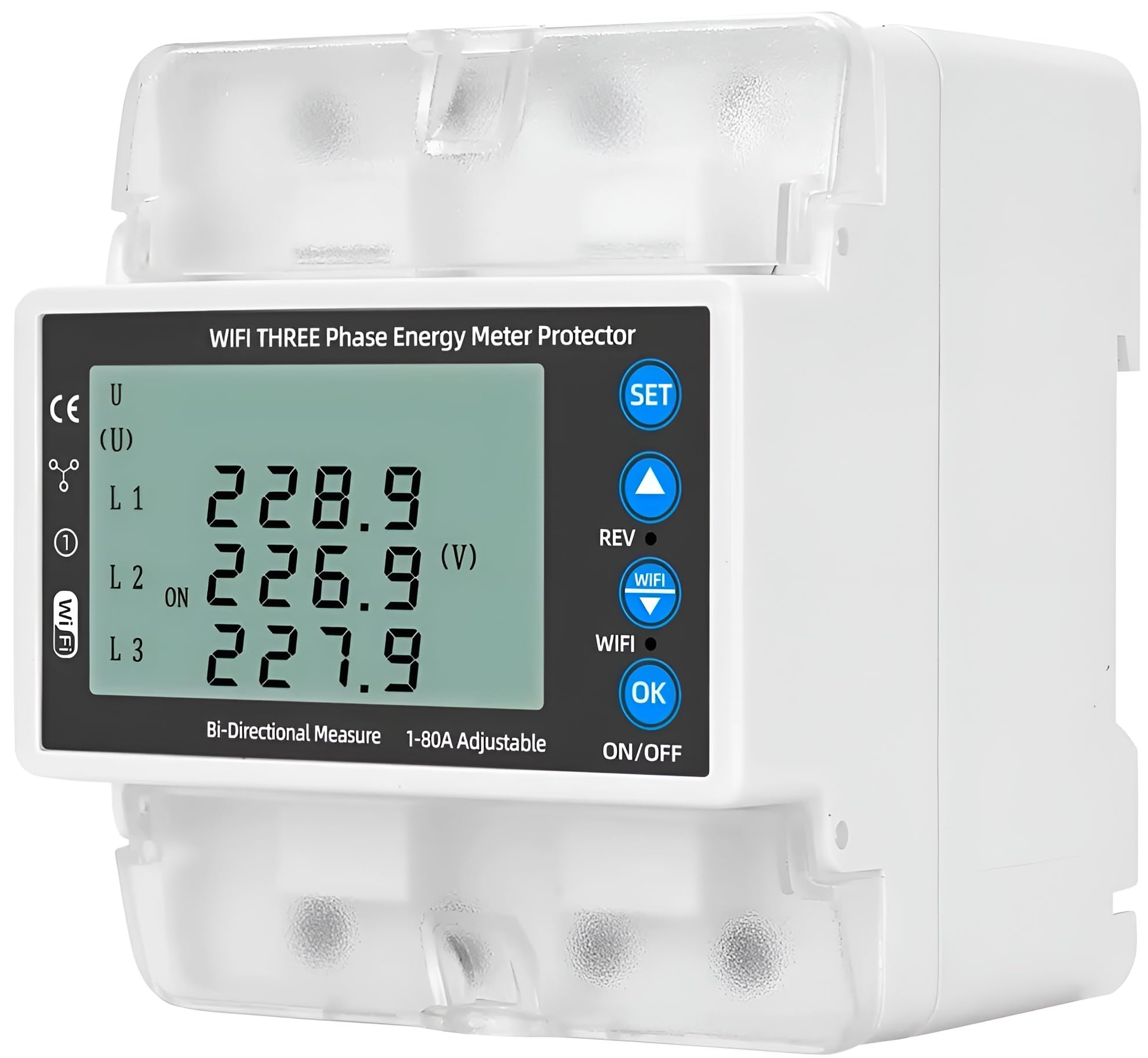
الشكل 3.1: الجبهة view of the XPR3SS 3P4W Smart WiFi 3-Phase Bi-Directional Energy Meter, showing the LCD display and control buttons.

الشكل 3.2: انتهىview of the meter's key features, including remote control, voice control, timing schedule, electricity metering, and various protections.

الشكل 3.3: مفصل view of the meter's display and integrated features such as backlight, thermometer, energymeter, circuit breaker, over voltagه، وتحت المجلدtagالمؤشرات الإلكترونية.
4. الإعداد
4.1 التثبيت
The XPR3SS 3P4W Energy Meter is designed for DIN rail mounting. Ensure proper wiring for a 3-phase, 4-wire system (3P4W) and compatibility with 380V systems if applicable. Refer to the wiring diagram provided with the product packaging for specific connection details.
- Mount the meter securely on a standard DIN rail in an appropriate electrical enclosure.
- Connect the three phase lines (L1, L2, L3) and the neutral line (N) to the corresponding terminals.
- تأكد من أن جميع التوصيلات محكمة وآمنة لمنع التوصيلات غير المحكمة والمخاطر المحتملة.
- Verify correct input and output connections for bidirectional measurement.
4.2 App Connection (Smart Life / Tuya App)
To enable smart features, connect the meter to your WiFi network using the Smart Life or Tuya App.
- Download the Smart Life or Tuya Smart app from your mobile device's app store.
- تسجيل أو تسجيل الدخول إلى حسابك.
- Ensure your mobile device is connected to a 2.4GHz WiFi network.
- Power on the energy meter. The WiFi indicator on the meter should blink, indicating pairing mode. If not, refer to the product's quick start guide for manual pairing mode activation.
- In the app, tap '+' to add a device, then select 'Electrical Engineering' > 'Energy Meter (Wi-Fi)'.
- Follow the on-screen instructions to connect the meter to your WiFi network.
- Once connected, the WiFi indicator on the meter will become solid.
5. تعليمات التشغيل
5.1 Local Display Monitoring
The LCD screen on the meter displays real-time data for voltage, current, active power, reactive power, frequency, and total energy (kWh) for each phase (L1, L2, L3) and overall.
- Use the 'UP' and 'DOWN' buttons on the meter to cycle through different display parameters.
- The 'SET' button allows access to configuration menus (refer to the detailed product manual for advanced settings).
5.2 Remote Control and Monitoring (Smart Life / Tuya App)
After successful app connection, you can access a wide range of functions remotely.
- بيانات في الوقت الفعلي: View يعيش المجلدtage, current, power (kW), power factor, and frequency.
- البيانات التاريخية: Access daily, monthly, and yearly energy consumption and generation reports.
- إعدادات الحماية: Adjust over/under voltage, overcurrent, and leakage protection thresholds.
- التنبيهات: Receive notifications for abnormal conditions or protection trips.
- الأتمتة: Integrate with other smart home devices to create automated scenes based on energy usage.

الشكل 5.1: مثالample of the mobile app interface showing real-time energy data and remote control options.
5.3 التحكم الصوتي
The meter supports voice commands through Amazon Alexa and Google Assistant when integrated with the Smart Life/Tuya App.
- Enable the Smart Life/Tuya skill in your Alexa or Google Home app.
- اكتشف الأجهزة.
- Use commands such as "Alexa, turn on/off [device name]" or "Hey Google, what is the power consumption of [device name]?" (Functionality may vary based on voice assistant capabilities).

Figure 5.2: Illustration of voice control functionality with smart assistants.
5.4 Timing Schedule
Set up timing schedules within the Smart Life/Tuya App to automate energy management tasks.
- Access the 'Timing Schedule' feature in the app for your energy meter.
- Create schedules to turn connected loads on or off at specific times, optimizing energy usage.

الشكل 5.3: مثالample of setting up a timing schedule for environmental lighting control.
5.5 Adjustable Protections
The meter offers configurable protection settings to safeguard your electrical system.
- أكثر من المجلدtagهـ- الحماية: قابلة للتعديل من 120 فولت إلى 300 فولت.
- تحت المجلدtagهـ- الحماية: قابلة للتعديل من 80 فولت إلى 210 فولت.
- حماية من التحميل الزائد: Supports 1A to 100A current range.
- BCD Trip Curve: Supports B, C, and D curves for flexible circuit protection.
- كشف التسرب: Configurable leakage alarm threshold.
- إنذار ارتفاع درجة الحرارة: Set a threshold for temperature alerts.
These settings can be configured via the Smart Life/Tuya App under the device settings or locally using the meter's 'SET' button and navigation keys.

Figure 5.4: Screenshot of the app's alarm setting interface for leakage, high temperature, over-current, over-voltagه، وتحت المجلدtagالحماية ه.
6. الصيانة
The XPR3SS 3P4W Energy Meter requires minimal maintenance.
- قم بفحص الجهاز بشكل دوري للتأكد من عدم وجود أي تلف مرئي أو وصلات مفكوكة.
- نظّف السطح الخارجي بقطعة قماش ناعمة وجافة. لا تستخدم المنظفات الكاشطة أو المذيبات.
- Ensure the installation environment is free from excessive dust, moisture, and corrosive gases.
7. استكشاف الأخطاء وإصلاحها
If you encounter issues with your XPR3SS 3P4W Energy Meter, refer to the following common troubleshooting steps:
- لا يوجد عرض/طاقة: Check the main power supply and wiring connections. Ensure the circuit breaker is not tripped.
- WiFi Disconnection: Verify your WiFi router is working and the meter is within range. Ensure your WiFi network is 2.4GHz. Try restarting the meter and your router. Re-pair the device with the app if necessary.
- قراءات غير دقيقة: Double-check all wiring connections, especially for current transformers (if applicable) and phase sequencing. Ensure the meter is correctly configured for your system type.
- رحلة الحماية: Identify the cause of the over/under voltage or overcurrent condition. Address the underlying electrical issue before resetting the protection.
- التطبيق لا يستجيب: Ensure your mobile device has an internet connection. Update the Smart Life/Tuya App to the latest version. Try restarting the app or your phone.
في حالة وجود مشكلات مستمرة، اتصل بدعم العملاء.
8. المواصفات
| المعلمة | قيمة |
|---|---|
| رقم الموديل | 3P4W (Xpr3ss-energy-01) |
| عدد المراحل | 3 Phase (3P) |
| تصنيف المجلدtage | 100–240V AC (Compatible with 380V systems) |
| التيار المقدر | حتى 100 أمبير |
| التردد المقدر | 50/60 هرتز |
| فئة الدقة | 1000 imp/kWh (Class 1) |
| الاتصال | WiFi (2.4 جيجا هرتز) |
| التحكم الصوتي | أمازون أليكسا، مساعد جوجل |
| توافق التطبيق | الحياة الذكية، تويا الذكية |
| أكثر من المجلدtagالحماية | قابل للتعديل 120 فولت – 300 فولت |
| تحت المجلدtagالحماية | قابل للتعديل 80 فولت – 210 فولت |
| حماية من التحميل الزائد | Adjustable 1A – 100A |
| الأبعاد (الطول × العرض × الارتفاع) | 6.6 × 5.5 × 7.5 سنتيمتر |
| وزن العنصر | 450 جرام |
| الشركة المصنعة | Yueqing Taixin Electric Co., Ltd. |
| بلد المنشأ | الصين |
9. معلومات الضمان
This XPR3SS product comes with a ضمان لمدة 6 شهرًا against manufacturing defects only. Please retain your purchase receipt and the warranty card for any claims.
10. الدعم
For technical assistance, troubleshooting beyond this manual, or warranty claims, please contact XPR3SS customer support. Refer to the contact information provided in your warranty card or product packaging.