مقدمة
This manual provides detailed instructions for the installation, operation, and maintenance of your Generic 11.26" Car HD On-Dash Camera System. This system is designed for Ford B-MAX Hatchback models from 2012-2017, offering advanced features such as 4K front recording, 1080P rear recording, wireless CarPlay, Android Auto, Bluetooth, and GPS functionality. Please read this manual thoroughly before using the device to ensure proper operation and safety.
معلومات السلامة
- التثبيت الاحترافي: Professional installation is recommended for optimal performance and to avoid damage to your vehicle or the device.
- سلامة القيادة: Always prioritize driving safety. Do not operate the device in a way that distracts you from the road.
- مصدر الطاقة: Use only the provided power cable and connect to a compatible vehicle power outlet. Incorrect power sources may damage the device.
- درجة حرارة: تجنب تعريض الجهاز لدرجات حرارة قصوى، أو لأشعة الشمس المباشرة لفترات طويلة، أو للرطوبة العالية.
- صيانة: لا تحاول تفكيك الجهاز أو إصلاحه بنفسك. استشر فني صيانة مؤهلًا.
محتويات الحزمة
تأكد من وجود جميع العناصر في الحزمة الخاصة بك:
- 11.26" On-Dash Camera System Unit
- 4K Front Dash Camera
- 1080P Waterproof Rear Camera
- حامل سطح المكتب
- جبل شفط جبل
- كابل الطاقة
- شنومكسب تف بطاقة
- دليل المستخدم
يثبت
1. التثبيت
The system offers two primary installation methods: dashboard mounting or windshield mounting. Both methods utilize adjustable brackets to secure the device.
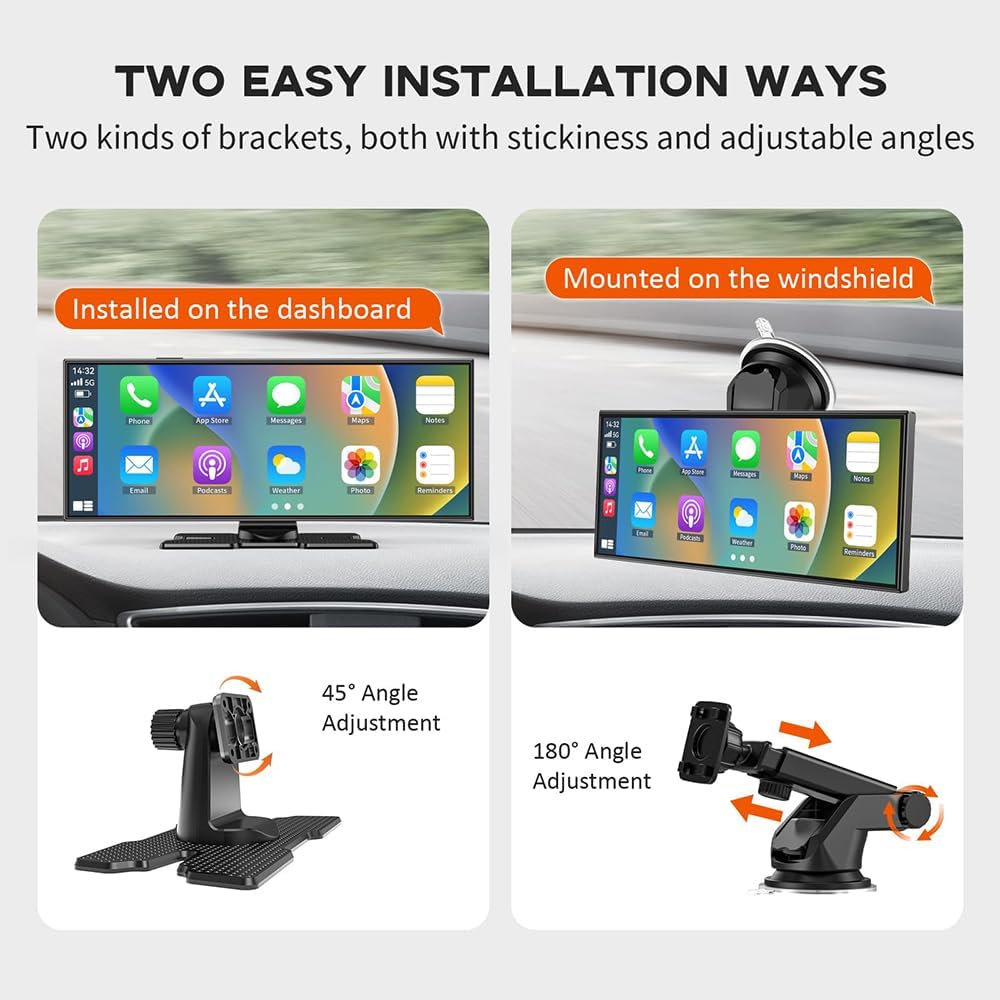
Image: Two easy installation ways. The left shows the device installed on the dashboard with a 45-degree angle adjustment. The right shows the device mounted on the windshield with a 180-degree angle adjustment.
- تركيب لوحة التحكم: Use the desktop stand with its adhesive base to secure the unit to your dashboard. Adjust the angle for optimal viewعمل.
- تركيب الزجاج الأمامي: Attach the suction cup mount to the windshield. Secure the unit to the mount and adjust the angle as needed.
2. توصيل الطاقة
Connect the provided power cable to the device and then to your vehicle's 12V power outlet (cigarette lighter socket). Ensure the connection is secure.
3. اتصال الكاميرا
- الكاميرا الأمامية: The front camera is integrated into the main unit.
- الكاميرا الخلفية: Connect the rear camera cable to the designated port on the main unit. Route the cable carefully to the rear of your vehicle, ensuring it does not interfere with vehicle operations. Mount the rear camera in a suitable location, typically above the license plate or on the rear window, ensuring a clear view.
4. أدخل بطاقة TF
Insert the provided 64GB TF card into the designated slot on the main unit. Ensure it is inserted correctly until it clicks into place.
تعليمات التشغيل
1. Initial Power-On and Touchscreen Interface
Once connected to power, the device will automatically power on with your vehicle. The 11.26-inch IPS touchscreen allows for intuitive navigation through menus and functions. Tap icons to select options and swipe to navigate.
2. CarPlay and Android Auto Connection
The system supports wireless CarPlay and Android Auto for seamless smartphone integration.
- الاقتران بلوتوث: On the device, enable Bluetooth. On your smartphone, search for the device's Bluetooth name and pair them.
- اتصال واي فاي: After Bluetooth pairing, the device will prompt you to connect to its Wi-Fi network for CarPlay/Android Auto functionality. Follow the on-screen instructions.
- Once connected, your phone's compatible apps (navigation, music, calls) will appear on the dash camera screen.
3. التحكم الصوتي
Utilize Siri or Google Voice Control for hands-free operation, enhancing driving safety.

Image: Safe Driving with Siri/Google Voice Control. The image displays various app icons (Phone, Google Map, Apple Map, Message, Music, WhatsApp, Calendar) and examples of voice commands such as 'Hey Siri, call Mom', 'Hi Google, Message to Lisa', 'Hey Siri, play some music', and 'Hi Google, Navigate Home'.
- Activate voice control by saying the wake word (e.g., "Hey Siri" or "Hey Google") or by tapping the voice assistant icon on the screen.
- Issue commands for navigation, making calls, sending messages, or playing music.
4. وظائف التسجيل
The system provides comprehensive recording capabilities for front and rear views.

Image: 4K High Definition Recording. This image illustrates the system's recording capabilities, including a 4K front camera view, a 1080P rear camera view, and a diagram highlighting the multi-angle adjustable and waterproof design of the dash cam. It also mentions reverse view and unlimited loop recording.
- الكاميرا الأمامية: Records in 4K resolution, capturing clear details of the road ahead.
- الكاميرا الخلفية: Records in 1080P resolution, providing a wide-angle view of the rear. The waterproof design ensures reliable operation in all weather conditions.
- التسجيل المتكرر: The system supports unlimited loop recording. When the 64GB TF card is full, the oldest fileيتم استبدال التسجيلات القديمة تلقائيًا بالتسجيلات الجديدة.

Image: Unlimited Loop Recording. This image depicts the loop recording function, showing a circular flow of traffic and a central dash cam view, emphasizing continuous recording and data protection. Icons for '64G TF Card', 'HD Videos', and 'Loop Recording' are included.
5. خيارات إخراج الصوت
The device offers multiple ways to output audio to your vehicle's sound system.

Image: Four Audio Output Options. This image illustrates the various audio output methods: built-in speaker, Bluetooth, FM Transmitter, and AUX connection, each with a corresponding screen interface exampليه.
- مكبر صوت مدمج: For direct audio output from the unit.
- بلوتوث: Connect wirelessly to your car's Bluetooth system for audio playback.
- وزير الخارجية الارسال: Transmit audio to your car's FM radio by tuning both devices to the same frequency.
- وصلة AUX: Use an AUX cable to connect the device to your car's AUX input for direct audio transfer.
6. نظام الملاحة GPS
When connected via CarPlay or Android Auto, utilize your smartphone's navigation applications directly on the dash camera screen for real-time directions.
صيانة
1. التنظيف
- شاشة: استخدم قطعة قماش ناعمة وخالية من الوبر لمسح شاشة اللمس برفق. تجنب استخدام المنظفات الكاشطة أو المذيبات.
- عدسات الكاميرا: Keep the front and rear camera lenses clean for clear recordings. Use a lens cleaning cloth or a soft, dry cloth.
2. Storage Card Management
- التنسيق: Periodically format the TF card through the device's settings menu to maintain optimal recording performance and prevent data corruption. Back up any important fileقبل التنسيق.
- الاستبدال: If the TF card shows signs of degradation or error, replace it with a new high-speed (Class 10 or higher) TF card.
استكشاف الأخطاء وإصلاحها
المشاكل الشائعة والحلول:
- الجهاز لا يعمل:
- Check the power cable connection to both the device and the vehicle's power outlet.
- تأكد من أن منفذ الطاقة في السيارة يعمل.
- Recording Issues (e.g., blurry video, no recording):
- تنظيف عدسات الكاميرا.
- Ensure the TF card is inserted correctly and is not full. Format the TF card if necessary (back up data first).
- Check recording settings in the device menu.
- عدم اتصال CarPlay/Android Auto:
- Ensure Bluetooth and Wi-Fi are enabled on both the device and your smartphone.
- Forget the device from your phone's Bluetooth/Wi-Fi settings and try pairing again.
- Restart both the device and your smartphone.
- لا يوجد مخرج صوتي:
- Check the selected audio output mode (Built-in speaker, Bluetooth, FM, AUX).
- Adjust volume levels on both the device and your car stereo.
- If using FM, ensure the frequency is clear and matched. If using AUX, check the cable connection.
تحديد
| ميزة | مواصفة |
|---|---|
| اسم المنتج | Car on-dash cameras system |
| رقم الموديل | CzyBBD-9225367-FBN-02 |
| التوافق | For Ford B-MAX Hatchback 2012-2017 |
| حجم الشاشة | 11.26 بوصة |
| نوع العرض | شاشة تعمل باللمس IPS |
| دقة الكاميرا الأمامية | 4K (1920×720 video resolution) |
| دقة الكاميرا الخلفية | 1080 بكسل |
| Camera Megapixels | 5 ميجا بكسل |
| Main Lens Aperture | ف1.8 |
| بطاقة التخزين | 64GB TF card included |
| نوع الشبكة | واي فاي |
| مجال View | 160° |
| أوضاع إخراج الصوت | Speaker, AUX, FM, Bluetooth |
| أبعاد المنتج | 0.39 × 0.39 × 0.39 بوصة |
| وزن العنصر | 2.2 رطل (1 كيلوجرام) |
| الشركة المصنعة | CzyBBD |
الضمان والدعم
For any issues encountered after receiving your package, or for technical support, please contact the seller directly. They are committed to assisting you with product-related concerns.


