
مقدمة
The Hunter ZenTech 44-inch smart ceiling fan combines modern design with advanced technology to provide efficient air circulation and adjustable lighting for indoor and covered outdoor spaces. This fan features a slim DC motor for quiet operation and energy efficiency, TrueLight LED technology for customizable lighting, and HunterSMART technology for seamless integration with smart home systems like Amazon Alexa, Google Assistant, and Apple HomeKit.
This manual provides detailed instructions for the safe installation, operation, and maintenance of your ZenTech ceiling fan. Please read all instructions carefully before beginning installation or use.
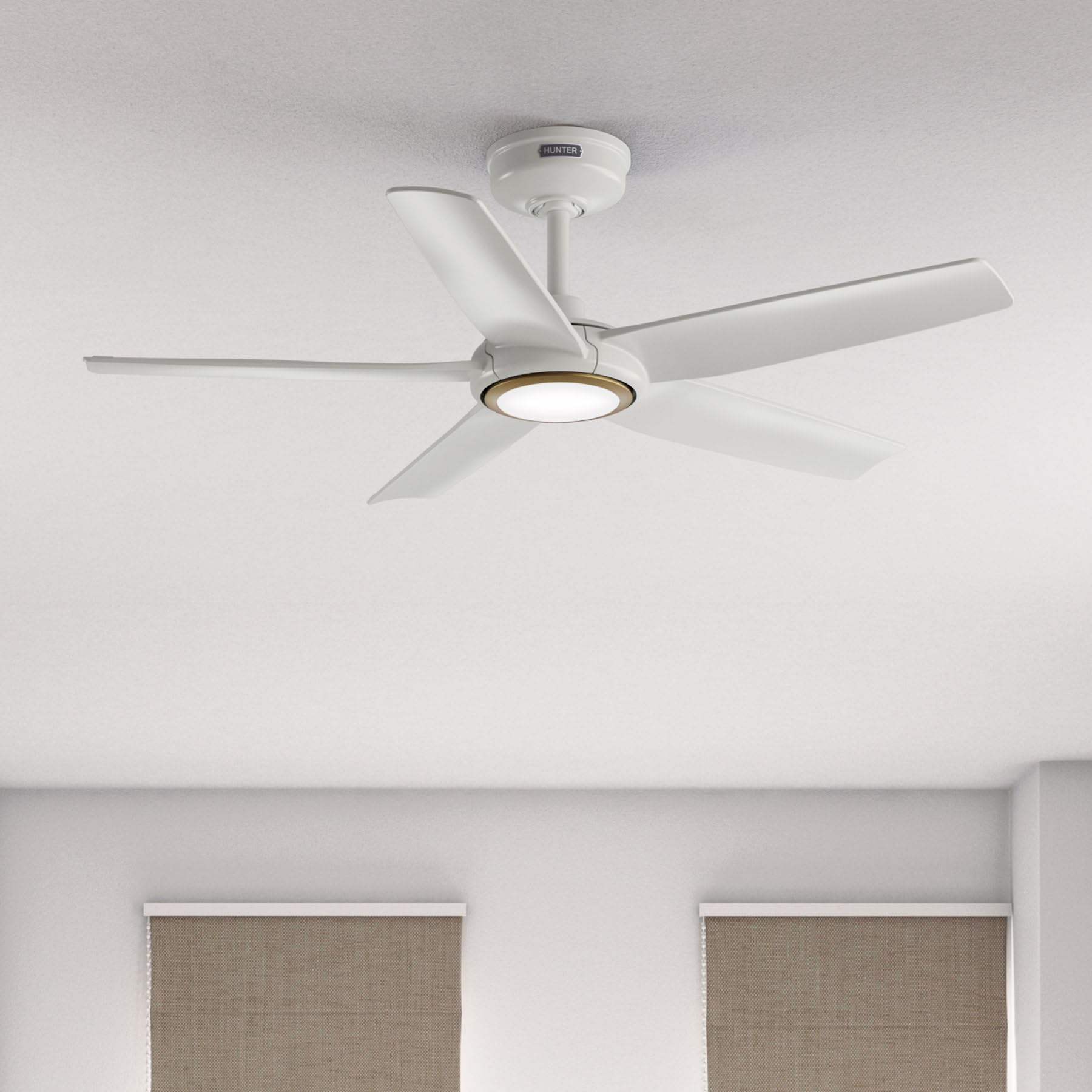
Image: Hunter ZenTech 44-inch ceiling fan in Fresh White, showcasinبفضل تصميمه الأنيق وإضاءة LED المدمجة.
معلومات السلامة
To reduce the risk of electric shock, fire, or injury to persons, always follow these important safety precautions:
- اقرأ جميع التعليمات قبل تركيب أو استخدام هذه المروحة.
- تأكد من إيقاف تشغيل الطاقة عند قاطع الدائرة قبل التثبيت أو الصيانة.
- يجب أن تتوافق جميع التمديدات الكهربائية مع قوانين الكهرباء الوطنية والمحلية. إذا لم تكن لديك خبرة في التمديدات الكهربائية، فاستشر فني كهرباء مؤهل.
- يجب تركيب المروحة مع ترك مسافة لا تقل عن 7 أقدام (2.1 متر) بين الحافة الخلفية للشفرات والأرضية.
- تأكد من أن هيكل التثبيت يمكنه تحمل وزن المروحة (حوالي 13.45 رطل).
- لا تقم بتشغيل المروحة إذا كانت شفراتها تالفة أو إذا كانت أي من مكوناتها الأخرى تالفة.
- هذه المروحة دamp-rated, suitable for indoor use and covered outdoor areas where exposure to moisture may occur. Do not expose to direct water spray.
الإعداد والتثبيت
Proper installation is crucial for the performance and safety of your ceiling fan. It is recommended to have a qualified electrician perform the installation.
فحوصات ما قبل التثبيت
- تأكد من وجود جميع المكونات كما هو موضح في قائمة التعبئة.
- Ensure the electrical box is securely mounted and capable of supporting a ceiling fan.
- قم بإيقاف تشغيل الطاقة عند قاطع الدائرة الرئيسي.
تركيب المروحة
- قم بتثبيت دعامة التثبيت على صندوق الكهرباء الموجود في السقف باستخدام البراغي المرفقة.
- Assemble the downrod (6 inches included) to the motor housing. Factory-installed wiring and connectors are designed for downrods up to 24 inches. Do not extend or modify.
- ارفع مجموعة المروحة بعناية وقم بتعليقها من حامل التثبيت.
التوصيلات الكهربائية
- Connect the fan's electrical wires to the household wiring according to the wiring diagram in the full instruction manual. Ensure all connections are secure.
- أدخل جميع الأسلاك بدقة في الصندوق الكهربائي.
تركيب الشفرات ومجموعة الإضاءة
- Securely attach the five fan blades to the motor housing.
- Install the LED light kit module. The fan includes in-box accessories for a personalized finish, including an interchangeable LED module, a no-light cap, and two trim ring options (one matching the fan finish and one in Luxe Gold).

Image: Hunter ZenTech ceiling fan installed in a modern living room, demonstrating its aesthetic integration into a home environment.

Image: Hunter ZenTech ceiling fan installed on a covered outdoor patio, highlighting its damp-rated suitability for outdoor use.
تعليمات التشغيل
Your ZenTech fan offers multiple control options for convenience.
جهاز التحكم عن بعد
A handheld remote control is included for basic fan and light functions:
- سرعة المروحة: Adjust between 6 speeds.
- اتجاه المروحة: Reverse the fan direction for summer (downward airflow) or winter (upward airflow) operation.
- تشغيل / إيقاف الضوء: قم بتشغيل أو إيقاف تشغيل ضوء LED.
- تعتيم الضوء: ضبط سطوع ضوء LED.
HunterSMART App Control
The HunterSMART app provides advanced control and customization options:
- Download the HunterSMART app from your device's app store.
- Follow the in-app instructions to connect your ZenTech fan to your home Wi-Fi network.
- Once connected, you can control fan speed, light brightness, and color temperature from your smartphone or tablet.
- Access additional features such as scheduling and custom settings.

Image: Diagram illustrating HunterSMART app interface and voice command examples for controlling the ceiling fan.
التحكم الصوتي
The ZenTech fan is compatible with leading smart home platforms:
- أمازون اليكسا: Enable the Hunter skill in the Alexa app and link your HunterSMART account.
- مساعد جوجل: Link your HunterSMART account through the Google Home app.
- أبل هوم كيت: Follow the pairing instructions in the Apple Home app.
Use voice commands such as "Alexa, turn on the living room fan" or "Hey Google, set the bedroom light to warm white."
TrueLight LED Lighting
The integrated TrueLight LED technology allows for fully adjustable lighting:
- Choose from 10 brightness levels to suit your needs.
- Adjust the color temperature between warm and cool tones to create the desired ambiance.

Image: Graphic illustrating the 'Clearly Brighter' TrueLight features, showing 10 levels of light and 10 color temperatures for adjustable LED lighting.
صيانة
Regular maintenance ensures the longevity and optimal performance of your ZenTech ceiling fan.
تنظيف
- شفرات المروحة: Wipe the blades with a soft, damp cloth. Do not use abrasive cleaners as they may damage the finish.
- الإسكان المحرك: Dust the motor housing with a soft, dry cloth.
- مجموعة الإضاءة: Clean the light diffuser with a soft, lint-free cloth.
Always ensure the power is off at the circuit breaker before cleaning any part of the fan.
صيانة عامة
- افحص جميع البراغي والوصلات بشكل دوري للتأكد من إحكامها. أعد ربطها حسب الحاجة.
- The fan's DC motor is designed for long-term, maintenance-free operation and does not require lubrication.
استكشاف الأخطاء وإصلاحها
If you encounter issues with your ZenTech ceiling fan, refer to the following common problems and solutions:
| مشكلة | السبب المحتمل | حل |
|---|---|---|
| المروحة لا تبدأ | لا يوجد طاقة للمروحة؛ توصيلات الأسلاك فضفاضة؛ بطارية جهاز التحكم عن بعد منخفضة. | التحقق من قاطع الدائرة؛ والتأكد من سلامة جميع توصيلات الأسلاك؛ واستبدال بطارية جهاز التحكم عن بعد. |
| الضوء لا يعمل | Loose wire connection to light kit; LED module faulty. | Check light kit wiring; Contact customer support for LED module replacement if necessary. |
| تذبذب المروحة | براغي الشفرة مفكوكة؛ شفرات غير متوازنة بشكل صحيح؛ دعامة تثبيت مفكوكة. | Tighten all blade screws; Use a blade balancing kit (not included); Ensure mounting bracket is secure. |
| جهاز التحكم عن بعد لا يعمل | Battery low or dead; Remote not paired with fan. | Replace battery; Refer to the full manual for remote pairing instructions. |
| مشاكل الاتصال بشبكة Wi-Fi | كلمة مرور الواي فاي غير صحيحة؛ جهاز التوجيه بعيد جدًا؛ تداخل الشبكة. | Verify Wi-Fi password; Move router closer or use a Wi-Fi extender; Reduce interference from other devices. |
For more complex issues or if troubleshooting steps do not resolve the problem, please contact Hunter customer support.
تحديد
| ميزة | التفاصيل |
|---|---|
| ماركة | صياد |
| اسم الموديل | ZenTech |
| رقم الموديل | 53641 |
| مقاس | 44 بوصة |
| لون | الأبيض الطازج |
| أبعاد المنتج | 44 بوصة عمق × 44 بوصة عرض × 11.78 بوصة ارتفاع |
| وزن العنصر | 13.45 رطل |
| عدد الشفرات | 5 |
| نوع المحرك | DC Motor (43% slimmer) |
| عدد السرعات | 6 |
| نوع الضوء | TrueLight LED (Adjustable Brightness & Color Temperature) |
| طريقة التحكم | App Control (HunterSMART), Remote Control, Voice Control |
| التوافق مع المنزل الذكي | Amazon Alexa, Google Assistant, Apple HomeKit |
| الاستخدام الداخلي والخارجي | داخلي، خارجي مغطى (Damp (مصنف) |
| المجلدtage | 120 فولت |
| واتtage | 14 واط |
| سعة تدفق الهواء | 4493.25 قدم مكعب في الدقيقة |
| طول داونرود | 6 Inches (included), compatible up to 24 inches |
| الشهادات | ETL، Energy Star، FCC |
ضمان
The Hunter ZenTech ceiling fan is backed by a limited lifetime motor warranty, reflecting Hunter's commitment to engineering and quality. This warranty covers defects in materials and workmanship of the fan motor for the lifetime of the original purchaser. Specific terms and conditions apply. Please refer to the warranty card included with your product or visit the official Hunter webالموقع للحصول على التفاصيل الكاملة.
يدعم
For technical assistance, warranty claims, or additional information regarding your Hunter ZenTech ceiling fan, please contact Hunter customer support:
- الدعم عبر الإنترنت: Visit the Hunter Fan Company webالموقع الخاص بالأسئلة الشائعة، ودليل استكشاف الأخطاء وإصلاحها، ونماذج الاتصال.
- دعم الهاتف: راجع عبوة المنتج أو دليل المستخدم الخاص بـ Hunter webللحصول على أحدث رقم هاتف لخدمة العملاء، تفضل بزيارة الموقع الإلكتروني.
عند الاتصال بالدعم، يرجى تجهيز رقم الطراز (53641) وإثبات الشراء.