
1. انتهى المنتجview
The Hunter ZenTech 52 Inch Smart Ceiling Fan (Model 53638) is designed for both indoor and covered outdoor spaces, offering quiet, efficient performance with advanced smart home integration. This 5-blade fan features a slim DC motor, adjustable LED lighting with TrueLight technology, and Wi-Fi connectivity for control via the HunterSMART app, Amazon Alexa, Google Assistant, and Apple HomeKit. It is ENERGY STAR certified and damp-rated for versatile use.
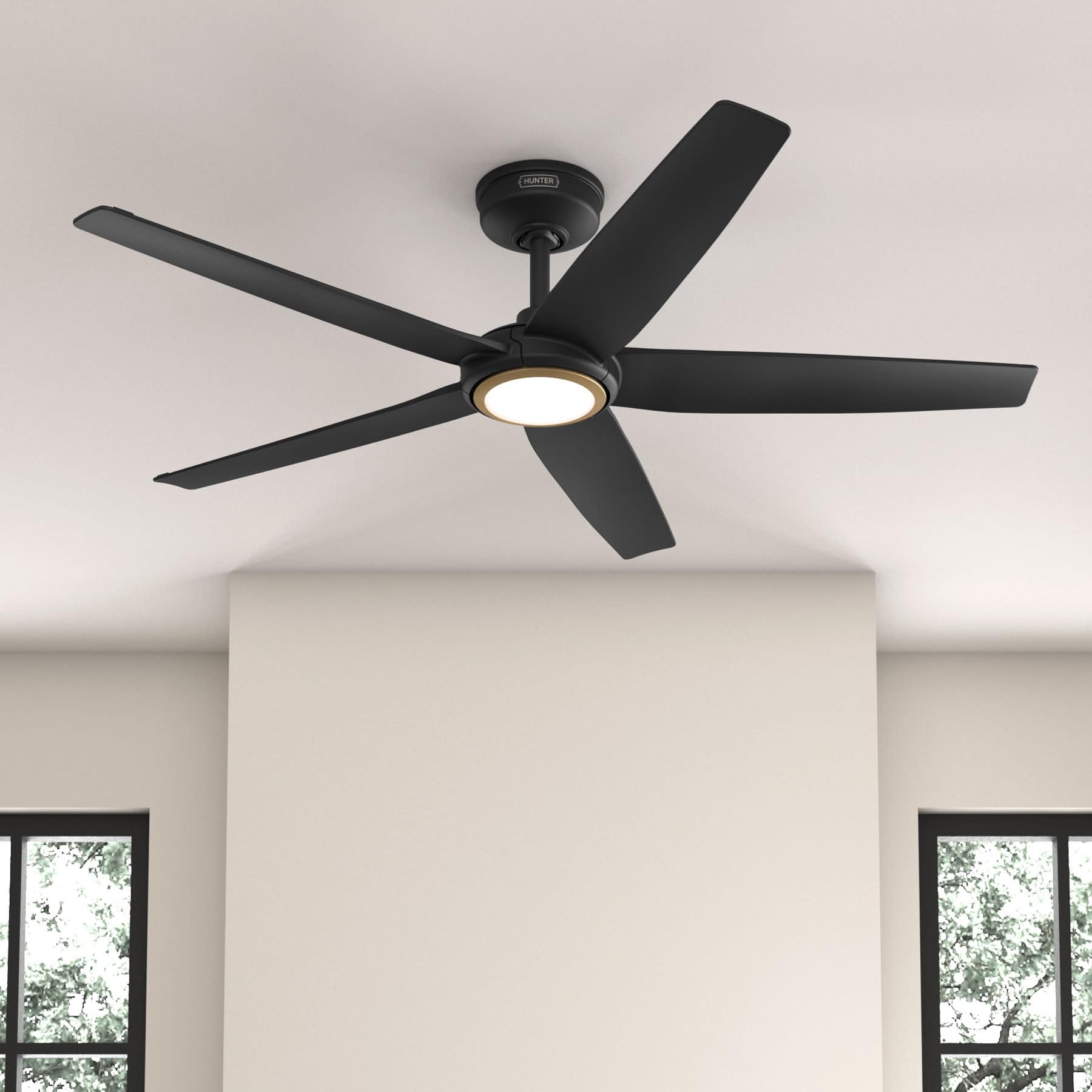
Figure 1: Hunter ZenTech 52 Inch Smart Ceiling Fan (Matte Black)
المميزات الرئيسية:
- التصميم المتقدم: Ultra-slim DC motor for powerful, quiet airflow and a modern aesthetic.
- تكامل المنزل الذكي: HunterSMART technology for app and voice control via Amazon Alexa, Google Assistant, and Apple HomeKit.
- إضاءة LED قابلة للتعديل: TrueLight LED offers 10 brightness levels and 10 color temperatures, protected by a durable Duralight lens.
- SureSpeed Guarantee: Delivers strong, consistent airflow with quiet, wobble-free performance.
- كفاءة الطاقة: ENERGY STAR certified reversible 6-speed DC motor.
- Damp تم تقييمه: Suitable for indoor and covered outdoor areas.
2. تعليمات السلامة الهامة
اقرأ جميع التعليمات بعناية قبل البدء بالتثبيت. قد يؤدي عدم اتباع هذه التعليمات إلى حدوث صدمة كهربائية أو حريق أو إصابة شخصية.
- افصل التيار الكهربائي دائمًا من قاطع الدائرة الرئيسي قبل التركيب أو الصيانة.
- تأكد من أن جميع التوصيلات الكهربائية تتوافق مع القوانين واللوائح المحلية. إذا لم تكن لديك خبرة في التمديدات الكهربائية، فاستشر فني كهرباء مؤهل.
- يجب أن يكون هيكل التثبيت قادراً على تحمل وزن المروحة (حوالي 14.11 رطل).
- Do not bend blade brackets during installation or cleaning.
- أبقِ يديك بعيداً عن شفرات المروحة أثناء تشغيلها.
- هذه المروحة دamp-rated for use in covered outdoor areas but should not be exposed directly to water.
3. محتويات العبوة
تأكد من وجود جميع المكونات المدرجة أدناه في حزمة التثبيت الخاصة بك قبل البدء في التثبيت.
- غلاف محرك مروحة السقف
- شفرات مروحة 5
- Light Kit with Duralight Lens
- قضيب تعليق بطول 6 بوصات
- المظلة وقوس التثبيت
- جهاز تحكم عن بعد محمول
- مجموعة الأجهزة (البراغي والغسالات والصواميل السلكية)

Figure 2: ZenTech 52 Inch Fan Components
4. دليل التثبيت
Professional installation is recommended. Ensure the power is OFF at the circuit breaker before starting.
4.1 تركيب المروحة
- Secure the mounting bracket to the ceiling junction box. The junction box must be listed for fan support.
- Assemble the downrod (6-inch included, compatible with up to 24-inch downrods) to the fan motor housing.
- قم بتعليق مروحة التبريد من دعامة التثبيت.
- Complete electrical wiring connections as per the wiring diagram provided in the full manual.
- قم بربط شفرات المروحة بغلاف المحرك.
- Install the light kit and Duralight lens.

Figure 3: ZenTech Fan installed in a covered outdoor space
5. تعليمات التشغيل
The ZenTech fan can be operated using the included handheld remote control or through the HunterSMART app.
5.1 تشغيل جهاز التحكم عن بعد
- تشغيل / إيقاف تشغيل المروحة: اضغط على زر المروحة لتشغيلها أو إيقافها.
- سرعة المروحة: استخدم أزرار السرعة للتنقل بين 6 سرعات للمروحة.
- تشغيل / إيقاف الضوء: اضغط على زر الضوء لتشغيل الضوء أو إيقاف تشغيله.
- تعتيم الضوء: Hold the light button to dim or brighten the light.
- درجة حرارة اللون: Press the color temperature button to cycle through different color temperatures (warm to cool).
- وظيفة عكسية: Press the reverse button to change the fan's direction for seasonal use.
5.2 LED Light Control (TrueLight Technology)
The TrueLight LED system allows for precise control over your lighting environment. You can select from 10 brightness levels and 10 color temperatures to match your preference.

Figure 4: TrueLight LED Technology for adjustable lighting
6. تكامل المنزل الذكي
The ZenTech fan features HunterSMART technology, enabling seamless integration with popular smart home ecosystems.
6.1 Connecting to HunterSMART App
- Download the HunterSMART app from your device's app store.
- Follow the in-app instructions to create an account and add your ZenTech fan.
- Ensure your fan is powered on and your mobile device is connected to a 2.4 GHz Wi-Fi network during setup.
6.2 Voice Control Compatibility
Once connected to the HunterSMART app, you can link your fan to:
- أمازون اليكسا
- مساعد جوجل
- أبل هوم كيت
Refer to the respective smart home platform's instructions for linking smart devices.

Figure 5: HunterSMART Control Options
7. الرعاية والصيانة
تضمن الصيانة المنتظمة الأداء الأمثل وطول العمر لمروحة السقف الخاصة بك.
- تنظيف: Dust the fan blades and motor housing periodically with a soft, lint-free cloth. For damp-rated areas, wipe down with a slightly damp cloth, then dry thoroughly. Do not use abrasive cleaners or solvents.
- فحص الضيق: Annually, check all screws and connections for tightness. Vibrations can cause them to loosen over time.
- مجموعة الإضاءة: The LED light source is designed for long life and is not user-serviceable.
8. دليل استكشاف الأخطاء وإصلاحها
If you encounter issues with your ZenTech ceiling fan, refer to the table below for common problems and solutions.
| مشكلة | السبب المحتمل | حل |
|---|---|---|
| المروحة لا تبدأ | لا يوجد طاقة للمروحة؛ توصيلات الأسلاك فضفاضة؛ بطارية جهاز التحكم عن بعد منخفضة. | التحقق من قاطع الدائرة؛ والتأكد من سلامة جميع توصيلات الأسلاك؛ واستبدال بطارية جهاز التحكم عن بعد. |
| الضوء لا يعمل | No power to the light kit; Loose wire connection; Light kit malfunction. | Check circuit breaker; Verify light kit wiring; Contact customer support if LED is faulty. |
| تذبذب المروحة | Loose blades or blade holders; Improperly balanced blades; Loose mounting bracket. | Ensure all blade screws are tight; Use a blade balancing kit (not included); Tighten mounting bracket screws. |
| الميزات الذكية لا تتصل | Incorrect Wi-Fi network (not 2.4 GHz); Incorrect app setup; Router issues. | Ensure connection to 2.4 GHz Wi-Fi; Re-attempt app setup; Restart router and fan. |
9. المواصفات الفنية
| مواصفة | التفاصيل |
|---|---|
| ماركة | صياد |
| اسم الموديل | ZenTech |
| رقم الموديل | 53638 |
| مقاس | 52 بوصة |
| لون | أسود غير لامع |
| أبعاد المنتج | 52 بوصة عمق × 52 بوصة عرض × 11.78 بوصة ارتفاع |
| وزن العنصر | 14.11 رطل |
| عدد الشفرات | 5 |
| نوع المحرك | DC |
| عدد السرعات | 6 |
| سعة تدفق الهواء | 5443.94 قدم مكعب في الدقيقة |
| واتtage | 17 واط |
| المجلدtage | 120 فولت |
| الاستخدام الداخلي والخارجي | داخلي، خارجي مغطى (Damp (مصنف) |
| المميزات الخاصة | LED Light, Quiet Operation, Water Resistant, Wi-Fi Enabled |
| نوع وحدة التحكم | التحكم في التطبيق، التحكم عن بعد |
| الشهادات | ETL، Energy Star، FCC |
| طول داونرود | 6 بوصات (مشمولة) |
10. معلومات الضمان
The Hunter ZenTech 52 Inch Smart Ceiling Fan is backed by Hunter's commitment to quality. It includes a limited lifetime motor warranty, ensuring long-term confidence in your product. For full warranty details and terms, please refer to the documentation included with your fan or visit the official Hunter Fan Company webموقع.
11. دعم العملاء
If you require further assistance, have questions about installation, operation, or troubleshooting that are not covered in this manual, please contact Hunter Fan Company customer support. You can typically find contact information on the official Hunter Fan Company webالموقع أو داخل عبوة المنتج.