
1. المقدمة
Thank you for choosing the COOAU 4G LTE Solar Powered Outdoor Security Camera, Model AR-W607. This manual provides essential information for the proper installation, operation, and maintenance of your new security camera. Please read it thoroughly before use and keep it for future reference.
This advanced outdoor security camera offers complete wireless freedom, eliminating the need for Wi-Fi or external power sources. It operates on 4G LTE cellular networks and is powered by an integrated solar panel, ensuring continuous surveillance in various outdoor environments.
2. محتويات العبوة
يرجى التأكد من تضمين جميع العناصر المذكورة أدناه في طردك. في حال وجود أي عناصر مفقودة أو تالفة، يُرجى التواصل مع خدمة العملاء.
- COOAU 4G LTE Security Camera Body
- حامل التركيب
- لوحة شمسية
- دليل التعليمات
- براغي التثبيت والمراسي
- SIM Card (pre-installed or included)
3. الميزات الرئيسية
- اتصال 4G LTE: Operates independently without Wi-Fi, providing surveillance in remote areas. Includes a free 100MB data SIM card for immediate use.
- تعمل بالطاقة الشمسية: Equipped with a high-efficiency monocrystalline solar panel (up to 19.5% conversion rate) for continuous, eco-friendly power.
- فيديو عالي الدقة 3 ميجابكسل: Captures clear and detailed images at 1296p resolution, allowing for precise identification even from a distance.
- 360-Degree Pan/Tilt/Zoom (PTZ): Remotely control the camera's viewing angle with 350° horizontal pan and 90° vertical tilt for comprehensive coverage. Features 8x digital zoom.
- 24-Hour Full-Color Night Vision: Four LED lights enable vivid color recording at night, enhancing security and identification capabilities.
- PIR Human Motion Detection: Advanced human and motion detection with customizable detection zones. Receive instant push notifications with photos to your smartphone.
- Built-in 64GB Micro SD Card: Automatically records detected events to the internal 64GB Micro SD card. Supports up to 128GB.
- صوت ثنائي الاتجاه: Communicate directly through the camera using your smartphone app, allowing for real-time interaction or deterrence.
- المشاركة العائلية: Easily share camera access with family and friends via QR code. Supports simultaneous viewing by up to 4 users.
- IP65 مقاوم للطقس: Designed for outdoor use, resistant to dust and water, operating reliably in temperatures from -10°C to 55°C.
4. دليل الإعداد
4.1 الشحن الأولي
Before first use, fully charge the camera's internal battery using a standard USB charger. This ensures sufficient power for initial setup and operation.
4.2 تركيب بطاقة SIM وبطاقة Micro SD
The camera comes with a pre-installed or included SIM card and a 64GB Micro SD card. Ensure they are properly seated in their respective slots. The SIM card enables 4G LTE connectivity, and the Micro SD card stores recordings.

الصورة: عن قرب view of the camera's SIM card and Micro SD card slot, indicating where to insert the cards.
4.3 تنزيل التطبيق وإنشاء الحساب
Download the 'CloudEdge' app from your smartphone's app store (available for iOS and Android). Follow the in-app instructions to create a new account or log in if you already have one.
4.4 إقران الكاميرا
- Open the 'CloudEdge' app and tap 'Add Device'.
- اختر طراز الكاميرا الخاص بك من القائمة.
- Follow the on-screen prompts to scan the QR code on the camera or manually enter its ID.
- The app will guide you through connecting the camera to the 4G LTE network.
4.5 تركيب الكاميرا
اختر موقعًا خارجيًا مناسبًا يستقبل ample sunlight for the solar panel and provides the desired viewing angle. Use the provided mounting stand, screws, and anchors to securely attach the camera and solar panel. Ensure the solar panel is positioned to maximize sun exposure.

Image: The COOAU camera mounted on a pillar with its solar panel, illustrating its 350-degree pan and 90-degree tilt capabilities.

Image: The camera mounted on a tree, demonstrating its IP65 weather resistance in rainy conditions.
5. تعليمات التشغيل
5.1 مباشر View والتحكم PTZ
Open the 'CloudEdge' app and select your camera to access the live video feed. Use the on-screen controls to pan (350°), tilt (90°), and digitally zoom (8x) the camera to adjust your viewمنطقة ing.

Image: A smartphone displaying the live feed from the camera, with options for remote control and two-way communication.
5.2 الصوت ثنائي الاتجاه
أثناء العيش view, tap the microphone icon in the app to enable two-way audio. You can speak through your phone, and your voice will be projected through the camera's speaker. This feature is useful for communicating with visitors or deterring intruders.
5.3 اكتشاف الحركة والتنبيهات
The camera uses PIR (Passive Infrared) technology for human motion detection. When motion is detected in the configured area, the camera will automatically start recording and send a push notification with a snapshot to your smartphone.

Image: A person walking on a street, highlighted by the camera's motion detection zone, with a push notification indicating an alert.
5.4 أوضاع الرؤية الليلية
The camera supports both infrared (black and white) and full-color night vision. The four built-in LED lights provide illumination for color night vision. You can switch between modes or set it to automatically adjust based on ambient light conditions within the app.
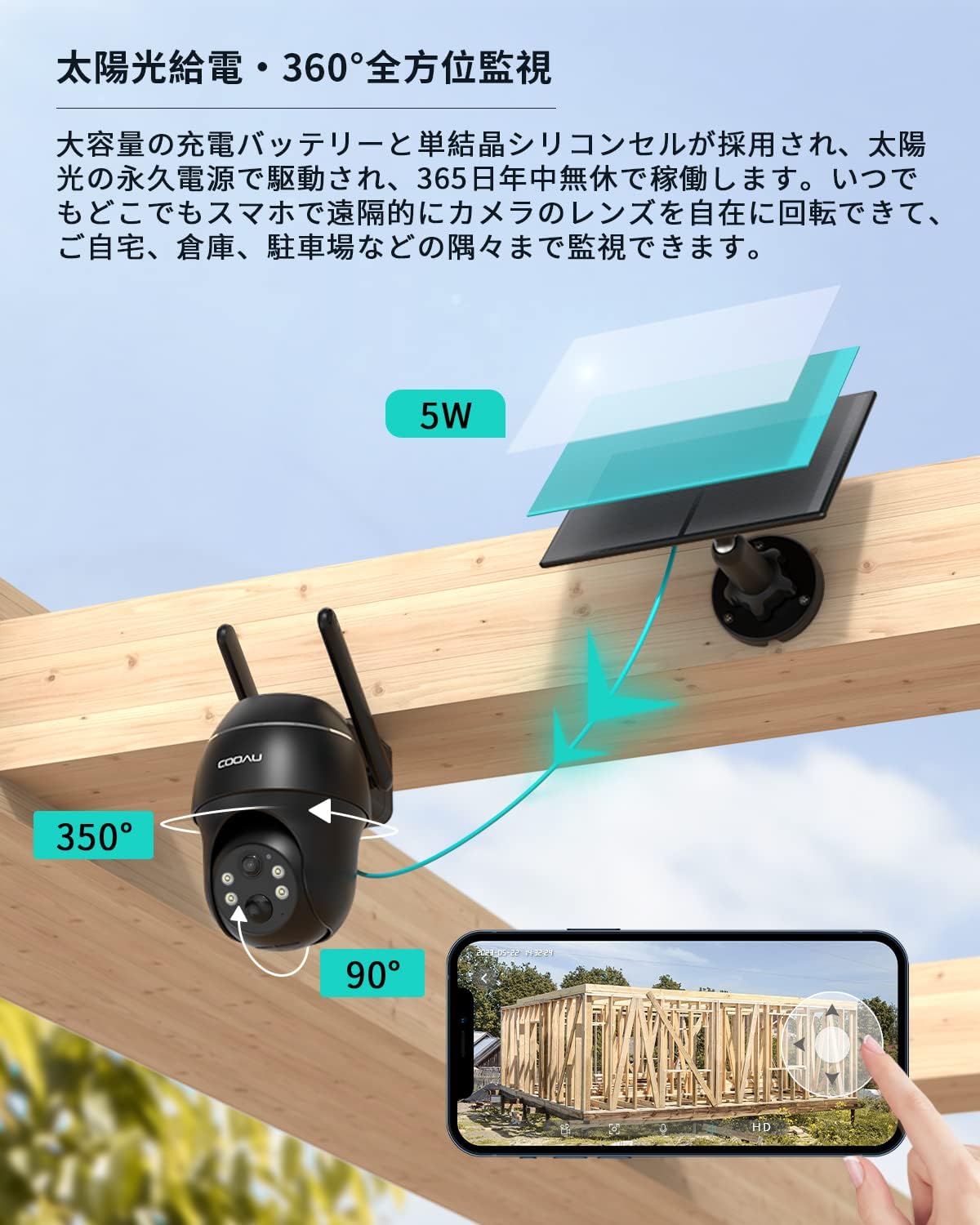
Image: A split image demonstrating the difference between color night vision (left, with LEDs on) and infrared night vision (right, black and white) from the camera.
5.5 التسجيل والتشغيل
All detected events are recorded to the built-in 64GB Micro SD card. You can access recorded footage through the 'CloudEdge' app. The app allows you to view recordings by date and time, making it efficient to review أحداث محددة.
6. الصيانة
6.1 Cleaning the Solar Panel
Regularly clean the surface of the solar panel to ensure optimal charging efficiency. Dust, dirt, and debris can reduce its performance. Use a soft, damp استخدم قطعة قماش لمسح اللوحة برفق.
6.2 تحديثات البرامج الثابتة
Periodically check the 'CloudEdge' app for available firmware updates. Keeping your camera's firmware up-to-date ensures optimal performance, security, and access to new features.
6.3 إدارة بطاقة SD
The camera's built-in 64GB Micro SD card will automatically overwrite older footage when full. If you wish to manually manage recordings or replace the card, refer to the app settings for formatting options or physical access to the card slot.
7. استكشاف الأخطاء وإصلاحها
- Camera not connecting to 4G LTE: Ensure the SIM card is correctly inserted and activated. Check for network coverage in the installation area. Restart the camera.
- No recordings or motion alerts: Verify that motion detection is enabled in the app settings. Check the Micro SD card status (ensure it's not full or corrupted). Ensure the camera's battery is charged.
- جودة الصورة رديئة: نظف عدسة الكاميرا. تأكد من عدم وجود أي عوائق في مجال رؤية الكاميرا. view. Check network signal strength for live view جودة.
- لوحة الطاقة الشمسية لا تشحن: Ensure the solar panel is clean and receives direct sunlight for several hours daily. Check the connection cable between the solar panel and the camera.
- مشاكل الصوت ثنائي الاتجاه: تحقق من إعدادات الميكروفون ومكبر الصوت في هاتفك الذكي. تأكد من عدم وجود أي عائق أمام ميكروفون ومكبر صوت الكاميرا.
For further assistance, please refer to the FAQ section within the 'CloudEdge' app or contact COOAU customer support.
8. المواصفات
| ماركة | كواو |
| اسم الموديل | AR-W607 |
| تكنولوجيا الاتصال | لاسلكي (4G LTE) |
| المميزات الخاصة | Solar charging, Motion sensor, Night vision, Rainproof (IP65) |
| الاستخدام الداخلي والخارجي | في الهواء الطلق |
| الأجهزة المتوافقة | الهواتف الذكية، أجهزة لوحية |
| مصدر الطاقة | تعمل بالطاقة الشمسية |
| بروتوكول الاتصال | Mobile line (4G LTE) |
| نوع وحدة التحكم | COOAU CAM, Cloud Edge |
| دقة مستشعر الصورة | 3 ميجا بكسل |
| تصنيف مقاومة الماء | IP65 |
| دقة الفيديو | 1296 بكسل |
| معدل الإطارات | 30 إطارًا في الثانية |
| مجال View | 110 درجة |
| تكبير | تقريب رقمي 8x |
| تخزين | بطاقة MicroSD (حتى 128 جيجابايت) |
| أبعاد المنتج | 16 × 15 × 9 سم |
9. الضمان والدعم
The COOAU 4G LTE Solar Powered Outdoor Security Camera comes with a ضمان لمدة 24 شهرًا from the date of purchase. This product is TELEC certified, ensuring compliance with technical standards.
If you encounter any issues or have questions regarding your product, please contact COOAU customer support through your Amazon order history. Our support team is dedicated to providing prompt and helpful assistance.