
1. المقدمة
This manual provides essential information for using your REDMI Note 15 Pro+ 5G smartphone. Please read it carefully to ensure proper operation and to maximize the device's features. Keep this manual for future reference.

Image: The REDMI Note 15 Pro+ 5G smartphone in Mirage Blue, showcasinتصميمها الأنيق.
2. ماذا يوجد في الصندوق
تأكد من وجود جميع العناصر في عبوة المنتج الخاص بك:
- REDMI Note 15 Pro+ 5G Smartphone
- شاحن
- كابل USB Type-C
- أداة إخراج SIM
- بطاقة الضمان
- دليل المستخدم (هذا المستند)
- حافظة حماية
3. الإعداد
3.1. إدخال بطاقة SIM
- حدد مكان درج بطاقة SIM على جانب جهازك.
- قم بإدخال أداة إخراج بطاقة SIM في الفتحة الصغيرة الموجودة بجوار الدرج واضغط برفق حتى يخرج الدرج.
- ضع بطاقة Nano-SIM في الدرج مع توجيه جهات الاتصال الذهبية لأسفل.
- ادفع الدرج بعناية إلى داخل الجهاز حتى يستقر في مكانه.

الصورة: الخلفية view of the REDMI Note 15 Pro+ 5G, indicating the location of the SIM card tray.
3.2. التشغيل الأولي والإعداد الأساسي
- Press and hold the Power button until the REDMI logo appears.
- اتبع التعليمات التي تظهر على الشاشة لاختيار لغتك ومنطقتك والاتصال بشبكة Wi-Fi وإعداد حساب Google الخاص بك.

الصورة: الجبهة view of the REDMI Note 15 Pro+ 5G, displaying the screen during initial setup.
3.3. شحن الجهاز
Connect the provided USB Type-C cable to the phone's charging port and the other end to the 100W HyperCharge adapter. Plug the adapter into a power outlet. The device supports 100W fast charging and 22.5W reverse charging.

Image: Visual representation of the 6500mAh Silicon-Carbon battery and 100W HyperCharge technology.
4. تشغيل جهازك
4.1. ميزات العرض
The REDMI Note 15 Pro+ 5G features a 6.83-inch Quad curved 1.5K CrystalRes AMOLED display with 3200 nits peak brightness. It supports a 120Hz adaptive refresh rate for smooth visuals and Eye Protect 2.0 with Triple TÜV Certifications to reduce eye strain.

Image: The vibrant 1.5K Quad-curved AMOLED display of the REDMI Note 15 Pro+ 5G, highlighting its brightness.

Image: Information on the advanced eye protection features, including TÜV triple certification, for comfortable viewعمل.
4.2. نظام الكاميرا
Capture stunning photos and videos with the advanced 200MP OIS camera system. It features a 1/1.4" sensor for exceptional detail and clarity, even in low light. The camera supports 4K video recording, ultra-sharp details, steady videos with OIS, and portraits with natural depth.

الصورة: أكثر منview of the 200MasterPixel OIS Camera system, emphasizing its clarity and capabilities.
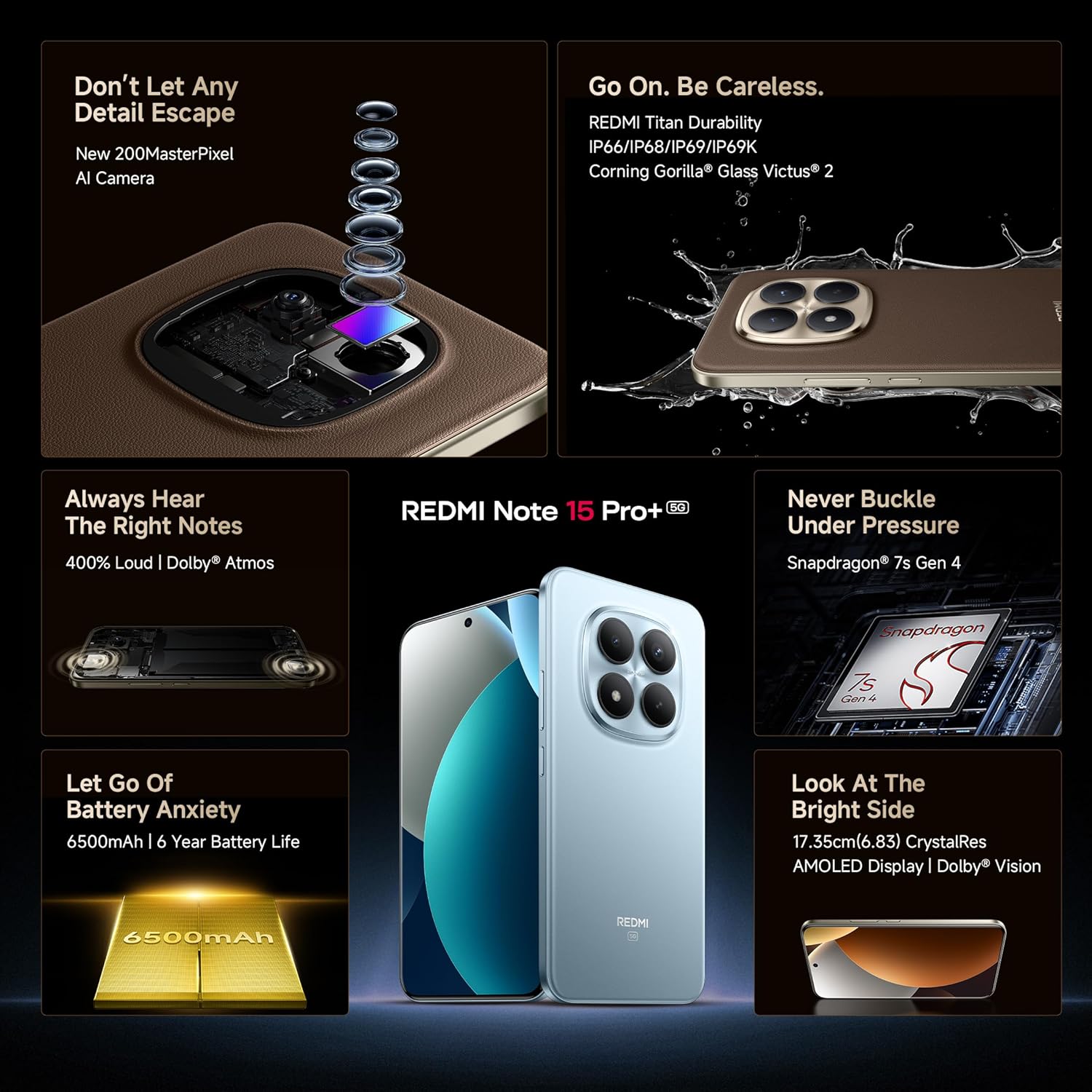
الصورة: لقطة مقربة view of the 200MP camera module, showing its intricate lens arrangement.
4.3. الأداء
Powered by the Snapdragon 7s Gen 4 processor, the device delivers smooth and efficient performance for gaming and multitasking. The IceLoop cooling technology helps maintain optimal temperatures during intensive use.

Image: Graphic illustrating the Snapdragon 7s Gen 4 processor, highlighting its advanced performance.
4.4. سمعي
Experience immersive sound with symmetric stereo speakers and Dolby Atmos support, providing up to 400% louder and clearer audio for media consumption and calls.

Image: Diagram showing the symmetric stereo speakers and Dolby Atmos sound enhancement.
4.5. ميزات البرمجيات والذكاء الاصطناعي
The REDMI Note 15 Pro+ 5G runs on Android 15 with Xiaomi HyperOS 2, offering a seamless and intelligent cross-device experience. It includes AI features like Circle to Search, Gemini Assistance, and Xiaomi HyperAI Tools for enhanced user interaction. The device also supports Xiaomi Offline Communication for device-to-device calling without cellular or Wi-Fi in certain zones.

Image: The Xiaomi HyperOS 2 logo, representing the device's operating system.

Image: Visuals demonstrating AI features such as Circle to Search and Gemini Assistance on the smartphone.

Image: Illustration of the Xiaomi Offline Communication feature, showing device-to-device calling without network.
5. الصيانة
5.1. تنظيف جهازك
استخدم قطعة قماش ناعمة وخالية من الوبر لتنظيف شاشة هاتفك وجسمه. تجنب استخدام المواد الكيميائية القاسية أو المواد الكاشطة التي قد تُتلف السطح. بالنسبة للبقع العنيدة، افركها برفق.ampانقع قطعة القماش في الماء أو في منظف الشاشة المخصص للإلكترونيات.
5.2. تحديثات البرامج
تحقق بانتظام من تحديثات البرامج وثبّتها لضمان حصول جهازك على أحدث الميزات وتحديثات الأمان وتحسينات الأداء. انتقل إلى الإعدادات > حول الهاتف > إصدار MIUI للتحقق من التحديثات.
5.3. العناية بالبطارية
The device is equipped with a 6500mAh Silicon-Carbon battery designed for long life, supporting 1600 charge cycles. To prolong battery health:
- تجنب درجات الحرارة القصوى.
- لا تدع البطارية تنفد تماماً قبل إعادة شحنها.
- Use the original 100W HyperCharge adapter and cable for optimal charging.
5.4. المتانة والحماية
The REDMI Note 15 Pro+ 5G features a high-strength fiberglass back panel and Corning Gorilla Glass Victus 2 for enhanced durability. It boasts IP66/IP68/IP69/IP69K protection against dust and water, making it resistant to drops, splashes, and high-pressure water jets.
Image: Visual highlighting the durability features, including Corning Gorilla Glass Victus 2 and IP69K water resistance.
6. استكشاف الأخطاء وإصلاحها
6.1. الجهاز لا يعمل
- تأكد من شحن البطارية. وصّل الشاحن وانتظر بضع دقائق قبل تشغيل الجهاز.
- اضغط مع الاستمرار على زر الطاقة لمدة 10-15 ثانية على الأقل لفرض إعادة التشغيل.
6.2. تعطل التطبيقات أو تجميدها
- أغلق التطبيق الذي يسبب المشكلة ثم أعد فتحه.
- امسح ذاكرة التخزين المؤقت وبيانات التطبيق (الإعدادات > التطبيقات > [اسم التطبيق] > التخزين > مسح ذاكرة التخزين المؤقت/مسح البيانات).
- أعد تشغيل جهازك.
6.3. مشاكل الاتصال بالشبكة
- قم بتشغيل وضع الطيران وإيقاف تشغيله.
- تأكد من إدخال بطاقة SIM الخاصة بك بشكل صحيح.
- Reset network settings (Settings > Connection & sharing > Reset Wi-Fi, mobile networks, and Bluetooth).
6.4. إعادة ضبط المصنع
If issues persist, you may need to perform a factory reset. تحذير: سيؤدي هذا إلى مسح جميع البيانات على جهازك. انسخ بياناتك المهمة احتياطيًا قبل المتابعة.
- اذهب الى الإعدادات > حول الهاتف > إعادة ضبط المصنع.
- اتبع الإرشادات التي تظهر على الشاشة لتأكيد إعادة الضبط.
7. المواصفات
| ميزة | التفاصيل |
|---|---|
| ماركة | ريدمي |
| اسم الموديل | REDMI Note 15 Pro+ 5G |
| نظام التشغيل | Android 15, Xiaomi HyperOS |
| ذاكرة الوصول العشوائي (RAM) | 12 جيجا بايت |
| سعة التخزين | 256 جيجا بايت |
| لون | Mirage Blue |
| نوع العرض | AMOLED, 1.5K Quad curved, 3200 nits peak brightness |
| المعالج | سنابدراجون 7 إس الجيل الثالث |
| طاقة البطارية | 6500 مللي أمبير |
| الشحن | 100W HyperCharge, 22.5W Reverse Charging |
| آلة تصوير | 200MP OIS Camera |
| مقاومة الماء / الغبار | IP66 / IP68 / IP69 / IP69K |
| أبعاد | 16.3 × 7.8 × 0.8 سنتيمتر |
| وزن | 207 جرام |
| نوع الموصل | يو اس بي نوع سي |
| تكنولوجيا الخلوية | 5G |
8. الضمان والدعم
8.1. معلومات الضمان
Your REDMI Note 15 Pro+ 5G comes with a ضمان الشركة المصنعة لمدة سنة واحدة for the device and ضمان الشركة المصنعة لمدة 6 أشهر بالنسبة للملحقات الموجودة في العلبة، بما في ذلك البطاريات، من تاريخ الشراء.
8.2. Manufacturer and Importer
الشركة المصنعة: DBG Technology (India) Pvt Ltd, PLOT NO-2, BAWAL, SECTOR-8, Rewari, Haryana, 123501.
المستورد: Xiaomi Technology India Private Limited, Building Orchid. Block E, Embassy Tech Village, Marathahalli Outer Ring Road, Devarabisanahalli, Bengaluru 560103.
8.3. الدعم عبر الإنترنت
For additional support, FAQs, and service center locations, please visit the official Redmi webموقع أو متجر ريدمي على أمازون.
9. معلومات السلامة
يرجى مراعاة إرشادات السلامة التالية لمنع تلف جهازك أو إصابتك:
- Do not expose the device to extreme temperatures, direct sunlight, or fire.
- تجنب إسقاط الجهاز أو تعريضه لصدمة شديدة.
- استخدم فقط الشواحن والملحقات المعتمدة.
- لا تحاول تفكيك الجهاز أو إصلاحه بنفسك. استعن بفنيي الصيانة المعتمدين.
- Keep the device away from water and liquids, despite its water resistance, to prevent potential damage.
- تخلص من الجهاز وبطاريته بطريقة مسؤولة وفقًا للوائح المحلية.