
مقدمة
This manual provides essential information for setting up, operating, maintaining, and troubleshooting your REDMI Note 15 Pro+ 5G smartphone. Please read this guide thoroughly to ensure optimal performance and longevity of your device.
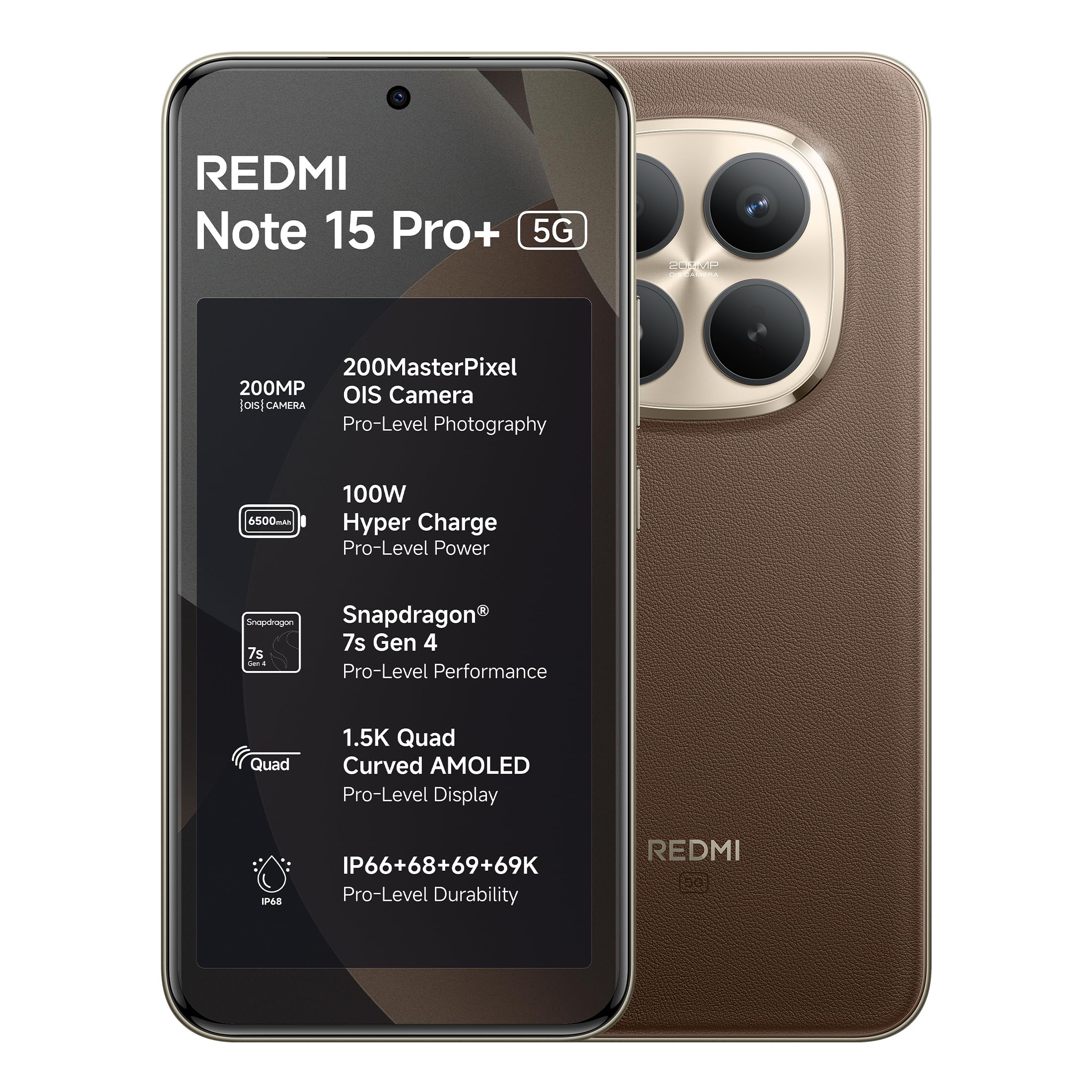
Figure 1: REDMI Note 15 Pro+ 5G (Coffee Mocha)
1. الإعداد
1.1 محتويات الصندوق
تأكد من وجود جميع العناصر في عبوة المنتج:
- REDMI Note 15 Pro+ 5G Smartphone
- شاحن
- كابل USB Type-C
- أداة إخراج SIM
- دليل المستخدم (هذا المستند)
- بطاقة الضمان
- حافظة حماية
1.2 إدخال بطاقة SIM
- حدد مكان درج بطاقة SIM على جانب الجهاز.
- قم بإدخال أداة إخراج بطاقة SIM في الفتحة الصغيرة الموجودة بجوار الدرج واضغط برفق حتى يخرج الدرج.
- ضع بطاقة/بطاقات Nano-SIM في الدرج مع توجيه أطراف التوصيل الذهبية لأسفل. تأكد من توجيهها بشكل صحيح.
- ادفع الدرج بعناية إلى الفتحة مرة أخرى حتى يصبح مستويًا مع الجهاز.
1.3 التشغيل الأولي والتكوين
- Press and hold the Power button until the REDMI logo appears.
- اتبع التعليمات التي تظهر على الشاشة لاختيار لغتك ومنطقتك والاتصال بشبكة Wi-Fi.
- قم بتسجيل الدخول باستخدام حساب Google الخاص بك أو قم بإنشاء حساب جديد.
- Complete the setup process, including setting up security features like fingerprint or face unlock.
2. تشغيل جهازك
2.1 العرض والتنقل
The device features a 6.83-inch Quad curved 1.5K Ultra QHD AMOLED display with up to 3200 nits peak brightness. It supports a 120Hz adaptive refresh rate for smooth scrolling and interaction. Eye Protect 2.0 with Triple TÜV Certifications helps reduce eye strain.

Figure 2: Immersive AMOLED Display
نظام كاميرا 2.2
Your REDMI Note 15 Pro+ 5G is equipped with an advanced 200MP ultimate clarity camera system featuring OIS (Optical Image Stabilization) and an HPE 1/1.4" sensor. This camera is designed for capturing detailed photos and 4K videos with natural depth and steady motion.
- Capture Ultra-Sharp Details: Utilize the 200MP mode for maximum resolution.
- Steady Videos: OIS ensures stable video recording, even when moving.
- Portraits: Use portrait mode for natural depth-of-field effects.

Figure 3: 200MasterPixel Camera System
2.3 الأداء والألعاب
Powered by the Snapdragon 7s Gen 4 processor, the device offers smooth performance for daily tasks and gaming. IceLoop cooling technology helps maintain optimal temperatures during intensive use.

الشكل 4: معالج سنابدراغون 7 إس من الجيل الثالث
2.4 البطارية والشحن
The 6500mAh Silicon-Carbon battery supports 100W HyperCharge, allowing for rapid charging. It also features 22.5W reverse charging. The battery is designed for advanced 1600 lifecycles, ensuring long-term reliability.

Figure 5: 6500mAh Silicon-Carbon Battery
2.5 ميزات الصوت
Experience enhanced audio with symmetric stereo speakers and Dolby Atmos® support. The speakers deliver clear sound, suitable for music and calls.

Figure 6: Ultra-Loud, Ultra-Clear Sound
2.6 Xiaomi HyperOS and AI Features
The device runs on Android 15 with Xiaomi HyperOS, offering intelligent AI features and seamless cross-device connectivity. Key features include:
- التواصل خارج الإنترنت: Enables device-to-device calling even without cellular or Wi-Fi network coverage, ideal for travel or areas with poor signal.
- AI Tools: Integrated AI features like Circle to Search and Gemini Assistance enhance user interaction and productivity.

Figure 7: Powered by Xiaomi HyperOS

Figure 8: Smarter Help with AI Tools

Figure 9: Xiaomi Offline Communication
3. الصيانة
3.1 تنظيف جهازك
To clean your device, use a soft, lint-free cloth. Avoid using abrasive cleaners, solvents, or aerosol sprays directly on the phone. For stubborn marks, slightly dampانقع قطعة القماش في الماء أو في منظف الشاشة المخصص للإلكترونيات.
3.2 العناية بالبطارية
The 6500mAh Silicon-Carbon battery is designed for extended longevity with 1600 lifecycles. To maximize battery life:
- تجنب درجات الحرارة القصوى.
- Use the provided 100W HyperCharge charger and cable for optimal charging.
- تجنب تفريغ البطارية بالكامل بشكل متكرر.
3.3 تحديثات البرامج
Your device will receive regular software updates, including OS updates for up to 4 years and security patches for up to 6 years. Ensure your device is connected to Wi-Fi and has sufficient battery before initiating updates.
4. المتانة والحماية
The REDMI Note 15 Pro+ 5G features a fiberglass back panel and Corning Gorilla Glass Victus 2 for enhanced durability. It boasts an IP69K rating, providing high-level protection against dust and water ingress, including high-pressure water jets and steam cleaning. AI Wet Touch 2.0 ensures screen responsiveness even when wet.

الشكل 10: ميزات الحماية المدمجة
5. استكشاف الأخطاء وإصلاحها
إذا واجهت مشاكل مع جهازك، فجرب خطوات استكشاف الأخطاء وإصلاحها الأساسية التالية:
- الجهاز لا يستجيب: اضغط مع الاستمرار على زر الطاقة لمدة 10 ثوانٍ تقريبًا لإعادة التشغيل القسري.
- مشاكل الشبكة: تأكد من إدخال شريحة SIM بشكل صحيح. حاول تشغيل وضع الطيران وإيقافه.
- خلل في التطبيق: أغلق التطبيق ثم أعد فتحه. إذا استمرت المشكلة، فامسح ذاكرة التخزين المؤقت للتطبيق أو أعد تثبيته.
- مشاكل الشحن: تأكد من توصيل الشاحن والكابل بإحكام وسلامتهما. جرّب مقبسًا كهربائيًا آخر.
- مواطن الخلل في البرنامج: تأكد من تحديث برنامج جهازك.
للمسائل الأكثر تعقيداً، يرجى الرجوع إلى قسم الدعم أو الاتصال بخدمة العملاء.
6. المواصفات
| ميزة | التفاصيل |
|---|---|
| ماركة | ريدمي |
| نموذج | Note 15 Pro+ 5G |
| نظام التشغيل | Android 15, Xiaomi HyperOS |
| حجم ذاكرة الوصول العشوائي المثبتة | 12 جيجا بايت |
| سعة تخزين الذاكرة | 256 جيجا بايت |
| حجم الشاشة | 6.83 بوصة (17.35 سم) |
| نوع العرض | أموليد |
| لون | قهوة موكا |
| نوع الموصل | يو اس بي نوع سي |
| مستوى مقاومة الماء | مقاوم للماء (IP69K) |
| Rear Facing Camera Photo Sensor Resolution | 200 ميجا بكسل |
| سعة البطارية | 6500 مليamp ساعات |
| وزن العنصر | 208 جرام |
| أبعاد العنصر (الطول × العرض × الارتفاع) | 16.3 × 7.8 × 0.8 سنتيمتر |
| مزود خدمة الاتصالات اللاسلكية | مفتوح لجميع شركات النقل |
| تكنولوجيا الخلوية | 5G |
| محتويات الصندوق | Charger, cable, SIM eject tool, Warranty card, User guide, Protective case |
7. معلومات الضمان
Your REDMI Note 15 Pro+ 5G comes with a ضمان الشركة المصنعة لمدة سنة واحدة يشمل الضمان الجهاز من تاريخ الشراء. الملحقات الموجودة في العلبة، بما في ذلك البطاريات، مشمولة بالضمان. ضمان الشركة المصنعة لمدة 6 أشهر من تاريخ الشراء.
يرجى الاحتفاظ بإثبات الشراء الخاص بك لمطالبات الضمان.
8. الدعم والخدمة
For technical assistance, service, or warranty claims, please contact Redmi customer support. You can find contact information on the official Redmi website or through the provided warranty card.
معلومات الشركة المصنعة:
DBG Technology (India) Pvt Ltd
PLOT NO-2, BAWAL, SECTOR-8, Rewari, Haryana, 123501.
معلومات المستورد:
Xiaomi Technology India Private Limited
Building Orchid. Block E, Embassy Tech Village, Marathahalli Outer Ring Road, Devarabisanahalli, Bengaluru 560103
Redmi aims for efficient service, with many issues resolved quickly. For more details on repair services, refer to the official Redmi support channels.

Figure 11: Support and Repair Services
For information on potential benefits and subscriptions, please scan the QR code provided in your product packaging or visit the official Redmi webالموقع للحصول على التفاصيل. Scan for benefits