
1. المقدمة
This manual provides essential information for setting up, operating, maintaining, and troubleshooting your REDMI Note 15 Pro 5G smartphone. Please read this guide thoroughly to ensure optimal performance and longevity of your device.
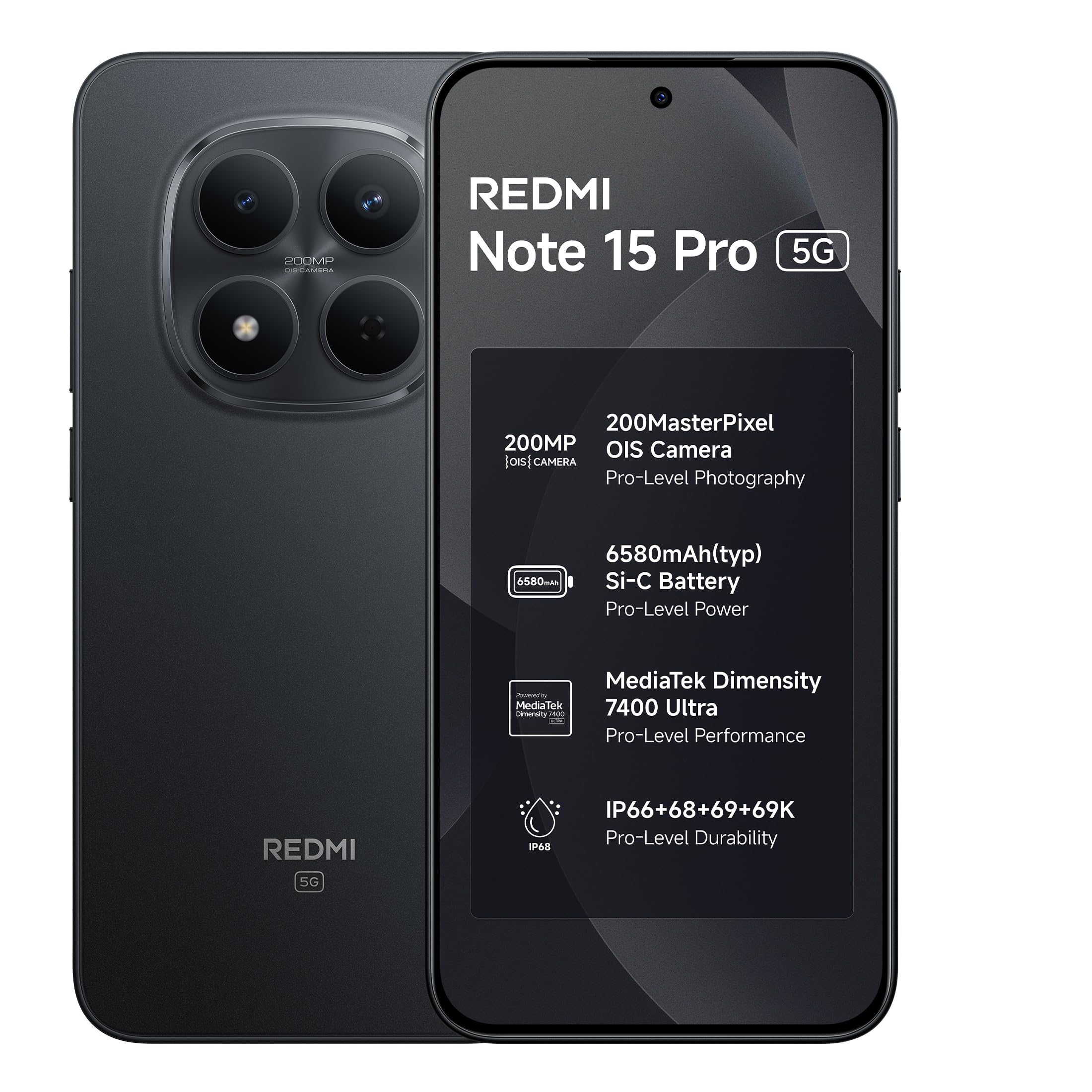
Image: REDMI Note 15 Pro 5G in Carbon Black.
2. ماذا يوجد في الصندوق
Upon unboxing your REDMI Note 15 Pro 5G, verify that all the following items are present:
- REDMI Note 15 Pro 5G Smartphone
- شاحن
- كابل USB Type-C
- أداة إخراج SIM
- بطاقة الضمان
- دليل المستخدم (هذا المستند)
- حافظة حماية
3. الإعداد
3.1. تركيب بطاقة SIM
- حدد مكان درج بطاقة SIM على جانب جهازك.
- Insert the provided SIM eject tool into the small hole next to the tray and press gently until the tray pops out.
- ضع بطاقة Nano-SIM و/أو بطاقة microSD (إن وجدت) في الدرج مع توجيه جهات الاتصال الذهبية لأسفل، مع التأكد من محاذاتها بشكل صحيح.
- قم بدفع الدرج بعناية إلى الفتحة مرة أخرى حتى يصبح مستويًا مع جسم الهاتف.
3.2. التشغيل الأولي والتكوين الأساسي
- Press and hold the Power button until the REDMI logo appears.
- اتبع التعليمات التي تظهر على الشاشة لاختيار لغتك ومنطقتك والاتصال بشبكة Wi-Fi.
- قم بتسجيل الدخول باستخدام حساب Google الخاص بك أو قم بإنشاء حساب جديد للوصول إلى خدمات Google ومتجر Play.
- Set up your screen lock (PIN, pattern, password, fingerprint, or face unlock) for security.
- Transfer data from your old device if prompted, or set up as a new device.
4. تشغيل جهازك
4.1. ميزات العرض
Your REDMI Note 15 Pro 5G features a 6.83-inch 1.5K CrystalRes AMOLED display with a peak brightness of 3200 nits, offering vivid visuals and excellent outdoor visibility. It supports a 120Hz adaptive refresh rate for smooth scrolling and interactions, and includes Eye Protect 2.0 with Triple TÜV Certifications for reduced eye strain.

Image: The 1.5K AMOLED display of the REDMI Note 15 Pro 5G.

Image: Visual representation of the 120Hz adaptive refresh rate.

Image: Eye comfort features for extended use.
4.2. استخدام الكاميرا
The device is equipped with an advanced 200MP OIS camera featuring a 4th Gen HPE sensor. It supports 4K video recording and in-sensor 2x/4x zoom. The AI ultra-clear engine enhances photo and video quality.

Image: The 200MP OIS camera system.
4.3. إدارة البطارية
The REDMI Note 15 Pro 5G is powered by a 6580mAh Si-carbon battery, designed for extended usage. It supports 45W Turbo charging for quick power-ups and 18W reverse charging. The battery is rated for 1600 lifecycles, retaining health for 4-5 years.

Image: Long-lasting 6580mAh battery with fast charging.
4.4. الاتصال والأداء
The device supports 5G cellular technology and is unlocked for all carriers. It is powered by the MediaTek Dimensity 7400-Ultra processor, ensuring smooth multitasking and responsive performance. The Vapour Chamber cooling system helps maintain temperature stability.

Image: MediaTek Dimensity 7400-Ultra processor.
4.5. Software Features (HyperOS & AI Tools)
The REDMI Note 15 Pro 5G runs on Android 15 with Xiaomi HyperOS 2, offering a seamless and intelligent cross-device experience. It includes smart tools like Circle to Search and Gemini AI assistance.

Image: Xiaomi HyperOS 2 with AI features like Circle to Search and Gemini AI.
4.6. سمعي
Experience exceptional sound quality with symmetric stereo speakers featuring Dolby Atmos, delivering louder sound, clearer dialogue, and richer audio.

Image: Symmetric stereo speakers with Dolby Atmos.
5. الصيانة
5.1. تنظيف جهازك
To clean your REDMI Note 15 Pro 5G, use a soft, lint-free cloth. Avoid abrasive materials, solvents, or aerosol sprays. For stubborn smudges, slightly dampen the cloth with water. Ensure no moisture enters ports.
5.2. تحديثات البرامج
تحقق بانتظام من تحديثات البرامج وثبّتها لضمان حصول جهازك على أحدث الميزات وتصحيحات الأمان وتحسينات الأداء. انتقل إلى الإعدادات > حول الهاتف > إصدار MIUI للتحقق من التحديثات.
6. استكشاف الأخطاء وإصلاحها
6.1. المشكلات الشائعة
- الجهاز لا يعمل: تأكد من شحن البطارية. قم بتوصيل الجهاز بالشاحن لمدة 15 دقائق على الأقل، ثم حاول تشغيله مرة أخرى.
- تعطل التطبيقات أو تجميدها: قم بإغلاق التطبيقات التي تعمل في الخلفية، أو مسح ذاكرة التخزين المؤقت للتطبيقات (الإعدادات > التطبيقات > [اسم التطبيق] > التخزين > مسح ذاكرة التخزين المؤقت)، أو أعد تشغيل الجهاز.
- عمر البطارية ضعيف: Reduce screen brightness, disable unnecessary features (GPS, Bluetooth, Wi-Fi when not in use), or check for power-intensive apps in battery settings.
- مشاكل الاتصال بالشبكة: قم بتشغيل وضع الطيران وإيقافه، أو أعد تشغيل جهازك، أو تحقق مع مزود الخدمة الخاص بك.
6.2. المتانة والحماية
The REDMI Note 15 Pro 5G features Corning Gorilla Glass Victus 2 for enhanced drop resistance and IP66/IP68/IP69/IP69K protection against water and dust. It also incorporates a Titan Structure internal reinforcement.

Image: Durability features including Gorilla Glass Victus 2 and IP69K protection.
7. المواصفات
| ميزة | مواصفة |
|---|---|
| ماركة | ريدمي |
| نموذج | نوت 15 برو 5G |
| نظام التشغيل | Android 15, Xiaomi HyperOS |
| المعالج | معالج MediaTek Dimensity 7400-Ultra |
| كبش | 8 جيجا بايت |
| التخزين الداخلي | 128 جيجا بايت |
| حجم العرض | 6.83 بوصة |
| نوع العرض | AMOLED, 1.5K CrystalRes, 3200 nits peak brightness, 120Hz Adaptive Refresh Rate |
| الكاميرا الخلفية | 200 ميجابكسل مع OIS |
| دقة التقاط الفيديو | 4K |
| سعة البطارية | 6580 مللي أمبير |
| الشحن | 45W Turbo Charge, 18W Reverse Charging |
| مستوى مقاومة الماء | IP66 / IP68 / IP69 / IP69K |
| أبعاد | 16.4 × 7.8 × 0.8 سنتيمتر |
| وزن | 210 جرام |
| نوع الموصل | يو اس بي نوع سي |
| تكنولوجيا الخلوية | 5G |
8. الضمان والدعم
8.1. معلومات الضمان
Your REDMI Note 15 Pro 5G comes with a ضمان الشركة المصنعة لمدة سنة واحدة يشمل الضمان الجهاز من تاريخ الشراء. الملحقات الموجودة في العلبة، بما في ذلك البطاريات، مشمولة بالضمان. ضمان الشركة المصنعة لمدة 6 أشهر من تاريخ الشراء.
8.2. Manufacturer and Importer
- الشركة المصنعة: DBG Technology (India) Pvt Ltd, PLOT NO-2, BAWAL, SECTOR-8, Rewari, Haryana, 123501.
- المستورد: Xiaomi Technology India Private Limited, Building Orchid. Block E, Embassy Tech Village, Marathahalli Outer Ring Road, Devarabisanahalli, Bengaluru 560103.
8.3. Support and Repair
For technical assistance or repair services, please contact Redmi customer support. Redmi aims for industry-leading repair turnaround times, with 52% of issues resolved within 4 hours.

Image: Redmi support and repair statistics.
9. Additional Services
Your REDMI Note 15 Pro 5G may come with access to various digital services. Scan the QR code below for details on available subscriptions and benefits.
Image: QR code for subscription benefits.