
1. المقدمة
Thank you for choosing the AULA G7 Pro Wireless Gaming Headset. This manual provides detailed instructions for setting up, operating, and maintaining your headset to ensure optimal performance and an immersive audio experience. Please read this manual thoroughly before using the product.
2. انتهى المنتجview
2.1 محتويات العبوة
The AULA G7 Pro package includes the following items:
- AULA G7 Pro Wireless Gaming Headset
- ميكروفون بوم قابل للفصل
- كابل شحن USB-C إلى USB-A
- كابل صوت 3.5 ملم
- 2.4G Wireless USB-A Receiver
- محول USB-C إلى USB-A
- دليل المستخدم
2.2 Headset Components and Controls
Familiarize yourself with the various parts and controls of your AULA G7 Pro headset.
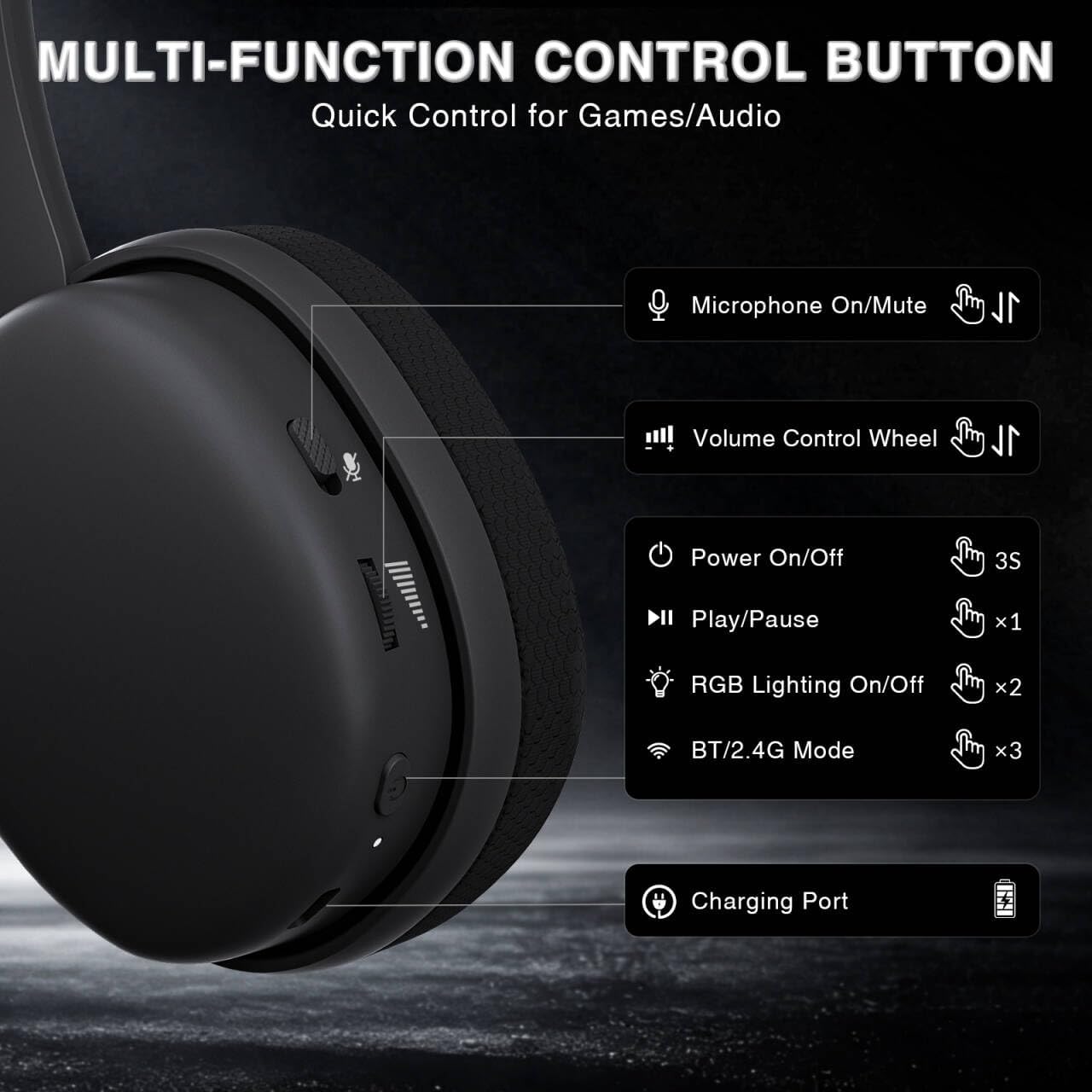
Image: Multi-function control buttons on the AULA G7 Pro headset, showing the microphone on/off toggle, volume control wheel, power switch, play/pause button, RGB lighting on/off button, BT/2.4G mode switch, and charging port.
- Microphone On/Off Toggle: اسحب لكتم صوت الميكروفون أو إلغاء كتمه.
- عجلة التحكم في مستوى الصوت: ضبط مستوى صوت الإخراج.
- مفتاح التشغيل: اضغط مع الاستمرار لمدة 3 ثوانٍ للتشغيل / الإيقاف.
- زر التشغيل/الإيقاف المؤقت: اضغط مرة واحدة لتشغيل الصوت أو إيقافه مؤقتًا.
- تشغيل/إيقاف إضاءة RGB: Press twice to toggle RGB lighting.
- BT/2.4G Mode Switch: Press three times to switch between Bluetooth and 2.4G wireless modes.
- منفذ الشحن: منفذ USB-C لشحن سماعة الرأس.
- مقبس صوت 3.5 ملم: للاتصال السلكي.
- منفذ الميكروفون: For attaching the detachable boom microphone.
فيديو: أكثر منview of the AULA G7 Pro Wireless Gaming Headset, showcasing its design, features, and different color options (black and pink).
3. الإعداد والاتصال
3.1 2.4G Wireless Connection (PC, PS5, PS4, Switch)
For low-latency gaming, use the 2.4G wireless connection.
- Insert the 2.4G USB-A receiver into an available USB port on your PC, PS5, PS4, or Nintendo Switch dock. If your device only has USB-C ports, use the provided USB-C to USB-A adapter.
- Power on the AULA G7 Pro headset by pressing and holding the power button for 3 seconds.
- The headset will automatically attempt to connect to the receiver. The indicator light on the headset will show a stable color once connected.
- On your device, ensure the audio output is set to the AULA G7 Pro headset.

Image: The AULA G7 Pro headset demonstrating its tri-mode connectivity options: 3.5mm wired, Bluetooth 5.3, and 2.4G wireless with USB-C and USB-A receivers, compatible with various devices including PC, PS5, PS4, Switch, and smartphones.
3.2 Bluetooth 5.3 Connection (PC, Smartphones, Tablets)
Connect your headset via Bluetooth for general use with compatible devices.
- Power on the AULA G7 Pro headset.
- Press the BT/2.4G mode switch three times to enter Bluetooth pairing mode. The indicator light will flash.
- On your device (PC, smartphone, tablet), go to Bluetooth settings and search for available devices.
- Select "AULA G7 Pro" from the list to pair. The indicator light on the headset will become stable once connected.
3.3 3.5mm Wired Connection (Xbox, PC, PS5, PS4, Switch, Smartphones)
Use the 3.5mm audio cable for a universal wired connection, especially for Xbox consoles.
- Connect one end of the 3.5mm audio cable to the 3.5mm audio jack on the headset.
- Connect the other end of the 3.5mm audio cable to the audio output port of your device (e.g., Xbox controller, PC audio jack).
- The headset will operate in wired mode. Note that some advanced features like virtual 7.1 surround sound may not be available in wired mode, depending on the device.
4. تعليمات التشغيل
4.1 استخدام الميكروفون
The AULA G7 Pro features a detachable noise-canceling microphone.
- تركيب الميكروفون: Align the 3.5mm plug of the boom microphone with the microphone port on the headset and insert it firmly.
- Muting/Unmuting: Use the microphone on/off toggle switch on the headset to quickly mute or unmute your microphone.
- إلغاء الضوضاء: The 360° omnidirectional microphone filters out approximately 80% of background noise. For enhanced noise cancellation and voice clarity, install the driver software (Windows 2.4G mode only).
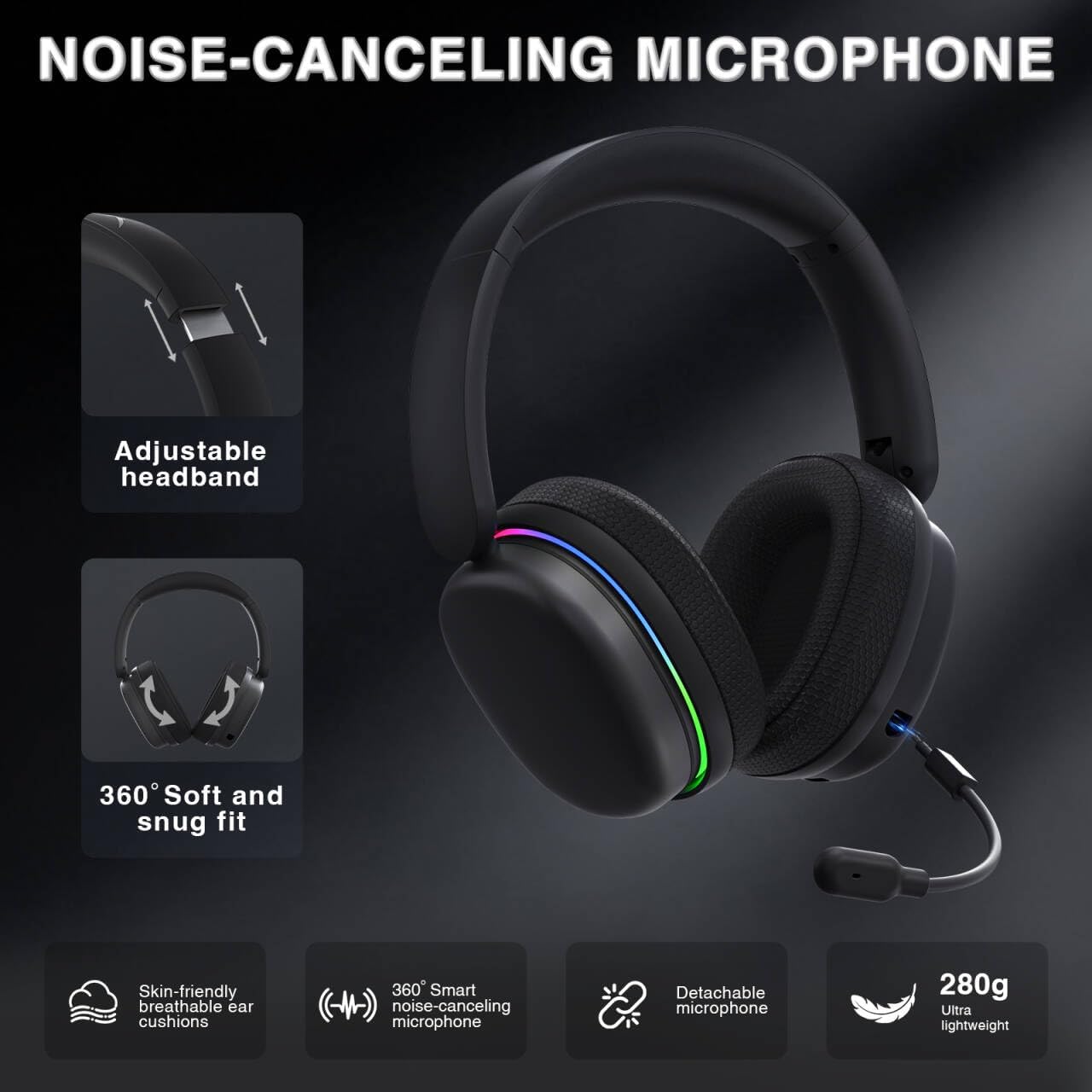
Image: The AULA G7 Pro headset highlighting its adjustable headband, soft and snug fit, skin-friendly breathable ear cushions, 360° smart noise-canceling microphone, detachable microphone, and ultra-lightweight 280g design.
4.2 Virtual 7.1 Surround Sound and EQ Software
Experience immersive audio with virtual 7.1 surround sound and customize your sound profile.
- صوت محيطي افتراضي 7.1: Available in Windows 2.4G mode, this feature provides precise audio positioning for gaming.
- EQ Software: قم بتنزيل وتثبيت برنامج التشغيل من soaidriver.com (Windows 2.4G mode only). The software allows for customizable EQ settings, dynamic bass boost, vocal enhancement, and voice morphing.
- ملاحظة التثبيت: First, insert the 2.4G receiver into your computer, then install the driver. After entering the driver interface, right-click the icon on the left side of the screen to access the audio settings menu.
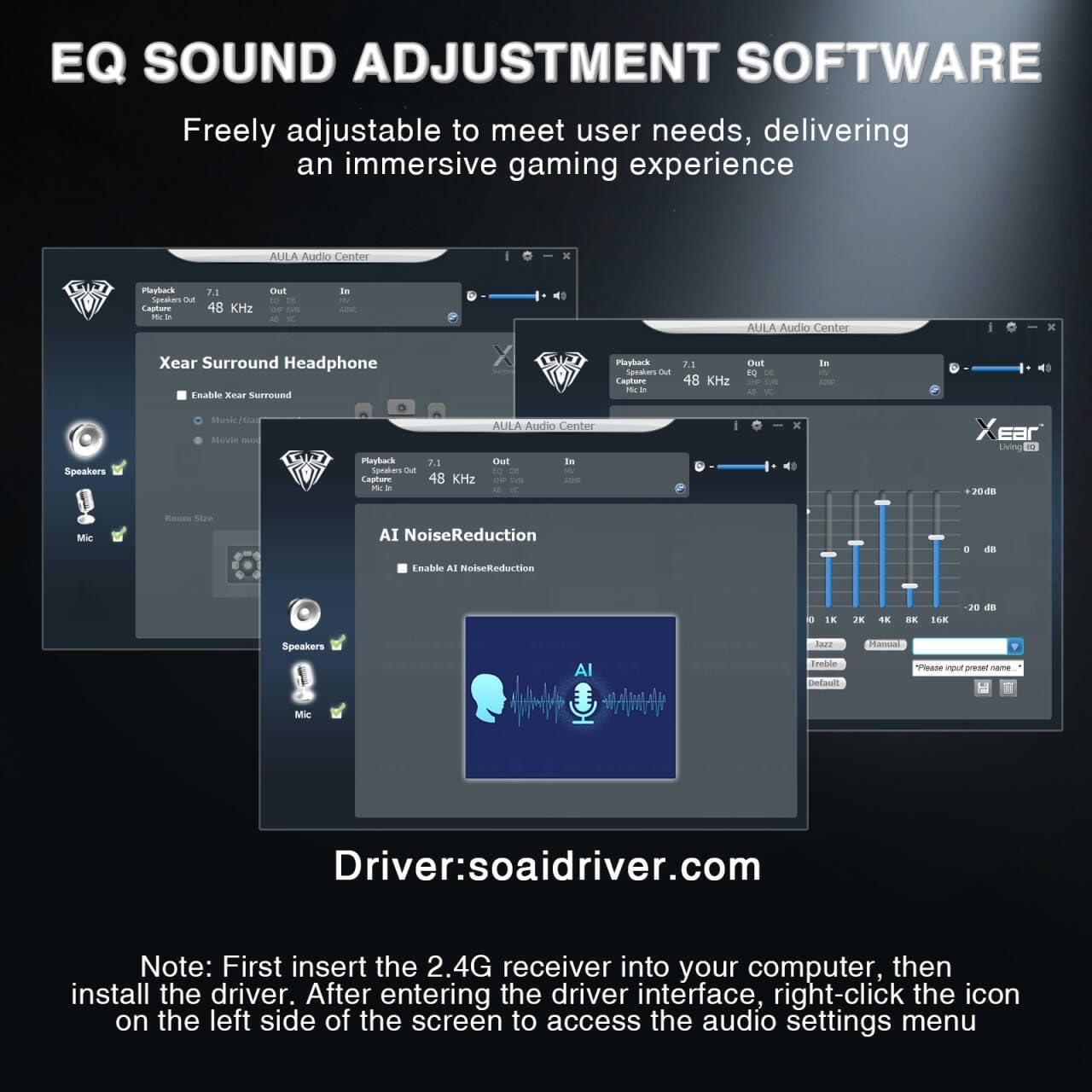
Image: Screenshots of the AULA Audio Center software interface, showing options for Xear Surround Headphone, AI Noise Reduction, and Equalizer settings for sound customization.
إضاءة RGB 4.3
The headset features 16 million-color RGB lighting.
- Toggle RGB: Press the RGB Lighting On/Off button twice to activate or deactivate the lighting.
- المزامنة: RGB lighting can synchronize with gaming peripherals for an immersive atmosphere.
5. الشحن وعمر البطارية
The AULA G7 Pro is equipped with a 1000mAh rechargeable battery.
- الشحن: Connect the USB-C charging cable to the headset's charging port and the other end to a USB power source (e.g., computer, wall adapter). The indicator light will show charging status.
- عمر البطارية: Up to 65 hours of playback with RGB lighting off, and approximately 20 hours with RGB lighting activated.
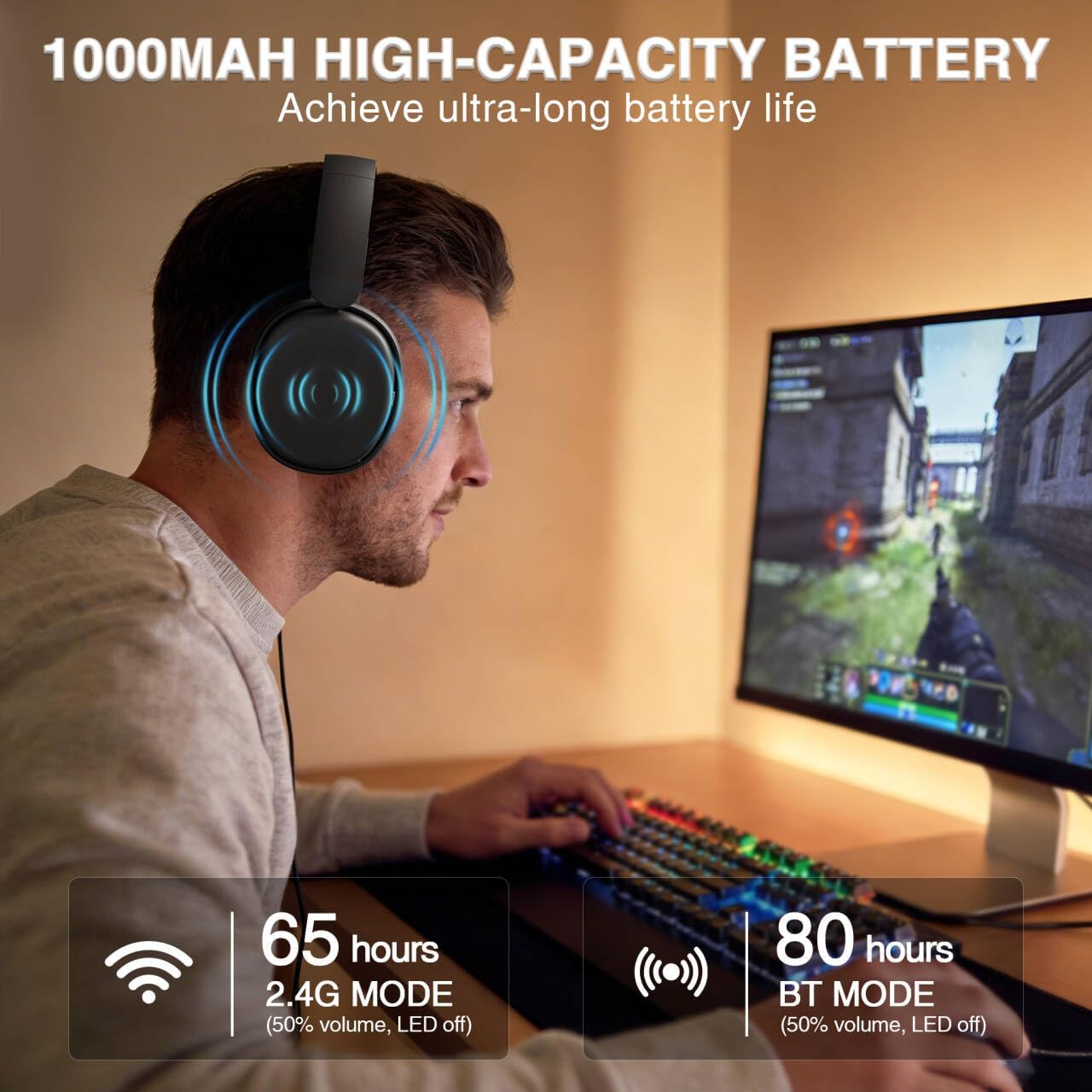
Image: A user wearing the AULA G7 Pro headset while gaming, illustrating the 65 hours of battery life in 2.4G mode (50% volume, LED off) and 80 hours in BT mode (50% volume, LED off).
6. الراحة والتصميم
The headset is designed for extended wear comfort.
- خفيف الوزن: Weighing 280g, the headset is designed to minimize pressure during long gaming sessions.
- ملاءمة مريحة: Features an ergonomic headband with protein leather padding and breathable mesh ear cushions.
- قابلة للتعديل: An 8-position adjustable steel frame and 360° acoustic chamber conform to facial contours, with micro-adjustable horizontal angles for a personalized fit.
7. المواصفات
| ميزة | التفاصيل |
|---|---|
| ماركة | أولا |
| اسم الموديل | G7 Pro |
| تكنولوجيا الاتصال | 2.4G Wireless, BT5.3, Wired (3.5mm Jack) |
| نسخة البلوتوث | 5.3 |
| حجم برنامج تشغيل الصوت | 40 مليمتر |
| مقاومة | 32 أوم |
| التحكم في الضوضاء | إلغاء الضوضاء النشط (الميكروفون) |
| سعة البطارية | 1000 مللي أمبير |
| Battery Life (RGB Off) | Up to 65 Hours (2.4G Mode), Up to 80 Hours (BT Mode) |
| وزن | 280 جرام |
| الأجهزة المتوافقة | PC, PS5, PS4, Switch, Smartphones, Xbox (wired mode only) |
8. استكشاف الأخطاء وإصلاحها
If you encounter issues with your AULA G7 Pro headset, refer to the following common solutions:
- لا يوجد صوت:
- تأكد من تشغيل سماعة الرأس وشحنها.
- Check that the correct audio output device is selected in your system settings.
- Verify the volume control wheel on the headset is not at minimum.
- For 2.4G/BT modes, ensure the headset is properly paired/connected. Try re-pairing if necessary.
- For wired mode, ensure the 3.5mm cable is fully inserted into both the headset and the device.
- الميكروفون لا يعمل:
- Ensure the detachable microphone is securely attached.
- Check the microphone on/off toggle switch on the headset is in the 'on' position.
- تأكد من تحديد جهاز إدخال الميكروفون الصحيح في إعدادات النظام.
- Ensure the microphone is not muted in your operating system or communication software.
- Connectivity Issues (2.4G/Bluetooth):
- Ensure the headset is within range of the receiver/device.
- تجنب التداخل الكهرومغناطيسي القوي من الأجهزة اللاسلكية الأخرى.
- حاول إعادة تشغيل كل من سماعة الرأس والجهاز المتصل بها.
- For 2.4G, try plugging the receiver into a different USB port.
- 7.1 Surround Sound Not Working:
- Ensure you are in 2.4G wireless mode on a Windows PC.
- Verify that the AULA driver software is installed and configured correctly.
9. الصيانة
لضمان طول عمر سماعة الرأس وأدائها الأمثل، اتبع إرشادات الصيانة التالية:
- تنظيف: استخدم قطعة قماش ناعمة وجافة لتنظيف سماعة الرأس. لا تستخدم المنظفات الكاشطة أو المذيبات.
- تخزين: قم بتخزين سماعة الرأس في مكان بارد وجاف بعيدًا عن أشعة الشمس المباشرة ودرجات الحرارة القصوى.
- العناية بالكابلات: تجنب الانحناءات الحادة أو الشد المفرط على الكابلات لمنع التلف.
- العناية بالبطارية: For optimal battery life, avoid fully discharging the battery frequently. Charge the headset regularly, even if not in use for extended periods.
10. الضمان والدعم
10.1 معلومات الضمان
The AULA G7 Pro Wireless Gaming Headset comes with a ضمان لمدة 1 سنوات يسري هذا الضمان من تاريخ الشراء. ويغطي عيوب التصنيع وجودة الصنع في ظل الاستخدام العادي. ولا يغطي الأضرار الناجمة عن سوء الاستخدام أو الحوادث أو التعديلات غير المصرح بها أو التلف الناتج عن الاستخدام العادي.
10.2 دعم العملاء
For technical assistance, warranty claims, or any questions regarding your AULA G7 Pro headset, please contact AULA customer support through the retailer where you purchased the product or visit the official AULA webموقع لمعلومات الاتصال.
Please have your purchase receipt and product model number (G7 Pro) ready when contacting support.