
مقدمة
Thank you for choosing the EcoLink Tiny Tornado Mini Fan. This compact and portable personal fan is designed to provide powerful, quiet, and convenient cooling for various environments. Please read this manual carefully before use to ensure proper operation and maintenance.
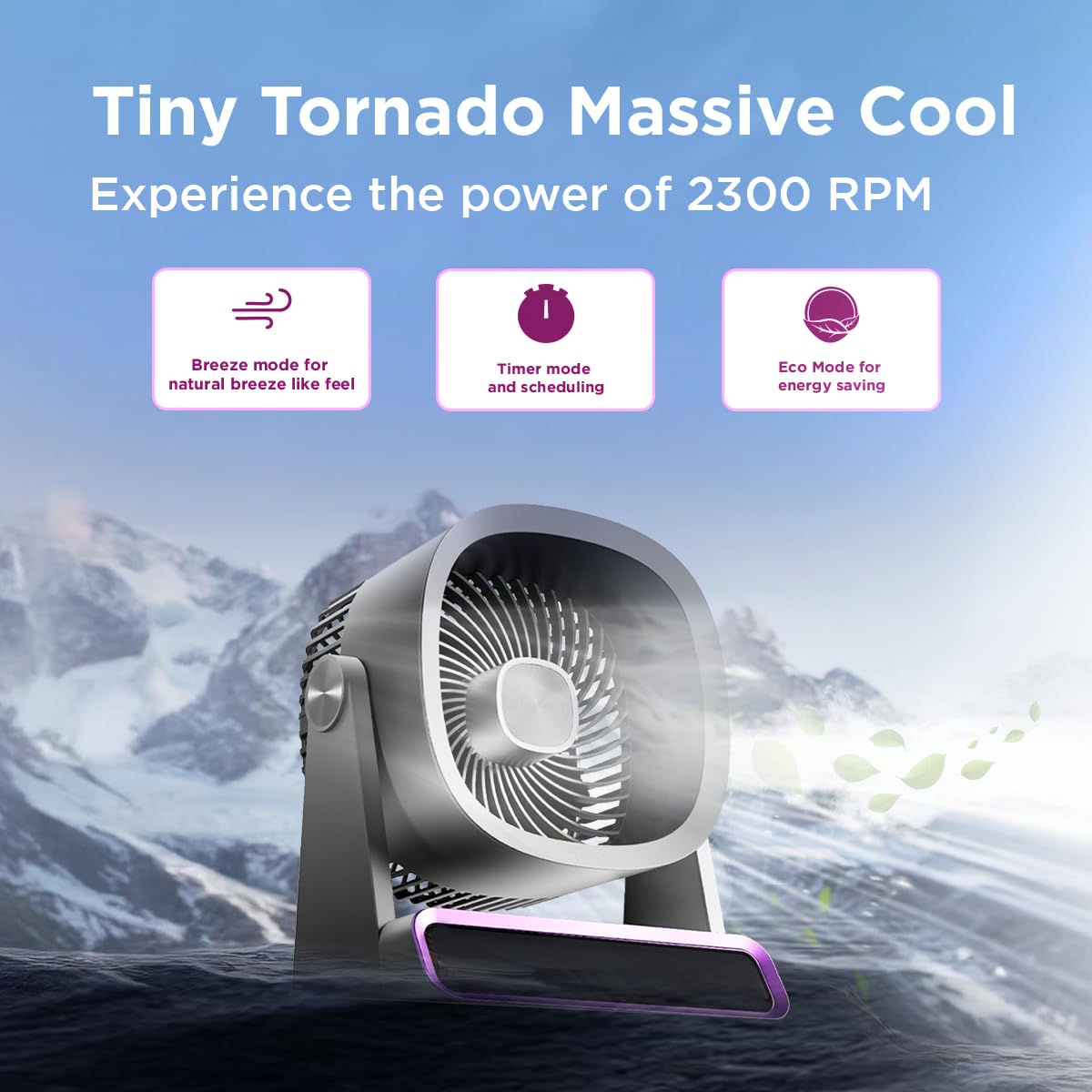
The EcoLink Tiny Tornado Mini Fan delivers powerful airflow in a compact design.
المميزات الرئيسية:
- Mini Yet Powerful Cooling: Delivers strong airflow in a compact size for instant personal cooling.
- صغير الحجم وخفيف الوزن للغاية: Easy to carry and place on desks, tables, or in bags.
- Smooth & Quiet Operation: Low-noise performance suitable for various quiet environments.
- الراحة القابلة لإعادة الشحن عبر USB: Rechargeable via laptop, power bank, or USB adapter.
- استخدامات متعددة: Ideal for desk use, travel, outdoor activities, commuting, and emergency cooling.
محتويات الحزمة
تأكد من وجود جميع العناصر في العبوة:
- EcoLink Tiny Tornado Mini Fan (1 unit)
- كابل شحن USB من النوع C (وحدة واحدة)

The fan comes with a Type-C charging cable for easy recharging via various devices.
تعليمات السلامة
لتجنب الإصابة أو التلف، يرجى مراعاة احتياطات السلامة التالية:
- لا تقم بإدخال أصابعك أو أي أشياء أخرى في شبكة المروحة.
- أبقِ المروحة بعيدة عن الماء أو السوائل الأخرى.
- Do not use the fan in excessively humid or dusty environments.
- يحفظ بعيدًا عن متناول الأطفال والحيوانات الأليفة.
- Use only the provided USB cable or a certified Type-C cable for charging.
- لا تحاول تفكيك المروحة أو إصلاحها بنفسك. اتصل بخدمة العملاء للحصول على المساعدة.
- تجنب سد مدخل أو مخرج الهواء أثناء التشغيل.
يثبت
الشحن الأولي:
- Connect the provided USB Type-C cable to the charging port on the fan.
- Connect the other end of the USB cable to a power source such as a USB adapter (not included), computer, or power bank.
- The charging indicator light will illuminate (color may vary) to show that the fan is charging.
- A full charge typically takes 10 to 12 hours. The indicator light will change or turn off when charging is complete.
الموقع:
Place the fan on a stable, flat surface. Ensure there is adequate space around the fan for proper airflow.
تعليمات التشغيل
تشغيل/إيقاف التشغيل:
- To turn on the fan, press the power button (usually located on the base or front panel).
- To turn off the fan, press and hold the power button, or cycle through the speed settings until it turns off.
ضبط سرعة المروحة:
Press the power button repeatedly to cycle through different fan speeds. The fan typically has multiple speed settings (e.g., Low, Medium, High, Boost).
أوضاع التشغيل:
The fan may feature different operating modes, indicated by specific icons or lights:
- وضع النسيم: Simulates a natural breeze with varying fan speeds.
- وضع المؤقت: Allows scheduling the fan to turn off after a set period. Refer to the fan's display or specific button for timer settings.
- نمط الصدى: Optimizes fan speed for energy saving, extending battery life.

The fan features digital touch screen control and a boost mode for high-speed output.
عمر البطارية:
The fan offers extended battery life, with up to 17 hours of run time at the lowest speed on a full charge. Run time decreases with higher fan speeds.

The 6000 mAh battery provides long-lasting power, with up to 17 hours of run time at speed 1.
صيانة
تنظيف:
- تأكد من إيقاف تشغيل المروحة وفصلها قبل التنظيف.
- امسحي الأسطح الخارجية بقطعة ناعمة ، دamp القماش. لا تستخدم المنظفات أو المذيبات الكاشطة.
- Use a soft brush or vacuum cleaner to gently remove dust from the fan grille.
- لا تغمر المروحة في الماء أو أي سائل آخر.
تخزين:
When not in use for extended periods, store the fan in a cool, dry place, away from direct sunlight and extreme temperatures. It is recommended to fully charge the battery before storing.
استكشاف الأخطاء وإصلاحها
| مشكلة | السبب المحتمل | حل |
|---|---|---|
| المروحة لا تعمل. | نفدت طاقة البطارية. | قم بشحن المروحة باستخدام كابل USB Type-C المرفق. |
| تدفق الهواء ضعيف. | Fan grille is obstructed or dirty. | Clean the fan grille. Ensure nothing is blocking the air intake or outlet. |
| المروحة تصدر صوتا غير عادي. | جسم غريب داخل المروحة. | Turn off and unplug the fan. Carefully inspect for any foreign objects. If unable to resolve, contact customer support. |
| مؤشر الشحن لا يعمل. | مشكلة في الكابل أو مصدر الطاقة. | Try a different USB Type-C cable or a different power source. Ensure connections are secure. |
تحديد
| ميزة | التفاصيل |
|---|---|
| ماركة | EcoLink |
| رقم الموديل | 915006708301_1 |
| لون | أرجواني |
| تصميم المروحة الكهربائية | Wearable Fan / Tabletop Mount |
| مصدر الطاقة | يعمل بالبطارية (قابل لإعادة الشحن عبر USB) |
| أسلوب | ميني |
| أبعاد المنتج (العمق × العرض × الارتفاع) | 19.5 عمق × 14.5 عرض × 25.8 ارتفاع سنتيمتر |
| وزن العنصر | 940 جرام |
| واتtage | 4.6 واط |
| المكونات المضمنة | Handheld Pack of 1 (Fan, USB Type-C Cable) |
| الاستخدام الداخلي والخارجي | داخلي، خارجي |
| نوع التثبيت | محمول |
| التوافق مع المنزل الذكي | Not Smart Home Compatible |

The fan is equipped with a powerful and silent BLDC motor for smooth, consistent, and energy-efficient airflow.
معلومات الضمان
This EcoLink product is covered by a manufacturer's warranty. Please refer to the warranty card included with your purchase or contact EcoLink customer support for detailed warranty terms and conditions. Keep your purchase receipt as proof of purchase for warranty claims.
دعم العملاء
For any questions, technical assistance, or warranty claims, please contact the manufacturer:
- الشركة المصنعة: سيجنيفاي إنوفيشنز إنديا ليمتد
- معلومات الاتصال: Refer to the packaging or official EcoLink webالموقع للحصول على تفاصيل الاتصال الحالية.