
مقدمة
The Fachixy VK81 Wireless Gaming Headset provides an immersive audio experience with versatile connectivity options. Designed for compatibility with multiple platforms including PS5, PC, PS4, Switch, and mobile devices, it features low-latency 2.4GHz wireless and Bluetooth 5.4 connections. Enjoy clear communication with the ENC noise-canceling microphone and dynamic RGB lighting.
ماذا يوجد في الصندوق
- 1 × Fachixy VK81 Wireless Gaming Headset
- 1 × 2.4GHz USB/USB-C Wireless Dongle
- 1 × كابل شحن USB من النوع C
- 1 × User Manual (This document)
المنتج انتهىview
عناصر التحكم في سماعة الرأس
Familiarize yourself with the control buttons located on the headset for easy operation.

الصورة: أكثر منview شرح عناصر التحكم في سماعة الرأس ووظائفها.
- زر الطاقة: Press and hold for 3 seconds to power on. Press and hold for 4 seconds to power off. Single click to Play/Pause audio or Answer/End calls.
- زر خفض الصوت (-): Single click to decrease volume.
- زر رفع الصوت (+): Single click to increase volume.
- زر الوضع (M): Single click to turn RGB lighting On/Off. Double click to switch between Game mode and Music mode. Press and hold for 3 seconds to re-pair in Bluetooth mode.
- زر الميكروفون: Single click to turn the microphone On/Off. Press and hold for 2 seconds to switch between Bluetooth and 2.4GHz modes.
تعليمات الإعداد
2.4GHz Wireless Connection (for PC, PS5, PS4, Switch, Laptops)
This mode provides ultra-low latency audio for gaming.

Image: 2.4GHz wireless dongle for low-latency connection.
- Insert the 2.4GHz USB/USB-C wireless dongle into an available USB port on your PC, PS5, PS4, Switch, or laptop.
- Power on the Fachixy VK81 headset by pressing and holding the Power button for 3 seconds.
- The headset will automatically connect to the dongle. A successful connection is indicated by a steady light on the dongle and headset.
- Adjust the audio output settings on your device to ensure the headset is selected as the primary audio device.
Bluetooth 5.4 Connection (for Mobile Devices, PC, Mac, Laptops)
Use Bluetooth for convenient connection to mobile devices or other compatible systems.
- Ensure the headset is powered on. If it's in 2.4GHz mode, press and hold the Microphone button for 2 seconds to switch to Bluetooth mode.
- على جهازك المحمول أو الكمبيوتر، قم بتمكين Bluetooth وابحث عن الأجهزة المتاحة.
- Select "Fachixy VK81" from the list of discovered devices to pair.
- بمجرد الاقتران، ستشير سماعة الرأس إلى اتصال ناجح.
تعليمات التشغيل
تشغيل/إيقاف الطاقة
- تشغيل الطاقة: اضغط مع الاستمرار على زر الطاقة لمدة ثانيتين.
- إيقاف التشغيل: اضغط مع الاستمرار على زر الطاقة لمدة ثانيتين.
التحكم في مستوى الصوت
- ارفع على الصوت: انقر مرة واحدة على زر "+".
- تقليل الحجم: انقر مرة واحدة على زر "-".
التحكم في الميكروفون
The flexible boom microphone features ENC noise-canceling technology.
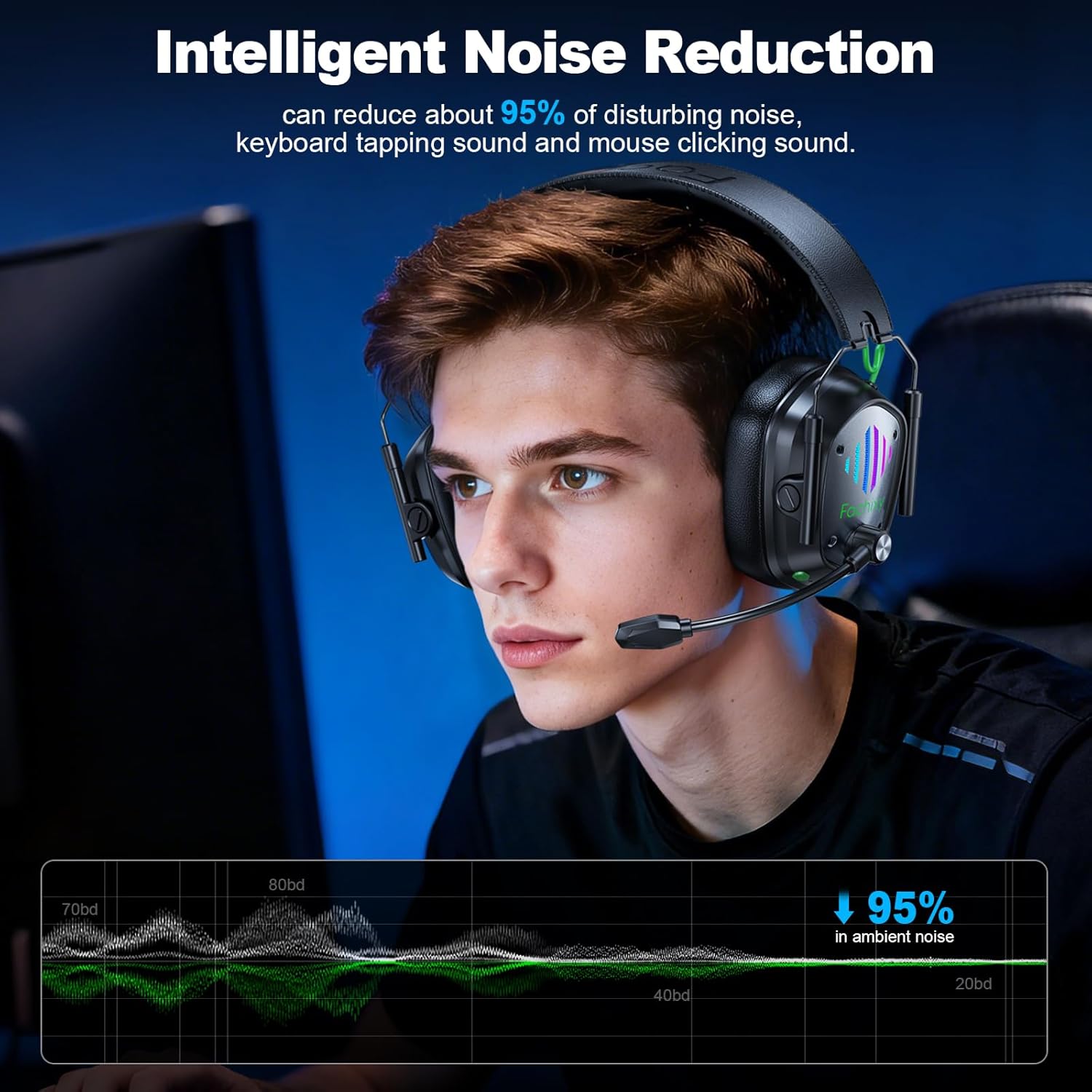
Image: Headset in use, demonstrating noise reduction capabilities.
- تشغيل / إيقاف تشغيل الميكروفون: Single click the Microphone button.
- Adjust the microphone's position for optimal voice pickup.
رغب التحكم في الإضاءة

Image: Headset with active RGB lighting.
- تشغيل/إيقاف RGB: Single click the 'M' (Mode) button to toggle RGB lighting.
وضع اللعبة/الموسيقى
- وضع التبديل: Double click the 'M' (Mode) button to alternate between Game and Music audio modes.
Re-pairing (Bluetooth Mode)
- If the headset fails to connect via Bluetooth, press and hold the 'M' (Mode) button for 3 seconds to enter re-pairing mode. Then, attempt to pair from your device's Bluetooth settings again.
التوافق مع منصات متعددة
The Fachixy VK81 headset offers flexible connectivity across various devices. Please refer to the table below for detailed compatibility:

Image: Compatibility table for various gaming devices.
| جهاز الألعاب | 2.4GHz Mode (Audio) | وضع 2.4 جيجاهرتز (الميكروفون) | Bluetooth 5.4 Mode (Audio) | Bluetooth 5.4 Mode (Mic) |
|---|---|---|---|---|
| PC | ✓ | ✓ | ✓ | ✓ |
| بلاي ستيشن 4/بلاي ستيشن 5 | ✓ | ✓ | ✗ | ✗ |
| كمبيوتر محمول | ✓ | ✓ | ✓ | ✓ |
| يُحوّل | ✓ (النوع C) | ✓ (النوع C) | ✓ | ✗ |
| الهاتف/الكمبيوتر اللوحي | ✓ (النوع C) | ✓ (النوع C) | ✓ | ✓ |
| All Xbox Series | ✗ | ✗ | ✗ | ✗ |
ملحوظة: 1. All modes do not support the entire Xbox series. 2. Microphone is not compatible with Switch in Bluetooth mode. 3. Bluetooth mode is not compatible with PS4/PS5.
الشحن
The Fachixy VK81 headset is equipped with a high-capacity rechargeable battery for extended use.

صورة: تفاصيل عمر البطارية والشحن.
- سعة البطارية: 1000 مللي أمبير.
- وقت اللعب: ما يصل إلى 60 ساعة من الاستخدام المستمر عند الشحن الكامل.
- وقت الشحن: حوالي ساعتين للشحن الكامل.
- طريقة الشحن: Connect the included USB Type-C charging cable to the headset's charging port and a power source (e.g., computer USB port, USB wall adapter).
- An indicator light on the headset will show charging status (e.g., red for charging, off or blue for fully charged).
صيانة
إن العناية المناسبة تضمن طول عمر سماعات الرأس والأداء الأمثل لها.
- تنظيف: Use a soft, dry cloth to clean the headset. Avoid liquid cleaners or abrasive materials.
- تخزين: خزّن سماعة الرأس في مكان بارد وجاف بعيدًا عن أشعة الشمس المباشرة ودرجات الحرارة القصوى. يتيح تصميمها القابل للطي تخزينها بشكل مضغوط.
- التعامل: Avoid dropping the headset or exposing it to excessive force. Do not attempt to disassemble the headset.
- مقاومة الماء: هذه السماعة غير مقاومة للماء. تجنب تعريضها للسوائل.
استكشاف الأخطاء وإصلاحها
If you encounter issues with your Fachixy VK81 headset, refer to the following common solutions:
| مشكلة | السبب المحتمل | حل |
|---|---|---|
| لا يوجد صوت من سماعة الرأس | Headset not powered on, low battery, incorrect audio output selected, disconnected. | Ensure headset is powered on and charged. Check device's audio settings to select VK81. Reconnect dongle or re-pair Bluetooth. Increase headset and device volume. |
| الميكروفون لا يعمل | Microphone muted, incorrect input device selected, compatibility issue. | Single click the Microphone button to unmute. Check device's sound settings to select VK81 microphone. Ensure compatibility (e.g., Switch mic not supported in Bluetooth mode). |
| Cannot connect wirelessly (2.4GHz) | لم يتم إدخال الدونجل بشكل صحيح، وسماعة الرأس ليست في وضع 2.4 جيجاهرتز، مما يسبب تداخلاً. | Ensure dongle is fully inserted. Press and hold Microphone button for 2 seconds to switch to 2.4GHz mode. Try a different USB port. Move closer to the dongle. |
| لا يمكن الاتصال عبر البلوتوث | Headset not in Bluetooth mode, not in pairing mode, device Bluetooth off, already connected to another device. | Press and hold Microphone button for 2 seconds to switch to Bluetooth mode. Press and hold 'M' button for 3 seconds to enter re-pairing mode. Ensure device Bluetooth is on. Disconnect from other devices. |
| عمر البطارية قصير | Not fully charged, RGB lighting always on, high volume usage. | Ensure headset is fully charged (approx. 2.5 hours). Turn off RGB lighting if not needed. Reduce volume. |
تحديد
| ميزة | التفاصيل |
|---|---|
| ماركة | فاتشيكسي |
| نموذج | VK81 |
| الاتصال | 2.4GHz RF Wireless, Bluetooth 5.4 |
| وضع الأذن | فوق الأذن |
| السائقين | محرك ديناميكي 50 مم |
| مقاومة | 32 أوم |
| الكمون الصوتي | 20 milliseconds (2.4GHz mode) |
| عمر البطارية | تصل إلى 60 ساعة |
| وقت الشحن | حوالي 2.5 ساعات |
| وزن | 280 جرام |
| ميكروفون | ENC Noise-Canceling, Flexible Boom |
| مميزات اضافية | Dynamic RGB Lighting, Foldable Design, Adjustable Headband, Volume Control, Game/Music Modes |
| التوافق | PS5, PS4, PC, Mac, Laptops, Switch, Mobile (Xbox not supported) |
| مادة | المعدن والبلاستيك |
فيديو المنتج الرسمي
Video: An official product video from Fachixy Tech Store showcasing the wireless gaming headset with its microphone and RGB lighting features.
الضمان والدعم
For warranty information, technical support, or any inquiries regarding your Fachixy VK81 Wireless Gaming Headset, please refer to the warranty card included in the packaging or visit the official Fachixy webللحصول على تفاصيل الاتصال بخدمة العملاء، يرجى زيارة الموقع الإلكتروني.