
1. المقدمة
This manual provides essential instructions for the safe and efficient operation, setup, and maintenance of your Procolored F13 Panda DTF Printer. Please read this manual thoroughly before using the printer to ensure optimal performance and longevity.
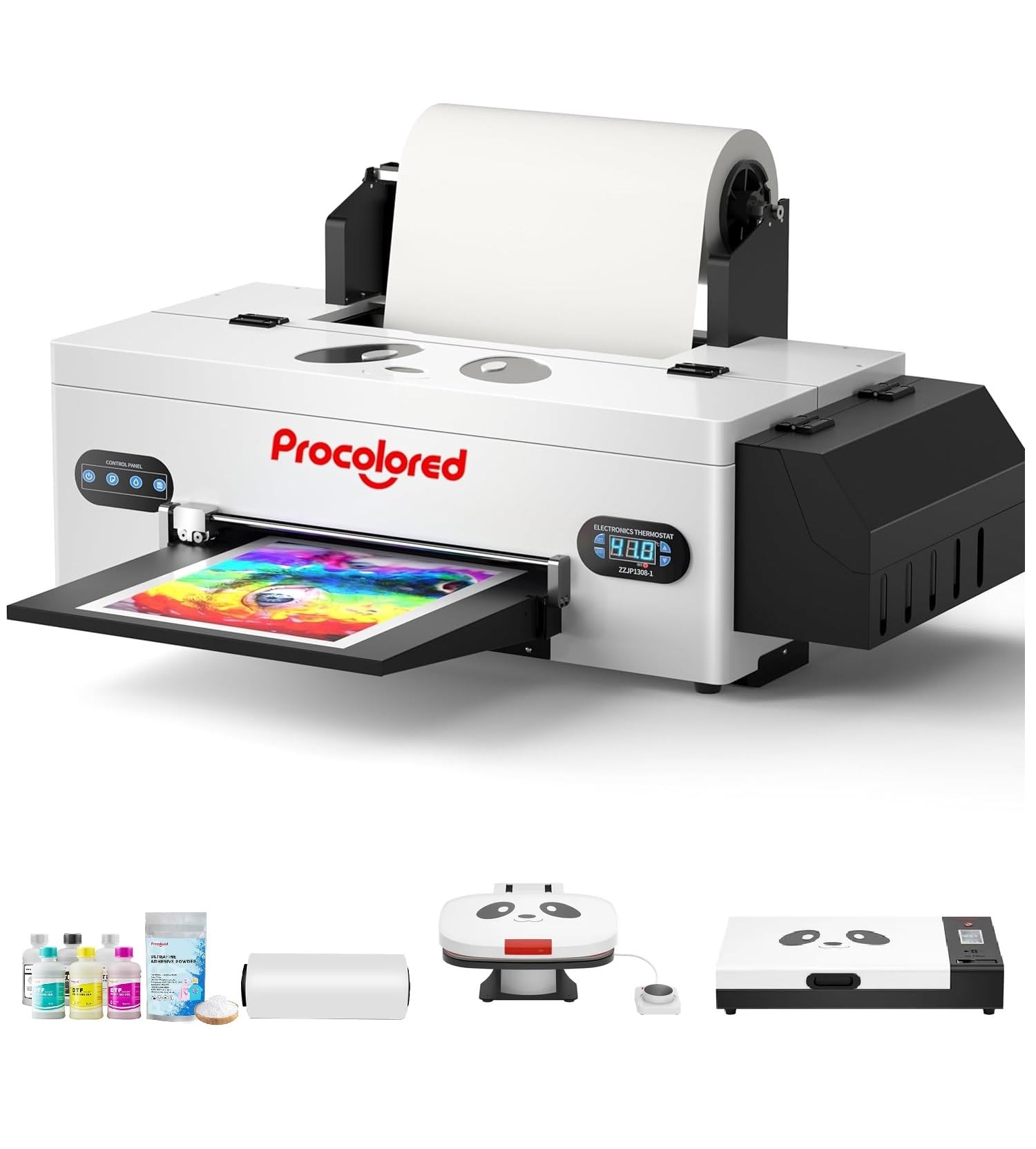
Figure 1: Procolored F13 Panda DTF Printer.
2. معلومات السلامة
يرجى دائمًا مراعاة احتياطات السلامة التالية لمنع الإصابة أو تلف الطابعة:
- تأكد من وضع الطابعة على سطح مستوٍ وثابت.
- Connect the printer to a grounded power outlet with the correct voltagهـ (تيار متردد 100-230 فولت).
- لا تعرض الطابعة للماء أو الرطوبة الزائدة.
- احتفظ بيديك بعيدًا عن الأجزاء المتحركة أثناء التشغيل.
- Use only recommended inks and cleaning solutions.
- يحفظ بعيدًا عن متناول الأطفال.
3. محتويات العبوة
تأكد من وجود جميع العناصر في العبوة:
- Procolored F13 DTF Printer
- Roll Film 13"
- DTF Ink Set (CMYK+WW)
- Nozzle Protection Fluid
- DTF Powder
- دعم بلاستيك
- كابل البيانات (USB)
- كابل الطاقة
- Moisturizing Device
- زجاجة نفايات
- خرطوشة
- Spare Ink Tube
- قوس الرول
- وسادة الحبر
- ممسحة
- قطع بليد
- دونجل يو اس بي
- محقنة
- مفك البراغي
- شريط الأسطوانة
- أنبوب التمديد
- Needle Hub
- ربيع
- مسحة

Figure 2: Included accessories for the Procolored F13 DTF Printer.
4. دليل الإعداد
4.1 فك الصندوق والوضع الأولي
Carefully remove the printer and all components from the packaging. Place the printer on a sturdy, level surface in a well-ventilated area.
Video 1: Procolored F13 DTF Printer Unboxing. This video demonstrates the unboxing process and initial setup steps for the printer.
4.2 تركيب بكرة الفيلم
Install the 13-inch DTF film roll onto the designated holder at the rear of the printer. Ensure the film feeds smoothly into the printer mechanism.
4.3 Ink System Setup
Fill the ink tanks with the corresponding DTF pigment inks (Cyan, Magenta, Yellow, Black, White, Light Cyan). Ensure the white ink circulation system is properly connected and functioning to prevent clogging.

Figure 3: Illustration of the advanced white ink system, showing circulation, siphon effect, and automatic cleaning.
4.4 Power Connection and Software Installation
Connect the power cable to the printer and a suitable power outlet. Install the Procolored RIP software (compatible with Windows 7/10/11) on your computer. Follow the on-screen instructions for software installation and driver setup.
الشكل 4: انتهىview of the Procolored RIP software interface and available tutorials.
5. تعليمات التشغيل
5.1 Preparing for Print
- Power on the printer using the main switch.
- Ensure the DTF film is correctly loaded and aligned.
- Open the Procolored RIP software on your computer.
- Import your design and adjust settings such as size, resolution (up to 1440x1440dpi), and color profile.
5.2 عملية الطباعة
Initiate the print job from the software. The printer will feed the film and apply ink. The built-in cutter will automatically trim the film after printing, optimizing material usage.
Video 2: Procolored F13 DTF Printer in operation. This video demonstrates the printing process, including film feeding and ink application.
5.3 Post-Printing
After printing, apply DTF powder to the wet ink and cure it using a DTF oven or heat press. Once cured, the design is ready for transfer to textiles.

الشكل 5: مثالamples of versatile applications for DTF prints, including shirts, flags, tote bags, and caps.
6. الصيانة
6.1 نظام التنظيف الآلي
The F13 Panda DTF Printer features an automatic cleaning system that operates even when the printer is powered on. This system helps prevent print head clogs and ensures consistent print quality. Regular use of this feature is recommended.
6.2 White Ink Circulation
The printer includes a white ink circulation system with a siphon filtration diaphragm pump. This system minimizes blockages and maintains the quality of white ink. Ensure the system is always active during operation.
Video 3: F13 L1800 DTF Apparel Printer features. This video highlights the white ink circulation and automatic cleaning functions.
6.3 التنظيف العام
نظف الجزء الخارجي من الطابعة بشكل دوري بقطعة قماش ناعمة.amp cloth. Refer to the software's maintenance section for specific print head cleaning procedures if needed.
7. استكشاف الأخطاء وإصلاحها
إذا واجهت مشاكل مع طابعتك، فضع في اعتبارك الحلول الشائعة التالية:
- مشكلات جودة الطباعة: Perform a nozzle check and head cleaning through the software. Ensure ink levels are sufficient.
- Film Feeding Problems: Check for obstructions in the film path and ensure the film roll is correctly installed and aligned.
- أخطاء البرمجيات: Restart the software and the printer. Ensure your software and drivers are up to date.
- مشاكل الاتصال: Verify USB cable connection and ensure the printer is powered on.
For persistent issues, contact Procolored customer service.
8. المواصفات
| ميزة | مواصفة |
|---|---|
| ماركة | ملون |
| اسم الموديل | F13-XMJZ |
| تكنولوجيا الاتصال | USB |
| تكنولوجيا الطباعة | نفث الحبر |
| ميزة خاصة | محمول |
| مخرجات الطابعة | لون |
| الحد الأقصى لسرعة الطباعة (ملونة) | 1 جزء في المليون |
| أقصى سرعة طباعة أحادية اللون | 1 جزء في المليون |
| أبعاد المنتج (العمق × العرض × الارتفاع) | 16.53 بوصة عمق × 34.25 بوصة عرض × 16.4 بوصة ارتفاع |
| لون الحبر | Cyan, Magenta, Yellow, Black, White, Light Cyan |
| دقة | 1440 × 1440 نقطة في البوصة |
| الحد الأقصى لحجم الوسائط | A3 (13 Inches) |
| دعم البرمجيات | ويندوز 7/10/11 |
| استخدامات محددة للمنتج | Textile Printing |
9. الضمان والدعم
Your Procolored F13 Panda DTF Printer comes with a comprehensive warranty:
- Print Head and Related Components: Six-month warranty.
- ملحقات أخرى: ضمان عام واحد.
Our dedicated customer service team is available 24/6 to address any queries or technical issues you may encounter. Please refer to your purchase documentation for specific contact details.