
1. المقدمة
This manual provides detailed instructions for the setup, operation, and maintenance of the FoMaKo K600N 4K 60fps NDI PTZ Camera. The K600N is a high-performance camera designed for professional video production, offering advanced features such as 4K 60fps video output, 20x optical zoom, and Gen 3 AI auto-tracking. It supports NDI HX3, HDMI, 3G-SDI, USB, and Power over Ethernet (PoE) connectivity.
2. ماذا يوجد في الصندوق
تأكد من وجود جميع العناصر في العبوة:
- FoMaKo AI Tracking 4K 60FPS NDI PTZ Camera (20x optical zoom)
- تحكم عن بعد بالأشعة تحت الحمراء
- حامل التثبيت على الحائط
- كابل يو اس بي
- محول الطاقة (12 فولت 2 أمبير)
- دليل المستخدم (هذا المستند)
3. مواصفات المنتج
The FoMaKo K600N camera incorporates several advanced features for professional use:
- 4K 60fps NDI HX3 Output: Supports uncompressed Ultra High Definition video output at 60 frames per second via NDI HX3, HDMI, and LAN. USB output supports 4K30, and 3G-SDI supports 1080P60.
- تقريب بصري 20x: Equipped with a high-quality lens (f=5.1–94.5mm) for detailed close-up shots from a distance.
- Gen 3 AI Auto-Tracking: Advanced human-shape and facial recognition algorithms enable automatic tracking of subjects. Customizable tracking modes, sensitivity, figure size, character position, and lost target actions are available.
- مخارج فيديو متعددة: Simultaneous output via HDMI 2.0, USB 3.0, LAN (NDI), and 3G-SDI.
- الطاقة عبر إيثرنت (PoE): Power, video, and control data can be transmitted through a single Ethernet cable, simplifying installation.
- Auto-Focus (AF) Technology: Provides fast, accurate, and stable auto-focusing. Supports Auto, Manual, and One Push Focus modes.
- Adjustable Pan/Tilt/Zoom Speed: Pan, Tilt, and Zoom speeds are adjustable, as are preset speeds.
- Multiple Presets: Supports up to 255 presets, with 10 accessible via the IR remote control.
- واجهات التحكم: RS232/RS485 control, TCP/IP, RTSP, RTMP, VISCA OVER IP, VISCA, SRT, and NDI Network Protocols are supported.

الصورة: أكثر منview of the FoMaKo K600N PTZ Camera's key features, including 4K60 resolution, 20x optical zoom, AI auto-tracking, and various video output ports.
4. الإعداد
4.1 التثبيت المادي
The K600N camera supports three primary installation methods:
- جدار جبل: Securely attach the camera to a wall using the provided wall mount bracket.
- ترايبود جبل: Mount the camera onto a standard tripod for portable or temporary setups.
- سقف جبل: Install the camera inverted on a ceiling using an appropriate ceiling mount (may require additional accessories not included). Ensure proper orientation settings are configured in the camera's web interface if mounted inverted.

Image: Visual representation of the three supported installation methods: wall mount, tripod mount, and ceiling mount for the FoMaKo K600N camera.
4.2 توصيل الطاقة
Connect power to the camera using one of the following methods:
- محول الطاقة: Connect the included 12V 2A power adapter to the DC 12V input port on the camera and plug it into a power outlet.
- الطاقة عبر إيثرنت (PoE): If using a PoE-enabled network switch or injector, connect an Ethernet cable from the switch/injector to the LAN port on the camera. This will provide both power and network connectivity.
4.3 توصيلات إخراج الفيديو
Connect the camera to your video production equipment using the appropriate output ports:
- HDMI: Connect an HDMI cable from the camera's HDMI 2.0 port to a display, switcher, or capture device.
- يو اس بي 3.0: Connect a USB cable from the camera's USB 3.0 port to a computer for direct video capture or streaming.
- LAN (NDI): Connect an Ethernet cable to the LAN port for NDI video output and IP control. The camera's IP address will be displayed on its front panel for easy access to the web UI.
- 3G-SDI: Connect an SDI cable from the camera's 3G-SDI port to professional video equipment.
4.4 إدخال الصوت
The camera features a 3.5mm line-in audio jack for external audio input. Connect your audio source to this port.

الصورة: مفصلة view of the FoMaKo K600N PTZ Camera's rear panel, highlighting the USB, HDMI, 3G-SDI, LAN/PoE, and control ports.
5. تعليمات التشغيل
5.1 التحكم الأساسي
The camera can be controlled via the included IR remote, a PTZ controller, or its web واجهة.
- عموم/إمالة/تكبير/تصغير: Use the directional and zoom buttons on the remote control or PTZ controller to adjust the camera's view.
- تعديل السرعة: Pan/Tilt/Zoom speeds are adjustable to achieve smooth movements.
5.2 التتبع التلقائي بالذكاء الاصطناعي
The K600N features a Gen 3 AI auto-tracking system:
- تفعيل خاصية التتبع: اضغط على F2 button on the IR remote control to enable automatic tracking.
- Switch Tracking Target: اضغط على F4 button on the IR remote control to switch between detected tracking targets.
- أوضاع التتبع: Adjust tracking modes, sensitivity, figure size, character position, and lost target actions via the camera's web interface. Available modes include:
- Close body
- Half body
- الجسم بالكامل
- مخصص
- Real-time vs. Regional Tracking: Choose between real-time tracking (follows immediately) and regional tracking (follows when subject leaves a defined zone) based on your environment and preference.
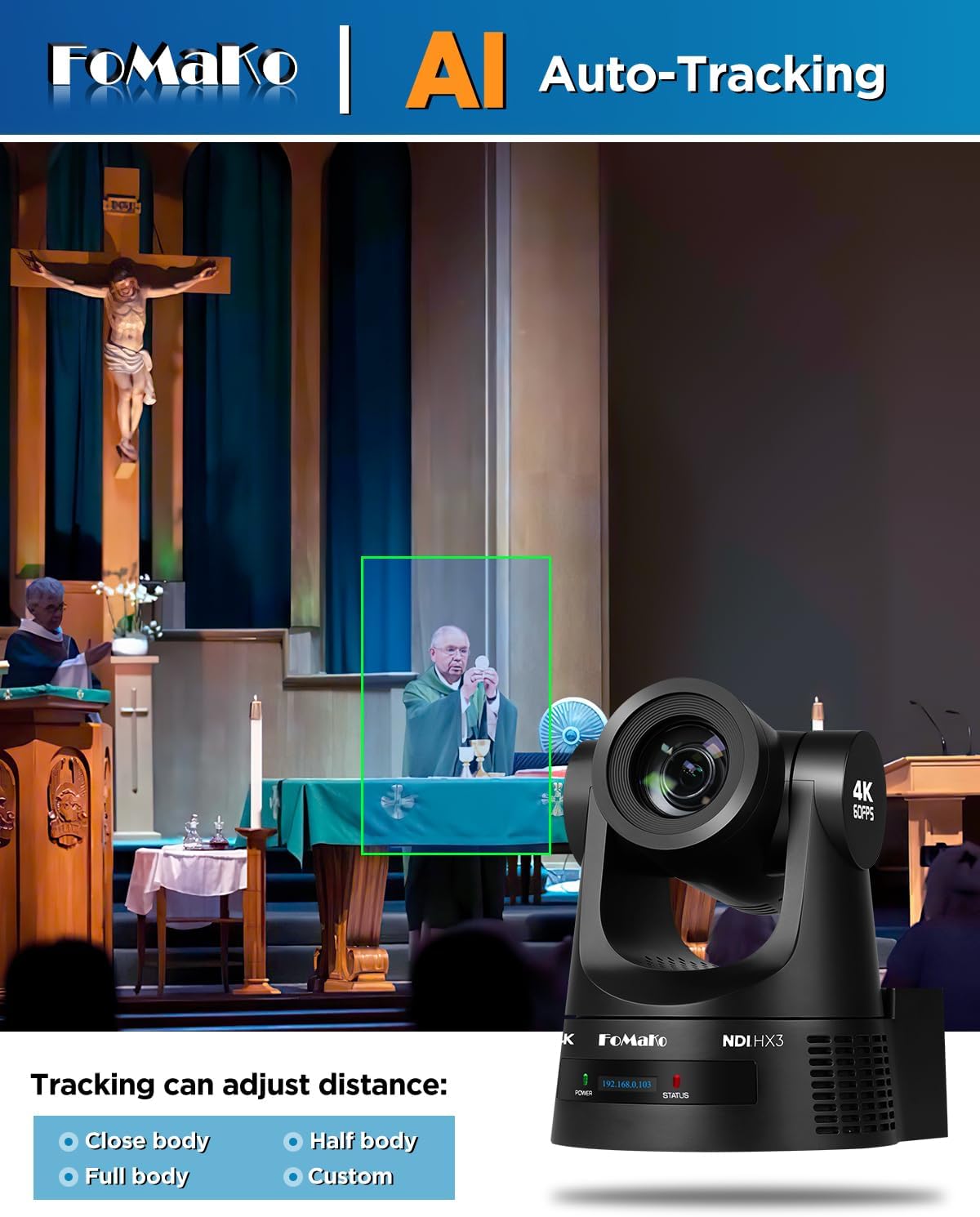
Image: A demonstration of the AI auto-tracking feature, showing a green box around a subject and options for adjusting tracking distance (Close body, Half body, Full body, Custom).
5.3 التحكم في التركيز
The camera offers flexible focus options:
- التركيز التلقائي (AF): The camera automatically adjusts focus for clarity.
- التركيز اليدوي: Allows for precise manual adjustment of the focus.
- One Push Focus: Initiates a single auto-focus cycle and then holds the focus.
5.4 المسبقة
Configure and recall camera positions:
- The camera supports up to 255 preset positions.
- Up to 10 presets can be stored and recalled directly using the IR remote control.
6. Connectivity and Output
The K600N provides versatile connectivity options for integration into various production workflows:
- HDMI 2.0: Supports 4K60, 1080P60, 1080P50, 1080P30, and other resolutions.
- يو اس بي 3.0: Supports 4K60, 1080P60, 1080P30, and other resolutions.
- LAN (NDI HX3): Supports 4K60, 1080P60, and other resolutions. NDI HX3 provides low-latency video transmission over IP networks.
- 3G-SDI: Supports 1080P60 resolution.
- بروتوكولات الشبكة: Compatible with TCP/IP, RTSP, RTMP, VISCA OVER IP, VISCA, SRT, and NDI.
- توافق البرامج: Works with vMix, OBS, and other live video streaming software.

Image: The FoMaKo K600N PTZ Camera displaying a 4K@60fps output, indicating compatibility with various streaming platforms and software like YouTube, vMix, Facebook Live, Twitch, OBS Studio, and Zoom.
7. سيناريوهات التطبيق
The FoMaKo K600N PTZ Camera is designed for professional AV live streaming, production, and broadcasting in various environments:
- Church worship live services
- Live studio environments
- University lectures and educational streaming
- Factory live monitoring
- Sports club / eSports / dance club events
- Training classrooms
- Large conference and summit events
- Theater / concert live streaming

Image: A collage illustrating various application scenarios for the FoMaKo K600N PTZ Camera, including education, church, video conferencing, live broadcast, large conferences, and live concerts.
8. الصيانة
To ensure optimal performance and longevity of your FoMaKo K600N camera, follow these maintenance guidelines:
- تنظيف: استخدم قطعة قماش ناعمة وجافة لتنظيف جسم الكاميرا. أما بالنسبة للعدسة، فاستخدم قطعة قماش ومحلول تنظيف مخصصين للعدسات. تجنب استخدام المنظفات الكاشطة أو المذيبات.
- بيئة: قم بتشغيل الكاميرا وتخزينها في بيئة نظيفة وجافة، بعيدًا عن درجات الحرارة القصوى والرطوبة وأشعة الشمس المباشرة.
- التعامل: Handle the camera with care to prevent physical damage. Avoid sudden impacts or excessive force on the pan/tilt mechanism.
- تحديثات البرامج الثابتة: Periodically check the FoMaKo official website for firmware updates to ensure the camera has the latest features and performance enhancements.
9. استكشاف الأخطاء وإصلاحها
If you encounter issues with your FoMaKo K600N camera, refer to the following common troubleshooting steps:
- لا يوجد طاقة: Ensure the power adapter is securely connected and plugged into a working outlet, or that the PoE connection is active and functional.
- لا يوجد مخرج فيديو: Verify all video cables (HDMI, USB, SDI, Ethernet for NDI) are correctly connected to both the camera and the receiving device. Check input selections on your display or switcher.
- مشاكل الاتصال بالشبكة: Confirm the Ethernet cable is properly connected. Check network settings on your computer and ensure the camera's IP address is accessible on your network. The camera's front panel displays its current IP address.
- خاصية التتبع التلقائي لا تعمل: Ensure auto-tracking is enabled (F2 on remote). Check tracking mode settings in the web interface. Ensure the subject is within the effective tracking distance (up to 18 meters).
- مشكلات جودة الصورة: Ensure proper lighting in the environment. Check lens for smudges or dust. Verify resolution and frame rate settings are appropriate for your setup.
- جهاز التحكم عن بعد لا يستجيب: Check battery in the remote. Ensure there are no obstructions between the remote and the camera's IR receiver.
لمزيد من المساعدة، يرجى الاتصال بدعم العملاء.
10. المواصفات
| ميزة | مواصفة |
|---|---|
| ماركة | فوماكو |
| رقم الموديل | ك600ن |
| تقنية مستشعر الصور | سيموس |
| دقة التقاط الفيديو | 1080 بكسل، 4K |
| التكبير البصري | 20x |
| الطول البؤري الأقصى | 94.5 مليمتر |
| الطول البؤري الأدنى | 5.1 مليمتر |
| الفتحة القصوى | 92 مليمتر |
| تكنولوجيا الاتصال | 4K NDI, LAN, HDMI, 3G-SDI, USB3.0 |
| المميزات الخاصة | AI tracking 4K NDI PTZ Camera |
| لون | أسود |
| وزن العنصر | 1.2 كيلوغرام |
| Screen Size (on camera) | 2 بوصة |
| تثبيت الصورة | لا |
| رمز المنتج الموحد | 735530571972 |
| ASIN | B0GC66B5RK |
11. الضمان والدعم
FoMaKo provides comprehensive support for the K600N camera:
- الضمان المحدود: A 3-year limited warranty covers manufacturing defects.
- ضمان استعادة الأموال: A 30-day no-questions-asked money-back guarantee is offered.
- التدريب عبر الإنترنت: Free online training resources are available to assist with setup and operation.
- المساعدة من الخبراء: 24/7 expert assistance is available, with responses typically provided within 24 hours. Please include your Order ID when contacting support.
- الدعم الفني: Lifetime customer technical support is provided. Remote assistance for setup can be arranged if necessary.