
Ulefone RugKing Pad Pro
Ulefone RugKing Pad Pro Android 16 Rugged Tablet User Manual
Model: RugKing Pad Pro | Brand: Ulefone
1. المقدمة
This manual provides essential instructions for setting up, operating, and maintaining your Ulefone RugKing Pad Pro rugged tablet. Please read this manual thoroughly before using the device to ensure proper function and longevity.
2. محتويات العبوة
تأكد من وجود جميع العناصر في عبوة المنتج الخاص بك:
- Ulefone RugKing Pad Pro Tablet x 1
- AC Charger (100~240V) x 1
- Type-C Data Cable (100 cm) x 1
- Protective Film (Pre-installed) x 1
- Metal Pry Opener x 1
- Portable Strap x 1
- براغي × 2
- Multilingual User Manual x 1
- Charging Instruction Card x 1
- Safety Warning Declaration x 1

Figure 2.1: Contents of the Ulefone RugKing Pad Pro package.
3. انتهى المنتجview
The Ulefone RugKing Pad Pro is a rugged tablet designed for durability and performance. Familiarize yourself with its physical components.
3.1 المكونات المادية
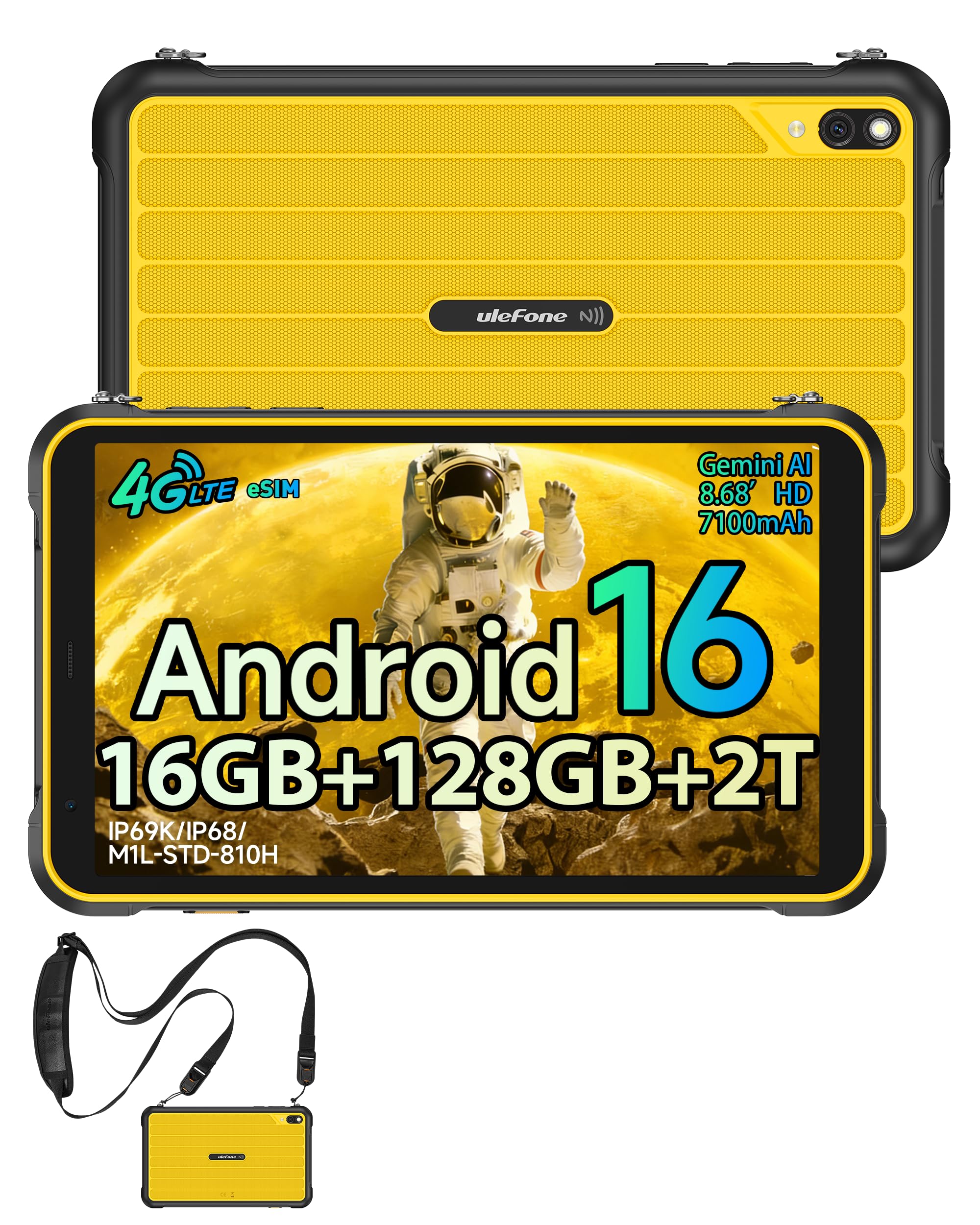
الشكل 3.1: الجبهة view of the Ulefone RugKing Pad Pro.

الشكل 3.2: الجانب view with buttons and ports.
- عرض: 8.68-inch, 90Hz refresh rate, Corning Gorilla Glass.
- زر الطاقة: يوجد على الجانب، ويستخدم لتشغيل/إيقاف تشغيل الجهاز أو تنبيهه/إدخاله في وضع السكون.
- أزرار التحكم في الصوت: اضبط مستويات الصوت.
- منفذ USB من النوع C: للشحن ونقل البيانات.
- شبكات مكبر الصوت: Dual stereo speakers for audio output.
- آلة تصوير: كاميرا خلفية بدقة 16 ميجابكسل، وكاميرا أمامية بدقة 8 ميجابكسل.
- مصباح يدوي: Integrated 133 lumen Super Torch.
- فتحة بطاقة SIM/MicroSD: Supports dual SIM and up to 2TB microSD expansion.
- موصل التوسعة uSmart: For compatible peripherals like endoscopes.
- مقبس سماعة رأس مقاس 3.5 ملم: For audio accessories.
4. الإعداد
4.1 التشغيل المبدئي
- اضغط مع الاستمرار على زر الطاقة until the Ulefone logo appears.
- اتبع التعليمات التي تظهر على الشاشة لتحديد اللغة والمنطقة والاتصال بشبكة Wi-Fi.
- قم بتسجيل الدخول باستخدام حسابك على جوجل أو أنشئ حسابًا جديدًا للوصول إلى متجر جوجل بلاي والخدمات الأخرى.
4.2 إعداد بطاقة SIM وبطاقة eSIM
The RugKing Pad Pro supports dual physical SIM cards and eSIM functionality for 4G LTE connectivity.

Figure 4.1: Triple card slot for SIM and MicroSD.
4.2.1 Physical SIM Card Installation
- حدد مكان درج بطاقة SIM على جانب الجهاز اللوحي.
- Use the provided metal pry opener to eject the tray.
- Place your Nano-SIM cards into the designated slots.
- قم بإعادة إدخال الدرج داخل الجهاز اللوحي بعناية.
4.2.2 تفعيل الشريحة الإلكترونية
To activate eSIM, navigate to الإعدادات > الشبكة والإنترنت > شرائح SIM and follow the instructions to add a new mobile plan. You will typically need a QR code or activation code from your network provider.

Figure 4.2: eSIM connectivity feature.
5. تعليمات التشغيل
نظام التشغيل 5.1 Android 16
The RugKing Pad Pro runs on Android 16, offering a dynamic and fluid user interface with enhanced security and usability features. Enjoy desktop-like window views for multitasking and smarter notification management.

الشكل 5.1: واجهة مستخدم نظام أندرويد 16.
5.2 العرض والتفاعل
The 8.68-inch display with a 90Hz refresh rate provides smooth navigation and streaming. With 860 nits peak brightness, the screen is readable even in bright sunlight. Corning Gorilla Glass offers enhanced scratch resistance.

Figure 5.2: Display features including 90Hz refresh rate and Gorilla Glass.
5.2.1 وضع القفازات
For use in cold environments or industrial settings, enable Glove Mode in settings to allow touch input while wearing gloves. Note that some leather gloves may not be compatible due to material differences.

Figure 5.3: Tablet operation with gloves enabled.
5.3 Camera and Flashlight
The tablet features a 16MP rear camera for clear photos and document scanning, and an 8MP front camera for video calls. The integrated 133 lumen Super Torch provides bright illumination in low-light conditions.

Figure 5.4: Camera and Super Torch features.
5.4 الاتصال والتنقل
- 4G LTE: Stay connected with dual SIM or eSIM.
- NFC: Supports Google Pay and other NFC functions for identification and authentication.
- نظام تحديد المواقع العالمي (GPS): Integrated GPS, GLONASS, BeiDou, and Galileo for accurate navigation.
- واي فاي: Supports 802.11b/g/n standards.
- بلوتوث: لتوصيل الملحقات اللاسلكية.

Figure 5.5: NFC enabled device for various applications.

Figure 5.6: GPS navigation in a vehicle.
5.5 ميزات خاصة
- مفتاح مخصص: Assign specific functions to a programmable key for quick access.
- معرف الوجه: افتح جهازك باستخدام خاصية التعرف على الوجه.
- راديو FM: Listen to FM radio without headphones.
- موصل التوسعة uSmart: Connect compatible external peripherals such as endoscopes (uSmart E01, E02) or digital microscopes (uSmart C01).

Figure 5.7: uSmart expansion connector and peripherals.
6. ميزات المتانة
The RugKing Pad Pro is built to withstand extreme conditions, certified with IP68, IP69K, and MIL-STD-810H standards.
- IP68: Dustproof and resistant to continuous immersion in water up to 2 meters for 30 minutes.
- IP69K: Protected against high-pressure, high-temperature jet sprays.
- MIL-STD-810H: Military-grade standard ensuring reliable resistance to shocks, vibrations, and extreme temperatures.

Figure 6.1: Rugged design and certifications.

Figure 6.2: Dust, water, and drop resistance tests.
7. إدارة البطارية
The RugKing Pad Pro is equipped with a 7100 mAh battery, offering extended usage. It supports 492 hours of standby time or 10 hours of video playback on a single charge.
7.1 الشحن
- الشحن القياسي: Connect the provided Type-C cable and AC charger to the tablet.
- شحن دبوس بوجو: The tablet is compatible with Pogo Pin charging docks (sold separately) for convenient charging.
- الشحن العكسي (OTG): Use the tablet as a power bank to charge other devices via an OTG cable (sold separately).

Figure 7.1: Battery capacity and charging methods.
8. التخزين والأداء
Powered by an Unisoc T7250 Octa-core processor, the RugKing Pad Pro handles complex applications and demanding tasks efficiently. It comes with 16GB RAM (8GB physical + 8GB virtual) and 128GB internal storage, expandable up to 2TB via microSD card.

Figure 8.1: Octa-core processor for uninterrupted flow.

Figure 8.2: Memory and storage specifications.
*MicroSD card is sold separately for storage expansion. Dynamic RAM activation is user-configurable in Settings.
9. الصيانة
9.1 تنظيف الجهاز
- استخدم قطعة قماش ناعمة وخالية من الوبر لتنظيف الشاشة والجسم.
- بالنسبة للأوساخ العنيدة، قم بإزالة الأوساخ برفق.ampاغسل القماش بالماء. تجنب المواد الكيميائية القاسية أو المواد الكاشطة.
- Ensure all port covers are securely closed before cleaning with liquids to maintain water resistance.
9.2 تحديثات البرامج
Regularly check for software updates to ensure optimal performance, security, and access to new features. Navigate to الإعدادات > النظام > تحديث النظام للتحقق من التحديثات المتوفرة وتثبيتها.
9.3 إدارة التخزين
إعادة بشكل دوريview مخزنتك files and applications. Delete unnecessary data to free up space and maintain device speed. Utilize the microSD card slot for large media files.
10. استكشاف الأخطاء وإصلاحها
| مشكلة | حل |
|---|---|
| الجهاز لا يعمل. | تأكد من شحن البطارية. وصّل الشاحن وانتظر بضع دقائق قبل إعادة تشغيل الجهاز. |
| الشاشة لا تستجيب. | Perform a forced restart by holding the Power button for 10-15 seconds. If the issue persists, ensure Glove Mode is not causing interference if not needed. |
| لا يمكن الاتصال بشبكة Wi-Fi. | تأكد من تفعيل الواي فاي في الإعدادات. أعد تشغيل جهاز التوجيه والجهاز اللوحي. تحقق من كلمة مرور الواي فاي. |
| لم يتم الكشف عن بطاقة SIM. | تأكد من إدخال بطاقة SIM بشكل صحيح في الدرج. أعد تشغيل الجهاز اللوحي. تحقق من تفعيل بطاقة SIM لدى شركة الاتصالات لديك. |
| يتم استنزاف البطارية بسرعة. | Reduce screen brightness, close unused apps, disable unnecessary connectivity features (Bluetooth, GPS, Wi-Fi) when not in use. Check for background app activity. |
11. المواصفات
| ميزة | التفاصيل |
|---|---|
| اسم الموديل | Ulefone RugKing Pad Pro |
| نظام التشغيل | أندرويد 16 |
| المعالج | معالج Unisoc T7250 ثماني النواة |
| كبش | 16 جيجابايت (8 جيجابايت فعلي + 8 جيجابايت افتراضي) |
| التخزين الداخلي | 128 جيجا بايت |
| تخزين قابل للتوسيع | يدعم حتى 2 تيرابايت عبر بطاقة microSD |
| حجم العرض | 8.68 بوصة |
| دقة العرض | 1400 × 800 بكسل (HD+) |
| معدل التحديث | 90 هرتز |
| حماية الشاشة | زجاج كورنينج غوريلا |
| الكاميرا الخلفية | 16 ميجا بكسل |
| الكاميرا الأمامية | 8 ميجا بكسل |
| تسجيل الفيديو | دقة كاملة 1080 بكسل |
| سعة البطارية | 7100 مللي أمبير (بوليمر ليثيوم) |
| عمر البطارية (متوسط) | 13 Days (standby), 10 Hours (video playback) |
| الاتصال | 4G LTE (Dual SIM, eSIM), Wi-Fi (802.11b/g/n), Bluetooth, NFC |
| ملاحة | نظام تحديد المواقع العالمي (GPS)، وغلوناس، وبيدو، وجاليليو |
| تصنيفات المتانة | IP68، IP69K، MIL-STD-810H |
| ميزات الأمان | معرف الوجه |
| الأبعاد (الطول × العرض × الارتفاع) | 20 × 10 × 1 سم |
| وزن | 450 جرام |
12. الضمان والدعم
12.1 معلومات الضمان
The Ulefone RugKing Pad Pro comes with a ضمان الشركة المصنعة لمدة عامينيغطي هذا الضمان عيوب المواد والتصنيع في ظل الاستخدام العادي. يُرجى الاحتفاظ بإيصال الشراء للمطالبة بالضمان.


Figure 12.1: Ulefone brand and 2-year warranty indication.
12.2 دعم العملاء
For technical assistance, warranty claims, or further inquiries, please contact Ulefone customer support. A service center is available in Europe.
- Refer to the official Ulefone webموقع للحصول على تفاصيل الاتصال.
- Consult the "Multilingual User Manual" included in your package for additional information.
- The tablet includes a "Service Center 2.0" application for intelligent support.
Ask a question about this manual
Ask about setup, troubleshooting, compatibility, parts, safety, or missing instructions. Manuals+ will review the question and use this page’s manual context to help answer it.