
مقدمة
This manual provides detailed instructions for the Celly Trainermate Smartwatch. It covers setup, operation, maintenance, and troubleshooting to ensure optimal use of your device. The Celly Trainermate features a 1.96-inch AMOLED display, Bluetooth calling, and comprehensive health and fitness monitoring capabilities. It includes two interchangeable straps for versatile styling.
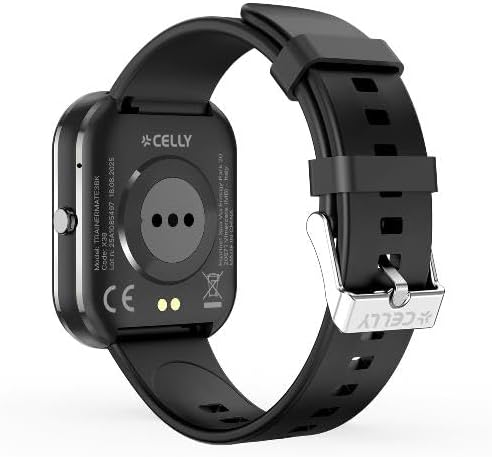
الصورة: الجبهة view of the Celly Trainermate Smartwatch with a black silicone strap, displaying a digital watch face.
1. الإعداد
1.1 فتح علبته
Carefully unpack your Celly Trainermate Smartwatch. The package should contain:
- Celly Trainermate Smartwatch
- كابل الشحن
- Two Straps (one silicone, one fabric)
- دليل المستخدم (هذا المستند)
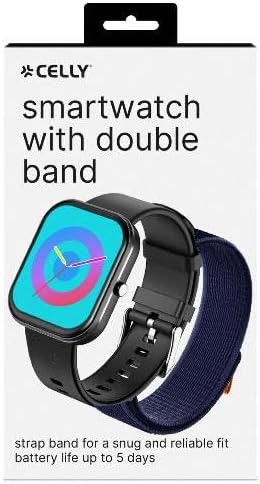
Image: The retail packaging for the Celly Smartwatch, showing the watch and an additional strap.
1.2 شحن الساعة الذكية
Before initial use, fully charge your smartwatch. Connect the provided charging cable to the charging port on the back of the watch and to a USB power source.

الصورة: الخلفية view of the Celly Trainermate Smartwatch, highlighting the optical sensors and magnetic charging pins.
1.3 تثبيت التطبيق
To unlock full functionality, download and install the companion app on your smartphone. بحث عن "Celly Smartwatch" or refer to the QR code in the quick start guide (if provided separately) in your device's app store (iOS or Android).
1.4 الاقتران بهاتفك الذكي
- تأكد من تمكين Bluetooth على هاتفك الذكي.
- Open the Celly Smartwatch app and follow the on-screen instructions to add a new device.
- Select "Trainermate" from the list of available devices.
- قم بتأكيد طلب الاقتران على كل من ساعتك الذكية وهاتفك الذكي.
1.5 Attaching/Changing Straps
The Celly Trainermate comes with two interchangeable straps. To attach or change a strap:
- Locate the quick-release pins on the back of the strap where it connects to the watch body.
- Slide the pin inwards to detach the current strap.
- Align the new strap with the watch body and slide the pin inwards to secure one side.
- Release the pin to lock the strap into place. Repeat for the other side.
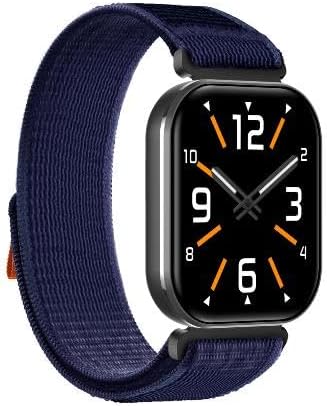
الصورة: الجبهة view of the Celly Trainermate Smartwatch fitted with a blue fabric strap, displaying an analog watch face.
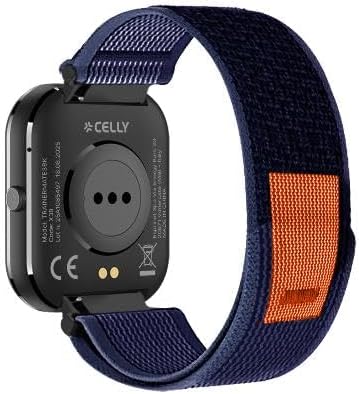
الصورة: الخلفية view of the Celly Trainermate Smartwatch with a blue fabric strap, showing the sensors and strap attachment mechanism.
2. تشغيل الساعة الذكية
2.1 الملاحة الأساسية
The Trainermate Smartwatch features a responsive touchscreen and a side button for navigation.
- شاشة تعمل باللمس: اسحب لأعلى أو لأسفل أو لليسار أو لليمين للتنقل بين القوائم والإشعارات. انقر لتحديد العناصر.
- زر جانبي: اضغط لتشغيل الشاشة، أو للعودة إلى الشاشة الرئيسية، أو للوصول إلى قائمة التطبيقات. اضغط مطولاً لعرض خيارات الطاقة.

الصورة: الجبهة view of the Celly Trainermate Smartwatch with a vibrant red display showing time and heart icon.

الصورة: الجبهة view of the Celly Trainermate Smartwatch with a green display showing time and a kiwi fruit graphic.
2.2 إجراء واستقبال المكالمات
مع تفعيل خاصية الاتصال عبر البلوتوث، يمكنك إدارة المكالمات مباشرة من معصمك.
- إجراء مكالمة: Access the dialer or contact list through the smartwatch menu. Tap to initiate a call.
- استقبال مكالمة: When a call comes in, the smartwatch will display the caller ID. Tap the green icon to answer or the red icon to reject.
2.3 مراقبة الصحة
The Trainermate Smartwatch monitors various health parameters:
- معدل ضربات القلب: Continuous or on-demand heart rate tracking. View معدل ضربات قلبك الحالي والبيانات التاريخية في التطبيق.
- ضغط الدم: Provides estimated blood pressure readings. Consult a medical professional for accurate measurements.
- تتبع النوم: Monitors sleep patterns, including deep sleep, light sleep, and wake times.
2.4 تتبع النشاط
Track your daily activities and workouts:
- Steps, Distance, Calories: Automatically records your daily steps, distance covered, and calories burned.
- أوضاع الرياضة المتعددة: Select from various sport modes (e.g., walking, running, cycling) to track specific workout data.
أبدا التخصيص
خصّص تجربة استخدام ساعتك الذكية:
- مشاهدة الوجوه: Change watch faces directly on the device or through the companion app.
- إشعارات: Manage which app notifications appear on your smartwatch via the companion app settings.
3. الصيانة
3.1 التنظيف
Regularly clean your smartwatch and straps to prevent skin irritation and maintain performance.
- Wipe the screen and watch body with a soft, damp، قطعة قماش خالية من الوبر.
- For silicone straps, wash with mild soap and water, then rinse thoroughly and dry.
- For fabric straps, gently clean with a damp قطعة قماش واتركها تجف تمامًا في الهواء.
- تجنب استخدام المواد الكيميائية القاسية أو المواد الكاشطة.
3.2 مقاومة الماء
Important: The Celly Trainermate Smartwatch is NOT water-resistant.
Avoid exposing the device to water, including rain, showers, swimming, or any other liquid. Water damage is not covered under warranty.
3.3 العناية بالبطارية
The smartwatch uses a Lithium Polymer battery. To maximize battery life:
- Charge the device regularly, but avoid letting it fully discharge frequently.
- لا تعرض الجهاز لدرجات حرارة عالية.
- استخدم فقط كابل الشحن المرفق.
4. استكشاف الأخطاء وإصلاحها
If you encounter issues with your Celly Trainermate Smartwatch, try the following solutions:
4.1 مشاكل الاتصال
- Smartwatch not connecting to phone: Ensure Bluetooth is on for both devices. Restart both the smartwatch and your phone. Try unpairing and re-pairing the device in the app.
- مشاكل جودة المكالمة: Ensure your smartwatch is within Bluetooth range of your phone. Check your phone's network signal.
4.2 مشاكل العرض
- الشاشة لا تستجيب: Restart the smartwatch by long-pressing the side button.
- Screen not turning on: تأكد من شحن الجهاز. قم بتوصيله بالشاحن لمدة 30 دقائق على الأقل.
4.3 قضايا الشحن
- Smartwatch not charging: Check if the charging cable is securely connected to both the watch and the power source. Ensure the charging pins are clean and free of debris. Try a different USB power adapter.
4.4 بيانات صحية غير دقيقة
For health monitoring features, ensure the smartwatch is worn snugly on your wrist, about one finger's width above the wrist bone. Avoid excessive movement during measurements. Remember, these are for reference and not medical devices.
5. المواصفات
| ميزة | التفاصيل |
|---|---|
| اسم الموديل | Trainermate |
| رقم الموديل | B0G59XYKCC |
| عرض | شاشة AMOLED مقاس 1.96 بوصة |
| الاتصال | بلوتوث |
| المميزات الخاصة | Health and Fitness Monitoring, Bluetooth Calls |
| نوع البطارية | بوليمر الليثيوم |
| نظام تحديد المواقع العالمي (جي بي اس) | لا يوجد نظام تحديد المواقع العالمي (GPS) |
| مستوى مقاومة الماء | غير مقاوم للماء |
| الأجهزة المتوافقة | Smartphones, Laptops, Tablets (iOS and Android compatible) |
| User Interface Interaction | Microphone, Touchscreen |
| مادة الحزام | Silicone (and fabric included) |
6. معلومات الضمان
The Celly Trainermate Smartwatch comes with a ضمان الشركة المصنعة لمدة عامين from the date of purchase. This warranty covers defects in materials and workmanship under normal use. It does not cover damage caused by misuse, accidents, unauthorized modifications, or failure to follow the instructions in this manual (e.g., water damage due to non-water resistance).
يرجى الاحتفاظ بإثبات الشراء الخاص بك لمطالبات الضمان.
7. الدعم
For further assistance, technical support, or warranty claims, please contact Celly customer service. You can find more information and contact details on the official Celly website or through their Amazon Brand Store: