
1. المقدمة
This user manual provides comprehensive instructions for the installation, operation, and maintenance of your Polarlander B5350 Car Stereo. Please read this manual thoroughly before using the product to ensure proper functionality and to prevent damage. Keep this manual for future reference.
2. معلومات السلامة
- سلامة القيادة: Always prioritize safe driving. Do not operate the system in a way that distracts you from the road.
- تثبيت: Professional installation is recommended. Ensure all wiring is correctly connected to prevent short circuits or damage.
- مزود الطاقة: Connect the unit to a 9-30V DC power supply. Incorrect voltagقد يتسبب ذلك في أضرار.
- درجة حرارة: Operate the unit within the specified temperature range of -20℃ to 60℃.
- رُطُوبَة: احتفظ بالوحدة بعيدًا عن الماء والرطوبة الزائدة.
3. محتويات العبوة
تأكد من وجود جميع العناصر في العبوة:
- Main Unit (Car Stereo)
- Waterproof Power Cord
- Fixed Mounting Bracket Set (Hardware bracket + Sunshade)
- MINI-USB to USB2.0 Cable
- دليل المستخدم (هذا المستند)

Image 3.1: Contents of the Polarlander B5350 package, including the main unit, power cord, mounting bracket, and USB cable.
4. انتهى المنتجview
The Polarlander B5350 is a double DIN car stereo featuring a 5.0-inch touchscreen display with 800x480 resolution. It supports wireless CarPlay and Android Auto, Bluetooth 5.0, and various media playback options.
4.1 اللوحة الأمامية والشاشة
The front panel features the 5.0-inch touchscreen, which is the primary interface for controlling the unit. The display provides access to various functions including navigation, media playback, and phone calls.

الصورة 4.1: مثالamples of the user interface display, showing various application icons and menu layouts.
4.2 Side and Rear Connections
The unit includes several ports for connectivity and expansion:
- مقبس سماعة الرأس: للاستماع الصوتي الخاص.
- فتحة بطاقة TF: For media playback from a TransFlash (MicroSD) card.
- MINI to USB Interface: For connecting USB devices or the provided MINI-USB to USB2.0 cable.
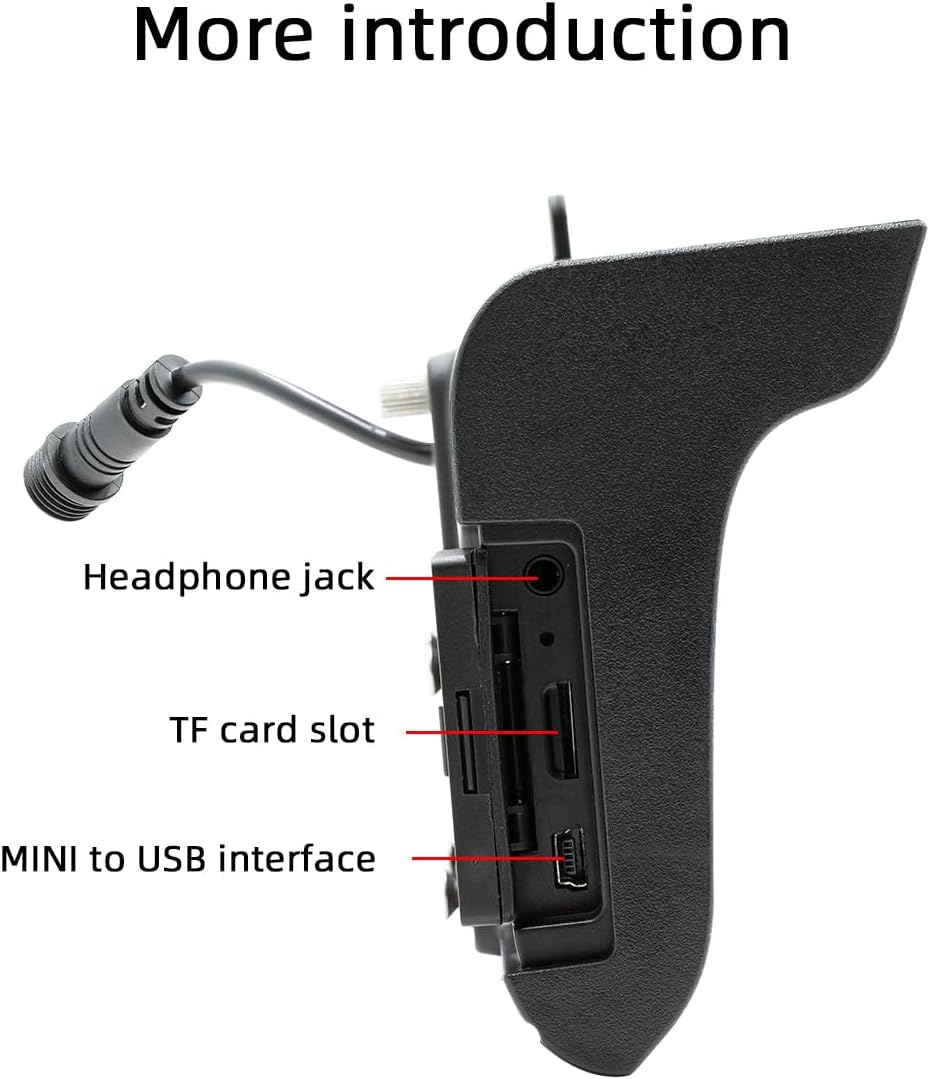
الصورة 4.2: الجانب view illustrating the headphone jack, TF card slot, and MINI to USB interface.
The rear of the unit houses a built-in 1W speaker and mounting points for the bracket.

الصورة 4.3: خلفي view of the unit, highlighting the built-in 1W speaker.
5. التثبيت
This unit is designed for double DIN installation. Due to the complexity of vehicle wiring and dashboard configurations, professional installation is highly recommended. Incorrect installation can lead to vehicle damage or malfunction of the stereo unit.
5.1 General Installation Steps (Consult a professional)
- افصل بطارية السيارة لمنع حدوث ماس كهربائي.
- Remove the existing car stereo or dashboard trim to access the double DIN slot.
- Connect the wiring harness from the vehicle to the stereo's power and speaker connections. Ensure correct polarity.
- Connect any additional inputs/outputs such as the reversing camera, AUX-in, or RCA audio outputs.
- Mount the stereo securely into the double DIN slot using the provided mounting bracket set.
- Reconnect the vehicle's battery and test the unit's functionality.
- أعد تجميع غطاء لوحة القيادة.
Note: The waterproof power cord should be routed carefully to avoid damage and ensure proper sealing.
6. الإعداد الأولي
6.1 تشغيل/إيقاف التشغيل
The unit will power on automatically when the vehicle's ignition is turned on. To power off, turn off the vehicle's ignition.
6.2 إعدادات اللغة
Upon first use, you may be prompted to select your preferred language. Navigate through the on-screen menu to select from English, Chinese, Spanish, Portuguese, Russian, German, French, Polish, Turkish, Arabic, Hebrew, Italian, Czech, Japanese, or Korean.
7. تعليمات التشغيل
7.1 نظام الملاحة بشاشة اللمس
The 5-inch touchscreen is the primary control interface. Tap icons to open applications, swipe to navigate menus, and use pinch-to-zoom gestures where applicable (e.g., in navigation apps).
7.2 التحكم في عجلة القيادة
If your vehicle supports steering wheel controls, connect the appropriate wires during installation. The unit supports programmable steering wheel controls, allowing you to map functions like volume, track skip, and mode selection to your vehicle's buttons.
7.3 Seven-Color Key Backlights
The unit features adjustable seven-color key backlights. Access the settings menu to customize the backlight color to match your vehicle's interior lighting or your personal preference.
8. الاتصال
8.1 بلوتوث 5.0
The unit features Bluetooth 5.0 for wireless audio streaming and hands-free calling. The default Bluetooth name is "SWL-BT".
- قم بتمكين Bluetooth على هاتفك المحمول.
- في جهاز ستيريو السيارة، انتقل إلى قائمة البلوتوث.
- بحث عن available devices on your phone and select "SWL-BT".
- قم بتأكيد رمز الاقتران إذا طُلب منك ذلك.
The unit supports connecting to two Bluetooth devices simultaneously, such as a mobile phone and a Bluetooth earphone.

Image 8.1: Illustration of the dual Bluetooth connection capability, powered by a Bluetooth 5.0 chip.
8.2 Wireless & Wired CarPlay / Android Auto
Connect your smartphone to access functions like navigation, phone calls, messages, and music directly on the car stereo display. Both wired and wireless connections are supported.

Image 8.2: Display showing the CarPlay and Android Auto interfaces, demonstrating mobile phone function integration.
8.2.1 اتصال لاسلكي
For wireless CarPlay or Android Auto, ensure your phone's Wi-Fi and Bluetooth are enabled. Follow the on-screen prompts on the car stereo to pair your device wirelessly.
8.2.2 اتصال سلكي
Connect your smartphone to the unit's USB port using a compatible USB cable. The system will automatically detect and launch CarPlay or Android Auto.
9. تشغيل الوسائط
The Polarlander B5350 supports multiple methods for media playback:
- Bluetooth (BT) Playback: Stream audio wirelessly from your paired smartphone.
- تشغيل بطاقة TF: Insert a TF (MicroSD) card into the designated slot to play audio and video files.
- تشغيل USB: Connect a USB flash drive to the USB port for audio and video file التشغيل.
- مدخل AUX: قم بتوصيل أجهزة الصوت الخارجية عبر المدخل المساعد.
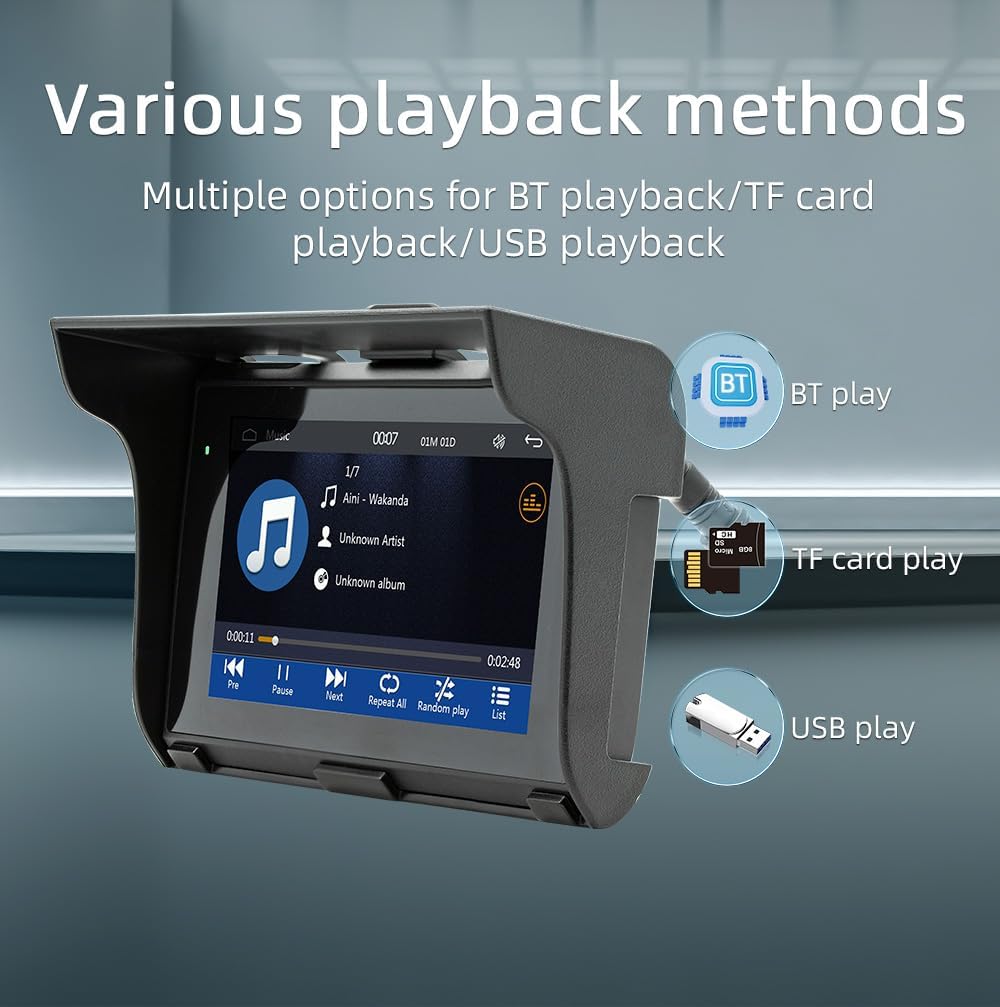
Image 9.1: Visual representation of the various media playback methods available: Bluetooth, TF card, and USB.
9.1 تنسيقات الوسائط المدعومة
- صيغ الصوت: MP3, AAC, APE, OGG, M4A, RA, WAV
- صيغ الفيديو: H263, H264, H265, DIVX HD, AVI, FLV, MKV, MPEG, MP4, WMV9, VC, ASF, TS, QT
- تنسيقات الصور: JPEG, PNG, BMP, GIF, TIFF
10. تشغيل راديو AM/FM
The unit includes an AM/FM radio receiver. To access the radio function, select the "Radio" icon from the main menu.
- مسح: Use the scan function to automatically search for and save available radio stations.
- ضبط يدوي: Manually tune to specific frequencies using the on-screen controls.
- المسبقة: احفظ محطاتك المفضلة في أزرار محددة مسبقًا للوصول السريع إليها.
The radio allows you to stay updated with real-time traffic, news broadcasts, and weather forecasts.
11. Driving Recorder Function (Optional)
The Polarlander B5350 supports an optional car driving recorder. When connected, the unit can display and record your driving dynamics, providing additional security and peace of mind.

Image 11.1: The car stereo displaying footage from an optional driving recorder camera.
Note: The driving recorder camera is an optional accessory and is not included in the standard package.
12. استكشاف الأخطاء وإصلاحها
| مشكلة | السبب المحتمل | حل |
|---|---|---|
| الوحدة لا تعمل بالطاقة. | No power connection or incorrect wiring. | Check power cables and fuse. Ensure correct 9-30V DC supply. |
| لا يوجد صوت. | Volume too low, mute activated, or speaker wiring issue. | قم بزيادة مستوى الصوت، والتحقق من حالة كتم الصوت، والتحقق من توصيلات مكبر الصوت. |
| فشل اتصال Bluetooth. | Bluetooth not enabled on phone/unit, or device out of range. | Ensure Bluetooth is active on both devices. Move phone closer to unit. Re-pair device. |
| CarPlay/Android Auto غير متصل. | Incorrect cable, phone settings, or app issues. | Use a certified USB cable. Check phone settings for CarPlay/Android Auto. Restart phone and unit. |
| شاشة اللمس لا تستجيب. | System freeze or temporary software issue. | Restart the unit (turn off/on ignition). If issue persists, consult support. |
13. المواصفات
| ميزة | التفاصيل |
|---|---|
| نوع المنتج | Car Stereo (Double Din) |
| حجم العرض | 5.0 بوصة |
| دقة العرض | 800×480 |
| طاقة الإخراج | مكبر صوت مدمج بقوة 1 وات |
| العمل المجلدtage | 9~30 فولت تيار مستمر |
| درجة حرارة التشغيل | -20 درجة مئوية إلى 60 درجة مئوية |
| نسخة البلوتوث | 5.0 (Default name: SWL-BT) |
| الذاكرة قيد التشغيل | 1Gbit DRAM |
| تنسيقات الصوت المدعومة | MP3, AAC, APE, OGG, M4A, RA, WAV |
| تنسيقات الفيديو المدعومة | H263, H264, H265, DIVX HD, AVI, FLV, MKV, MPEG, MP4, WMV9, VC, ASF, TS, QT |
| تنسيقات الصور المدعومة | JPEG, PNG, BMP, GIF, TIFF |
| الإدخال/الإخراج | SD Card, USB, AUX-in, RCA Audio output, Reversing camera input |
| رقم قطعة الشركة المصنعة | ب5350 |
14. الصيانة
- تنظيف الشاشة: استخدم قطعة قماش ناعمة وخالية من الوبر لمسح شاشة اللمس برفق. لا تستخدم منظفات أو مذيبات كاشطة.
- النظافة العامة: حافظ على نظافة الجهاز من الغبار والحطام. استخدم فرشاة ناعمة أو هواء مضغوط للمناطق التي يصعب الوصول إليها.
- وصلات الكابلات: قم بفحص جميع توصيلات الكابلات بشكل دوري للتأكد من أنها آمنة.
15. الضمان والدعم
للحصول على معلومات الضمان والدعم الفني، يُرجى مراجعة الوثائق المُقدمة عند الشراء أو التواصل مع التاجر. احتفظ بإيصال الشراء لأي مطالبات تتعلق بالضمان.
For further assistance, visit the official Polarlander webالموقع أو الاتصال بقسم خدمة العملاء.