
1. المقدمة
Thank you for choosing the Cooler Master ELITE Gold 1000W Power Supply Unit. This manual provides essential information for the safe and efficient installation, operation, and maintenance of your new power supply. The ELITE Gold 1000W is designed for daily gaming and PC building enthusiasts, fully supporting the latest ATX 3.1 standard and offering flexible compatibility with RTX 50 series GPUs and future upgrades.
2. معلومات السلامة
يرجى قراءة وفهم جميع تعليمات السلامة قبل تركيب أو تشغيل هذا المنتج. قد يؤدي عدم القيام بذلك إلى إصابة شخصية أو تلف المنتج أو الأجهزة المتصلة به.
- خطر الصدمة الكهربائية: لا تفتح وحدة تزويد الطاقة جasinز. حجم الصوت العاليtages are present inside, even when the unit is turned off. There are no user-serviceable parts inside.
- التأريض السليم: Ensure the power supply is properly grounded using the provided power cord.
- تهوية: Do not block any ventilation openings of the power supply. Ensure adequate airflow around the unit to prevent overheating.
- رُطُوبَة: لا تعرض مصدر الطاقة للماء أو الرطوبة الزائدة.
- مصدر الطاقة: Connect the power supply only to a power source with the correct voltage and frequency as indicated on the unit's label.
- إدارة الكابلات: Route cables carefully to avoid pinching or damage.
- درجة حرارة: Operate the power supply within the specified temperature range (up to 40°C high-load environments).
3. محتويات العبوة
تأكد من وجود جميع العناصر في الحزمة الخاصة بك:
- Cooler Master ELITE Gold 1000W Power Supply Unit
- Modular Cable Set (including 12+4 Pin, ATX24 Pin, EPS 4+4 Pin, EPS 8 Pin, SATA + Peripheral 4 Pin connectors)
- AC Power Cord (A/JP cord)
- مسامير التثبيت
- دليل المستخدم
4. الإعداد والتثبيت
Follow these steps to install your Cooler Master ELITE Gold 1000W Power Supply Unit:
- حضّر نظامك:
Before installation, ensure your computer is completely powered off and unplugged from the wall outlet. Discharge any residual power by pressing the power button a few times.
- Install the PSU into the PC Case:
Position the ELITE Gold 1000W PSU into the designated power supply bay in your PC case. The compact design (under 150mm) facilitates easy installation in various PC cases. Secure the PSU with the provided mounting screws.

Image: The Cooler Master ELITE Gold 1000W Power Supply Unit installed within a computer chassis, viewed from above, highlighting its compact form factor and top-mounted fan grill.
- توصيل الكابلات المعيارية:
The ELITE Gold 1000W features a full modular design. Connect only the necessary cables to the power supply unit first. Refer to the labels on the PSU for correct connector types (e.g., 10P MB, 18P MB, 8P PCI-E/CPU, 12V-2x6, 6P SATA/HDD).

الصورة: تفصيلية view of the Cooler Master ELITE Gold 1000W Power Supply Unit's modular cable interface, clearly showing labeled ports for various component connections such as motherboard, CPU, PCIe, and SATA/HDD.

Image: The Cooler Master ELITE Gold 1000W Power Supply Unit with its full suite of modular cables securely connected and neatly routed, demonstrating the full modular design.
- الاتصال بالمكونات:
- اللوحة الأم: قم بتوصيل كابل ATX ذو 24 سنًا باللوحة الأم.
- وحدة المعالجة المركزية: Connect the 4+4 pin or 8-pin EPS cable(s) to your motherboard's CPU power connector(s).
- بطاقة الرسومات (GPU): Connect the appropriate PCIe power cables (e.g., 8-pin, 12+4 pin for ATX 3.1/PCIe Gen 5.1) to your graphics card(s). This unit is optimized for RTX 50 series GPUs.
- أجهزة التخزين: قم بتوصيل كابلات الطاقة SATA بمحركات الأقراص SSD ومحركات الأقراص الصلبة ومحركات الأقراص الضوئية.
- الأجهزة الطرفية: Connect peripheral 4-pin cables to any other devices requiring power.
- توصيل طاقة التيار المتردد:
Connect the provided AC power cord to the power supply unit and then to a grounded wall outlet. Ensure the power switch on the PSU is in the OFF position before connecting to the wall outlet.
5. تعليمات التشغيل
بعد التثبيت الناجح، اتبع الخطوات التالية لتشغيل النظام الخاص بك:
- تشغيل الطاقة:
Flip the power switch on the back of the power supply unit to the ON (I) position.
- بدء تشغيل النظام:
Press the power button on your computer case to start your system. The ELITE Gold 1000W will provide stable and efficient power, thanks to its 80 Plus Gold certification and quiet, long-life rifle bearing fan.
- إيقاف التشغيل:
To power off your system, shut down your operating system normally. For complete power disconnection, flip the power switch on the back of the power supply unit to the OFF (O) position and unplug the AC power cord.
6. الصيانة
Proper maintenance ensures the longevity and optimal performance of your power supply unit.
- تنظيف الغبار: نظّف الغبار دوريًا من مروحة وحدة التزويد بالطاقة وفتحات التهوية باستخدام الهواء المضغوط. تأكد من إيقاف تشغيل النظام وفصله عن الكهرباء قبل التنظيف.
- تهوية: Ensure that the PC case has adequate airflow and that the power supply's fan intake and exhaust are not obstructed.
- فحص الكابلات: Regularly check all modular cables for any signs of wear, fraying, or damage. Replace damaged cables immediately.
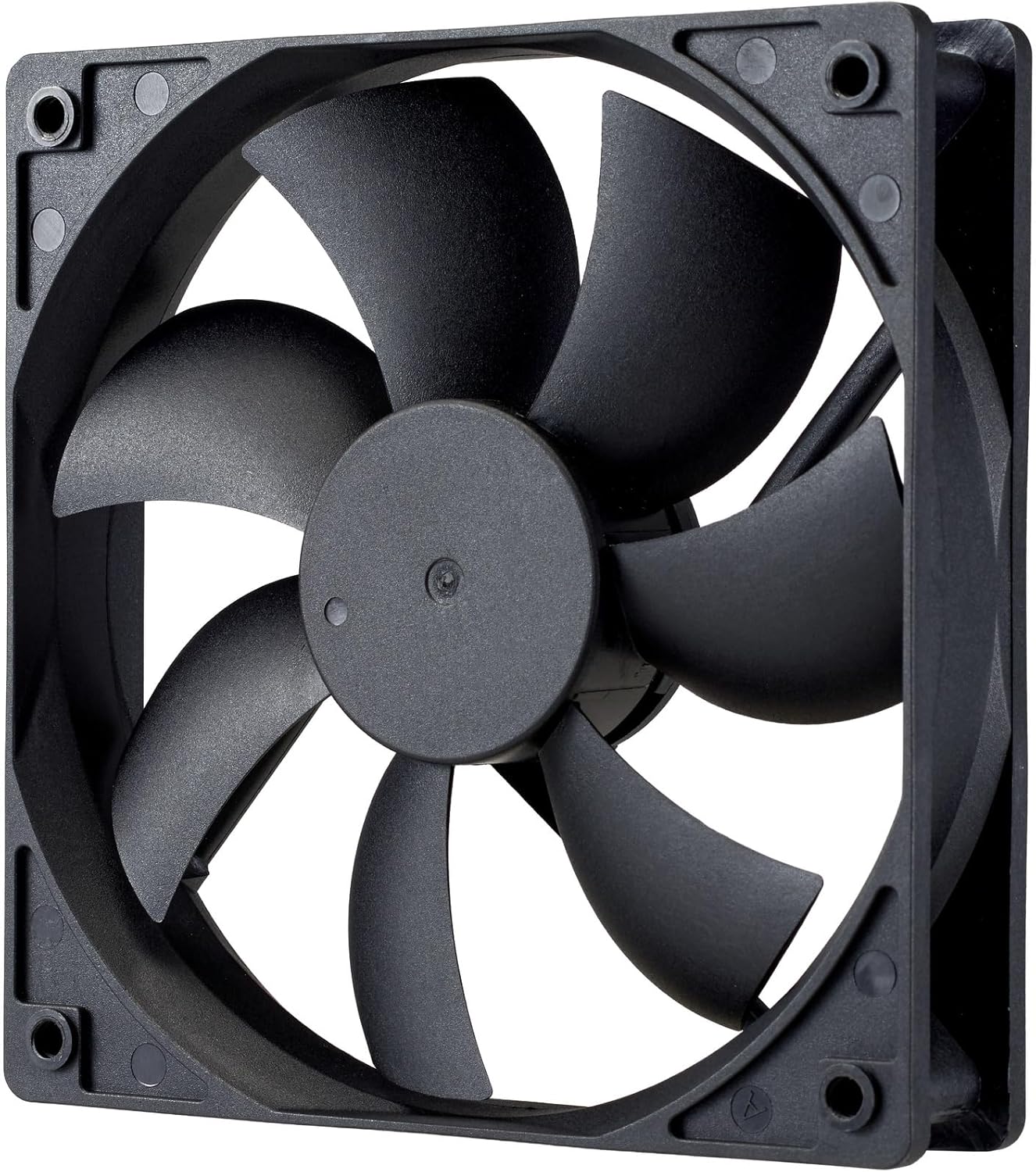
الصورة: لقطة مقربة view of the power supply's cooling fan, featuring five blades designed for efficient airflow and quiet operation.
7. استكشاف الأخطاء وإصلاحها
If you encounter issues with your power supply, refer to the following troubleshooting steps:
- لا يوجد طاقة:
- تأكد من توصيل سلك الطاقة المترددة بإحكام بكل من مصدر الطاقة ومقبس الحائط.
- Verify that the power switch on the back of the PSU is in the ON (I) position.
- Check all modular cables (24-pin ATX, EPS, PCIe) are firmly seated in both the PSU and the respective components.
- اختبر مقبس الحائط بجهاز آخر للتأكد من أنه يعمل بشكل صحيح.
- عدم استقرار النظام/الإغلاق العشوائي:
- تأكد من وجود تهوية كافية داخل صندوق الكمبيوتر الخاص بك لمنع ارتفاع درجة الحرارة.
- Verify that your system's power requirements do not exceed the 1000W capacity of the PSU.
- تأكد من عدم وجود أي توصيلات كابلات مفكوكة.
- ضوضاء غير عادية:
- A quiet rifle bearing fan is designed for minimal noise. If you hear unusual grinding or rattling, ensure no cables are obstructing the fan.
- إذا استمرت الضوضاء، فاتصل بدعم Cooler Master.
إذا لم تحل هذه الخطوات المشكلة، فيرجى الاتصال بدعم عملاء Cooler Master للحصول على مزيد من المساعدة.
8. المواصفات
Detailed technical specifications for the Cooler Master ELITE Gold 1000W Power Supply Unit:
| اسم الموديل | ELITE Gold |
| رقم موديل الشركة المصنعة | MPX-A005-AFAG-BJP |
| ماركة | كولر ماستر |
| انتاج واتtage | 1000 واط |
| 80 PLUS شهادة | ذهب |
| نسخة ايه تي اكس | ايه تي اكس 3.1 |
| إصدار PCIe | PCIe الجيل 5.1 |
| عامل الشكل | ايه تي اكس |
| تصميم الطاقة | وحدات كاملة |
| أنواع الموصلات | 12+4 Pin, ATX24 Pin, EPS 4+4 Pin, EPS 8 Pin, SATA + Peripheral 4 Pin |
| عدد المعجبين | 1 (Rifle Bearing Fan) |
| الحد الأقصى لحجم الإدخالtage | 240 فولت (تيار متردد) |
| الحد الأدنى لحجم الإدخالtage | 100 فولت (تيار متردد) |
| أبعاد المنتج (الطول × العرض × الارتفاع) | 14 × 15 × 8.6 سم |
| وزن المنتج | 2230 جرام |
| درجة حرارة التشغيل | تصل إلى 40 درجة مئوية |

الصورة: أعلى view of the Cooler Master ELITE Gold 1000W Power Supply Unit, showcasing its branding and honeycomb-patterned ventilation.

Image: The official 80 PLUS GOLD certification logo, indicating high power efficiency.
9. الضمان والدعم
The Cooler Master ELITE Gold 1000W Power Supply Unit comes with a ضمان لمدة 5 سنوات من تاريخ الشراء. يغطي هذا الضمان عيوب المواد والصناعة في ظل الاستخدام العادي.
For technical support, warranty claims, or further assistance, please visit the official Cooler Master website or contact your local Cooler Master distributor. Please have your product model number (MPX-A005-AFAG-BJP) and proof of purchase ready when contacting support.