
1. المقدمة
This manual provides comprehensive instructions for the AirheadStorm GPS Digital Speedometer. This heads-up display (HUD) is designed to enhance driving safety by presenting essential vehicle information directly in the driver's line of sight. Featuring a 10Hz high refresh rate and Beidou dual-mode chip, it offers broad compatibility with various vehicles, including new energy cars, hybrids, motorcycles, buses, and trucks. Its automatic brightness adjustment ensures optimal visibility in diverse lighting conditions.
2. محتويات العبوة
تأكد من تضمين جميع العناصر المدرجة أدناه في الحزمة الخاصة بك:
- 1 x Heads-Up Display (HUD) GPS Digital Speed Meter
- 1 × كابل USB من النوع C
- 1 x Reflective Film
- 1 × دليل المستخدم
- 1 x Anti-Slip Double-Sided Tape

الشكل 2.1: ملحقات المنتج المضمنة
3. مواصفات المنتج
- Clear Driving Data Display: Provides essential driving information in a clear format.
- الضبط التلقائي للسطوع: Built-in light sensor automatically adjusts display brightness for optimal visibility in any lighting condition (day or night).
- توافق متعدد الاستخدامات: Equipped with a 10Hz high refresh rate and Beidou dual-mode chip, compatible with new energy cars, HYBRIDs, motorcycles, buses, and trucks.
- Multi-Function Speedometer: Allows switching between speed units (KMh and MPH) and includes an overspeed warning feature.
- الهندسة الدقيقة: Features seamless assembly technology and a dual-core processor for smooth and consistent RPM displays.
- التثبيت بدون جهد: Designed for user convenience, installs easily without vehicle damage. Powers on and off automatically with your car via USB.
- Visual Overspeed Alerts: Three-level flash alarm visually warns when preset speed thresholds are exceeded. This alarm is silent to minimize distraction.

Figure 3.1: Intelligent Light Sensing for Optimal Visibility
4. الإعداد
Follow these steps to set up your AirheadStorm GPS Digital Speedometer:
- أفرغ: قم بإزالة جميع المكونات بعناية من العبوة.
- إرفاق جبل: Secure the suction cup mount to the bottom of the HUD unit. Ensure it clicks into place firmly.
- التمركز: اختر موقعًا مناسبًا على لوحة التحكم الخاصة بك بحيث لا يعيق رؤيتك view of the road. Use the anti-slip double-sided tape for a secure placement if needed.
- توصيل الطاقة: Connect the Type-C USB cable to the HUD unit and plug the other end into a USB power source in your vehicle (e.g., USB port, cigarette lighter adapter). The unit will power on automatically with your vehicle.
- Reflective Film (Optional): If the display is not clear due to reflections, apply the reflective film to your windshield directly above the HUD unit. Clean the windshield thoroughly before application.

Figure 4.1: Speedometer positioned on a dashboard
Video 4.1: Unboxing and Assembly of the GPS Digital Speedometer. This video demonstrates how to unpack the device, attach the mount, and connect the power cable.
5. تعليمات التشغيل
The GPS Digital Speedometer is designed for simple operation. Once connected to power, it will automatically turn on and begin acquiring GPS signals to display your speed.
5.1 تشغيل/إيقاف التشغيل
The device powers on automatically when your vehicle starts and powers off when your vehicle is turned off, provided it is connected to a switched USB power source.
5.2 ضبط السطوع
The built-in light sensor automatically adjusts the display brightness to suit ambient light conditions, ensuring readability during both day and night driving.
5.3 Speed Unit Switching (KMh/MPH)
Refer to the user manual for specific button presses to switch between Kilometers per hour (KMh) and Miles per hour (MPH) display units. This is typically done via a short press of a designated button on the device.
5.4 Overspeed Alarm
The device features a three-stage visual overspeed alarm. When your speed exceeds a preset limit, the display will flash to alert you. This alarm is visual only and does not produce sound.
Video 5.1: Demonstration of the GPS Digital Speedometer's operation, including power-on sequence, display modes, and unit switching.
6. أوضاع العرض
The device offers multiple display modes, allowing you to customize the information shown. You can switch between interfaces to meet different needs, typically by pressing a button on the unit.
- Speed + Unit + Compass: Displays current speed, speed unit (MPH/KMh), and cardinal direction.
- Speed + Unit: Displays current speed and speed unit.
- السرعة + البوصلة: Displays current speed and cardinal direction.
- Speed Only: Displays only the current speed.

الشكل 6.1: أوضاع العرض المتعددة
7. المواصفات
| مواصفة | التفاصيل |
|---|---|
| اسم القطعة | شاشة عرض أمامية |
| مادة | أكريلونيتريل بوتادين ستايرين (ABS)، بولي كربونات (PC) |
| مقاس | 86 × 54 × 14 ملم (3.4 × 2.1 × 0.5 بوصة) |
| لون | أسود |
| المجلدtage | 5V (via USB) |
| عرض خفيف | أخضر |
| حجم الشاشة | 3 بوصة |
| الوظائف | Speed, Automatic Light Sensing, Speed Unit Switching (KMH/MPH) |
| إنذار | ثلاث قtage speed alarm settings (flashing alarm, no sound) |
| وزن العنصر | 4.8 أونصة (135 جرامًا) |
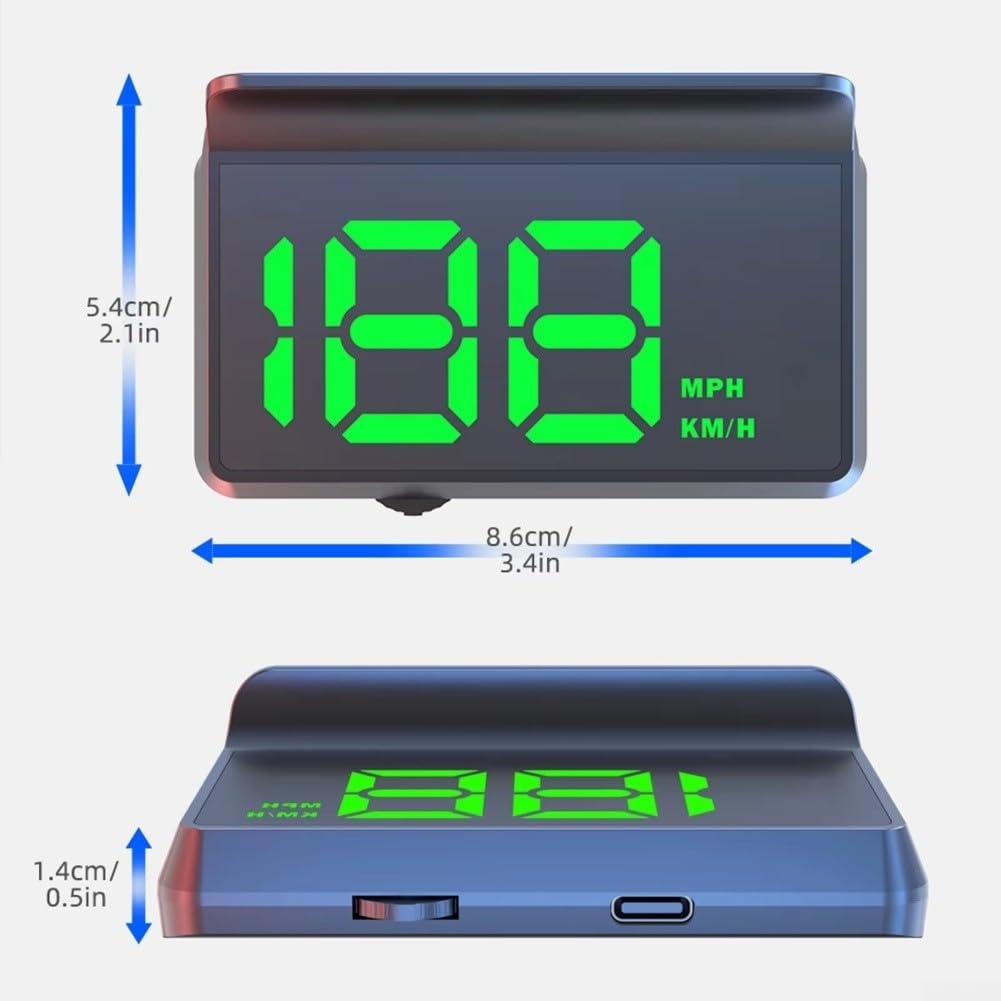
الشكل 7.1: أبعاد المنتج
8. استكشاف الأخطاء وإصلاحها
- لا يوجد عرض: Ensure the USB cable is securely connected to both the device and a working USB power source. Check if the vehicle's ignition is on.
- قراءة سريعة غير دقيقة: تأكد من أن الجهاز لديه واضحة view of the sky for optimal GPS signal reception. Speed accuracy may vary slightly based on GPS signal strength.
- Display Too Dim/Bright: The device features automatic brightness adjustment. Ensure the light sensor is not obstructed.
- لا يوجد إشارة GPS: The device requires an unobstructed view of the sky to acquire GPS signals. This may take a few minutes upon initial startup or in areas with poor satellite coverage (e.g., tunnels, dense urban areas).
9. الضمان والدعم
للحصول على معلومات الضمان أو الدعم الفني أو الاستفسارات المتعلقة بالخدمة، يرجى الرجوع إلى بيانات الاتصال المرفقة بوثائق الشراء أو زيارة الموقع الرسمي للشركة المصنعة. webالموقع. احتفظ بإثبات الشراء الخاص بك لتقديم مطالبات الضمان.