
المنتج انتهىview
The Blaupunkt Bremen SQR 46 DAB Retro Car Stereo is a modern reinterpretation of the classic 1-DIN car radio from the 1980s. It combines vintage aesthetics with contemporary technology, offering a comprehensive in-car entertainment experience. This unit features Bluetooth connectivity, dual USB ports, SD card slot, AUX input, and AM/FM radio, along with DAB+ digital tuner capabilities. The package includes the receiver, a fully enclosed under-dash/overhead installation mounting kit, and a 22-inch radio antenna, providing a complete solution for various vehicle installations.
ماذا يوجد في الصندوق
- Blaupunkt Bremen SQR 46 DAB Retro Car Stereo Receiver: The main head unit for audio playback and control.
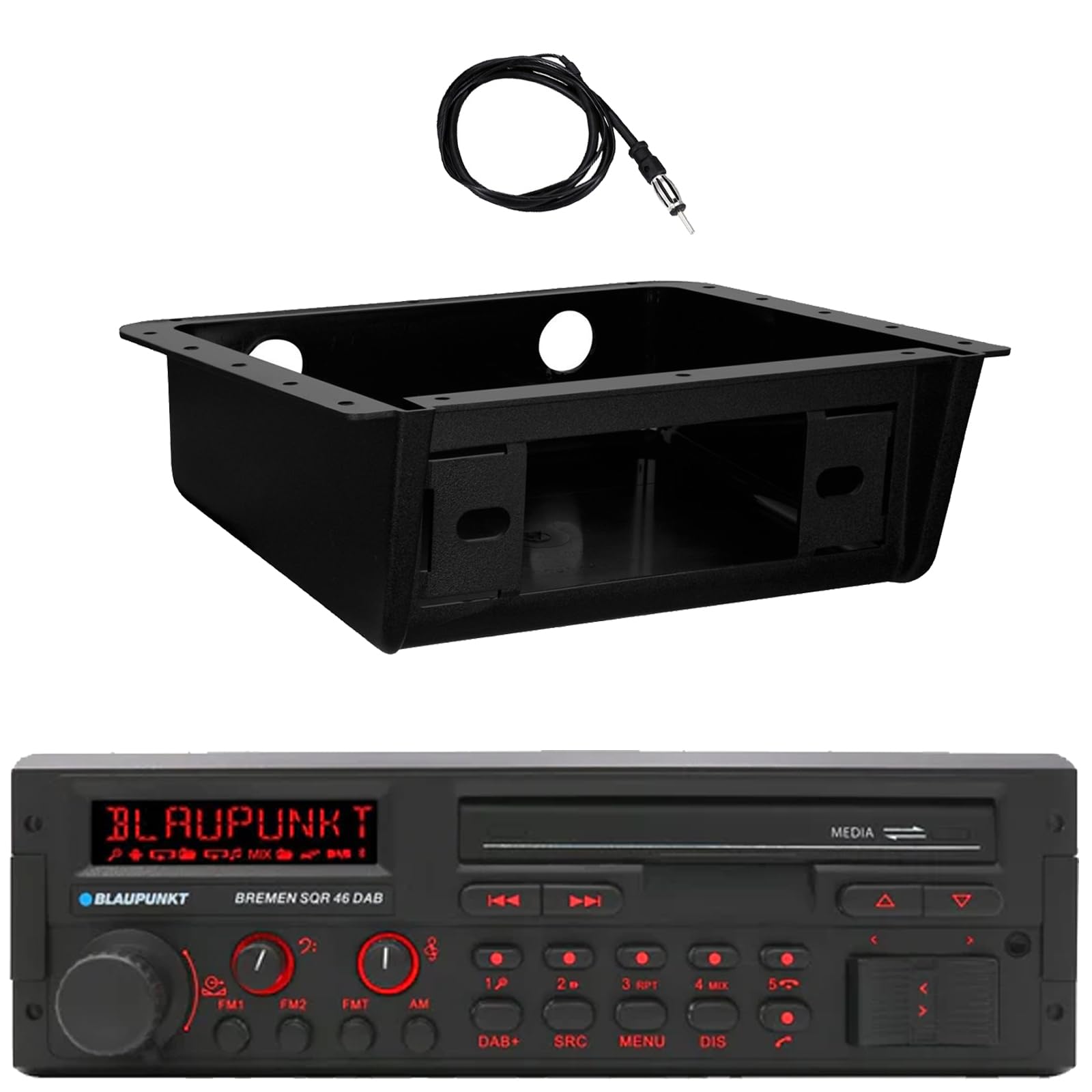
الصورة: الجبهة view of the Blaupunkt Bremen SQR 46 DAB car stereo receiver, showing the display, control knobs, and buttons.
- Fully Enclosed Under Dash/Overhead Installation Mounting Kit: A premium housing designed for secure installation of the receiver under the dashboard or overhead.

Image: Black, rectangular under-dash/overhead mounting kit, designed to house a single DIN car stereo.
- 22" Radio Antenna: A flexible marine-grade antenna for improved AM/FM radio reception.

Image: Coiled black wire antenna with a silver connector at one end.
الإعداد والتثبيت
Proper installation is crucial for optimal performance. It is recommended that installation be performed by a qualified professional. This section provides general guidelines.
1. تركيب جهاز الاستقبال
- Under Dash/Overhead Installation: The included mounting kit is designed to fully enclose the single DIN receiver. Secure the kit to a suitable flat surface under the dashboard or overhead using appropriate fasteners (not included).
- Insert the Blaupunkt Bremen SQR 46 receiver into the mounting kit. Ensure it is securely seated and locked into place.
- Alternatively, the unit can be installed in a standard single DIN opening in your vehicle's dashboard.
2. توصيلات الأسلاك
- توصيل الطاقة: Connect the yellow wire to a constant 12V power source, the red wire to a switched 12V accessory power source, and the black wire to a chassis ground.
- توصيلات السماعات: Connect the speaker wires to your vehicle's speakers, ensuring correct polarity for each speaker.
- اتصال الهوائي: Connect the 22" radio antenna to the antenna input on the rear of the receiver. Route the antenna cable away from other wiring to minimize interference.
- المدخلات المساعدة: If using external devices, connect them to the AUX-in port.
- مخرجات رسيا: لتوصيل الأجهزة الخارجية amplifiers, use the RCA pre-outs.
3. التشغيل الأولي
- After all connections are made, turn on your vehicle's ignition.
- اضغط على زر الطاقة الموجود على جهاز الاستقبال لتشغيله.
- Follow any on-screen prompts for initial setup, such as language selection or clock setting.
تعليمات التشغيل
عناصر التحكم الأساسية
- زر الطاقة: اضغط لتشغيل الوحدة أو إيقاف تشغيلها.
- مقبض الصوت: قم بتدوير الجهاز لضبط مستوى الصوت. اضغط لكتم الصوت/إلغاء كتمه.
- زر المصدر (SRC): Press to cycle through available audio sources: AM, FM, DAB+, Bluetooth, USB, SD, AUX.
- زر القائمة: الوصول إلى إعدادات النظام وتعديلات الصوت.
- DIS (Display) Button: Change display information or dim the display.
- Track/Tune Buttons (<< / >>): Use to skip tracks in media modes or tune radio frequencies.
Radio Operation (AM/FM/DAB+)
- اضغط على مصدر زر حتى AM, FM، أو داب+ تم تحديده.
- استخدم Track/Tune buttons to manually tune frequencies or seek for the next strong station.
- المحطات مسبقة الضبط: Press and hold numbered buttons (1-6) to save the current station as a preset. Press briefly to recall a saved station.
تشغيل البلوتوث
- الاقتران:
- تأكد من تمكين Bluetooth على جهازك المحمول.
- يختار بلوتوث as the source on the receiver using the مصدر زر.
- On your mobile device, search for available Bluetooth devices and select "Blaupunkt Bremen SQR 46".
- قم بتأكيد الاقتران إذا طُلب منك ذلك.
- تدفق الصوت: بمجرد الاقتران، يمكنك بث الصوت من جهازك. استخدم Track/Tune buttons on the receiver to skip tracks.
- الاتصال بدون استخدام اليدين: When a call comes in, the unit will display caller information. Press the green call button to answer, or the red call button to reject/end.
تشغيل بطاقة USB / SD
- Insert a USB drive into one of the USB ports or an SD card into the SD card slot.
- The unit will automatically switch to the USB or SD source and begin playback. If not, press the مصدر زر لاختيار المصدر الصحيح.
- استخدم Track/Tune أزرار للتنقل بين المقاطع الصوتية.
مدخلات AUX
- قم بتوصيل جهاز صوتي خارجي (مثل مشغل MP3) بمنفذ AUX-in باستخدام كابل صوت 3.5 ملم.
- يختار مدخل مساعد كمصدر باستخدام مصدر زر.
- تحكم في التشغيل من الجهاز المتصل.
إعدادات الصوت
- اضغط على قائمة طعام button to access audio settings such as Bass, Treble, Balance, Fader, and Equalizer presets.
- Rotate the volume knob to adjust values and press it to confirm selections.
صيانة
- تنظيف الوحدة: استخدم قطعة قماش ناعمة وجافة لمسح اللوحة الأمامية والشاشة. لإزالة الأوساخ المستعصية، افركها برفق.ampاغسل قطعة القماش بالماء. تجنب استخدام المواد الكيميائية القاسية، أو المنظفات الكاشطة، أو المذيبات.
- منافذ USB/SD: حافظ على فتحات USB وبطاقة SD خالية من الغبار والحطام.
- العناية العامة: تجنب تعريض الوحدة لدرجات حرارة عالية، أو أشعة الشمس المباشرة لفترات طويلة، أو الرطوبة الزائدة.
استكشاف الأخطاء وإصلاحها
| مشكلة | السبب المحتمل | حل |
|---|---|---|
| لا يوجد طاقة | أسلاك غير صحيحة؛ فتيل منفوخ؛ إشعال السيارة متوقف. | Check power and ground connections. Verify vehicle fuse and unit fuse. Ensure vehicle ignition is on. |
| لا يوجد صوت | مستوى الصوت منخفض جدًا؛ تم تفعيل كتم الصوت؛ توصيلات السماعات غير صحيحة؛ لم يتم تحديد المصدر. | ارفع مستوى الصوت. ألغِ كتم الصوت. تحقق من توصيلات السماعات. حدد مصدر الصوت الصحيح. |
| البلوتوث غير متصل | Device not in pairing mode; Unit not in Bluetooth source; Interference. | Ensure Bluetooth is enabled on device and unit. Put device in pairing mode. Try re-pairing. Move closer to the unit. |
| استقبال الراديو ضعيف | الهوائي غير موصول؛ هوائي تالف؛ منطقة إشارة ضعيفة. | Check antenna connection. Inspect antenna for damage. Try tuning to a stronger station or moving to a different location. |
| لا يعمل منفذ USB/SD | غير مدعوم file format; Corrupted media; Incorrect source selected. | يضمن files are in a supported format (e.g., MP3, WMA). Try a different USB drive/SD card. Select USB/SD source. |
تحديد
| ميزة | التفاصيل |
|---|---|
| ماركة | بلاوبونكت |
| رقم الموديل | Bremen SQR 46 |
| تكنولوجيا الاتصال | مساعد، بلوتوث |
| نوع وحدة التحكم | زر |
| المميزات الخاصة | Built-In Bluetooth, USB, SD Card, AUX-in, DAB+ digital tuner |
| الأجهزة المتوافقة | Amplifier, Smartphones, USB drives, SD cards |
| وضع إخراج الصوت | ستيريو |
| نوع مخرج الصوت | RCA (6 channels) |
| عدد الوحدات | 1 (المستقبل) |
| المكونات المضمنة | Receiver, Stereo Install Kit, Radio Antenna |
معلومات الضمان
This Blaupunkt Bremen SQR 46 DAB Retro Car Stereo comes with a ضمان الشركة المصنعة لمدة عامين. This warranty covers defects in materials and workmanship under normal use. Please retain your proof of purchase for warranty claims. For detailed terms and conditions, refer to the warranty card included with your product or visit the official Blaupunkt webموقع.
دعم العملاء
For further assistance, technical support, or warranty inquiries, please contact Blaupunkt customer service. You can typically find contact information on the official Blaupunkt webيمكنك الاطلاع على المعلومات المتوفرة في الموقع أو في الوثائق المرفقة مع منتجك.
رسمي Webموقع: www.blaupunkt.com (Please note: This link is a general placeholder. Refer to your product's specific documentation for the most accurate support contact information.)