
1. المقدمة
شكرا لك على الشراءasing the ELEPHAS BL128MINI Mini Projector. This manual provides essential information for setting up, operating, and maintaining your projector. Please read it thoroughly before use to ensure optimal performance and longevity of the device.
2. محتويات العبوة
تأكد من تضمين جميع العناصر المدرجة أدناه في الحزمة الخاصة بك:
- 1 x ELEPHAS BL128MINI Projector
- 1 × جهاز التحكم عن بعد
- 1 × دليل المستخدم (هذه الوثيقة)
- 1 × كابل HDMI
- 1 × حامل ثلاثي القوائم قابل للفصل
3. انتهى المنتجview
3.1 الميزات الرئيسية
- دقة 1080 بكسل كاملة الوضوح: Supports 1920 x 1080 resolution for clear images.
- 24-bit True Color: يُنتج ألوانًا زاهية ودقيقة.
- الإسقاط على شاشة كبيرة: Capable of projecting up to a 200-inch screen.
- Detachable Tripod: Provides stable placement and flexible positioning.
- Built-in HIFI Speaker: Offers integrated audio output.
- خيارات اتصال متعددة: Includes USB, HDMI, AV, and Audio ports.

Image 3.1: The ELEPHAS BL128MINI Projector offers 1080P Full HD resolution with 24-bit true color, an 8000:1 contrast ratio, and enhanced brightness for a vivid viewتجربة رائعة.
3.2 منافذ وأجهزة التحكم في جهاز العرض
Familiarize yourself with the various ports and controls on your projector for proper connection and operation.

Image 3.2: Rear panel of the ELEPHAS BL128MINI Projector, highlighting DC power input, USB ports, HDMI port, AV port, and audio output. Compatible devices include Xbox, TV Stick, PC, Smartphone, USB drives, speakers, and headphones.
4. الإعداد
4.1 توصيل الطاقة
- قم بتوصيل محول الطاقة بمنفذ DC IN الموجود على جهاز العرض.
- قم بتوصيل محول الطاقة بمأخذ الحائط.
4.2 Tripod Installation
The included detachable tripod allows for stable placement on various surfaces.
- حدد مكان ثقب المسمار الخاص بتثبيت الحامل الثلاثي في الجزء السفلي من جهاز العرض.
- Screw the tripod securely into the mounting hole.
- Adjust the tripod legs to achieve the desired height and angle for projection.

Image 4.2: The detachable tripod provides stability for the projector, whether placed on a desktop or uneven outdoor surfaces.
4.3 الموضع ومسافة الإسقاط
Position the projector on a flat, stable surface. The optimal projection distance ranges from 3.3 to 9.8 feet for screen sizes between 50 and 200 inches.

Image 4.3: Recommended projection distances for achieving various screen sizes, from 50 to 200 inches.
5. تعليمات التشغيل
5.1 تشغيل/إيقاف التشغيل
- تشغيل الطاقة: اضغط على زر الطاقة الموجود بجهاز العرض أو جهاز التحكم عن بُعد.
- إيقاف التشغيل: اضغط على زر التشغيل مرة أخرى. سيدخل جهاز العرض في وضع الاستعداد.
5.2 تعديل التركيز
قم بتدوير حلقة التركيز الموجودة على عدسة جهاز العرض حتى تصبح الصورة المعروضة واضحة وحادة.
5.3 اختيار مصدر الإدخال
Use the 'Source' button on the remote control or the projector to select the desired input source (HDMI, USB, AV).
5.4 توصيل الأجهزة الخارجية
The projector supports various external devices:
- HDMI: Connect laptops, PCs, TV boxes, TV sticks, gaming consoles (e.g., Xbox), or other HDMI-enabled devices using the provided HDMI cable.
- USB: أدخل محرك أقراص فلاش USB في منفذ USB لتشغيل الوسائط fileس مباشرة.
- من: Use the AV port for older devices with composite video output.
- الهواتف الذكية / الأجهزة اللوحية: For iOS and Android devices, an additional HDMI adapter (not included) is required for connection.
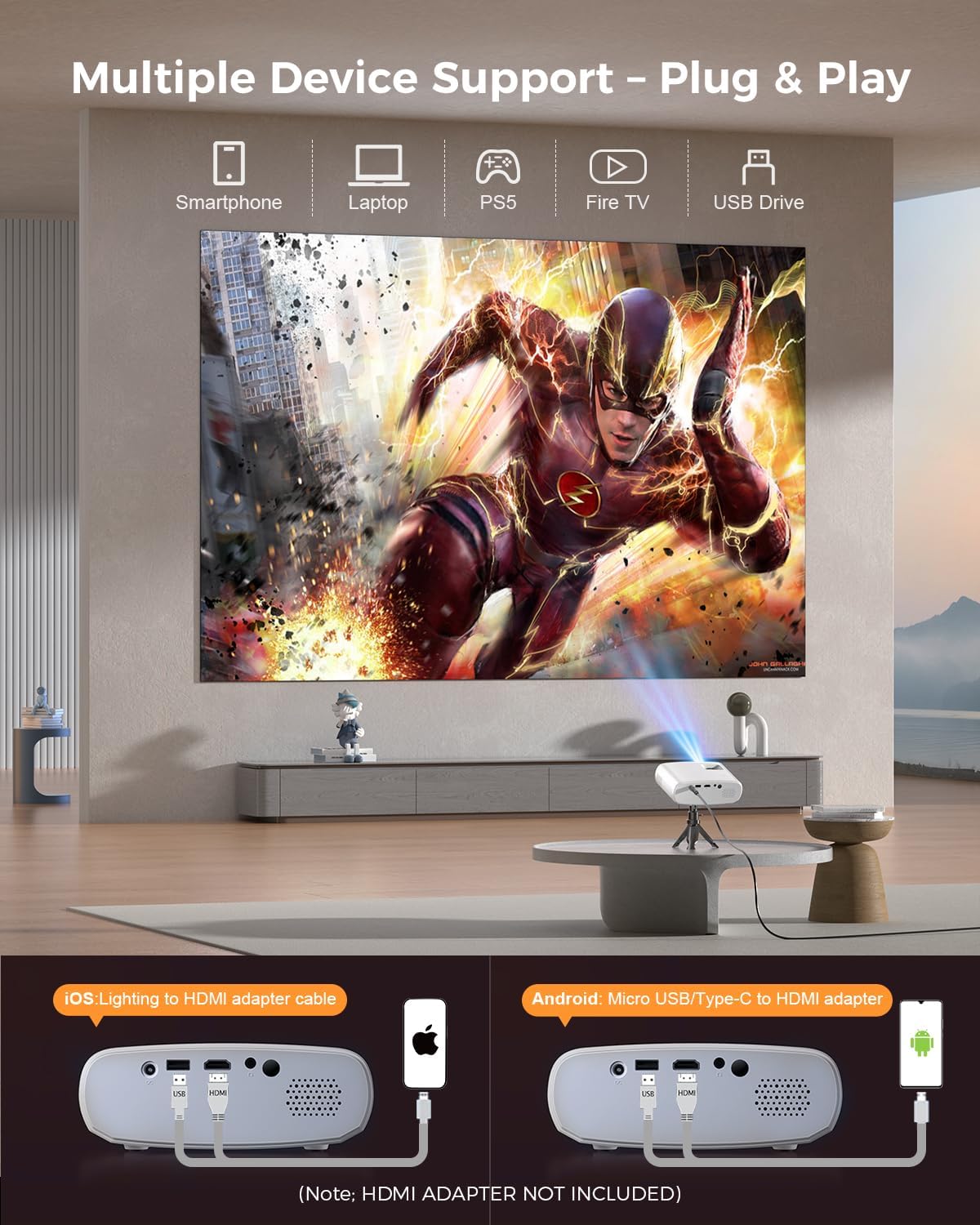
Image 5.4: The projector supports multiple devices via HDMI and USB. Note that an HDMI adapter is required for direct smartphone connection (not included).
5.5 إخراج الصوت
The projector has a built-in HIFI speaker. For external audio, connect headphones or external speakers to the Audio Out port.
6. الصيانة
6.1 التنظيف
- عدسة: Use a soft, lint-free cloth or lens cleaning paper. Avoid abrasive materials.
- Casing: امسح جهاز العرض جasing with a soft, dry cloth. Do not use liquid cleaners or solvents.
- تهوية: تأكد من أن فتحات التهوية خالية من الغبار والعوائق لمنع ارتفاع درجة الحرارة.
6.2 التخزين
When not in use, store the projector in a cool, dry place, away from direct sunlight and extreme temperatures. Use the original packaging or a protective bag to prevent dust accumulation.
7. استكشاف الأخطاء وإصلاحها
| مشكلة | السبب المحتمل | حل |
|---|---|---|
| لم يتم عرض أي صورة | كابل الطاقة غير موصول بإحكام؛ مصدر الإدخال غير صحيح؛ الجهاز غير موصول بشكل صحيح. | تحقق من توصيل الطاقة؛ حدد مصدر الإدخال الصحيح؛ أعد توصيل كابل HDMI/USB. |
| الصورة ضبابية | لم يتم ضبط التركيز؛ جهاز العرض قريب جدًا/بعيد جدًا عن الشاشة. | اضبط حلقة التركيز؛ اضبط مسافة الإسقاط. |
| لا يوجد صوت | مستوى الصوت منخفض جدًا؛ تم كتم الصوت؛ جهاز الصوت الخارجي غير متصل. | زيادة مستوى الصوت؛ إلغاء كتم الصوت؛ التحقق من اتصالات الصوت الخارجية. |
| جهاز التحكم عن بعد لا يعمل | البطاريات ضعيفة/نفدت؛ وجود عائق بين جهاز التحكم عن بعد وجهاز العرض. | استبدل البطاريات؛ تأكد من وجود خط رؤية واضح لجهاز استقبال الأشعة تحت الحمراء. |
| Cannot play Netflix/Hulu/Prime Video | HDCP copyright protection. | Use an external streaming device like Amazon Fire Stick or Roku Stick (not included). |
8. المواصفات
| ميزة | التفاصيل |
|---|---|
| نموذج | BL128MINI |
| ماركة | إليفاس |
| دقة العرض | 1920 × 1080 (1080P Full HD) |
| تكنولوجيا الاتصال | HDMI، USB، AV، مخرج صوت |
| المميزات الخاصة | HDMI Connectivity, Portable, Built-in Speakers, Detachable Tripod |
| الاستخدام الموصى به | داخلي/خارجي |
| وزن العنصر | 1.96 رطل (حوالي 0.89 كجم) |
| أبعاد المنتج | 6 × 4.4 × 2.4 بوصة (حوالي 15.2 × 11.2 × 6.1 سم) |
9. الضمان والدعم
ELEPHAS projectors are certified with CE, FCC, and RoHS standards.
- Factory Support: We provide 3-years factory support for this product.
- الدعم الفني: يتوفر الدعم الفني مدى الحياة.
- خدمة العملاء: 24/7 professional service is provided.
- الإرجاعات: A 30-day return or exchange policy is in place.
For further assistance, please refer to the contact information provided on the product packaging or the official ELEPHAS webموقع.

Image 9.1: ELEPHAS offers comprehensive customer support, including 24/7 professional service, a 30-day return policy, and lifetime technical support.