
1. المقدمة
شكرا لك على الشراءasing the DEPSTECH DS620-TL Triple Lens Endoscope Camera. This device is designed for visual inspection in hard-to-reach areas, featuring a 1080P triple-lens camera, a 5-inch IPS monitor, and an IP67 waterproof semi-rigid cable. This manual provides essential information for safe and effective use of your endoscope camera.
2. انتهى المنتجview
2.1 الميزات الرئيسية
- 1080P Triple Lens Camera: Equipped with three cameras (front, side B, side C) for multi-angle inspection.
- 5-inch IPS Monitor: Provides clear, real-time images with excellent color reproduction.
- مسبار مقاوم للماء بمعيار IP67: The 7.9mm diameter semi-rigid cable is waterproof, suitable for wet environments.
- أضواء LED قابلة للتعديل: Features 8+1+1 high-brightness LED chips with adjustable intensity for optimal illumination.
- 5M Semi-Rigid Cable: Offers flexibility and durability for navigating various spaces.
- بطارية قابلة لإعادة الشحن: Built-in battery provides approximately 2-3 hours of continuous operation.
2.2 محتويات العبوة
تأكد من وجود جميع العناصر في العبوة:
- DEPSTECH DS620-TL Endoscope Camera
- كابل شحن من النوع C
- ملحقات الخطاف والمغناطيس
- Storage Drawstring Bag
- دليل المستخدم

الشكل 2.2: الملحقات المرفقة والوحدة الرئيسية.
3. معلومات السلامة
- لا تستخدم الجهاز في بيئات تحتوي على غازات قابلة للاشتعال أو الانفجار.
- احتفظ بالجهاز بعيدًا عن المجالات الكهرومغناطيسية القوية.
- Avoid direct exposure of the camera lens to strong light sources.
- لا تحاول تفكيك الجهاز أو تعديله. يجب أن تتم عمليات الإصلاح فقط بواسطة فنيين معتمدين.
- تأكد من شحن الجهاز بالكامل قبل الاستخدام لتجنب الانقطاعات أثناء الفحص.
- Clean the probe and lens after each use, especially after contact with liquids or corrosive substances.
4. الإعداد
4.1 شحن الجهاز
Connect the provided Type-C charging cable to the device's charging port and a suitable USB power adapter (not included). The charging indicator will show the charging status. A full charge typically takes 2-3 hours.
4.2 إدخال بطاقة Micro SD
To save photos and videos, a Micro SD card (Class 10/Class 10 or higher, 8-32GB) is required (not included). Locate the Micro SD card slot on the side of the monitor unit and insert the card until it clicks into place.
4.3 إرفاق الملحقات
The endoscope comes with hook and magnet attachments. These can be screwed onto the tip of the camera probe for retrieving small objects or maneuvering in tight spaces.

Figure 4.3: Magnet and hook attachments for the probe.
5. تعليمات التشغيل
5.1 تشغيل/إيقاف التشغيل
Press and hold the power button (usually located on the side or front panel) for a few seconds to turn the device on. The screen will display the DEPSTECH logo. To power off, press and hold the power button again.

Figure 5.1: Monitor button layout and functions.
5.2 تبديل العدسات
The DS620-TL features a triple-lens system. Press the lens switch button (often labeled with a camera icon or 'M') to cycle between Front Camera A, Side Camera B, and Side Camera C. This allows for comprehensive viewing without repositioning the probe.

Figure 5.2: Triple lens camera detail.
5.3 ضبط سطوع LED
Use the up/down arrow buttons on the monitor to adjust the brightness of the LED lights on the camera probe. There are multiple levels of brightness to suit different inspection environments.
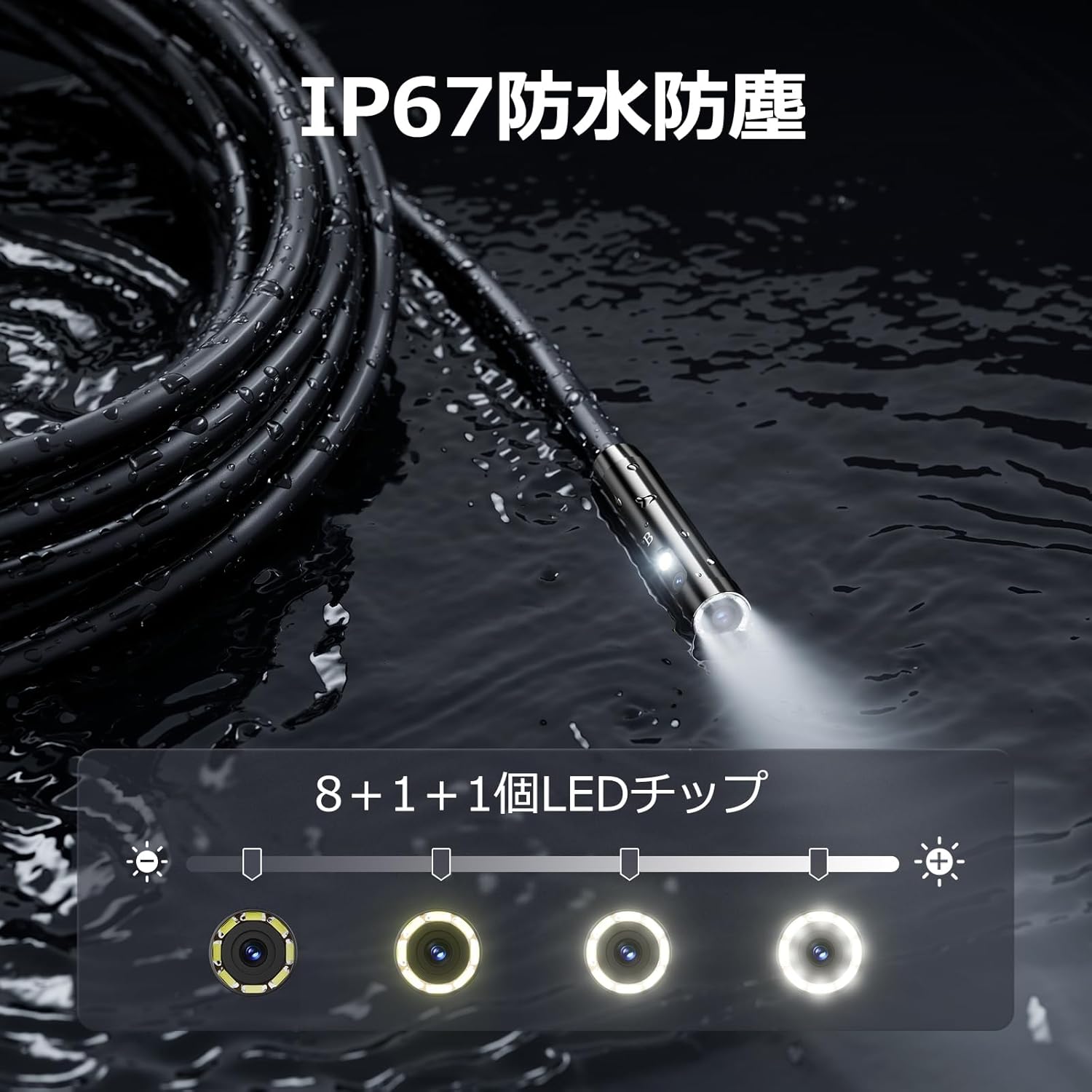
Figure 5.3: IP67 waterproof probe with adjustable LED illumination.
5.4 التقاط الصور وتسجيل مقاطع الفيديو
Press the photo/video button (usually a camera icon) to capture a still image. To record video, press and hold the photo/video button; press again to stop recording. Ensure a Micro SD card is inserted to save your media.

Figure 5.4: Monitor interface for photo and video capture.
5.5 دوران الشاشة
Press the screen rotation button (often a circular arrow icon) to rotate the image on the monitor by 180 degrees. This is useful when the probe is in an inverted position.
5.6 التطبيقات العملية
The DS620-TL is suitable for various tasks including home appliance maintenance, pipe inspection, wall wiring checks, and automotive repairs.

Figure 5.6: Various inspection scenarios for the endoscope.
5.7 فيديو توضيحي للمنتج
Video 5.7: A demonstration of the DEPSTECH DS620-TL endoscope camera in use, showcasinشرح ميزاته وتطبيقاته.
6. الصيانة
6.1 تنظيف المسبار والعدسة
After each use, especially in dirty or wet conditions, gently wipe the camera probe and lens with a soft, dry cloth. For stubborn dirt, a slightly damp cloth can be used, followed by drying. Do not use abrasive cleaners or solvents.
6.2 التخزين
Store the endoscope camera in a cool, dry place, away from direct sunlight and extreme temperatures. Use the provided drawstring bag for protection. Ensure the cable is coiled neatly without sharp bends.
6.3 العناية بالبطارية
To prolong battery life, avoid fully discharging the device frequently. If storing for an extended period, charge the battery to approximately 50% every three months.
7. استكشاف الأخطاء وإصلاحها
7.1 لا توجد صورة على الشاشة
- تأكد من تشغيل الجهاز وشحنه بالكامل.
- Check if the camera cable is securely connected to the monitor unit.
- اضبط سطوع مصابيح LED لضمان الإضاءة الكافية في منطقة الفحص.
7.2 Cannot Record Photos/Videos
- Verify that a compatible Micro SD card (Class 10/Class 10 or higher, 8-32GB) is inserted correctly.
- تحقق مما إذا كانت بطاقة الذاكرة الصغيرة (Micro SD) تحتوي على مساحة خالية كافية.
- Ensure the Micro SD card is not locked (read-only).
- Try formatting the Micro SD card (this will erase all data).
7.3 الجهاز لا يشحن
- Ensure the Type-C charging cable is properly connected to both the device and the power source.
- Try using a different USB power adapter or charging cable.
- تحقق من منفذ الشحن بحثًا عن أي حطام أو تلف.
If you encounter issues not listed here or if the problem persists, please contact DEPSTECH customer support.
8. المواصفات
| ميزة | مواصفة |
|---|---|
| ماركة | ديبستيك |
| اسم الموديل | DS620TL-JP |
| لون | أسود |
| مستوى مقاومة الماء | IP67 |
| نوع الوسائط | SD Memory Card (8-32GB, Class 10/Class 10 or higher recommended) |
| File شكل | MP4, MOV, AVI, JPEG, RAW |
| تنسيق التقاط الفيديو | إم بي 4 |
| Viewنوع الباحث | اي بي اس |
| نوع المستشعر | سيموس |
| دقة مستشعر الصورة | 2.1 ميجا بكسل |
| وظيفة التركيز | التركيز الثابت |
| التركيز التلقائي | لا |
| متوسط عمر البطارية | 2 ساعة |
| المكونات المضمنة | Type-C Cable, Attachments, Storage Drawstring Bag |
| ضمان الشركة المصنعة | 2 سنة |
| بلد المنشأ | الصين |
9. الضمان والدعم
9.1 ضمان الشركة المصنعة
The DEPSTECH DS620-TL comes with a 24-month manufacturer warranty. Your order number serves as proof of purchase for warranty claims.
9.2 دعم العملاء
For any inquiries, technical assistance, or warranty claims, please contact our dedicated support team:
- بريد إلكتروني: support@depstech.com
- وقت الاستجابة: We aim to respond to all inquiries within 24 hours. For requests submitted on weekends or holidays, a response will be provided on the next business day.

Figure 9.2: DEPSTECH support details.