
1. المقدمة
This manual provides essential information for setting up, operating, and maintaining your ASUS NUC 15 Pro Mini Desktop Computer. This compact and powerful AI Mini PC features an Intel Series 2 Core Ultra 7 255H processor, Intel Arc 140T GPU, 32GB DDR5 RAM, and a 1TB PCIe SSD, running on Windows 11 Pro. It is designed for demanding tasks such as AI computing, video editing, 3D rendering, and gaming, offering 8K/Quad 4K HDR display support and advanced connectivity options like Thunderbolt 4 and WiFi 7.
2. محتويات العبوة
تأكد من وجود جميع العناصر في الحزمة الخاصة بك:
- ASUS NUC 15 Pro Mini PC
- محول التيار المتردد وسلك الطاقة
- VESA Mount
- لوحة المفاتيح اللاسلكية
- ماوس لاسلكي
- دليل المستخدم (هذا المستند)
3. انتهى المنتجview
3.1 الميزات الرئيسية
- المعالج: Intel Series 2 Core Ultra 7 255H (16 cores, 16 threads, up to 5.1 GHz, 24 MB Intel Smart Cache)
- الرسومات: Integrated Intel Arc 140T GPU
- ذاكرة: 32GB DDR5 RAM (upgradeable to 128GB)
- تخزين: 1TB PCIe 4.0 SSD (upgradeable to 48TB)
- نظام التشغيل: ويندوز 11 برو
- دعم العرض: Up to 8K or Quad 4K HDR via HDMI 2.1 and Thunderbolt 4
- الاتصال: Wi-Fi 7, Bluetooth 5.4, 2.5G Gigabit Ethernet
- الموانئ: 1x USB 3.2 Gen2 x 2 Type-C, 3x USB 3.2 Gen2 Type-A, 1x USB 2.0 Gen2 Type-A, 2x HDMI 2.1, 2x Thunderbolt 4, 1x 2.5G Gigabit Ethernet
3.2 Processor and AI Capabilities
The Intel Series 2 Core Ultra 7 255H processor, with its 16 cores and 16 threads, provides robust performance for demanding applications. The integrated Intel Arc 140T GPU and built-in AI Acceleration Engine enhance AI computing, video editing, and 3D rendering tasks.

الشكل 3.2.1: زيادةview of the Intel Core Ultra 7 255H processor specifications, highlighting 16 cores, 16 threads, 24 MB cache, 96 TOPS, and 5.1 GHz max turbo frequency.

الشكل 3.2.2: Illustration of the Neural Processing Unit (NPU) for on-device AI acceleration, supporting applications like Midjourney, DeepSeek, Photoshop, and Premiere Pro.
3.3 المنافذ والاتصال
The ASUS NUC 15 Pro offers a comprehensive array of ports for connecting various peripherals and displays.

الشكل 3.3.1: Diagram illustrating the various ports on the ASUS NUC 15 Pro, including USB 3.2 Gen2 x 2 Type-C, USB 3.2 Gen2 Type-A, USB 2.0 Type-A, HDMI 2.1, Thunderbolt 4, and 2.5G Ethernet.
4. دليل الإعداد
4.1 الاتصال الأولي
- توصيل الشاشة: Connect your monitor(s) to the HDMI 2.1 or Thunderbolt 4 ports. The system supports up to four 4K HDR displays or one 8K display.
- توصيل الأجهزة الطرفية: Plug in the wireless keyboard and mouse receiver into an available USB port. Connect any other USB devices as needed.
- توصيل الطاقة: Connect the AC adapter to the DC-In port on the mini PC, then plug the power cord into an electrical outlet.
- إتصال شبكة: For wired internet, connect an Ethernet cable to the 2.5G Gigabit Ethernet port. For wireless internet, ensure your Wi-Fi network is available.
- تشغيل الطاقة: اضغط على زر الطاقة الموجود في الجزء الأمامي من الجهاز.

الشكل 4.1.1: Visual representation of the ASUS NUC 15 Pro connected to multiple displays, demonstrating its support for quad 4K or 8K display configurations via HDMI and Thunderbolt ports.
4.2 إعداد نظام التشغيل
Upon first boot, the Windows 11 Pro operating system will guide you through the initial setup process, including language selection, network configuration, and user account creation. Follow the on-screen instructions to complete the setup.
5. تعليمات التشغيل
5.1 الاستخدام العام
Your ASUS NUC 15 Pro is ready for a wide range of applications, from everyday computing to intensive tasks.
- تعدد المهام: Leverage the powerful Intel Core Ultra 7 processor for seamless multitasking across various applications.
- AI Computing: Utilize the integrated AI capabilities for enhanced performance in AI-driven software.
- شاشات عالية الدقة: Connect multiple high-resolution monitors for an expansive workspace or immersive entertainment.
5.2 الاتصال
The mini PC offers advanced connectivity options for fast and reliable data transfer and network access.
- واي فاي 7: للوصول إلى الإنترنت اللاسلكي عالي السرعة.
- بلوتوث شنومكس: For connecting wireless peripherals such as headphones, speakers, and game controllers.
- ثندربولت 4: Provides high-bandwidth connections for external GPUs, high-speed storage, and display output.
- 2.5G Ethernet: For ultra-fast wired network connections.

الشكل 5.2.1: Diagram highlighting the advanced connectivity features of the ASUS NUC 15 Pro, including Wi-Fi 7, Bluetooth 5.4, and 2.5G LAN for uninterrupted network performance.
5.3 سيناريوهات الاستخدام
The ASUS NUC 15 Pro is versatile and suitable for various applications:
- Graphic Design / Video Processing: Utilize the powerful CPU and GPU for demanding creative tasks.
- الألعاب: Enjoy a smooth gaming experience with the Intel Arc 140T GPU.
- وحدة التخزين المتصلة بالشبكة (NAS): Its compact size and connectivity make it suitable for home server applications.
- المسرح المنزلي: Connect to your TV for 8K or 4K HDR media playback.

الشكل 5.3.1: Examples of how the ASUS NUC 15 Pro can be used, including graphic design, video processing, gaming, network attached storage (NAS), and as a home theater PC.
6. الصيانة والترقيات
6.1 ترقيات الذاكرة والتخزين
The ASUS NUC 15 Pro features a tool-free design for easy upgrades of RAM and SSD.
- كبش: Supports 16GB–64GB DDR5 RAM, upgradeable to 128GB.
- SSD: Supports 512GB–2TB PCIe 4.0 SSDs, upgradeable to 48TB.
- إجراء: Refer to the detailed instructions in the physical user manual for safe access and installation of components.
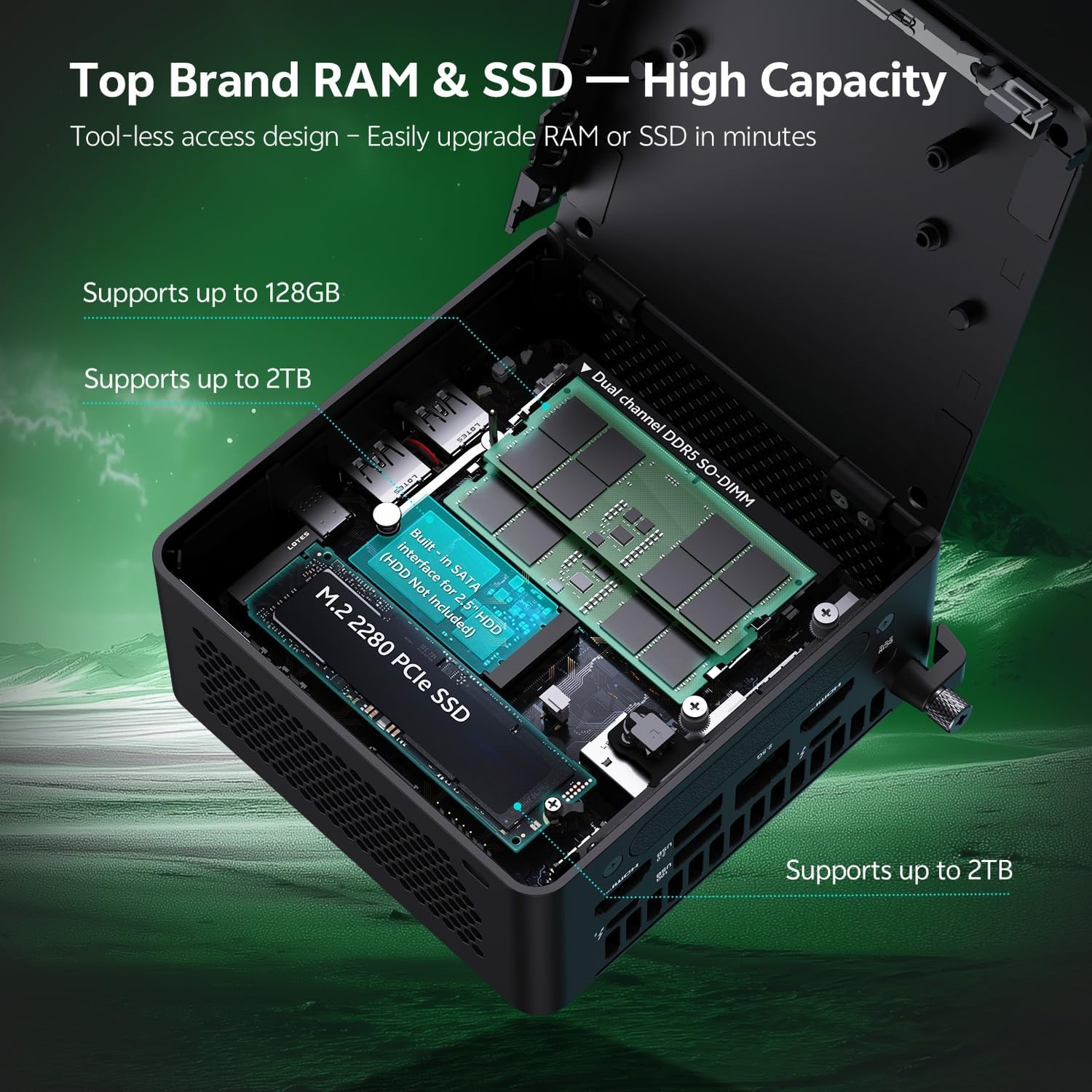
الشكل 6.1.1: Internal layout of the ASUS NUC 15 Pro, illustrating the dual-channel DDR5 SO-DIMM slots for RAM and the M.2 2280 PCIe SSD slot, both designed for tool-less access and upgrades.
6.2 نظام التبريد
The device incorporates a Smart Silent Cooling System with dual heat pipes and a large fan to ensure efficient heat dissipation and stable performance.
- تأكد من وجود تهوية مناسبة حول الكمبيوتر الصغير لمنع ارتفاع درجة الحرارة.
- Periodically clean dust from the vents using compressed air to maintain optimal cooling efficiency.

الشكل 6.2.1: انفجرت view diagram of the ASUS NUC 15 Pro's Smart Silent Cooling System, showing dual heat pipes and a large fan designed for efficient thermal management and multi-ventilation.
7. استكشاف الأخطاء وإصلاحها
If you encounter issues with your ASUS NUC 15 Pro, refer to the following common troubleshooting steps:
- لا يوجد طاقة:
- Ensure the AC adapter is securely connected to both the mini PC and a working power outlet.
- Verify the power cord is not damaged.
- لا يوجد عرض:
- Check that the display cable (HDMI or Thunderbolt) is firmly connected to both the mini PC and the monitor.
- تأكد من تشغيل الشاشة وضبطها على مصدر الإدخال الصحيح.
- حاول استخدام كابل عرض أو شاشة مختلفة إذا كانت متوفرة.
- لا يوجد اتصال بالإنترنت:
- بالنسبة للاتصالات السلكية، تحقق من حالة كابل الإيثرنت وجهاز التوجيه.
- بالنسبة لشبكة Wi-Fi، تأكد من تفعيل Wi-Fi في إعدادات Windows وأنك متصل بالشبكة الصحيحة.
- Restart your router/modem and the mini PC.
- الأجهزة الطرفية لا تستجيب:
- Ensure wireless keyboard/mouse receivers are properly inserted into a USB port.
- Check battery levels for wireless peripherals.
- Try connecting peripherals to different USB ports.
8. المواصفات
| ميزة | التفاصيل |
|---|---|
| ماركة | أسوس |
| اسم الموديل | RNUC15HU7 |
| نظام التشغيل | ويندوز 11 برو |
| نموذج وحدة المعالجة المركزية | إنتل كور ألترا 7 255H |
| سرعة وحدة المعالجة المركزية | حتى 5.1 جيجاهرتز |
| معالج الرسوميات المساعد | Intel Arc 140T GPU |
| حجم ذاكرة الوصول العشوائي المثبتة | 32 GB DDR5 (Upgradeable to 128 GB) |
| سعة تخزين الذاكرة | 1 TB PCIe SSD (Upgradeable to 48 TB) |
| واجهة الأجهزة | HDMI, Thunderbolt 4, USB 2.0 Type A, USB 3.2 Gen 2 |
| تكنولوجيا الاتصال | Bluetooth 5.4, Wi-Fi 7, Ethernet (2.5G) |
| واجهة إخراج الفيديو | HDMI 2.1, Thunderbolt 4 |
| أبعاد العنصر (الطول × العرض × الارتفاع) | 4.6 × 4.4 × 2.1 بوصة |
| وزن | 1.36 رطل |
| لون | أسود |
| رمز المنتج الموحد | 197105156340 |
9. الضمان والدعم
9.1 معلومات الضمان
Your ASUS NUC 15 Pro Mini Desktop Computer comes with a 12-month warranty. This warranty covers manufacturing defects and issues arising from normal use. Please retain your proof of purchase for warranty claims.
Note: The manufacturer box is opened by professional engineers for customizing and testing. Factory defects and blemishes are significantly reduced by this in-depth inspection and testing process.
9.2 الدعم الفني
For technical assistance, troubleshooting beyond this manual, or warranty inquiries, please contact ASUS customer support.
- قم بزيارة موقع دعم ASUS الرسمي website for drivers, FAQs, and contact information.
- Have your product model (RNUC15HU7) and serial number ready when contacting support.