
GOOLOO GT6000 Jump Starter & DS200 OBD2 Scanner User Manual
Model: GT6000 & DS200
1. المقدمة
This manual provides detailed instructions for the safe and effective use of your GOOLOO GT6000 6000A Jump Starter and GOOLOO DEEPSCAN DS200 OBD2 Diagnostic Scanner. Please read this manual thoroughly before operating the devices and retain it for future reference.
The GOOLOO GT6000 is a powerful portable jump starter designed to start vehicles with dead batteries, while also serving as a portable power bank. The GOOLOO DEEPSCAN DS200 is a compact OBD2 scanner that connects wirelessly to your smartphone, providing comprehensive vehicle diagnostics and maintenance functions.

Image 1.1: The GOOLOO GT6000 Jump Starter and GOOLOO DEEPSCAN DS200 OBD2 Scanner.
2. معلومات هامة حول السلامة
Always observe the following safety precautions when using the GOOLOO GT6000 Jump Starter and DS200 OBD2 Scanner to prevent injury or damage to the devices or your vehicle.
- اقرأ كافة التعليمات قبل الاستخدام.
- يحفظ بعيدًا عن متناول الأطفال.
- Do not expose the devices to rain or extreme temperatures.
- لا تقم بتفكيك الأجهزة أو تعديلها.
- تأكد من التهوية المناسبة أثناء الاستخدام والشحن.
- ارتدِ واقيات للعينين عند العمل مع بطاريات المركبات.
- تجنب حدوث ماس كهربائي في جهاز تشغيل السيارةamps.
- Use the jump starter only for 12V lead-acid batteries.

Image 2.1: The GT6000 Jump Starter features multiple safety protections including over-charge, short-circuit, and reverse-polarity protection.
3. GOOLOO GT6000 Jump Starter
3.1. انتهى المنتجview
The GT6000 is a high-capacity jump starter with a 6000A peak current, capable of starting all gas engines and diesel engines up to 12L. It also functions as a portable power bank with 100W bi-directional fast charging.

Image 3.1: Diagram showing the ports and controls of the GT6000 Jump Starter, including the BOOST button, jump cable socket, DC port, USB output ports, and IN/OUT PD100W port.

Image 3.2: The 3.2-inch LED display on the GT6000 shows battery level, charging power, low current mode, 'Ready to Start' status, low temperature reminder, and battery clips reversed warning.
3.2. شحن جهاز GT6000
Before first use, fully charge the GT6000. It supports 100W bi-directional fast charging. A full charge from 0-100% takes approximately 1.4 hours.
- Connect the provided USB-C cable to the IN/OUT PD100W port on the GT6000.
- Connect the other end of the cable to a compatible 100W USB-C power adapter (a 100W car charger is included).
- The LED display will show the charging status and battery percentage.

Image 3.3: The GT6000 charging, indicating 100W super fast charging capabilities.
3.3. Operating the Jump Starter
Follow these steps to jump-start a vehicle with a dead battery:
- إدراج: Insert the smart jumper cable plug into the jump cable socket on the GT6000. Ensure a secure connection.
- يتصل: قم بتوصيل السلك الأحمرamp إلى الطرف الموجب (+) لبطارية السيارة والقطعة السوداءamp إلى الطرف السالب (-). تأكد من أن clamps are firmly attached. If the LED display shows "Battery Clips Reversed", recheck the connections.
- يبدأ: Once the GT6000 display shows "READY", start your car engine. If the engine does not start immediately, wait 20-30 seconds and try again. Do not attempt more than 3 consecutive jump starts.
- يزيل: بمجرد بدء تشغيل السيارة، افصل القفل.amps from the car battery first, then remove the jumper cable from the GT6000.

Image 3.4: Visual guide for the three steps to jump start your vehicle using the GT6000.
3.4. الاستخدام كبنك طاقة
The GT6000 can charge various electronic devices via its USB output ports and the bi-directional USB-C port.
- Connect your device's charging cable to one of the GT6000's output ports (5V/2.4A, 5V/9V/12V, or IN/OUT PD100W USB-C).
- The GT6000 will automatically begin charging your device.

Image 3.5: The GT6000 functioning as a portable power bank, charging a laptop and smartphone.
3.5. وظائف مصباح LED اليدوي
The GT6000 includes an integrated LED flashlight with multiple modes:
- الإضاءة العادية: اضغط مع الاستمرار على زر الطاقة لمدة 3 ثوانٍ لتشغيل المصباح.
- ضوء إحترافي: اضغط زر التشغيل مرة أخرى ضغطة قصيرة للتبديل إلى وضع الوميض.
- إشارة استغاثة: Short press the power button a third time to activate the SOS signal mode.
- إيقاف: Short press the power button a fourth time or press and hold for 3 seconds to turn off the flashlight.
3.6. GT6000 Specifications
| ميزة | التفاصيل |
|---|---|
| ذروة التيار | 6000 أمبير |
| توافق المحرك | All Gas, up to 12.0L Diesel |
| سعة البطارية | 27000 mAh (99.9Wh) |
| الشحن السريع | 100W Bi-directional (USB-C) |
| عرض | 3.2 بوصة LED |
| الحماية | 10 SuperSafe Protections (Over-Charge, Short-Circuit, Reverse-Polarity, etc.) |
| ضوء LED | 400 Lumens (Flashlight, Strobe, SOS) |
| وقت الاستعداد | حتى 24 أشهر |
4. GOOLOO DEEPSCAN DS200 OBD2 Scanner
4.1. انتهى المنتجview
The DS200 is a wireless Bluetooth OBD2 scanner designed for comprehensive vehicle diagnostics. It connects to your smartphone via an app and supports full system diagnostics, bidirectional control, and various maintenance services.
4.2. Setup & App Installation
To begin using your DS200 scanner, you need to download and install the GOOLOO DEEPSCAN app on your smartphone.
- تحميل التطبيق: بحث عن "GOOLOO DEEPSCAN" in the Apple App Store (for iOS devices) or Google Play Store (for Android devices).
- تثبيت التطبيق: قم بتحميل وتثبيت التطبيق.
- التسجيل/تسجيل الدخول: Follow the in-app instructions to register an account or log in if you already have one.

Image 4.1: The DS200 scanner and instructions for downloading the GOOLOO DEEPSCAN app from app stores.
4.3. الاتصال بسيارتك
The DS200 connects to your vehicle's OBD2 port, typically located under the dashboard on the driver's side.
- Locate your vehicle's 16-pin OBD2 port.
- Plug the DS200 scanner firmly into the OBD2 port. The scanner will power on automatically.
- Turn on your vehicle's ignition (engine off or running, depending on the diagnostic task).
- Open the GOOLOO DEEPSCAN app on your smartphone and follow the prompts to connect to the DS200 via Bluetooth.

Image 4.2: The DS200 scanner connected to a vehicle's OBD2 port, displaying diagnostic information on a smartphone.
4.4. وظائف التشخيص الأساسية
Once connected, the DS200 app provides access to standard OBD2 functions:
- قراءة الرموز: استرجاع رموز أعطال التشخيص (DTCs) من وحدة التحكم الإلكترونية (ECU) الخاصة بمحرك السيارة.
- مسح الرموز: Erase DTCs and turn off the Check Engine Light (MIL) after repairs.
- البيانات الحية: View real-time sensor data, such as engine RPM, vehicle speed, coolant temperature, and fuel system status.
- أنا / م الاستعداد: Check the status of emission-related monitors to ensure the vehicle is ready for an emissions test.
- تجميد بيانات الإطار: View a snapshot of sensor data recorded when an emission-related fault occurred.
- معلومات السيارة: Retrieve vehicle identification number (VIN), calibration ID, and calibration verification numbers (CVN).
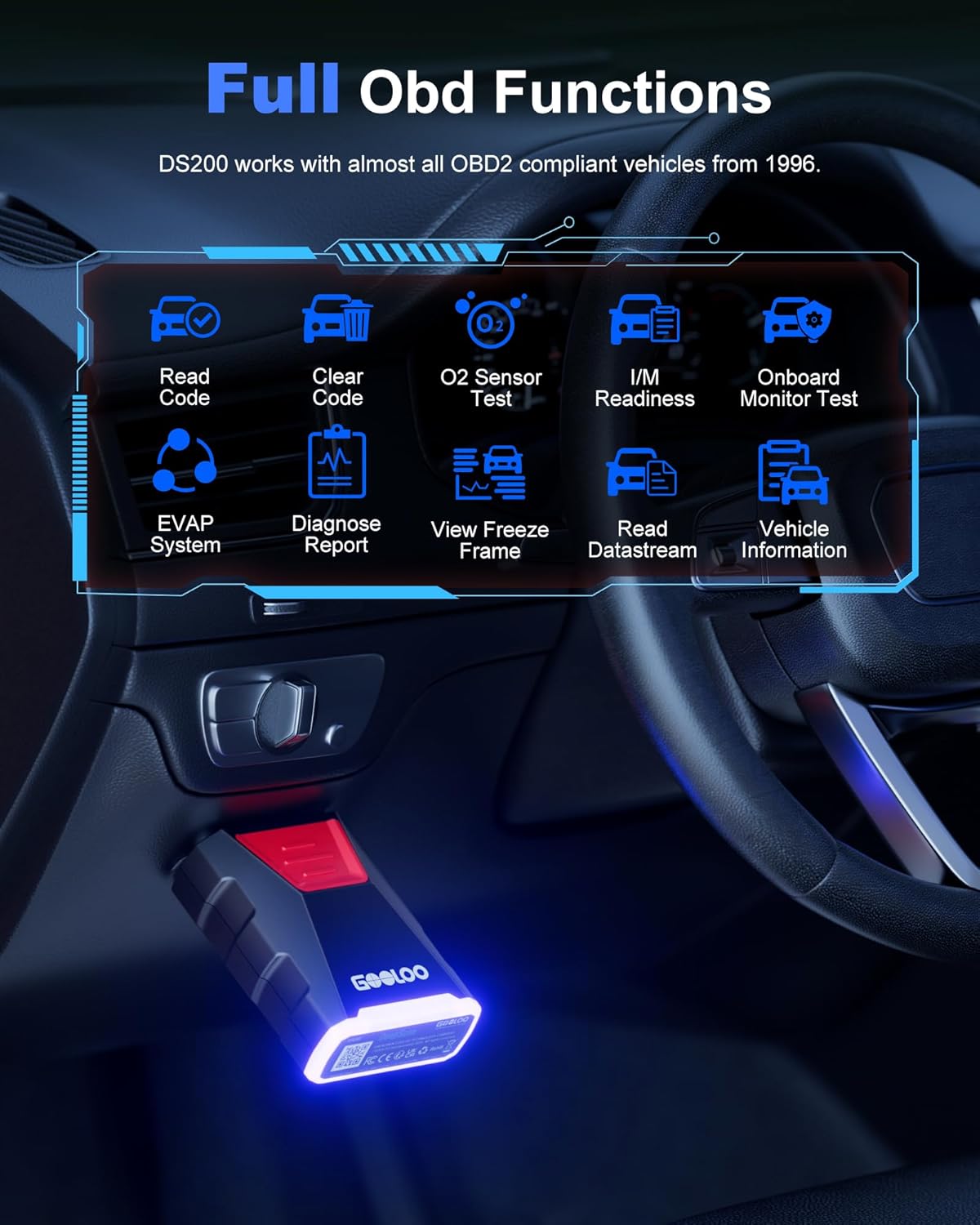
Image 4.3: The DS200 app interface displaying various full OBD functions like Read Code, Clear Code, O2 Sensor Test, and Live Data.
4.5. وظائف التشخيص المتقدمة
The DS200 offers advanced features for in-depth vehicle analysis:
- تشخيص النظام الكامل: Scan all available electronic control units (ECUs) in the vehicle, including Engine, Transmission, ABS, SRS, BCM, etc., to read and clear fault codes.
- التحكم ثنائي الاتجاه: Perform active tests to control various vehicle components (e.g., turn on/off wipers, headlights, fuel pump) to verify their functionality.
- Maintenance Services: Access common maintenance functions such as Oil Reset, Throttle Adaptation, EPB Reset, Steering Angle Resets, DPF Regeneration, ABS Bleeding, BMS Reset, and Airbag Reset.
- Vehicle Performance Test: Conduct tests to evaluate vehicle performance metrics like acceleration time, top speed, and engine load.

Image 4.4: The DS200 app interface listing 8 common maintenance services available for various vehicle systems.

Image 4.5: The DS200 app demonstrating bidirectional control, allowing users to troubleshoot faults by controlling components like wipers, mirrors, and headlights.
4.6. DS200 Specifications
| ميزة | التفاصيل |
|---|---|
| الاتصال | بلوتوث 5.0 |
| الأجهزة المدعومة | iOS and Android smartphones/tablets |
| بروتوكولات obd2 | All standard OBD2 protocols, including FCA & CAN-FD |
| الوظائف | Full System Diagnostics, Bidirectional Control, 8 Maintenance Services, Full OBD Functions, Real-time Data Monitoring, Vehicle Performance Test |
| تغطية المركبات | Most OBD2 compliant vehicles from 1996 onwards |
5. الرعاية والصيانة
Proper care ensures the longevity and optimal performance of your GOOLOO devices.
- تنظيف: Use a soft, dry cloth to clean the exterior of both devices. Do not use abrasive cleaners or solvents.
- تخزين: Store the devices in a cool, dry place away from direct sunlight and extreme temperatures. For the GT6000, ensure it is charged to at least 50% before long-term storage and recharge every 3-6 months.
- التعامل: تجنب إسقاط الأجهزة أو تعريضها لصدمات قوية.
- الكابلات: Inspect jumper cables and OBD2 connector for any damage before each use. Replace if frayed or damaged.
6. استكشاف الأخطاء وإصلاحها
6.1. GT6000 Jump Starter Issues
- الجهاز لا يعمل: تأكد من شحن الجهاز. اضغط مع الاستمرار على زر التشغيل لبضع ثوانٍ.
- السيارة لا تعمل:
- تأكد من أن clampيتم توصيلها بإحكام بأطراف البطارية الصحيحة.
- Ensure the GT6000 has sufficient charge.
- If the battery is severely discharged, press the BOOST button on the GT6000 (if available and safe to do so, refer to specific product instructions for boost mode).
- The vehicle battery might be completely dead or damaged and require replacement.
- "Battery Clips Reversed" error: افصل clamps and reconnect them to the correct positive (+) and negative (-) terminals.
6.2. DS200 OBD2 Scanner Issues
- الماسح الضوئي لا يعمل: Ensure the DS200 is fully plugged into the vehicle's OBD2 port and the vehicle's ignition is on.
- غير قادر على الاتصال عبر البلوتوث:
- تأكد من تمكين Bluetooth على هاتفك الذكي.
- Restart the GOOLOO DEEPSCAN app.
- Unplug and re-plug the DS200 from the OBD2 port.
- Check if the app requires location permissions, as some Bluetooth functions do.
- No communication with ECU:
- تأكد من تشغيل مفتاح تشغيل السيارة.
- Ensure the DS200 is securely connected to the OBD2 port.
- Confirm your vehicle is OBD2 compliant (most vehicles from 1996 onwards).
- Try scanning a different vehicle to rule out scanner malfunction.
7. الضمان ودعم العملاء
GOOLOO products are designed for reliability and performance. For warranty information, technical support, or any questions regarding your GT6000 Jump Starter or DS200 OBD2 Scanner, please refer to the official GOOLOO webالموقع أو اتصل بخدمة العملاء الخاصة بهم مباشرة.
Please have your product model number (GT6000, DS200) and purchase information ready when contacting support.