
مقدمة
This manual provides essential information for setting up, operating, maintaining, and troubleshooting your HP 15.6-inch FHD IPS Touchscreen Laptop. Please read this guide thoroughly to ensure optimal performance and longevity of your device. This laptop features an AMD Ryzen 7 7730U processor, 64GB DDR4 RAM, 2.28TB storage (2TB SSD + 288GB Docking Station Set), AMD Radeon Graphics, and runs on Windows 11 Pro.
يثبت
Unpacking and Initial Power-On
Carefully remove all components from the packaging. Connect the power adapter to the laptop and a power outlet. Press the power button to turn on the laptop. Follow the on-screen instructions to complete the initial Windows 11 Pro setup.
الملحقات المتضمنة
Your laptop package includes the following accessories:
- 1x 7-in-1 Docking Station with 256GB Storage
- 1x 32GB MicroSD Card with Adapter
- كابل بيانات من النوع C واحد
- 1x 3-in-1 Charging Cable
- 1x Suede Cleaning Cloth
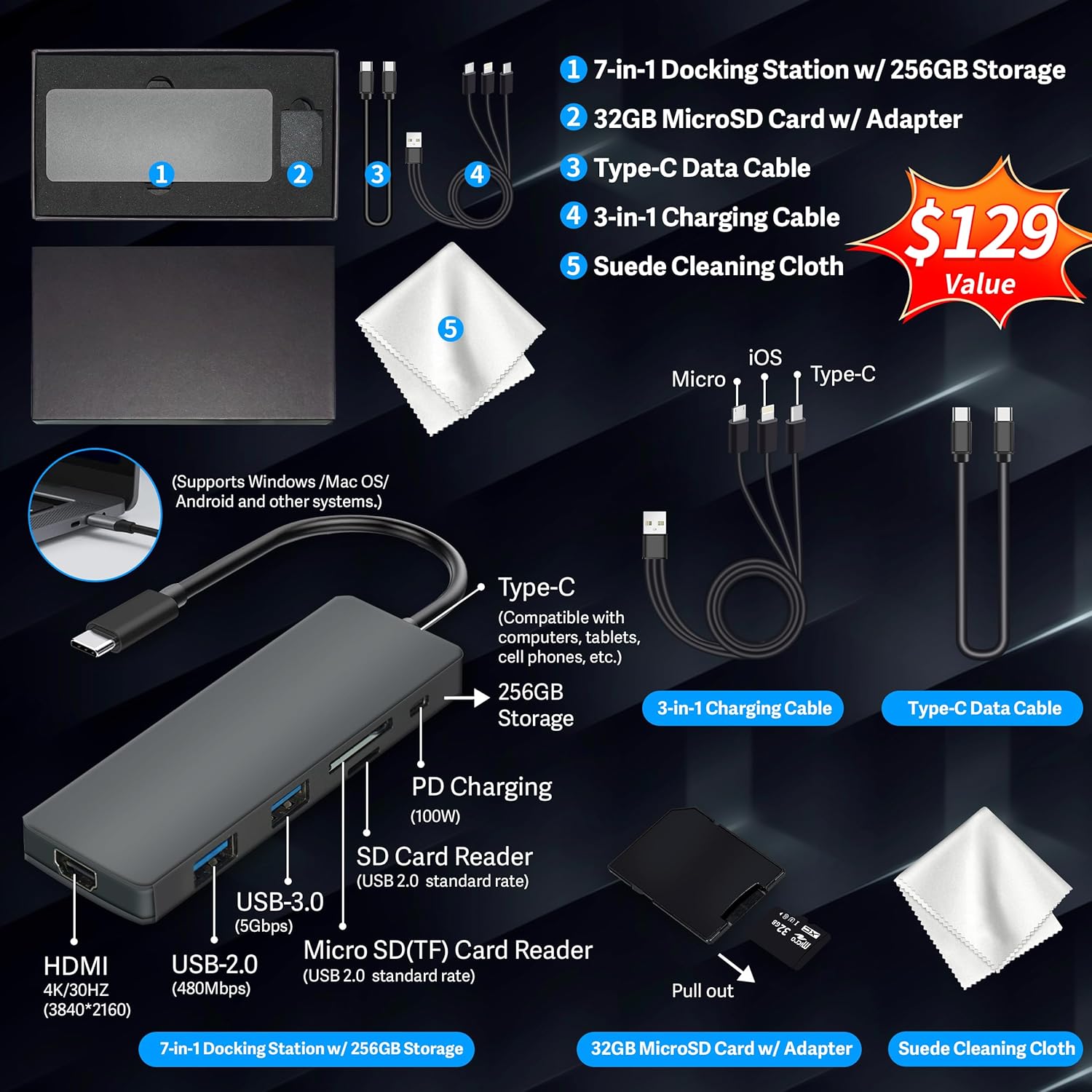
Figure 1: Included accessories, including the 7-in-1 docking station, various cables, and a cleaning cloth.
تشغيل الكمبيوتر المحمول
مميزات العرض
The HP 15.6-inch laptop features an FHD IPS touchscreen display with a resolution of 1920 x 1080 pixels and an anti-glare coating. This display provides clear and vibrant visuals from various viewزوايا متعددة.

Figure 2: The 15.6-inch FHD IPS display offers crisp and vivid details.
الاتصال والأجهزة الطرفية
Your laptop is equipped with various connectivity options and integrated features to enhance your user experience.
- 720p HD Camera: For video calls and online meetings.
- واي فاي 6: للاتصال بشبكة الإنترنت اللاسلكية عالية السرعة.
- بلوتوث: لتوصيل الأجهزة الطرفية اللاسلكية مثل الفأرة ولوحة المفاتيح وسماعات الرأس.
- المفاتيح العددية: A full numeric keypad is integrated for efficient data entry and calculations.

Figure 3: Key features for staying connected and productive, including the numeric keypad.
The laptop includes multiple ports for connecting external devices:
- منفذان USB من النوع A
- منفذ USB من النوع C واحد
- 1 × منفذ HDMI
- 1x Headphone/Microphone Combo jack

Figure 4: Multi-port configuration on the laptop for various connections.
الأداء وتعدد المهام
Equipped with an AMD Ryzen 7 7730U processor, 64GB DDR4 RAM, and AMD Radeon Graphics, this laptop is designed for efficient multitasking and demanding applications. The 2.28TB storage (2TB SSD + 288GB Docking Station Set) provides ample space and fast access to your files.

Figure 5: Core specifications for performance and storage.

Figure 6: Laptop demonstrating effortless multitasking with several applications running simultaneously.
The laptop is designed for extended use, offering reliable battery life to support your daily tasks.

Figure 7: The laptop supports continuous work throughout the day with its battery performance.
صيانة
To ensure the longevity and optimal performance of your HP laptop, follow these maintenance guidelines:
- تنظيف: Use the provided suede cleaning cloth or a soft, lint-free cloth to clean the screen and exterior. Avoid harsh chemicals.
- تحديثات البرامج: Regularly update your Windows 11 Pro operating system and drivers to ensure security and performance.
- العناية بالبطارية: Avoid fully discharging the battery frequently. For long-term storage, charge the battery to about 50-70%.
- تهوية: تأكد من عدم انسداد فتحات تهوية الكمبيوتر المحمول لمنع ارتفاع درجة حرارته. استخدمه على سطح صلب ومستوٍ.
- تخزين: قم بتخزين الكمبيوتر المحمول في مكان بارد وجاف بعيداً عن أشعة الشمس المباشرة ودرجات الحرارة القصوى.
استكشاف الأخطاء وإصلاحها
يتناول هذا القسم المشكلات الشائعة التي قد تواجهها مع الكمبيوتر المحمول الخاص بك.
لا يعمل الكمبيوتر المحمول
- تأكد من توصيل محول الطاقة بشكل آمن بالكمبيوتر المحمول ومأخذ الطاقة العامل.
- تأكد من أن منفذ الطاقة يعمل عن طريق توصيل جهاز آخر.
- إذا كانت البطارية فارغة تمامًا، اتركها تشحن لمدة 15 إلى 30 دقيقة على الأقل قبل محاولة تشغيلها.
Screen Remains Blank
- تحقق مما إذا كان الكمبيوتر المحمول قيد التشغيل (ضوء مؤشر الطاقة).
- Try connecting an external monitor to see if display output is available.
- اضبط سطوع الشاشة باستخدام مفاتيح الوظائف.
مشاكل الاتصال بشبكة Wi-Fi
- تأكد من تمكين Wi-Fi في إعدادات Windows.
- أعد تشغيل جهاز التوجيه والمودم.
- قم بتحديث برامج تشغيل Wi-Fi الخاصة بك من خلال إدارة الأجهزة.
- Check for any physical obstructions or interference.
الأداء البطيء
- أغلق التطبيقات غير الضرورية التي تعمل في الخلفية.
- تحقق من "إدارة المهام" للعمليات التي تستهلك قدرًا كبيرًا من وحدة المعالجة المركزية أو ذاكرة الوصول العشوائي.
- تأكد من أن نظام التشغيل وبرامج التشغيل لديك محدثة.
- قم بتشغيل عملية تنظيف القرص وإلغاء تجزئته (للأقراص الصلبة HDD، وليس ضرورياً للأقراص الصلبة SSD).
- فحص بحثًا عن البرامج الضارة أو الفيروسات.
تحديد
Below are the detailed technical specifications for your HP 15.6-inch FHD IPS Touchscreen Laptop.

Figure 8: Laptop dimensions and weight for portability.
| ميزة | التفاصيل |
|---|---|
| ماركة | HP |
| اسم الموديل | HP 15.6" FHD IPS Touchscreen Laptop |
| حجم الشاشة | 15.6 بوصة |
| دقة العرض | 1920 × 1080 بكسل (FHD) |
| نوع العرض | LED IPS Touchscreen |
| المعالج | AMD Ryzen 7 7730U (8 Cores, 2 GHz base) |
| معالج الرسوميات المساعد | رسومات AMD Radeon (متكاملة) |
| ذاكرة الوصول العشوائي (RAM) | 64 جيجابايت DDR4 (3200 ميجاهرتز) |
| تخزين | 2 TB SSD + 288 GB Docking Station Set (Total 2.28 TB) |
| نظام التشغيل | ويندوز 11 برو |
| الاتصال | Wi-Fi 6 (802.11ax), Bluetooth, HDMI, USB |
| الموانئ | 2x USB Type-A, 1x USB Type-C, 1x HDMI, 1x Headphone/Microphone Combo |
| Webكاميرا | كاميرا عالية الدقة 720 بكسل |
| لوحة المفاتيح | حجم كامل مع لوحة مفاتيح رقمية |
| الأبعاد (الطول × العرض × السماكة) | 14.17 بوصة × 9.29 بوصة × 0.73 بوصة |
| وزن العنصر | 3.52 رطل (حوالي 1.6 كجم) |
| لون | فضي |
| رمز المنتج الموحد | 196188514924 |
| ASIN | B0FX2NR2WN |
معلومات الضمان
Your HP laptop comes with a manufacturer's warranty. For upgraded components (RAM/SSD), a 1-year warranty is provided by SnowBell. The original 1-year manufacturer warranty applies to all other components of the laptop. Please retain your proof of purchase for warranty claims. For detailed terms and conditions, refer to the warranty documentation included with your product or visit the official HP support webموقع.
يدعم
للحصول على مزيد من المساعدة أو الدعم الفني أو الاستفسارات المتعلقة بالخدمة، يرجى الرجوع إلى الموارد التالية:
- الدعم الرسمي من HP Webموقع: يزور الدعم.hp.com للسائقين، والأدلة، وأدلة استكشاف الأخطاء وإصلاحها.
- المساعدة عبر الإنترنت: Utilize the built-in Windows 11 Pro help features for software-related questions.
- الاتصال بالتاجر: For issues related to upgraded components or purchase, contact SnowBell or your point of purchase.