
1. المقدمة
This manual provides essential information for the safe and efficient use of your Haier H55C95EUX 55-inch OLED 4K HDR Smart TV. Please read these instructions thoroughly before operating your television and retain them for future reference.
The Haier H55C95EUX features a 55-inch OLED display for deep blacks and vibrant colors, 4K HDR resolution, a 144Hz refresh rate for smooth motion, integrated Harman Kardon sound, and the Google TV operating system for smart functionality and voice control.

الصورة 1.1: انتهىview of Haier C95 Series OLED TV features, highlighting Harman Kardon audio, 144Hz gaming, Dolby Vision IQ, Dolby Atmos, HDR10+, Google TV, and 3GB RAM with 32GB storage.
2. معلومات السلامة
اتبع دائمًا احتياطات السلامة الأساسية عند استخدام هذا التلفزيون لتقليل خطر الحريق والصدمة الكهربائية والإصابة.
- مصدر الطاقة: قم بتوصيل التلفزيون فقط بمصدر طاقة تيار متردد 220-240 فولت، 50/60 هرتز.
- تهوية: تأكد من وجود تهوية كافية حول التلفزيون. لا تسد فتحات التهوية.
- الماء والرطوبة: لا تُعرِّض التلفزيون للمطر أو الرطوبة. لا تضع عليه أي أغراض مملوءة بالسوائل، مثل المزهريات.
- تنظيف: افصل التلفزيون عن مقبس الكهرباء قبل التنظيف. استخدم قطعة قماش ناعمة وجافة. لا تستخدم المنظفات السائلة أو البخاخات.
- التركيب: If wall-mounting, ensure the wall mount is compatible with the VESA standard (100 x 100 mm) and can support the TV's weight.
- أطفال: راقب الأطفال للتأكد من عدم لعبهم بالتلفزيون.
3. ماذا يوجد في الصندوق
قم بفتح الصندوق بعناية وتأكد من وجود جميع العناصر وعدم تلفها.
- Haier H55C95EUX 55-inch OLED 4K HDR Smart TV
- جهاز التحكم عن بعد
- دليل المستخدم (هذا المستند)
- كابل الطاقة
- مكونات حامل التلفزيون (إن وجدت)
4. الإعداد
4.1 التثبيت المادي
Before installation, consider the TV's dimensions to ensure proper placement.

الصورة 4.1: الجبهة view dimensions of the 55-inch Haier TV, indicating a width of 1225mm and a height of 749mm.

Image 4.2: Detailed dimensions of the Haier 55-inch TV, showing measurements with and without the stand.
تركيب الحامل
- ضع التلفزيون على سطح ناعم ومسطح بحيث يكون وجهه لأسفل لمنع تلف الشاشة.
- Attach the stand components to the designated slots on the bottom of the TV using the provided screws.
- تأكد من تثبيت الحامل بإحكام قبل وضع التلفزيون في وضع مستقيم.
التثبيت على الحائط
If wall-mounting, use a VESA-compatible mount (100 x 100 mm) and follow the mount manufacturer's instructions. Ensure the wall can support the TV's weight.
4.2 توصيل الأجهزة
Your TV is equipped with multiple ports for connecting external devices.
- HDMI: Connect Blu-ray players, game consoles, or set-top boxes to the HDMI 2.1 ports for high-quality audio and video.
- USB: قم بتوصيل أجهزة تخزين USB لتشغيل الوسائط.
- إيثرنت: للحصول على اتصال إنترنت سلكي مستقر.
- بلوتوث: قم بتوصيل سماعات الرأس اللاسلكية أو أجهزة البلوتوث الأخرى.
4.3 التشغيل الأولي والإعداد
- قم بتوصيل كابل الطاقة بالتلفزيون وبمقبس الحائط.
- اضغط على زر الطاقة الموجود في جهاز التحكم عن بعد أو التلفزيون.
- Follow the on-screen instructions to complete the initial setup, including language selection, network connection (Wi-Fi or Ethernet), and Google TV account login.
5. تشغيل جهاز التلفزيون
5.1 التحكم عن بعد
The included remote control allows you to navigate the TV's features. It may feature a solar cell for eco-friendly charging and USB-C for backup charging.

Image 5.1: The Haier TV remote control, featuring navigation, volume, and app access buttons.
5.2 واجهة Google TV
Your TV runs on Google TV, providing access to a wide range of streaming services, apps, and personalized content.

Image 5.2: The Google TV home screen, showcasing various streaming applications and content recommendations.
التحكم الصوتي
Use the built-in voice control feature to search for content, launch apps, and control your TV hands-free. Simply say "Hey Google" or press the voice assistant button on your remote.

Image 5.3: Demonstrating voice control functionality with the Haier TV and Google TV.
5.3 إعدادات الصورة والصوت
تقنية OLED
The OLED display provides absolute blacks and infinite contrast for a lifelike viewتجربة رائعة.

Image 5.4: Visual representation of OLED technology, showcasing deep blacks and vibrant colors.
Harman Kardon Sound
Experience immersive audio with clear dialogues and cinematic depth, delivered by the integrated Harman Kardon sound system.

Image 5.5: Depiction of the Harman Kardon sound system, emphasizing clear and powerful audio.
دولبي أتموس
Enjoy three-dimensional, immersive sound that moves around you, enhancing your audio experience.
شنومكسهز معدل التحديث
The 144Hz refresh rate ensures smooth and fluid motion, ideal for fast-paced content like gaming and sports.

Image 5.6: Visual comparison illustrating the fluidity of 144Hz motion compared to 60Hz, particularly beneficial for gaming.
6. الصيانة
6.1 تنظيف التلفزيون الخاص بك
- افصل دائمًا التلفاز عن الكهرباء قبل التنظيف.
- استخدم قطعة قماش ناعمة وجافة وخالية من الوبر لمسح الشاشة والخزانة.
- بالنسبة للعلامات العنيدة، قم بالتدليك برفقampاغسل قطعة القماش بالماء أو بمنظف شاشات متخصص. لا ترش المنظف مباشرةً على الشاشة.
- تجنب استخدام المنظفات الكاشطة، أو الشمع، أو المذيبات.
6.2 تحديثات البرامج
Your Haier TV may receive software updates to improve performance and add new features. Ensure your TV is connected to the internet to receive these updates automatically or check for them manually through the settings menu.
7. استكشاف الأخطاء وإصلاحها
إذا واجهت مشكلات مع التلفزيون الخاص بك، فراجع الحلول الشائعة التالية:
| مشكلة | الحل المحتمل |
|---|---|
| لا يوجد طاقة | Check if the power cable is securely connected to the TV and the wall outlet. Ensure the outlet is functioning. Try pressing the power button on the TV itself. |
| لا توجد صورة، ولكن الصوت موجود | تحقق من مصدر الإدخال. تأكد من أن الجهاز المتصل يعمل بشكل صحيح. جرب كابل HDMI أو منفذًا آخر. |
| لا يوجد صوت، ولكن الصورة موجودة | Check the volume level. Ensure the TV is not muted. Verify audio output settings (e.g., internal speakers, external sound system). Check audio cables if using external speakers. |
| جهاز التحكم عن بعد لا يعمل | Check the remote control's battery level. Ensure there are no obstructions between the remote and the TV's IR sensor. If it's a solar remote, ensure it has sufficient light exposure. |
| مشاكل اتصال الشبكة | Restart your router and modem. Check Wi-Fi password. If using Ethernet, ensure the cable is connected properly. Try connecting to a different network if available. |
8. المواصفات
| ميزة | التفاصيل |
|---|---|
| اسم الموديل | H55C95EUX |
| حجم الشاشة | 55 بوصة |
| تكنولوجيا العرض | شاشة OLED |
| دقة | 4K (3840 × 2160) |
| معدل التحديث | 120 Hz (Motion Enhancement: 144Hz) |
| يدعم تنسيق HDR | دولبي فيجن |
| نظام التشغيل | جوجل تي في |
| التخزين الداخلي | 32 جيجا بايت |
| نظام الصوت | Harman Kardon 2.1 Sound System |
| Surround Sound Format | دولبي أتموس |
| الاتصال | Bluetooth, Ethernet, HDMI (x4), USB (x1) |
| التكنولوجيا اللاسلكية | بلوتوث ، واي فاي |
| طريقة التحكم | Remote Control, Voice |
| أبعاد المنتج (عمق×عرض×ارتفاع) | 29.5P x 122.5l x 76.8H cm (with stand) |
| معيار التثبيت VESA | 100 × 100 ملم |
| فئة كفاءة الطاقة (SDR) | F (77 كيلوواط ساعة/1000 ساعة) |
| فئة كفاءة الطاقة (HDR) | G (70 كيلوواط ساعة/1000 ساعة) |
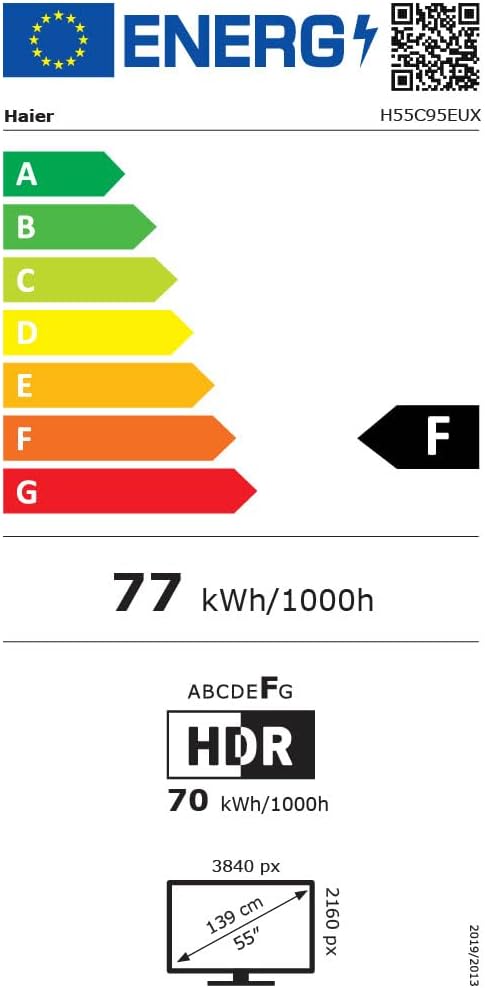
Image 8.1: EU Energy Label for the Haier H55C95EUX TV. For more details, visit the قاعدة بيانات EPREL.
9. الضمان والدعم
Your Haier H55C95EUX television comes with a ضمان الشركة المصنعة لمدة عامينيرجى الاحتفاظ بإثبات الشراء الخاص بك لاستخدامه في المطالبات بالضمان.
For technical support, service, or further inquiries, please refer to the contact information provided on the official Haier webالموقع أو مركز الخدمة المعتمد المحلي الخاص بك.