
1. المقدمة
Welcome to your new xinwld A97 Pro Wireless Earbuds. These earbuds are designed to provide a high-fidelity audio experience with deep bass, advanced Bluetooth 5.4 connectivity, and effective environmental noise cancellation (ENC) for clear calls. This manual will guide you through the setup, operation, and maintenance of your earbuds.
المميزات الرئيسية:
- بلوتوث شنومكس: للحصول على اتصال لاسلكي مستقر وفعال.
- HiFi Stereo Sound with Deep Bass: Delivers rich audio quality.
- Up to 40 Hours Playtime: استماع ممتد مع علبة الشحن.
- 4 ENC Noise Cancelling Microphones: Ensures clear calls by reducing ambient noise.
- مقاومة الماء بمعيار IP7: Protects earbuds from water splashes and sweat (earbuds only).
- ضوابط اللمس بديهية: إدارة سهلة للموسيقى والمكالمات.
- شاشة رقمية LED: Shows battery level of the charging case and earbuds.
2. محتويات العبوة
يرجى التحقق من الحزمة للعناصر التالية:
- xinwld A97 Pro Wireless Earbuds (Left and Right)
- حافظة الشحن
- كابل شحن USB-C
- دليل المستخدم
- (Optional) Various Sizes of Eartips
3. انتهى المنتجview
Familiarize yourself with the components of your xinwld A97 Pro Wireless Earbuds.
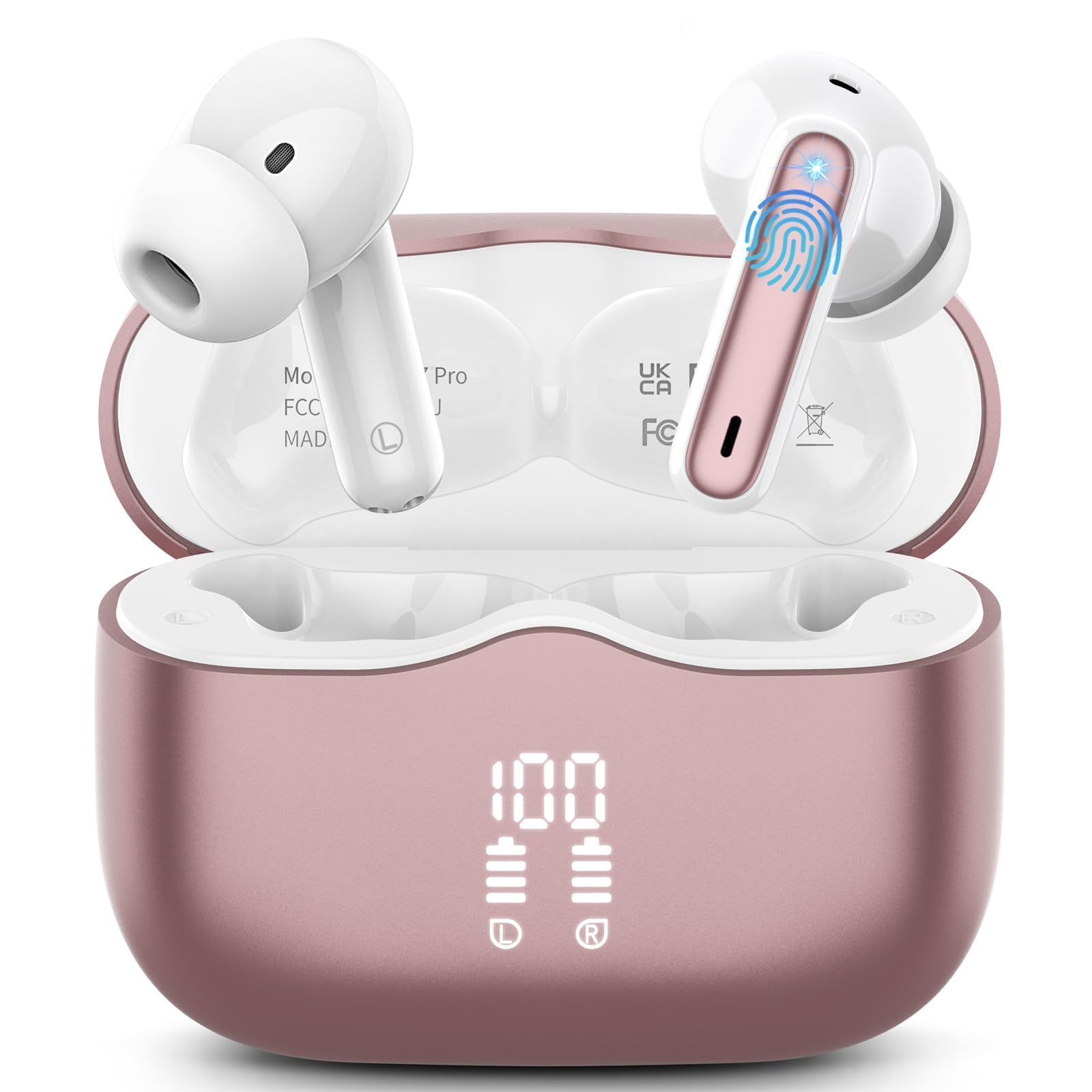
الصورة 1: xinwld A97 Pro Wireless Earbuds and Charging Case. The image shows the black earbuds placed inside their charging case, which features a digital LED display on the front indicating battery levels.
مكونات سماعة الأذن:
- منطقة التحكم باللمس: لإدارة التشغيل والمكالمات والمساعد الصوتي.
- ميكروفون: For calls and ENC functionality.
- شحن جهات الاتصال: يتصل بعلبة الشحن لتزويده بالطاقة.
- إيرتيب: Provides comfort and sound isolation; replaceable.
مكونات علبة الشحن:
- شاشة رقمية LED: Shows the battery level of the case and charging status of the earbuds.
- منفذ شحن USB-C: لشحن العلبة.
- فتحات شحن سماعات الأذن: Holds and charges the earbuds when placed inside.
4. دليل الإعداد
4.1. الشحن الأولي
قبل الاستخدام الأول، قم بشحن سماعات الأذن وعلبة الشحن بالكامل.
- ضع كلتا سمّاعات الأذن في علبة الشحن.
- قم بتوصيل كابل الشحن USB-C بمنفذ الشحن الموجود على العلبة والطرف الآخر بمحول طاقة USB (غير مرفق).
- ستعرض شاشة LED الموجودة على علبة الشحن نسبة شحن البطاريةtage. The charging indicators for the earbuds will also be visible.
- بمجرد الشحن بالكامل ، افصل كابل الشحن.
4.2. الاقتران بجهازك
- تأكد من شحن وسادات الأذن.
- Open the charging case. The earbuds will automatically power on and enter pairing mode, indicated by flashing lights.
- على جهازك (الهاتف الذكي، أو الجهاز اللوحي، وما إلى ذلك)، انتقل إلى إعدادات البلوتوث وقم بتشغيل البلوتوث.
- بحث عن available devices. Select "xinwld A97 Pro" from the list.
- Once connected, you will hear a confirmation sound, and the earbud indicator lights will turn off or flash slowly.
- إذا فشل الاقتران، ضع سماعات الأذن مرة أخرى داخل العلبة، وأغلق الغطاء، وانتظر بضع ثوانٍ، ثم كرر الخطوات.
5. تعليمات التشغيل
5.1. تشغيل/إيقاف التشغيل
- تشغيل الطاقة: افتح علبة الشحن، وسيتم تشغيل سماعات الأذن تلقائيًا. أو يمكنك الضغط مع الاستمرار على منطقة التحكم باللمس في كلتا السماعتين لمدة 3 ثوانٍ.
- إيقاف التشغيل: Place the earbuds back into the charging case and close the lid. They will automatically power off and begin charging. Alternatively, disconnect them from Bluetooth, and they will power off after 5 minutes of inactivity.
5.2. ارتداء سماعات الأذن
Insert the earbuds into your ears and gently rotate them to find a comfortable and secure fit. Ensure the microphones are facing downwards for optimal call quality. Experiment with different eartip sizes (if included) for the best seal and sound.
5.3. أدوات التحكم التي تعمل باللمس
The xinwld A97 Pro earbuds feature intuitive touch controls on each earbud. The functions are generally mirrored on both earbuds unless specified.
| وظيفة | فعل |
|---|---|
| تشغيل/إيقاف الموسيقى مؤقتًا | نقرة واحدة على أي من سماعات الأذن |
| المسار التالي | انقر نقرًا مزدوجًا على أي من سماعتي الأذن |
| المسار السابق | اضغط ثلاث مرات على أي سماعة أذن |
| الرد على المكالمة/إنهائها | نقرة واحدة على أي من سماعات الأذن |
| رفض المكالمة | اضغط مع الاستمرار على إحدى سماعات الأذن لمدة ثانيتين |
| تفعيل المساعد الصوتي | اضغط مع الاستمرار على إحدى سماعات الأذن لمدة ثانيتين |
| التحكم في مستوى الصوت | Control via your connected device (earbuds do not have direct volume control) |
5.4. إلغاء الضوضاء البيئية (ENC)
The earbuds feature 4 ENC microphones to reduce ambient noise during calls, ensuring clearer conversations for both you and the person you are speaking with. This feature is automatically active during phone calls.
6. الصيانة والعناية
6.1. التنظيف
- قم بتنظيف سماعات الأذن وعلبة الشحن بانتظام باستخدام قطعة قماش ناعمة وجافة وخالية من الوبر.
- Do not use harsh chemicals, cleaning solvents, or strong detergents, as these may damage the product.
- Gently clean the charging contacts on both the earbuds and inside the case to ensure proper charging and connectivity.
6.2. مقاومة الماء (IP7)
The earbuds are rated IP7 water-resistant, meaning they can withstand immersion in water up to 1 meter for 30 minutes. This rating applies to the earbuds only, not the charging case.
- لا تغمر علبة الشحن في الماء.
- Avoid using the earbuds in saunas, steam rooms, or during water sports.
- If the earbuds get wet, dry them thoroughly with a soft cloth before placing them back in the charging case to prevent damage to the charging contacts.
6.3. التخزين
عندما لا تكون قيد الاستخدام، قم بتخزين سماعات الأذن في علبة الشحن الخاصة بها لحمايتها من الغبار والخدوش والأضرار العرضية.
6.4. العناية بالبطارية
To prolong battery life, avoid fully discharging the earbuds and charging case frequently. Charge them regularly, even if not in constant use, to maintain optimal battery health.
7. استكشاف الأخطاء وإصلاحها
في حال واجهت أي مشاكل، يرجى الرجوع إلى الحلول الشائعة التالية:
7.1. Earbuds not pairing with device:
- تأكد من تمكين البلوتوث على جهازك.
- تأكد من شحن سماعات الأذن وإخراجها من علبة الشحن.
- Try forgetting "xinwld A97 Pro" from your device's Bluetooth list and re-pairing.
- أعد تشغيل جهازك.
- أعد وضع سماعات الأذن في العلبة، وأغلق الغطاء، وانتظر 10 ثوانٍ، ثم افتحه لإعادة الدخول إلى وضع الاقتران.
7.2. Only one earbud working:
- تأكد من شحن كلا سماعات الأذن.
- قم بوضع سماعتي الأذن مرة أخرى داخل علبة الشحن، وأغلق الغطاء، ثم افتحه مرة أخرى.
- قم بتنظيف نقاط اتصال الشحن الموجودة على سماعتي الأذن وداخل العلبة.
7.3. Earbuds not charging:
- تأكد من توصيل كابل الشحن بشكل آمن بكل من العلبة ومصدر الطاقة.
- تأكد من أن نقاط اتصال الشحن الموجودة على سماعات الأذن وداخل العلبة نظيفة وخالية من الحطام.
- جرّب كابل USB-C أو محول طاقة مختلفًا.
7.4. Poor sound quality:
- تأكد من تثبيت سماعات الأذن بشكل صحيح في أذنيك.
- حاول استخدام أحجام مختلفة من أطراف الأذن للحصول على إغلاق أفضل.
- قم بتنظيف أي شمع أذن أو شوائب من فوهات سماعات الأذن.
- Ensure your device's volume is not too low.
- اقترب من جهازك المتصل لتجنب التداخل.
8. المواصفات
| ميزة | التفاصيل |
|---|---|
| ماركة | xinwld |
| اسم الموديل | ايه 97 برو |
| رقم الموديل | أ97 |
| تكنولوجيا الاتصال | لاسلكي (بلوتوث) |
| نسخة البلوتوث | 5.4 |
| وضع الأذن | في الأذن |
| نوع التحكم | التحكم باللمس |
| تصنيف مقاومة الماء | IP7 (سماعات الأذن فقط) |
| وقت اللعب | ما يصل إلى 40 ساعة (مع علبة الشحن) |
| الميكروفونات | 4 ENC Noise Cancelling Mics |
| مادة | بلاستيك |
9. الضمان والدعم
9.1. معلومات الضمان
Your xinwld A97 Pro Wireless Earbuds come with a limited warranty. Please refer to the warranty card included in your package or visit the official xinwld website for detailed warranty terms and conditions. The warranty period is typically 1 year from the date of purchase, covering manufacturing defects.
9.2. دعم العملاء
For any questions, technical assistance, or warranty claims, please contact xinwld customer support through the following channels:
- بريد إلكتروني: Please check your product packaging or the official xinwld website for direct customer support email.
- Webموقع: Visit the xinwld Store on Amazon (for general inquiries or to find official contact information).
When contacting support, please have your product model (A97 Pro) and purchase details ready to expedite assistance.