
مقدمة
This manual provides essential information for setting up, operating, and maintaining your Roku 32-Inch Select Series 1080p Full HD Smart TV. Designed for a delightful streaming experience, this TV offers excellent picture quality, clear sound, and automatic updates. Please read this manual thoroughly before using your television.
ماذا يوجد في الصندوق
تأكد من وجود جميع المكونات في العبوة:
- Roku 32-Inch Select Series 1080p Full HD Smart TV
- جهاز التحكم عن بعد
- حامل (قطعتين)
- مسامير تثبيت (4 قطع)
- كابل الطاقة
- دليل المستخدم (هذا المستند)

Image: Contents of the Roku TV box, showing the television, remote control, two stand pieces, and four screws.
تعليمات الإعداد
1. تركيب حامل التلفزيون
- Carefully place your TV face-down on a soft, clean surface to prevent damage to the screen.
- قم بمحاذاة قطع الحامل مع فتحات البراغي الموجودة في الجزء السفلي من التلفزيون.
- Secure each stand piece with two screws using a Phillips head screwdriver. Do not overtighten.
2. توصيل الطاقة والأجهزة
- قم بتوصيل كابل الطاقة بمدخل الطاقة الخاص بالتلفزيون ثم بمأخذ الحائط.
- Connect your external devices (e.g., cable box, gaming console, Blu-ray player) to the available HDMI ports on the back of the TV. This model features 3 HDMI ports.
- For older devices, use the AV input ports (yellow, white, red).
- An optical audio output is available for connecting to soundbars or home theater systems.
- A USB port is provided for media playback.

الصورة: الخلفية view of the Roku TV displaying HDMI, AV, Antenna, USB, Optical, and Headphone ports.
3. التشغيل الأولي والاتصال بالشبكة
- اضغط على زر الطاقة الموجود في جهاز التحكم عن بعد أو التلفزيون.
- Follow the on-screen instructions to select your language and connect to your Wi-Fi network.
- Activate your Roku account or create a new one. This is required to access streaming channels and features.
تعليمات التشغيل
1. Roku OS Interface
The Roku OS provides a simple and intuitive home screen for accessing all your entertainment. Easily navigate between streaming apps, live TV, and connected devices.

Image: The Roku TV home screen with a menu on the left and app icons on the right, including Netflix, Disney+, Apple TV, and Roku Channel.
2. Voice Remote
Your Roku TV comes with a voice remote for convenient control. Use your voice to search for content, launch apps, and control playback.
- البحث الصوتي: Press the voice button and speak your command (e.g., "Find comedies," "Open Netflix").
- اختصارات التطبيق: Dedicated buttons provide quick access to popular streaming services.
- التحكم في مستوى الصوت: اضبط مستوى الصوت باستخدام الأزرار الجانبية.
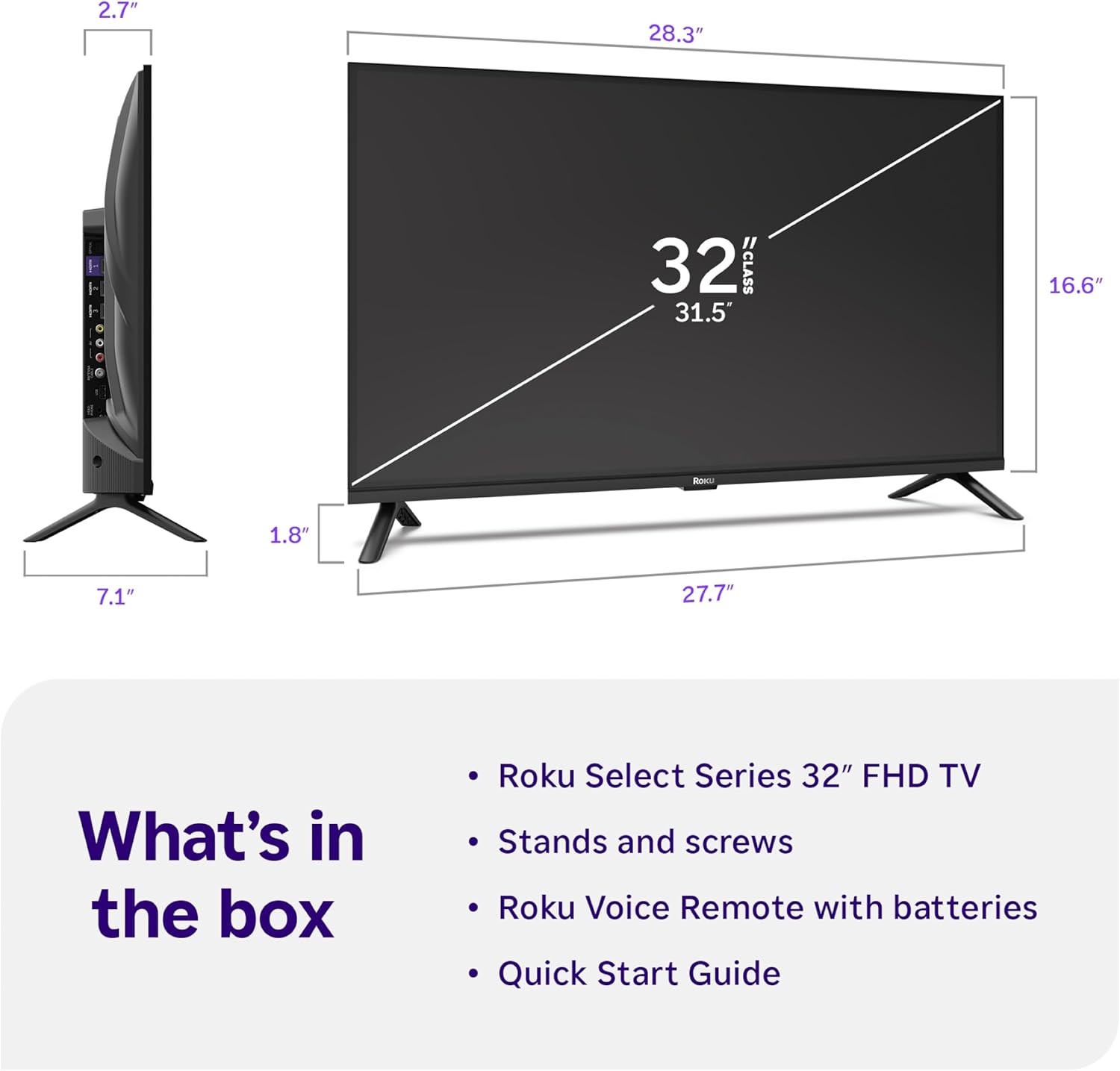
Image: Close-up of the Roku Voice Remote, highlighting buttons for TV power, volume, mute, voice search, instant replay, options, and dedicated app shortcuts.
3. Streaming Apps and Live TV
Access thousands of streaming channels, including Netflix, Disney+, Hulu, Prime Video, and Apple TV+. The Roku Channel also offers free live TV and on-demand content.

Image: A vibrant Roku TV home screen displaying a selection of popular streaming applications and recommended shows.
4. إعدادات الصورة
تحسين الخاص بك viewing experience with various picture settings:
- Roku Smart Picture: Automatically adjusts picture mode for optimal viewعمل.
- أوضاع الصورة: Choose from presets like Movie, Sports, Vivid, Standard, or Low Power.
- التخصيص: Adjust brightness, contrast, sharpness, color, and tint for a personalized picture.
5. إعدادات الصوت
حسّن تجربتك الصوتية:
- صوت دولبي: Enjoy clear speech and louder sound.
- أوضاع الصوت: Select from Standard, Dialogue, Movie, Music, or Night mode.
- Bluetooth Headphone Mode: Connect your wireless headphones to listen without disturbing others.

Image: A child wearing wireless headphones while watching the Roku TV, demonstrating the Bluetooth Headphone Mode.
6. تكامل المنزل الذكي
Your Roku TV is compatible with various smart home ecosystems:
- التحكم الصوتي: Use Roku Voice, Siri, Alexa, or Google Assistant for hands-free control.
- آبل إيربلاي: Effortlessly share videos, photos, and music from your Apple devices.
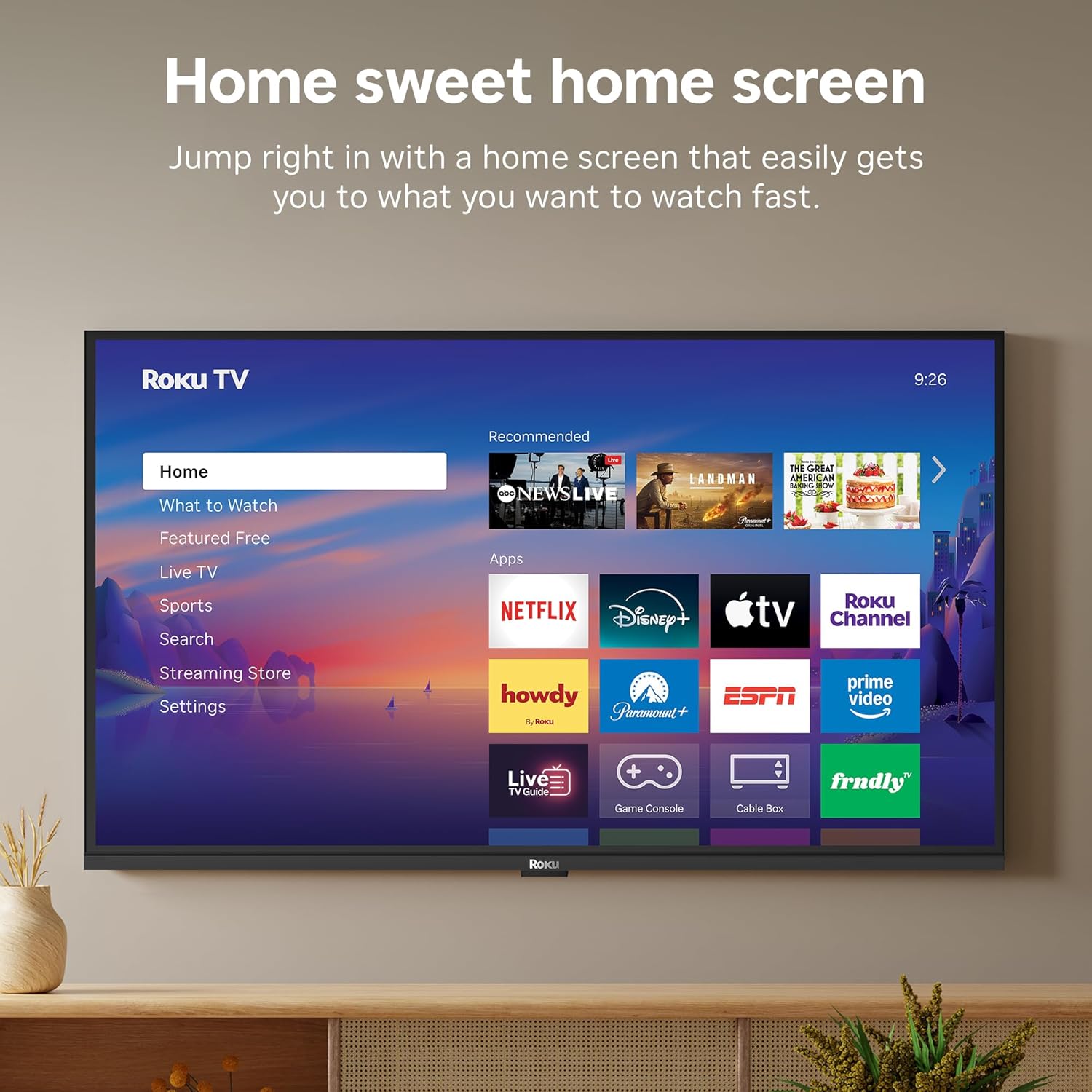
Image: The Roku TV screen displaying smart home compatibility logos for Roku Smart Home, Apple AirPlay, Apple Home, Alexa, and Google Home, with a smart speaker nearby.
7. الرقابة الأبوية
Manage content access with built-in parental controls, including V-Chip technology, to ensure a safe viewبيئة تعليمية مناسبة للأطفال.
فيديو المنتج الرسمي
فيديو: أكثر منview of the Roku TV OS, demonstrating its user-friendly interface, app selection, and smart features. This video is provided by Roku, Inc.
تحديد
- حجم الشاشة:
- 32 بوصة
- دقة:
- 1080p Full HD
- تكنولوجيا العرض:
- قاد
- معدل التحديث:
- 60 هرتز
- المميزات الخاصة:
- Bluetooth Headphone Mode, Dolby Audio, Voice Remote, Roku Smart Picture
- تقنية الاتصال:
- بلوتوث ، واي فاي
- واجهة الأجهزة:
- 3 HDMI Ports, 1 USB Port, S/PDIF (Optical Audio Out)
- نظام التشغيل:
- نظام التشغيل روكو
- أبعاد المنتج (العمق × العرض × الارتفاع):
- 7.1 بوصة عمق × 28.3 بوصة عرض × 18.4 بوصة ارتفاع
- وزن السلعة:
- 7.7 Pounds (with stand)
- معيار تركيب VESA:
- 200 × 200 ملم
- رقم الموديل:
- 32R3E5
- رمز المنتج العالمي:
- 829610009469
استكشاف الأخطاء وإصلاحها
If you encounter issues with your Roku TV, please refer to the following common solutions:
- لا يوجد طاقة: تأكد من توصيل كابل الطاقة بإحكام بالتلفزيون ومقبس كهربائي سليم. جرّب مقبسًا كهربائيًا آخر.
- لا صورة/صوت: Verify that the correct input source is selected on your TV. Check all cable connections (HDMI, AV, etc.) for looseness.
- جهاز التحكم عن بعد لا يستجيب: Replace the batteries in your remote control. Ensure there are no obstructions between the remote and the TV.
- مشاكل الاتصال بالشبكة: Restart your Wi-Fi router and modem. Go to the TV's Settings > Network > Check connection to diagnose and reconnect.
- التطبيق لا يتم تحميله: Restart the app. If the issue persists, try removing and reinstalling the app from the Roku Channel Store.
للحصول على مزيد من المعلومات حول استكشاف الأخطاء وإصلاحها، تفضل بزيارة موقع دعم Roku الرسمي. webموقع.
صيانة
To ensure the longevity and optimal performance of your Roku TV, follow these maintenance guidelines:
- تنظيف الشاشة: امسح الشاشة برفق بقطعة قماش ناعمة وجافة من الألياف الدقيقة. لإزالة البقع الصعبة، امسح برفق.ampبلل قطعة القماش بالماء أو بمحلول تنظيف شاشات مصمم خصيصًا للإلكترونيات. لا ترش السائل مباشرة على الشاشة.
- تنظيف هيكل التلفزيون: استخدم قطعة قماش ناعمة وجافة لمسح الجزء الخارجي من التلفزيون. تجنب استخدام المنظفات الكاشطة أو المذيبات.
- تهوية: Ensure the TV's ventilation openings are not blocked to prevent overheating. Maintain adequate space around the TV for air circulation.
- تحديثات البرامج: Your Roku TV automatically receives software updates. Ensure your TV is connected to the internet to receive the latest features and performance improvements.
- إدارة الطاقة: افصل التلفاز عن مأخذ الطاقة أثناء العواصف الرعدية أو عندما يتم تركه دون مراقبة لفترات طويلة.
الضمان والدعم
معلومات الضمان
Roku warrants the hardware of this device against defects in materials and workmanship under normal use for a period of one (1) year from the date of purchase ("Warranty Period"). If Roku determines that the device’s hardware is defective during the Warranty Period, Roku’s sole obligation, and your exclusive remedy, will be to either repair or replace the unit with either a new or rebuilt device, at its option. This warranty applies if the device is used in accordance with the provided documentation.
Important information about warranty returns and replacements is available on the Roku support site. You may also return a device for any reason, subject to the terms of the applicable return policy: 1) Within thirty (30) days from the date of purchase from Roku; or 2) within the applicable return period if purchased from an authorized reseller or distributor. Additional details regarding product returns can be found on the Roku support site.
دعم العملاء
For further assistance, technical support, or to access the full range of support resources, please visit the official Roku support webيمكنك العثور على الأسئلة الشائعة، وأدلة استكشاف الأخطاء وإصلاحها، ومعلومات الاتصال بخدمة العملاء هناك.