
1. المقدمة
This manual provides essential information for the safe and efficient operation of your Thomson 43FT2S15 FHD LED Smart TV. Please read this manual thoroughly before using the television and retain it for future reference.
2. معلومات السلامة
اتبع دائمًا احتياطات السلامة الأساسية عند استخدام هذا المنتج لتقليل خطر الحريق والصدمة الكهربائية والإصابة.
- لا تعرض التلفزيون للمطر أو الرطوبة.
- لا تسد فتحات التهوية.
- تأكد من التوصيل الأرضي المناسب لسلك الطاقة.
- لا تضع التلفاز على عربة أو حامل أو حامل ثلاثي أو قوس أو طاولة غير مستقرة.
- افصل التلفاز أثناء العواصف الرعدية أو عند عدم استخدامه لفترات طويلة.
- قم بإحالة جميع أعمال الصيانة إلى موظفي الخدمة المؤهلين.
3. محتويات العبوة
تأكد من تضمين جميع العناصر المدرجة أدناه في الحزمة الخاصة بك:
- Thomson 43FT2S15 FHD LED Smart TV
- محول الطاقة
- جهاز التحكم عن بعد
- دليل المستخدم (هذا المستند)
- بطاقة الضمان

الصورة: الجبهة view of the Thomson 43FT2S15 Smart TV.
4. الإعداد
4.1 التثبيت المادي
The Thomson 43FT2S15 TV is designed for table mounting. Ensure the TV is placed on a stable, flat surface.

Image: Diagram showing the dimensions of the Thomson 43FT2S15 Smart TV. The screen size is 109 cm (43 inches) diagonally, with a width of 95 cm and height of 60 cm (including stand). The depth is 6 cm.
الأبعاد (العرض × الارتفاع × العمق): 95 cm x 60 cm x 6 cm (without stand, depth is 6 cm). The screen diagonal is 109 cm (43 inches).
4.2 توصيل الأجهزة
Connect your external devices to the appropriate ports on the TV. Refer to the diagram below for port locations.
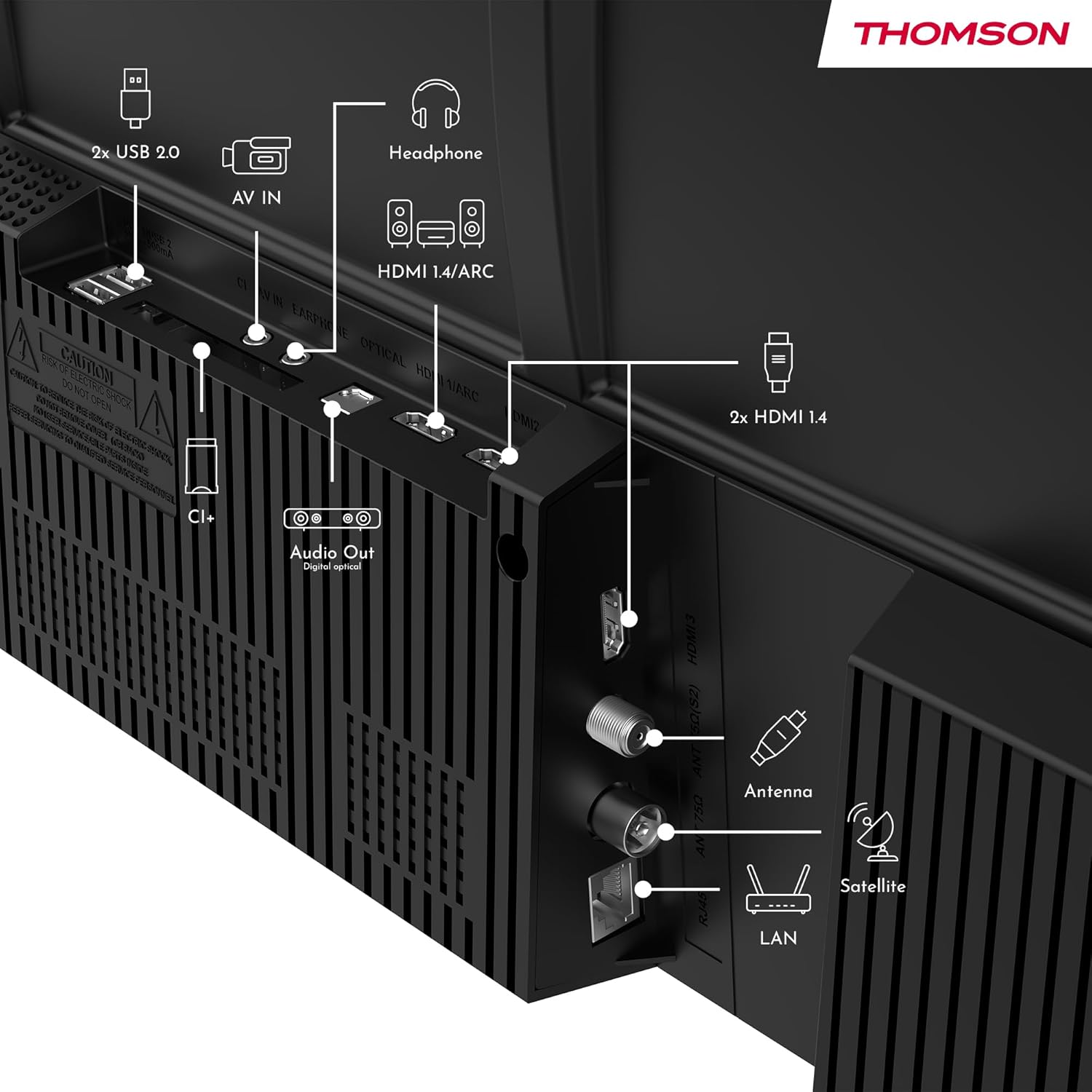
الصورة: الخلفية view of the Thomson 43FT2S15 Smart TV showing various connection ports. These include 2x USB 2.0, AV IN, Headphone out, HDMI 1.4/ARC, Optical Audio Out, CI+, Antenna (DVB-T2/C), Satellite (DVB-S2), and LAN (Ethernet).
- HDMI: Connect external devices like Blu-ray players, game consoles, or set-top boxes. The TV has 2 HDMI 1.4 ports, one with ARC support.
- USB: For connecting USB storage devices. The TV has 2 USB 2.0 ports.
- الهوائي/القمر الصناعي: Connect your terrestrial or satellite antenna for live TV.
- شبكة LAN (إيثرنت): للاتصال بالإنترنت السلكي.
- واي فاي: للاتصال بالإنترنت اللاسلكي.
- بلوتوث: لتوصيل الملحقات اللاسلكية المتوافقة.
- مخرج الصوت (البصري): للتوصيل بنظام صوتي خارجي.
- سماعة الرأس: لتوصيل سماعات الرأس.
- فتحة CI+: For inserting a Conditional Access Module (CAM) for encrypted channels.
5. تعليمات التشغيل
5.1 تشغيل/إيقاف التشغيل
Connect the power adapter to the TV and a power outlet. Press the power button on the remote control to turn the TV on or off.
5.2 نظام تشغيل TiVo والميزات الذكية
Your Thomson Smart TV is powered by TiVo OS, which integrates live TV, streaming applications, and on-demand services into a single, intuitive interface. Personalized recommendations help you discover new content.

Image: The Thomson Smart TV displaying the TiVo OS interface with various streaming apps like Netflix, Canal+, Prime Video, YouTube, and Disney+.
5.3 التحكم الصوتي
Use the TiVo Voice Control feature to navigate channels, open applications, or search for content across different platforms using voice commands. The remote control includes a microphone for this function.

Image: The Thomson Smart TV remote control highlighting the voice control microphone, backlit buttons, and direct access buttons for streaming services.
5.4 Wireless Display
Mirror content from your smartphone, tablet, or laptop to the TV screen using the Wireless Display function. This allows for easy sharing of videos, photos, and applications.
5.5 تحسينات الصوت والفيديو
- صوت دولبي: Experience enhanced sound quality with Dolby Audio, providing clear dialogue and immersive, multi-dimensional effects.

Image: A Thomson Smart TV displaying content with visual representations of sound waves, indicating the Dolby Audio feature.
- HDR10: Enjoy sharper contrast and lifelike colors with HDR10 technology, revealing details in both bright highlights and deep shadows.

Image: A split-screen comparison showing the difference between SDR (Standard Dynamic Range) and HDR10 (High Dynamic Range) image quality on a Thomson Smart TV, demonstrating improved contrast and color.
5.6 التحكم عن بعد
The ergonomic remote control features backlit buttons for easy navigation in low light conditions. It also includes direct access buttons for popular streaming services such as Netflix, YouTube, Prime Video, Disney+, and Canal+.
6. الصيانة
لضمان طول عمر جهاز التلفزيون الخاص بك وأدائه الأمثل، اتبع إرشادات الصيانة التالية:
- تنظيف الشاشة: امسح الشاشة برفق بقطعة قماش ناعمة وخالية من الوبر. لإزالة البقع الصعبة، استخدم منظف شاشات مصمم خصيصًا لأجهزة التلفزيون، وضعه على قطعة القماش، وليس مباشرة على الشاشة.
- تنظيف الخزانة: استخدم قطعة قماش ناعمة وجافة لمسح خزانة التلفزيون. لا تستخدم منظفات أو مذيبات كاشطة.
- تهوية: تأكد من عدم سد فتحات التهوية الموجودة في الجزء الخلفي من التلفزيون لمنع ارتفاع درجة الحرارة.
- سلك الطاقة: افحص سلك الطاقة بانتظام للتأكد من خلوه من أي تلف. في حال وجود تلف، اتصل بفنيي الصيانة المؤهلين لاستبداله.
7. استكشاف الأخطاء وإصلاحها
إذا واجهت مشكلات مع التلفزيون الخاص بك، فراجع خطوات استكشاف الأخطاء وإصلاحها الشائعة التالية:
- لا يوجد طاقة:
- تأكد من توصيل سلك الطاقة بشكل آمن بالتلفزيون ومأخذ الطاقة.
- Ensure the power outlet is functioning by plugging in another device.
- حاول الضغط على زر الطاقة الموجود على التلفزيون نفسه، وليس فقط على جهاز التحكم عن بعد.
- لا صورة/صوت:
- تأكد من تحديد مصدر الإدخال الصحيح (على سبيل المثال، HDMI 1، الهوائي).
- تحقق من جميع توصيلات الكابلات بين التلفزيون والأجهزة الخارجية.
- Adjust the volume and ensure the TV is not muted.
- جهاز التحكم عن بعد لا يعمل:
- استبدال البطاريات في جهاز التحكم عن بعد.
- تأكد من عدم وجود أي عوائق بين جهاز التحكم عن بعد ومستشعر الأشعة تحت الحمراء الخاص بالتلفزيون.
- Smart TV Features Not Working (Wi-Fi/Apps):
- تحقق من اتصالك بالإنترنت. أعد تشغيل جهاز التوجيه (الراوتر) إذا لزم الأمر.
- Go to the TV's network settings to ensure it's connected to Wi-Fi or Ethernet.
- حاول إعادة تشغيل التلفزيون.
For more complex issues, please contact customer support or refer to the manufacturer's webموقع.
8. المواصفات
Key technical specifications for the Thomson 43FT2S15 FHD LED Smart TV:
| ميزة | مواصفة |
|---|---|
| ماركة | تومسون |
| نموذج | 43FT2S15 |
| حجم الشاشة | 43 بوصة (109 سم) |
| تكنولوجيا العرض | قاد |
| دقة | 1920 × 1080 (FHD) |
| معدل التحديث | 60 هرتز |
| نسبة العرض إلى الارتفاع | 16:9 |
| نظام التشغيل | TiVo OS |
| تكنولوجيا الصوت | Dolby Audio (Dolby Atmos encoding) |
| دعم HDR | النطاق الديناميكي العالي 10 |
| الاتصال | Wi-Fi, Ethernet, Bluetooth, 2x HDMI 1.4 (1x ARC), 2x USB 2.0, Optical Audio Out, AV In, Headphone, CI+ |
| الموالفات | DVB-T2/C/S2 (Triple Tuner) |
| خدمات الإنترنت المدعومة | Netflix, YouTube, Prime Video, Disney+, Canal+, Browser |
| الأبعاد (المنتج) | 6 × 95 × 60 سم؛ 6.5 كجم |
| فئة كفاءة الطاقة | E |

Image: Energy efficiency label for the Thomson 43FT2S15 Smart TV, showing an energy class of E and energy consumption of 42 kWh/1000h (SDR) and 46 kWh/1000h (HDR).
للحصول على معلومات مفصلة عن المنتج، يرجى الرجوع إلى قاعدة بيانات EPREL: https://eprel.ec.europa.eu/qr/1969521
9. الضمان والدعم
Your Thomson 43FT2S15 TV comes with a warranty. Please refer to the included Warranty Card for specific terms and conditions.
For technical support or service inquiries, please contact the manufacturer:
- الشركة المصنعة: تدفقview شركة ذات مسؤولية محدودة
- Webموقع: www.streamview.كوم
- بريد إلكتروني: الاتصال@streamview.كوم
- هاتف: +4318900066
Please have your model number (43FT2S15) and purchase information ready when contacting support.