
مقدمة
This manual provides essential information for setting up, operating, and maintaining your TCL 32S5K 32-inch HD QLED Google Smart TV. Please read this manual thoroughly before using your television to ensure safe and optimal performance. Keep this manual for future reference.
معلومات السلامة
Always follow basic safety precautions when using this television to reduce the risk of fire, electric shock, and injury. Do not expose the TV to rain or moisture. Do not open the TV casing; refer all servicing to qualified personnel. Ensure proper ventilation and avoid placing the TV near heat sources. Use only the power cord and accessories specified by the manufacturer.
محتويات الحزمة
تأكد من وجود جميع العناصر في العبوة:
- TCL 32S5K 32-inch HD QLED Google Smart TV
- جهاز التحكم عن بعد
- سلك الطاقة
- حامل تلفزيون (قطعتان) ومسامير
- دليل البدء السريع
- بطاقة الضمان
يثبت
التثبيت المادي
تركيب الحامل: Place the TV screen-down on a soft, flat surface. Attach the two stand pieces to the designated slots on the bottom of the TV using the provided screws. Ensure the stand is securely fastened.
التثبيت على الحائط: If wall-mounting, ensure you use a VESA-compatible wall mount (not included) and follow the wall mount manufacturer's instructions. Disconnect the power cord before mounting.
توصيل الأجهزة
Connect your external devices to the appropriate ports on the TV. Refer to the image below for port locations and types.

Figure 1: Rear and Side Connectivity Ports. This image illustrates the various input and output ports available on the TCL 32S5K Smart TV, including USB 2.0, LAN, Antenna/Cable In, Digital Audio Out (Optical), HDMI 1, HDMI 2, and AV In adapter.
- HDMI Ports (1, 2): قم بتوصيل مشغلات Blu-ray، وأجهزة ألعاب الفيديو، وأجهزة استقبال الكابلات/الأقمار الصناعية، أو غيرها من الأجهزة التي تدعم HDMI.
- منفذ USB 2.0: قم بتوصيل أجهزة تخزين USB لتشغيل الوسائط.
- منفذ LAN: قم بتوصيل كابل إيثرنت للحصول على اتصال إنترنت سلكي.
- مدخل الهوائي/الكابل: قم بتوصيل هوائي أو إشارة تلفزيون الكابل.
- مخرج الصوت الرقمي (البصري): Connect to an external audio receiver or soundbar for digital audio.
- محول إدخال الصوت والفيديو: Use the provided adapter to connect older devices with composite video and stereo audio outputs.
التشغيل الأولي وإعداد Google TV
After connecting all necessary cables, plug the power cord into an electrical outlet. Press the power button on the remote control or on the TV. Follow the on-screen instructions to complete the initial setup, which includes selecting your language, connecting to a Wi-Fi network, and signing in to your Google account to access Google TV features.
التشغيل
وظائف التحكم عن بعد
The remote control allows you to navigate the Google TV interface, adjust volume, change channels, access apps, and control playback. Familiarize yourself with the button layout for easy operation.
واجهة Google TV
Google TV organizes your favorite movies, shows, and live TV from across your apps and subscriptions. Use the remote to browse recommendations, search for content, and manage your watch list. Access the Google Play Store to download additional applications.
ميزات الاتصال
- واي فاي: Connects your TV to your home wireless network for internet access and streaming.
- بلوتوث: Pair Bluetooth-enabled devices such as headphones or game controllers for a personalized experience.
- Googlecast (Chromecast built-in): Cast content from your compatible mobile devices or computer directly to your TV screen.
إعدادات الصورة والصوت
Your TCL 32S5K TV features QLED technology, Full HD resolution, HDR10 support, and Dolby Audio for an enhanced viewing and listening experience. Adjust picture modes (e.g., Standard, Vivid, Movie) and sound modes (e.g., Standard, Music, Movie) through the TV settings menu to suit your preferences.

Figure 2: Image Quality Features. This image highlights the key display technologies of the TCL 32S5K Smart TV, including QLED for vibrant colors, FHD (Full High Definition) for clear resolution, and HDR10 for enhanced contrast and brightness.
صيانة
تنظيف جهاز التلفزيون الخاص بك
افصل التلفزيون عن الكهرباء دائمًا قبل التنظيف. استخدم قطعة قماش ناعمة وجافة لمسح الشاشة والهيكل. لإزالة البقع الصعبة، افركها برفق.ampen the cloth with water or a mild, non-abrasive screen cleaner. Never spray cleaner directly onto the screen or allow liquids to enter the TV's openings.
تحديثات البرامج
Your Google TV may receive automatic software updates. Ensure your TV is connected to the internet to receive these updates, which can improve performance and add new features. You can also manually check for updates in the TV's settings menu.
استكشاف الأخطاء وإصلاحها
إذا واجهت مشكلات مع التلفزيون الخاص بك، فراجع الحلول الشائعة التالية:
- لا يوجد طاقة: تأكد من توصيل سلك الطاقة بإحكام بكل من التلفزيون ومأخذ الكهرباء. جرب مأخذاً كهربائياً آخر.
- No Picture/Poor Picture: Ensure all cables are correctly connected. Check the input source. Adjust picture settings. If using an antenna, check signal strength.
- No Sound/Poor Sound: Check volume levels and mute settings. Ensure external audio devices are properly connected and selected as the audio output.
- جهاز التحكم عن بعد لا يعمل: استبدل البطاريات. تأكد من عدم وجود عوائق بين جهاز التحكم عن بُعد ومستشعر الأشعة تحت الحمراء الخاص بالتلفزيون.
- مشاكل الاتصال بالشبكة: Restart your router and modem. Reconnect to the Wi-Fi network in the TV settings. For wired connections, ensure the Ethernet cable is properly connected.
- Google TV Slow/Unresponsive: Restart the TV by unplugging it for a few minutes and plugging it back in. Clear cache for problematic apps in settings.
For persistent issues, consult the TCL support webالموقع أو الاتصال بخدمة العملاء.
تحديد
Below are the technical specifications for the TCL 32S5K Smart TV:
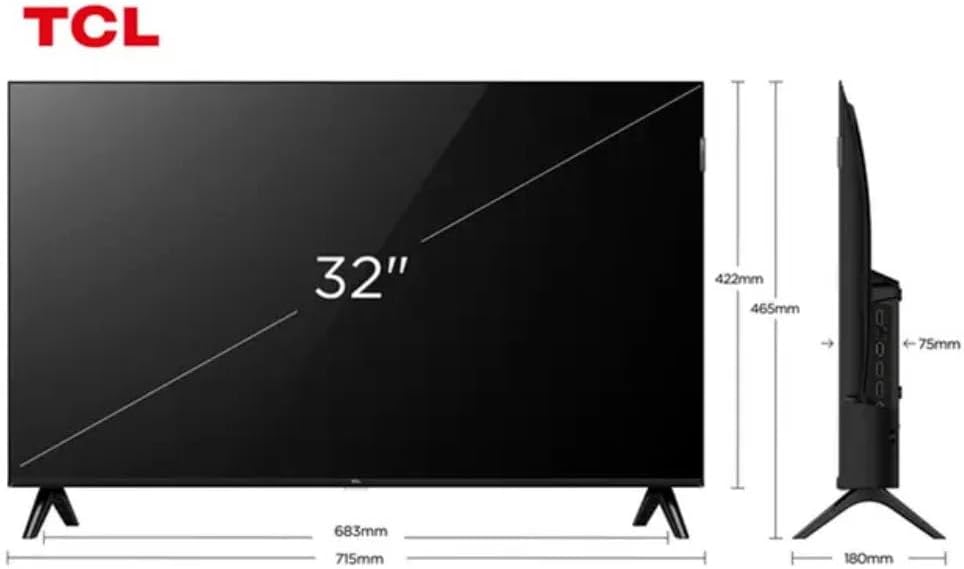
Figure 3: TV Dimensions. This image provides a detailed diagram of the TCL 32S5K Smart TV's physical dimensions, including screen size (32 inches), width (715mm), height (422mm without stand, 465mm with stand), and depth (75mm).
| ميزة | وصف |
|---|---|
| اسم الموديل | 32S5 ك |
| حجم الشاشة | 32 بوصة |
| تكنولوجيا العرض | تلفزيون كيو إل إي دي |
| دقة | 1080 بكسل (عالي الدقة بالكامل) |
| معدل التحديث | 60 هرتز |
| الاتصال | بلوتوث، إيثرنت، HDMI، USB، واي فاي |
| إجمالي منافذ HDMI | 2 |
| المميزات الخاصة | Integrated Speaker, Google TV, Googlecast Integrated, HDR10, Dolby Audio |
| أبعاد المنتج (العمق × العرض × الارتفاع) | 7.6P x 71.6L x 42.3A centimeters (approx. 3 x 28.2 x 16.7 inches) |
| الشركة المصنعة | تي سي إل |
| بلد المنشأ | البرازيل |
الضمان والدعم
معلومات الضمان
The TCL 32S5K Smart TV comes with a ضمان الشركة المصنعة لمدة عامين. This warranty covers defects in materials and workmanship under normal use. Please retain your proof of purchase for warranty claims. For specific terms and conditions, refer to the warranty card included in your package or visit the official TCL webموقع.
دعم العملاء
If you require technical assistance, have questions about your product, or need to initiate a warranty claim, please contact TCL customer support. You can typically find contact information on the TCL official webالموقع أو في وثائق المنتج الخاص بك.
Before contacting support, please have your TV model number (32S5K) and serial number ready, along with a detailed description of the issue.