
مقدمة
The ARCCTV Y2U3 Indoor Security Camera is designed to enhance your home's security and monitoring capabilities. Featuring advanced Wi-Fi 6 and dual-band (5GHz/2.4GHz) connectivity, it ensures stable and fast streaming. This camera offers 2.5K Quad HD resolution for clear visuals, two-way audio for communication, and intelligent motion detection with tracking. It also includes true-color night vision, automatic patrol cruise, and compatibility with Amazon Alexa for voice control.
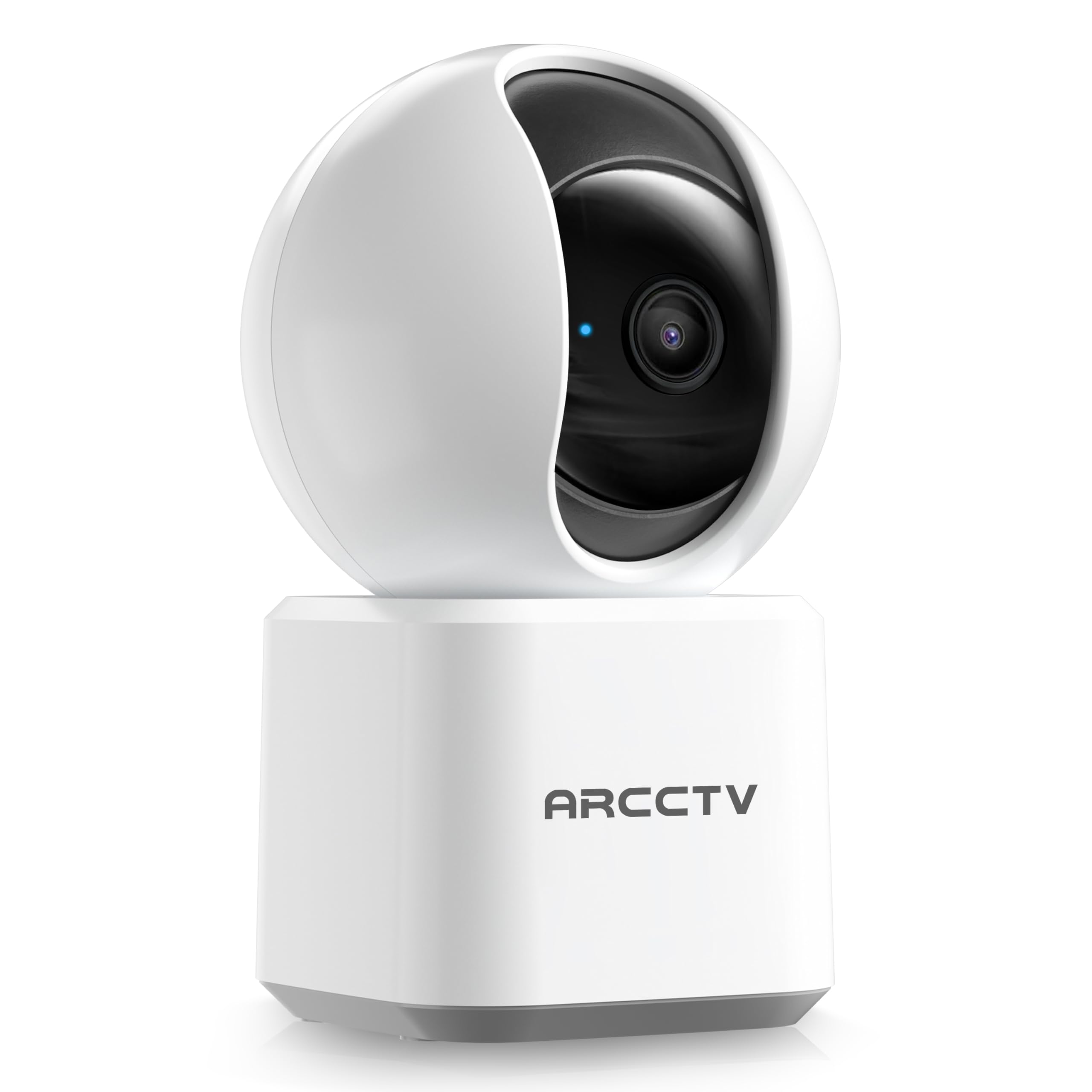
Image: The ARCCTV Y2U3 Indoor Security Camera.
ماذا يوجد في الصندوق
Upon unboxing your ARCCTV Y2U3 camera, you should find the following components:
- ARCCTV Y2U3 Indoor Security Camera Body
- USB Power Adapter (for your region)
- كابل طاقة USB-C
- تزايد شريحة
- مسامير التثبيت ومثبتات الحائط
- دليل البدء السريع

Image: The ARCCTV Y2U3 camera and its included accessories laid out on a wooden surface.
Video: An unboxing video demonstrating the contents of the ARCCTV Y2U3 Indoor Security Camera package, including the camera, power adapter, USB-C cable, mounting bracket, screws, and quick start guide.
يثبت
- تشغيل الطاقة: Connect the USB-C cable to the camera's port (located at the back of the base) and the USB power adapter. Plug the adapter into a power outlet. The camera will initiate a self-test and a blue indicator light will appear.
- تنزيل التطبيق: Scan the QR code in the Quick Start Guide or search for the "ARCCTV Security" app on your smartphone's app store (available for Android and iOS).
- تسجيل الحساب: افتح التطبيق وقم بالتسجيل للحصول على حساب جديد أو قم بتسجيل الدخول إذا كان لديك حساب بالفعل.
- إضافة جهاز: Follow the in-app instructions to add your new camera. This typically involves selecting "Add Device," choosing your camera model, and scanning a QR code displayed on your phone with the camera's lens.
- اتصال واي فاي: Ensure your smartphone is connected to a 2.4GHz or 5GHz Wi-Fi network. The camera supports both bands. The app will guide you through connecting the camera to your home Wi-Fi.
- تركيب بطاقة microSD (اختياري): If you plan to use local storage, gently rotate the camera lens upwards to reveal the microSD card slot. Insert a compatible microSD card (up to 256GB, not included) with the gold contacts facing down.
- التركيب (اختياري): If mounting the camera, use the provided mounting bracket, screws, and wall anchors. Secure the bracket to your desired location (wall or ceiling), then attach the camera to the bracket. Ensure the camera is within range of a power outlet.
فيديو: مقدمةview of the ARCCTV Y2U3 camera setup process, demonstrating the initial power-on, app connection, and basic functionality like pan/tilt control and live view.
تعليمات التشغيل
يعيش View والتحكم في الدوران/الإمالة
Access the live feed through the ARCCTV Security app. Use the on-screen controls to remotely pan (355° horizontal) and tilt (90° vertical) the camera lens, providing a 360° panoramic view of your space. This allows you to monitor every corner of the room.

Image: The camera's pan and tilt capabilities are illustrated, showing its wide coverage range.
صوت ثنائي الاتجاه
Utilize the built-in microphone and speaker for real-time two-way communication. Speak through the app to interact with family members, pets, or deter intruders. The audio quality is designed for clear conversations.

Image: A visual representation of the two-way communication feature, allowing interaction with individuals near the camera.
كشف الحركة وتتبعها
The camera features intelligent motion detection that sends instant notifications to your smartphone when activity is detected. With Smart Motion Tracking, the camera's lens automatically follows moving subjects, ensuring continuous monitoring of important events. You can customize monitoring zones to focus on specific areas.

Image: The camera's precision motion detection capability, distinguishing between human and pet movements.

Image: Smart motion tracking in action, where the camera automatically adjusts to follow moving subjects.
الرؤية الليلية
The camera is equipped with true-color night vision using an invisible light spectrum, allowing for clear monitoring in low-light conditions without disruptive red glows. The night vision range is up to 32 feet.

Image: A depiction of the camera's night vision capability, providing clear monochrome images in darkness.
خيارات التخزين
The ARCCTV Y2U3 supports local storage via a microSD card (up to 256GB) for continuous recording. Additionally, encrypted cloud storage is available through a paid subscription, ensuring your data is secure even if the device is damaged.

Image: The camera highlighting its microSD card slot for local video storage.

Image: An illustration of encrypted cloud storage, emphasizing data security and accessibility.
توافق اليكسا
Integrate your ARCCTV Y2U3 camera with Amazon Alexa for convenient voice control. Use simple voice commands like "Alexa, show me the nursery" to view البث المباشر على الأجهزة المتوافقة مع أليكسا.
Image: A user interacting with the camera via Alexa voice commands, viewing the feed on a tablet.
صيانة
- تنظيف: Gently wipe the camera lens and body with a soft, dry cloth. Avoid using harsh chemicals or abrasive materials that could scratch the lens or surface.
- تحديثات البرامج الثابتة: Regularly check the ARCCTV Security app for available firmware updates. Keeping your camera's firmware up-to-date ensures optimal performance, security, and access to new features.
- دورة الطاقة: If the camera experiences connectivity issues or unusual behavior, try power cycling it by unplugging it from the power source for 10 seconds and then plugging it back in.
- إدارة بطاقة MicroSD: في حال استخدام بطاقة microSD، قم بإعادة ضبطها بشكل دوريview and back up important recordings. Format the card within the app as needed to maintain performance and free up space.
استكشاف الأخطاء وإصلاحها
- الكاميرا غير متصل:
- تأكد من تشغيل الكاميرا وأن محول الطاقة موصول بإحكام.
- Verify your Wi-Fi network is active and the camera is within range of the router.
- أعد تشغيل جهاز توجيه Wi-Fi والكاميرا.
- Ensure the camera is connected to a supported 2.4GHz or 5GHz Wi-Fi network.
- جودة الفيديو رديئة:
- تأكد من أن عدسة الكاميرا نظيفة وخالية من الغبار والبقع.
- تحقق من قوة إشارة الواي فاي في التطبيق. قد تؤثر الإشارة الضعيفة على جودة الفيديو.
- Adjust the video resolution settings within the app to a lower quality if your network bandwidth is limited.
- كشف الحركة لا يعمل:
- تأكد من تفعيل خاصية كشف الحركة في إعدادات التطبيق.
- Adjust the motion detection sensitivity levels.
- تأكد من عدم وجود أي عوائق تعيق حركة الكاميرا view in the monitored zones.
- مشكلات الصوت ثنائية الاتجاه:
- Check the microphone and speaker volume settings in the app.
- Ensure there is no physical obstruction covering the microphone or speaker on the camera.
- قلل من الضوضاء المحيطة لتحسين التواصل.
- إعادة ضبط الكاميرا: If issues persist, locate the reset button (usually near the microSD card slot, accessible by rotating the lens upwards) and press and hold it for several seconds until you hear a prompt or see the indicator light change. This will restore factory settings, and you will need to set up the camera again.
تحديد
| ميزة | التفاصيل |
|---|---|
| اسم الموديل | Y2U3 |
| ماركة | ARCCTV |
| تكنولوجيا الاتصال | لاسلكي (واي فاي) |
| تكنولوجيا الاتصالات اللاسلكية | Bluetooth, Wi-Fi (Dual-Band: 2.4GHz, 5GHz) |
| دقة التقاط الفيديو | 1440p (2.5K Quad HD) |
| دقة ثابتة فعالة | 4 ميجا بكسل |
| المميزات الخاصة | 2-Way Audio, PTZ Technology (Pan/Tilt/Zoom), Motion Tracking, Night Vision, Alexa Compatibility |
| Viewزاوية جي | 360 Degrees (Pan & Tilt) |
| نطاق الرؤية الليلية | 32 أقدام |
| مصدر الطاقة | سلك كهرباء (5 فولت) |
| الحد الأقصى لحجم ذاكرة الفلاش المدعومة | 256 جيجابايت (بطاقة MicroSD) |
| أبعاد المنتج الطول × العرض × الارتفاع | 10 × 1.98 × 2.7 بوصة |
| وزن العنصر | 12.6 أونصات |
| الاستخدامات الموصى بها للمنتج | الأمن الداخلي |
الضمان والدعم
For warranty information, technical support, or further assistance with your ARCCTV Y2U3 Indoor Security Camera, please refer to the official ARCCTV webيمكنك الاطلاع على الموقع الإلكتروني أو الاتصال بخدمة العملاء مباشرةً. عادةً ما تجد التفاصيل في دليل البدء السريع أو على عبوة المنتج.
You can also visit the ARCCTV Store on Amazon for product updates and additional resources: ARCCTV Store