
1. المقدمة
This manual provides detailed instructions for the safe and efficient use of your Surfans F20 Pro Android Hi-Res Music Player. Please read this manual thoroughly before operating the device and retain it for future reference.
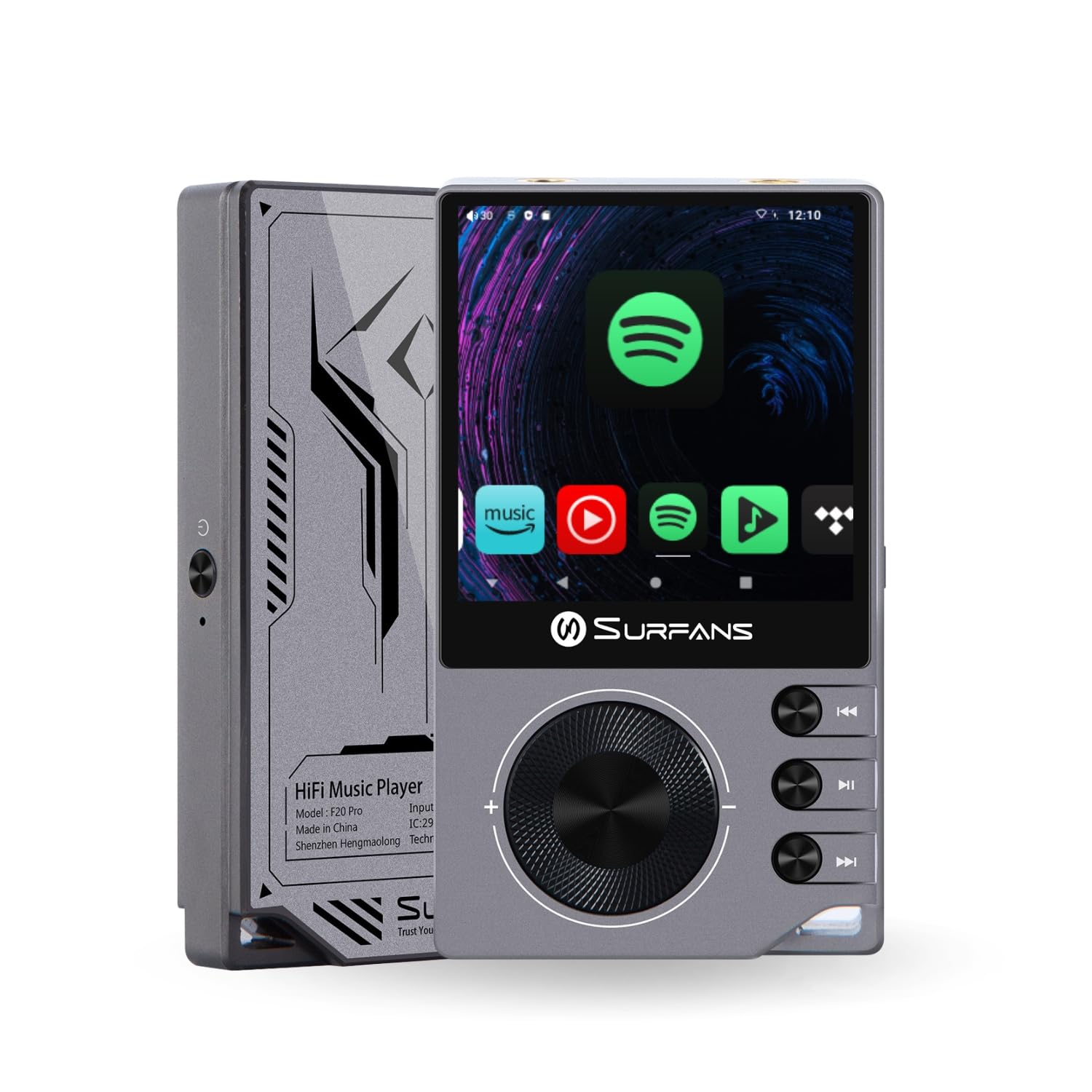
The Surfans F20 Pro Hi-Res Music Player, showcasing its compact design and touchscreen interface.
2. محتويات العبوة
تأكد من وجود جميع العناصر في العبوة:
- Surfans F20 Pro Hi-Res Music Player
- كابل USB Type-C
- 32 GB MicroSD Memory Card (pre-installed or separate)
- حافظة حماية
- دليل المستخدم (هذا المستند)
3. انتهى الجهازview
Familiarize yourself with the physical components and ports of your F20 Pro player.

الامام والخلف view of the Surfans F20 Pro, highlighting its robust CNC metal chassis and button layout.
3.1. الميزات الرئيسية
- Dual ESS9018Q2M DACs: For high-fidelity audio processing.
- Octa-Core Android 12 System: Enables streaming app compatibility and smooth operation.
- 3.5mm Single-Ended & 4.4mm Balanced Outputs: Versatile headphone connectivity.
- بلوتوث 5.0 مع LDAC: High-quality wireless audio transmission.
- واي فاي ثنائي النطاق (2.4 جيجاهرتز و 5 جيجاهرتز): For stable internet connectivity.
- مساحة تخزين قابلة للتوسعة: Supports up to 1TB via MicroSD card.
- شاشة تعمل باللمس مقاس 2.7 بوصات: واجهة مستخدم بديهية.
4. الإعداد
4.1. شحن الجهاز
Before first use, fully charge the F20 Pro. Connect the included USB Type-C cable to the device's charging port and a compatible USB power adapter (not included) or computer USB port. The charging indicator will show the charging status.
4.2. إدخال بطاقة MicroSD
The F20 Pro supports MicroSD cards up to 1TB for expanded storage. Locate the MicroSD card slot on the side of the device. Gently insert the card until it clicks into place. To remove, push the card in again until it springs out.
4.3. التشغيل الأولي
Press and hold the power button until the screen illuminates. Follow the on-screen prompts to complete the initial setup, including language selection and Wi-Fi connection.
4.4. الاتصال بشبكة Wi-Fi
انتقل إلى الإعدادات > الشبكة والإنترنت > Wi-Fi. Select your desired network and enter the password if prompted. The F20 Pro supports both 2.4GHz and 5GHz Wi-Fi bands.

The Surfans F20 Pro demonstrating its dual-band Wi-Fi capability for fast and stable connections.
4.5. اقتران بلوتوث
لتوصيل سماعات الرأس أو مكبرات الصوت بتقنية البلوتوث:
- تأكد من أن جهاز البلوتوث الخاص بك في وضع الاقتران.
- On the F20 Pro, go to الإعدادات> الأجهزة المتصلة> إقران جهاز جديد.
- Select your device from the list and confirm pairing.

An illustration of the Bluetooth 5.0 chip, indicating support for high-resolution wireless audio codecs like LDAC.
5. تشغيل الجهاز
5.1. التنقل الأساسي
The F20 Pro features a 2.7-inch touchscreen for navigation. Swipe to scroll, tap to select, and use the physical buttons for quick controls:
- زر الطاقة: Power on/off, screen on/off.
- عجلة الحجم: يضبط مستوى صوت الإخراج.
- أزرار التحكم في التشغيل: تشغيل/إيقاف مؤقت، المقطع التالي، المقطع السابق.
5.2. تشغيل الموسيقى
The F20 Pro supports various audio formats including DSD512, 192kHz/24bit, FLAC, WAV, WMA, M4A, MP3, MP2, and AAC.
5.2.1. محلي Files
نقل الموسيقى files to the device's internal storage or MicroSD card via USB connection to a computer. Use the pre-installed music player application to browse and play your library.
5.2.2. تطبيقات البث المباشر
The Android 12 operating system allows installation of streaming apps like Spotify, Apple Music, Tidal, or YouTube. Connect to Wi-Fi and download apps from the Google Play Store or other compatible sources.

The Surfans F20 Pro's screen showing various streaming application icons, demonstrating its Android capabilities.
5.3. Headphone Connections
The device offers both single-ended and balanced audio outputs.
- مخرج أحادي الطرف 3.5 مم: Standard headphone jack (125mW/32Ω).
- 4.4 مللي متر الناتج المتوازن: For enhanced audio performance with compatible headphones (500mW/32Ω).

عن قرب view of the 3.5mm single-ended and 4.4mm balanced audio output ports on the Surfans F20 Pro.
6. الصيانة
6.1. التنظيف
Use a soft, dry, lint-free cloth to clean the device. Avoid using abrasive cleaners or solvents, which may damage the surface.
6.2. تحديثات البرامج
Periodically check for software updates to ensure optimal performance and access to new features. Updates can typically be found in الإعدادات > النظام > تحديث النظام.
6.3. العناية بالبطارية
لإطالة عمر البطارية، تجنب تفريغ الجهاز بالكامل بشكل متكرر. خزّن الجهاز في مكان بارد وجاف عند عدم استخدامه لفترات طويلة.

داخلي view of battery cells, representing the long-lasting battery capacity of the F20 Pro.
7. استكشاف الأخطاء وإصلاحها
If you encounter issues with your F20 Pro, refer to the following common problems and solutions:
| مشكلة | السبب المحتمل | حل |
|---|---|---|
| الجهاز لا يعمل | بطارية منخفضة؛ تعطل النظام | اشحن الجهاز؛ اضغط مع الاستمرار على زر الطاقة لمدة 10-15 ثانية لإعادة التشغيل القسري. |
| لا يوجد مخرج صوت | Volume too low; Incorrect output selected; Faulty headphones | Increase volume; Check headphone connection; Test with different headphones. |
| لا يمكن الاتصال بشبكة Wi-Fi | كلمة مرور خاطئة؛ خارج النطاق؛ مشكلة في جهاز التوجيه | تحقق من كلمة المرور؛ اقترب من جهاز التوجيه؛ أعد تشغيل جهاز التوجيه. |
| بطء الأداء/تعطل التطبيق | تشغيل عدد كبير جدًا من التطبيقات؛ مساحة تخزين منخفضة؛ برامج قديمة | Close background apps; Free up storage; Check for system updates. |
8. المواصفات
Detailed technical specifications for the Surfans F20 Pro:
| ميزة | التفاصيل |
|---|---|
| ماركة | راكبي الأمواج |
| اسم الموديل | اف 20 برو |
| رقائق DAC | Dual ESS9018Q2M |
| أب-Amps | Dual OPA1612 |
| نظام التشغيل | أندرويد 12 |
| كبش | 3 جيجا بايت |
| التخزين الداخلي | 32 جيجا بايت |
| تخزين قابل للتوسيع | يدعم حتى 1 تيرابايت عبر بطاقة MicroSD |
| حجم الشاشة | 2.73 بوصة |
| الاتصال | Aux, Bluetooth 5.0 (LDAC), USB Type-C, Wi-Fi (2.4GHz & 5GHz) |
| مخرجات الصوت | 3.5mm Single-Ended (125mW/32Ω), 4.4mm Balanced (500mW/32Ω) |
| تنسيقات الصوت المدعومة | DSD512, 192kHz/24bit, FLAC, WAV, WMA, M4A, MP3, MP2, AAC |
| لون | رمادي |

An illustration of the dual ESS9018K2M DAC chips, central to the F20 Pro's high-resolution audio capabilities.
9. معلومات الضمان
The Surfans F20 Pro comes with a ضمان لمدة سنتين يسري هذا الضمان من تاريخ الشراء. ويغطي عيوب التصنيع وجودة الصنع في ظل الاستخدام العادي. ولا يغطي الأضرار الناجمة عن سوء الاستخدام أو الحوادث أو التعديلات غير المصرح بها أو التلف الناتج عن الاستخدام العادي. يرجى الاحتفاظ بإثبات الشراء لتقديم مطالبات الضمان.
10. دعم العملاء
For further assistance, technical support, or warranty inquiries, please contact Surfans customer service through the official website or your retailer. You may also find additional resources and FAQs online.