
مقدمة
This manual provides detailed instructions for the safe installation, operation, and maintenance of your TCL 62-inch ceiling fan. Please read this manual thoroughly before installation and keep it for future reference. Ensure all safety precautions are followed to prevent injury or damage.
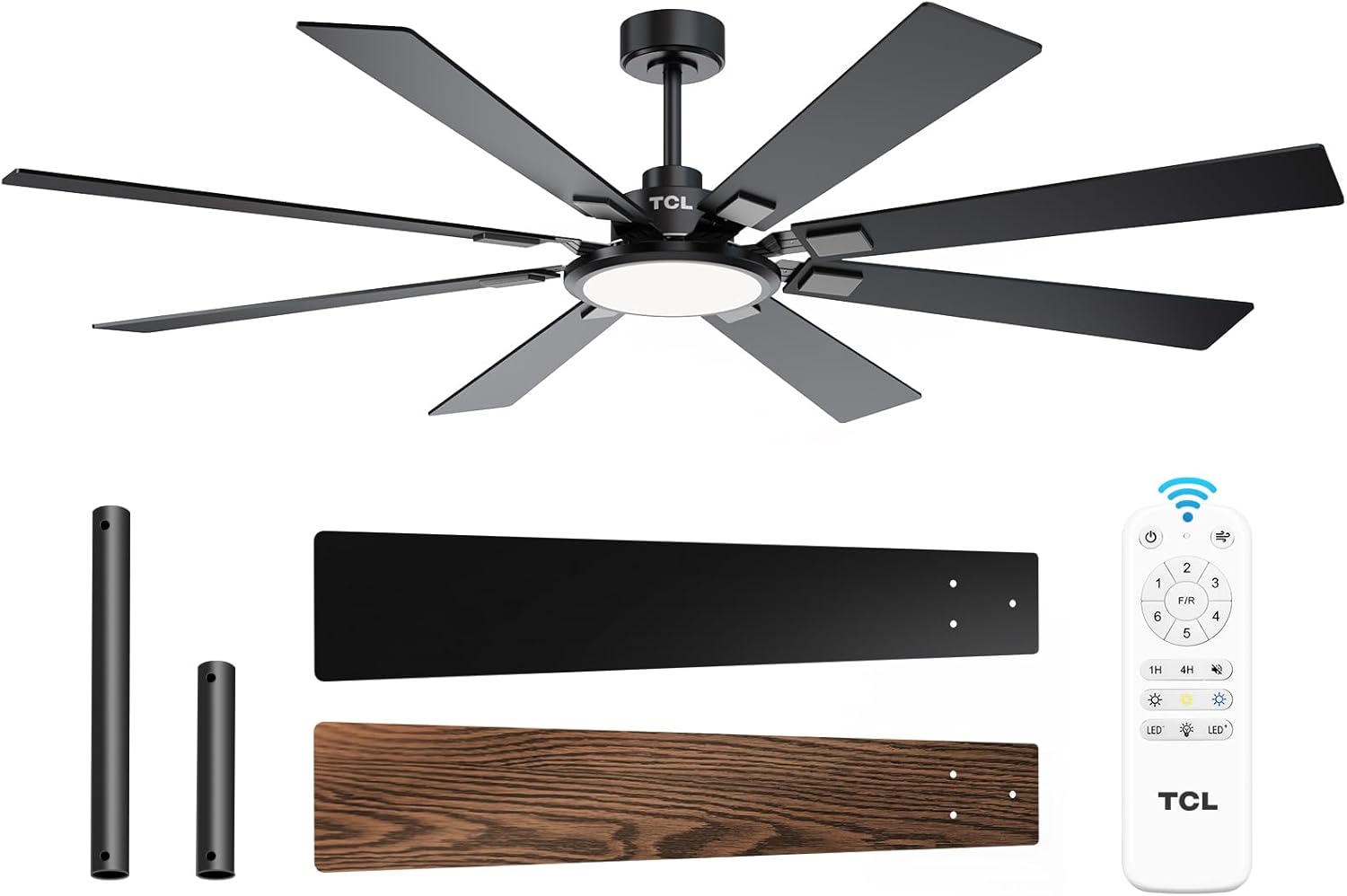
Figure 1: TCL 62-Inch Ceiling Fan Overview
معلومات السلامة
اتبع دائمًا احتياطات السلامة الأساسية عند تركيب هذا الجهاز وتشغيله لتقليل خطر الحريق والصدمة الكهربائية والإصابة الشخصية.
- اقرأ جميع التعليمات: تعرّف على مكونات المروحة وخطوات تركيبها قبل البدء.
- السلامة الكهربائية: تأكد من فصل التيار الكهربائي من قاطع الدائرة قبل التركيب أو الصيانة. يجب أن تتوافق جميع الأسلاك مع قوانين الكهرباء الوطنية والمحلية.
- التركيب: The fan must be mounted to a structurally sound ceiling joist or outlet box capable of supporting the fan's weight (12.4 lbs).
- خلوص الشفرة: حافظ على مسافة لا تقل عن 7 أقدام بين الأرضية وشفرات المروحة.
- التثبيت الاحترافي: إذا كنت غير متأكد من الأسلاك أو التركيب، فاستشر كهربائيًا مؤهلًا.
الإعداد والتثبيت
المكونات المضمنة
قبل البدء بالتثبيت، تأكد من وجود جميع الأجزاء:
- مروحة سقف واحدة بخمس شفرات
- دليل التعليمات (هذا المستند)
- جهاز التحكم عن بعد
- Downrods (10-inch and 5-inch switchable)

Figure 2: Fan Components and Features
خطوات التثبيت
- إيقاف تشغيل الطاقة: Disconnect power at the main circuit breaker to avoid electrical shock.
- تركيب قوس تصاعد: Securely attach the mounting bracket to the ceiling outlet box or a structural support. Ensure it can safely hold the fan's weight.
- تركيب قضيب التثبيت: Choose the appropriate downrod (5-inch or 10-inch) and assemble it with the fan motor unit.
- مروحة معلقة: ارفع مجموعة المروحة بعناية وقم بتعليقها على حامل التثبيت.
- التوصيلات الكهربائية: قم بتوصيل الأسلاك الكهربائية وفقًا لمخطط الأسلاك المرفق في دليل التثبيت المنفصل. تأكد من إحكام جميع التوصيلات.
- ربط الشفرات: Securely attach the 8 fan blades to the motor housing. Note that blades are reversible with black and wood-grain sides.
- تثبيت مجموعة الإضاءة: Connect and install the LED light panel to the bottom of the fan.
- اعادة الطاقة: بمجرد اكتمال التثبيت والتأكد من جميع التوصيلات، قم بإعادة التيار الكهربائي إلى قاطع الدائرة.
دليل التثبيت بالفيديو
Video 1: Step-by-step guide on how to install the TCL ceiling fan, demonstrating the ease of assembly and mounting.
تعليمات التشغيل
Your TCL ceiling fan is operated using the included remote control. Ensure batteries are correctly installed in the remote.
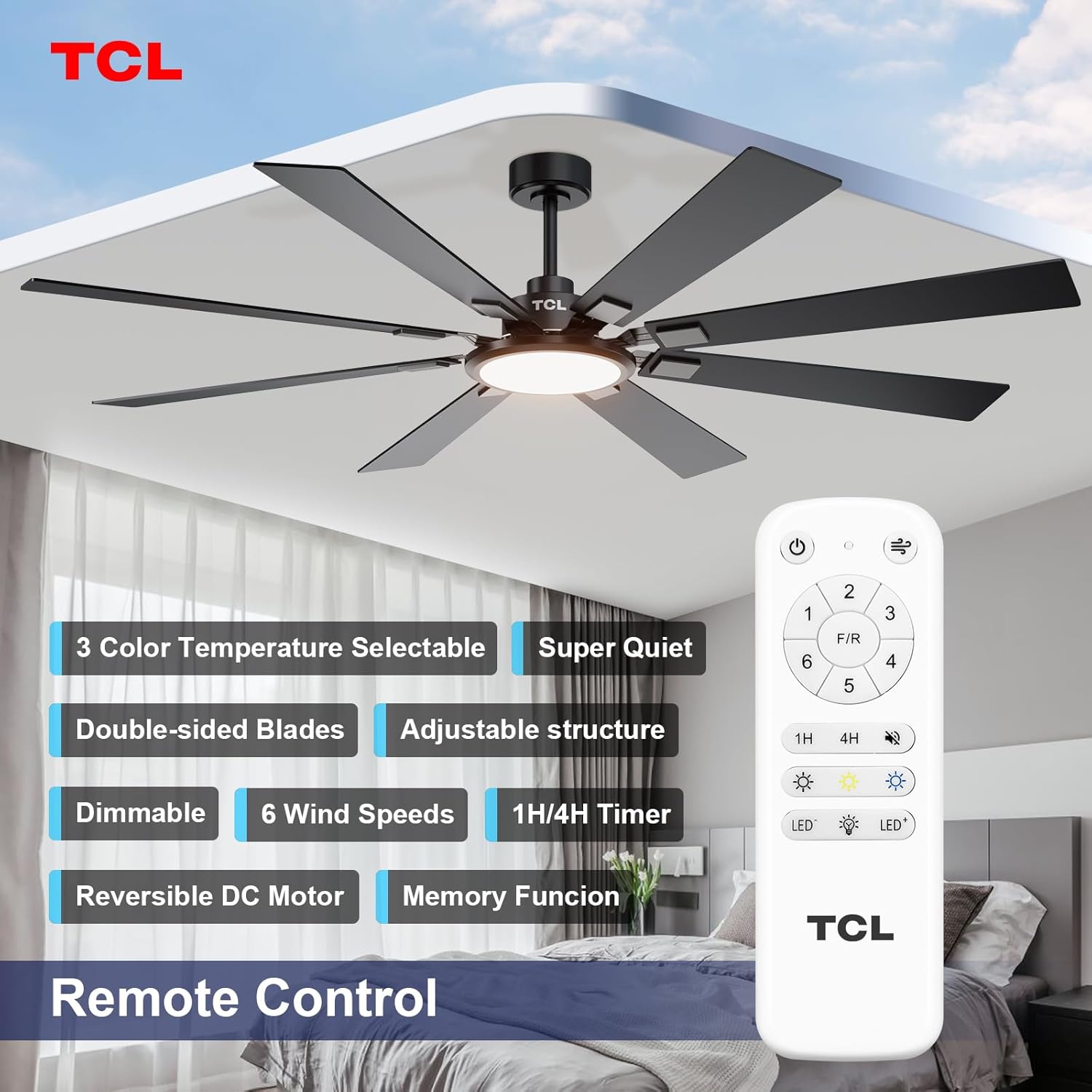
الشكل 3: تخطيط جهاز التحكم عن بعد
التحكم في سرعة المروحة
The fan features 6 adjustable speeds to suit your comfort needs. Use the '1' through '6' buttons on the remote to select your desired speed.
- المستويات 1-2: رياح خفيفة ومريحة لتهوية لطيفة.
- المستويات 3-4: رياح طبيعية متوسطة لتبريد معتدل.
- المستويات 5-6: رياح قوية وعالية لتبريد مثالي.
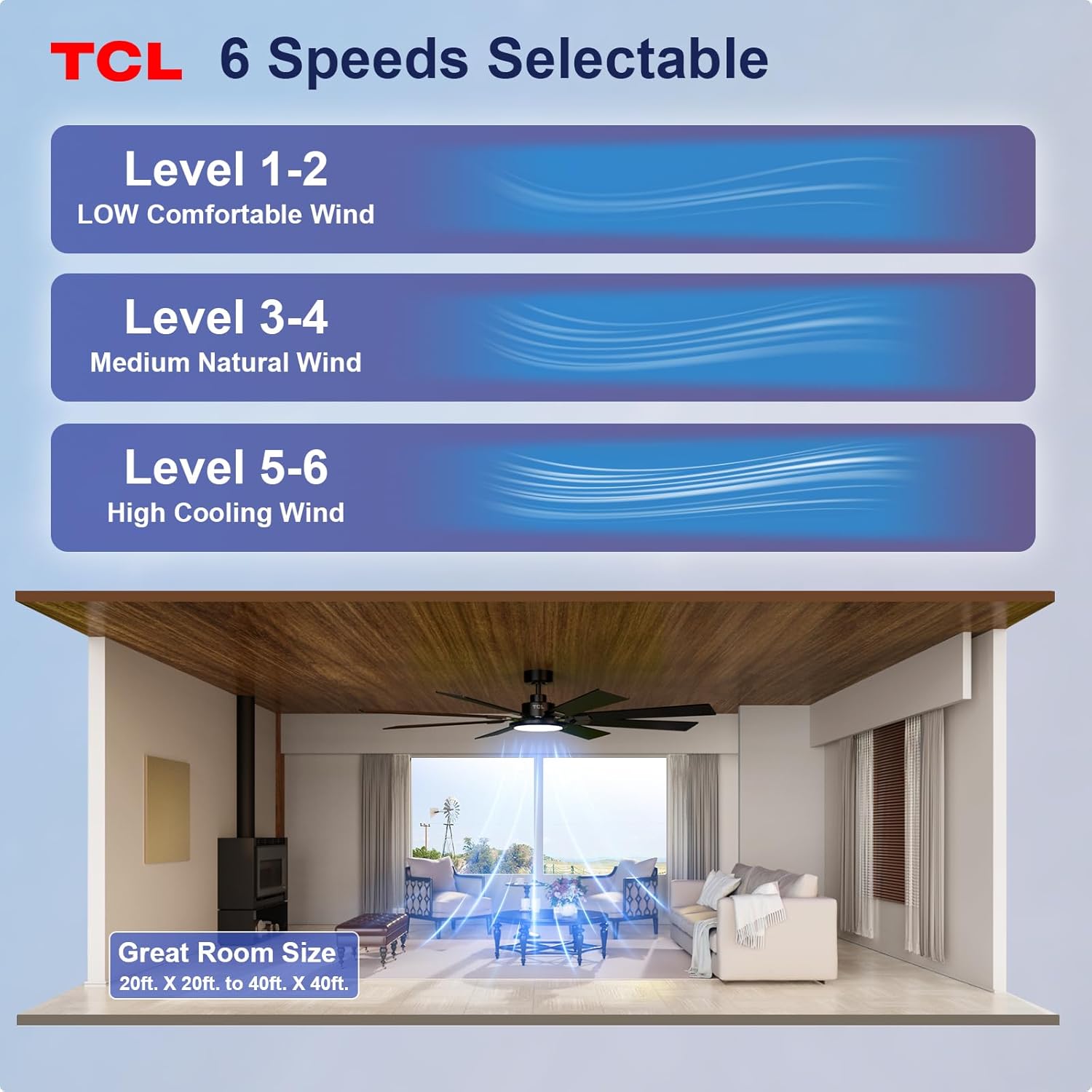
Figure 4: Fan Speed Settings
تشغيل خفيف
The integrated LED light offers dimmable brightness and 3 color temperature options:
- تشغيل/إيقاف: Use the light button on the remote to turn the light on or off.
- يعتم: Use the dimming buttons (up/down arrows) to adjust brightness from 10% to 100%.
- درجة حرارة اللون: Cycle through 3000K (Warm White), 4000K (Natural White), and 6000K (Cool White) using the color temperature button.
- وظيفة الذاكرة: The fan remembers your last light setting (brightness and color temperature) when turned off and on again. To ensure memory function works correctly, wait at least 20 seconds after turning off the light before turning it back on.

Figure 5: Customizable Light Settings
محرك تيار مستمر قابل للعكس
The fan features a reversible DC motor, allowing you to change the direction of airflow for year-round comfort. Use the 'F/R' button on the remote control.
- الوضع الصيفي (تدفق الهواء للأسفل): تدور الشفرات عكس اتجاه عقارب الساعة، مما يخلق نسيمًا هابطًا يوفر تأثيرًا مبردًا.
- وضع الشتاء (تدفق الهواء لأعلى): Blades rotate clockwise, drawing cool air up and pushing warm air down from the ceiling, helping to balance indoor heating.

Figure 6: Reversible DC Motor Function
وظيفة المؤقت
Set the fan to automatically turn off after a specified period using the timer buttons (1H/4H) on the remote control.
تشغيل هادئ
The fan is designed for noiseless operation, ensuring a peaceful environment.

Figure 7: Noiseless Operation Comparison
مقاطع الفيديو العملية
الفيديو 2: انتهىview of the TCL ceiling fan, highlighting its modern design and large size suitable for various rooms.
Video 3: Demonstrates the cooling power and stylish lighting features of the TCL ceiling fan.
الفيديو 4: مراجعة شاملةview of the TCL ceiling fan's features and benefits.
صيانة
تضمن الصيانة الدورية الأداء الأمثل وتطيل عمر مروحة السقف.
- تنظيف: نظف شفرات المروحة وغطاء المحرك بشكل دوري باستخدام قطعة قماش ناعمة.amp قطعة قماش. لا تستخدم منظفات أو مذيبات كاشطة. تأكد من فصل الكهرباء قبل التنظيف.
- فحص الشفرة: افحص شفرات المروحة بحثًا عن أي تشققات أو تلف. استبدل الشفرات التالفة فورًا.
- تشديد البراغي: Over time, screws may loosen. Periodically check and tighten all screws on the motor housing and blade attachments.
- غطاء خفيف: تأكد من تثبيت غطاء المصباح بإحكام.
استكشاف الأخطاء وإصلاحها
إذا واجهت مشاكل مع مروحة التبريد، فراجع المشاكل والحلول الشائعة التالية:
| مشكلة | السبب المحتمل | حل |
|---|---|---|
| المروحة لا تبدأ | لا يوجد طاقة للمروحة؛ توصيلات الأسلاك فضفاضة؛ بطارية جهاز التحكم عن بعد ميتة. | التحقق من قاطع الدائرة؛ والتأكد من سلامة جميع توصيلات الأسلاك؛ واستبدال بطاريات جهاز التحكم عن بعد. |
| الضوء لا يعمل | توصيل سلك غير محكم؛ مشكلة في لوحة LED. | Check light kit wiring; Contact customer support if LED panel is faulty. |
| التذبذب المفرط | شفرات مفكوكة أو أدوات تثبيت غير مثبتة بإحكام؛ شفرات غير متوازنة. | تأكد من إحكام جميع براغي الشفرة وبراغي التثبيت؛ استخدم مجموعة موازنة (غير مرفقة) إذا لزم الأمر. |
| عملية صاخبة | براغي مفكوكة؛ مشكلة في المحرك. | Tighten all screws; If noise persists, contact customer support. |
تحديد
Detailed technical specifications for the TCL 62-inch ceiling fan:
| ميزة | التفاصيل |
|---|---|
| ماركة | تي سي إل |
| رقم الموديل | HFSB-000000D |
| مقاس | 62 بوصة |
| لون | أسود |
| مادة | المعادن ، الخشب |
| أسلوب | حديث |
| الاستخدام الداخلي والخارجي | داخلي، خارجي |
| مصدر الطاقة | DC |
| طريقة التحكم | بعيد |
| مصدر الضوء | قاد |
| عدد مصادر الضوء | 1 |
| المجلدtage | 120 فولت |
| لون فاتح | Warm to Cool White (2700K-6500K) |
| واتtage | 66 واط |
| سطوع | 3000 لومن (كحد أقصى) |
| كفاءة | LED، قابلة للتعتيم |
| وزن العنصر | 12.4 رطل |
| الأبعاد (الطول × العرض × الارتفاع) | 72"L x 72"W x 20"H (Note: Product is 62-inch, this dimension might refer to overall span) |
| رمز المنتج الموحد | 846042019989 |
الضمان والدعم
معلومات الضمان
This TCL ceiling fan is covered by a limited manufacturer's warranty. Please refer to the warranty card included in your product packaging for specific terms, conditions, and duration. Retain your proof of purchase for warranty claims.
دعم العملاء
For technical assistance, troubleshooting not covered in this manual, or warranty inquiries, please contact TCL customer service. Contact information can typically be found on the product packaging or the official TCL webموقع.