
1. المقدمة
Thank you for choosing the REOLINK Argus Track 4K Dual-Lens Solar Security Camera. This manual provides essential information for setting up, operating, and maintaining your camera to ensure optimal performance and security. The Argus Track camera offers advanced features including 4K dual-lens video, auto-zoom tracking, smart AI detection, color night vision, and is powered by a 6W solar panel for continuous operation without subscriptions.
2. محتويات العبوة
تأكد من وجود جميع المكونات في الحزمة الخاصة بك:
- REOLINK Argus Track Camera
- لوحة شمسية 6 واط
- تصاعد طقم برغي
- كابل يو اس بي
- دليل التعليمات (هذا المستند)
3. انتهى المنتجview
The REOLINK Argus Track is a versatile 4K dual-lens security camera designed for both indoor and outdoor use. It features a wide-angle lens and a zoom lens, enabling comprehensive coverage and detailed close-ups. The camera is powered by a solar panel, ensuring continuous operation.
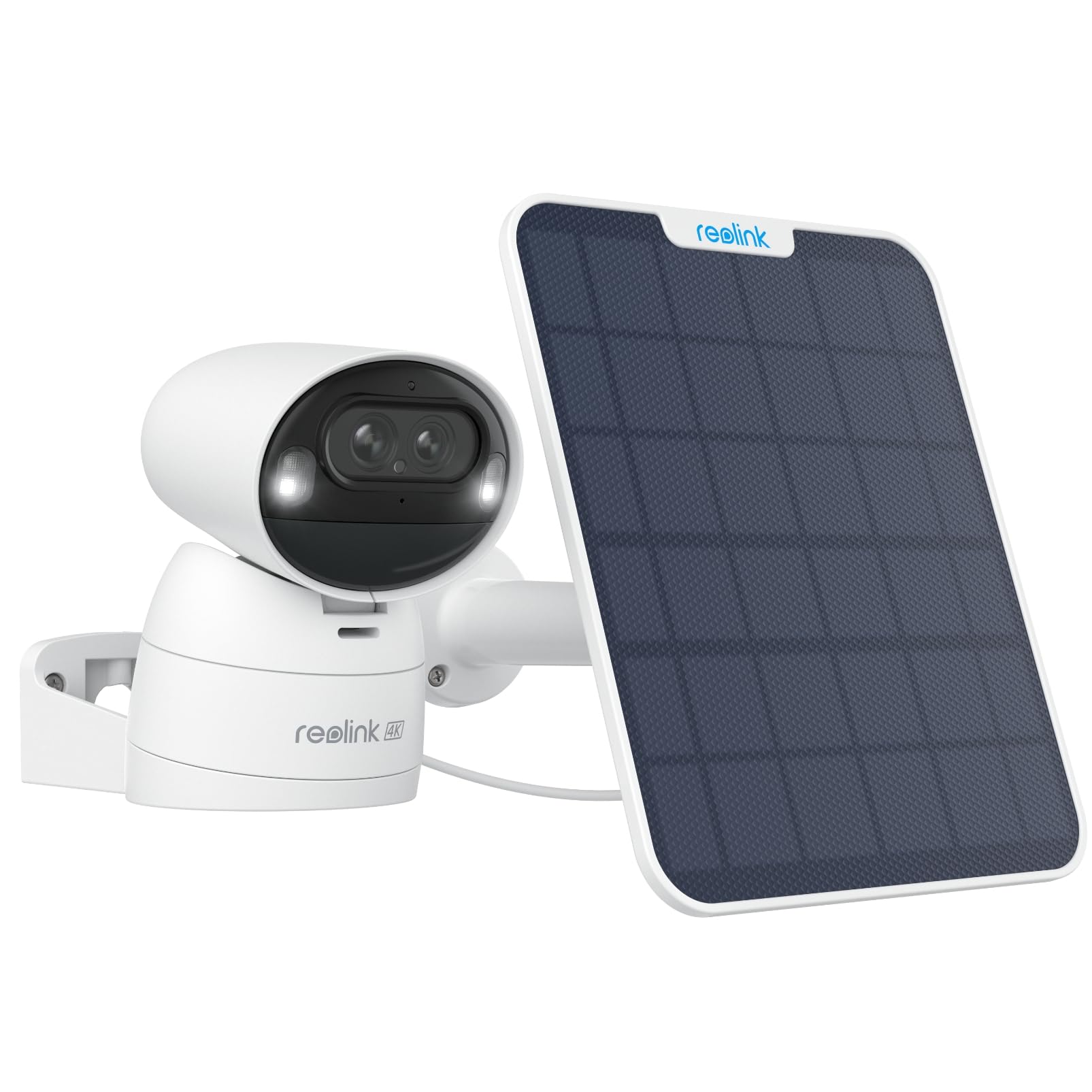
الصورة: الجبهة view of the REOLINK Argus Track 4K Dual-Lens Solar Security Camera with its accompanying solar panel.
فيديو: أكثر منview of the Reolink Argus Track camera and solar panel, highlighting its key features and design.
مكونات الكاميرا
- العدسات المزدوجة: One wide-angle 4K lens and one 2MP zoom lens for hybrid zoom and auto-tracking.
- مستشعر الحركة: Detects movement for smart alerts.
- الميكروفون ومكبر الصوت: للاتصال الصوتي ثنائي الاتجاه.
- أبرز النقاط: Enable color night vision.
- منفذ USB-C: For charging and connecting the solar panel.
- منفذ كارت الذاكرة الصغيرة: For local storage (supports up to 128GB, card not included).
- زر إعادة الضبط: لاستعادة إعدادات المصنع.
- زر الطاقة: To turn the camera on/off.

Image: The back of the REOLINK Argus Track camera, displaying the QR code for setup, serial number (S/N: WLBE246A000484), power button, and USB-C port. The QR code is used for initial setup with the Reolink app.
4. الإعداد
4.1 Initial Camera Activation
- اشحن الكاميرا: Before initial use, fully charge the camera using the provided USB cable or by connecting it to the solar panel under direct sunlight.
- إدخال بطاقة MicroSD (اختياري): If local storage is desired, open the protective cover on the camera's underside and insert a microSD card (up to 128GB, not included) into the designated slot.
- تشغيل الطاقة: Press and hold the power button located under the protective cover to turn on the camera. You will hear a startup chime.
4.2 تثبيت التطبيق وتكوينه
- تحميل تطبيق ريولينك: Download and install the "Reolink" app from your smartphone's app store (iOS or Android).
- إضافة جهاز: Open the Reolink app, tap the "+" icon in the top right corner, and scan the QR code located on the back of your camera.
- إتصال شبكة: Follow the in-app instructions to connect the camera to your 2.4GHz or 5GHz Wi-Fi network. Ensure your Wi-Fi signal is strong at the camera's intended installation location.
- Set Up Password: Create a strong password for your camera.
- يعيش View: Once connected, you can access the live view من الكاميرا الخاصة بك.
4.3 تركيب الكاميرا واللوحة الشمسية
The camera can be mounted indoors or outdoors. Choose a location with optimal Wi-Fi signal and direct sunlight exposure for the solar panel.
- اختر موقعا: Identify a suitable mounting spot for the camera and the solar panel. The solar panel should receive several hours of direct sunlight daily.
- تثبيت جبل: Use the provided mounting screws to securely attach the camera mount to a wall or ceiling.
- إرفاق الكاميرا: Secure the camera to the installed mount. The camera's image can be flipped in the app if mounted upside down.
- تركيب الألواح الشمسية: Mount the 6W solar panel in a location that maximizes sun exposure. Connect the solar panel cable to the camera's USB-C port. The long cable allows for flexible placement.

Image: The REOLINK Argus Track camera installed on an outdoor wall, connected to its solar panel for continuous power.

الصورة: السابقamples of flexible installation for the REOLINK Argus Track camera, showing it mounted on a wall, under an eave, and on a pole with the solar panel.
5. تعليمات التشغيل
5.1 مباشر View والتشغيل
الوصول إلى بث الفيديو المباشر و foo المسجلtage through the Reolink app or client software on your smartphone or computer.
- يعيش View: افتح التطبيق وحدد الكاميرا الخاصة بك لـ view البث المباشر.
- التشغيل: انتقل إلى قسم التشغيل لإعادةview recorded events stored on the microSD card.

Image: The Reolink app interface displayed on a smartphone, tablet, and computer, demonstrating multi-platform access to the camera feed.
5.2 التحكم في الحركة الأفقية والرأسية والتكبير (PTZ)
Remotely control the camera's viewing angle and zoom level via the app.
- التحريك/الإمالة: Use the directional controls in the app to rotate the camera horizontally (pan up to 355°) and vertically (tilt up to 50°).
- تكبير: Utilize the digital zoom function or rely on the camera's 6x hybrid zoom for detailed views.
- النقاط المحددة مسبقاً: يمكنك إعداد ما يصل إلى 32 إعدادًا مسبقًا viewing points for quick navigation to specific areas.

Image: The REOLINK Argus Track camera illustrating its pan and tilt capabilities, along with the concept of setting up to 32 preset points for monitoring key areas.
5.3 Auto-Tracking and Auto-Zoom
The camera can automatically track detected objects and zoom in for clarity.
- تفعيل التتبع التلقائي: In the app settings, navigate to "Detection Alarm" and enable "Auto Tracking."
- Set Tracking Type: Choose to track "Person," "Vehicle," or both.
- منطقة الكشف: Define specific areas for motion detection to minimize false alarms.
- حساسية: Adjust sensitivity levels for person and vehicle detection.
Video: A demonstration of how to set up auto-tracking in the Reolink app, showing the steps to enable the feature and select tracking types for persons and vehicles.

Image: The REOLINK Argus Track camera demonstrating its auto-tracking and auto-zoom capabilities, showing a wide view وصورة مكبرة view من السيارة.
6. المميزات
6.1 4K Dual-Lens, Dual-View & 6X Hybrid Zoom
Experience superior clarity with 4K resolution from the wide-angle lens, complemented by a dedicated 2MP lens for sharp, zoomed-in views. The 6x hybrid zoom ensures no detail is missed, whether near or far.

الصورة: لقطة مقربة view of the REOLINK Argus Track camera's dual lenses, highlighting the 4K wide-angle lens and the auto-tracking zoom lens.
6.2 100% Wireless & 6W Solar Panel
Enjoy complete freedom from wires with battery power and a robust 6W solar panel for continuous charging. The camera supports 2.4/5GHz Wi-Fi, offering flexible installation anywhere.

Image: The REOLINK 6W solar panel connected to the camera, illustrating its efficient charging capability under sunlight.
6.3 الكشف الذكي بالذكاء الاصطناعي
Advanced AI technology accurately identifies people, vehicles, and animals, sending instant alerts to your smartphone and significantly reducing false alarms.

Image: The REOLINK Argus Track camera demonstrating its smart AI detection, highlighting the recognition of a person, a vehicle, and an animal within the camera's view.
6.4 4K Color Night Vision & Remote Pan/Tilt
Capture vivid, detailed footage day and night with 4K color night vision, enhanced by motion-activated spotlights. Remotely pan and tilt the camera to monitor larger areas and track movement effectively.

Image: A comparison showing the REOLINK Argus Track camera's color night vision with spotlights activated, providing clear and detailed footagه في ظروف الإضاءة المنخفضة.
6.5 Local Storage & No Subscription
خزّن طعامكtage locally on a microSD card (up to 128GB) without any monthly fees. Your data remains private and accessible directly from the camera.

Image: An illustration representing the local storage capability of the REOLINK camera via an SD card, emphasizing no monthly fees or hub requirements.
6.6 تكامل المنزل الذكي
The REOLINK Argus Track camera is compatible with smart home ecosystems like Amazon Alexa and Google Assistant, allowing for convenient voice control and integration into your smart home routines.

Image: The REOLINK camera integrated with a smart home display, showing compatibility with Google Assistant for hands-free control.
7. الصيانة
- العدسات النظيفة: Regularly clean the camera lenses with a soft, dry cloth to ensure clear image quality.
- التحقق من اللوحة الشمسية: Ensure the solar panel is free from dirt, dust, or obstructions to maintain optimal charging efficiency.
- تحديثات البرامج الثابتة: Check the Reolink app periodically for firmware updates to ensure your camera has the latest features and security enhancements.
- صحة البطارية: Monitor battery levels in the app. If the camera is not charging effectively, check the solar panel's placement and cleanliness.
8. استكشاف الأخطاء وإصلاحها
| مشكلة | حل |
|---|---|
| الكاميرا لا تعمل. | Ensure the camera is fully charged. Press and hold the power button for a few seconds. |
| لا يمكن الاتصال بشبكة Wi-Fi. | Verify Wi-Fi password. Ensure the camera is within range of your router. Try resetting the camera and re-pairing. The camera supports both 2.4GHz and 5GHz Wi-Fi. |
| جودة الصورة رديئة. | Clean the camera lenses. Ensure sufficient lighting. Check network connection stability. |
| Auto-tracking not working correctly. | Ensure auto-tracking is enabled in the app settings. Adjust detection zones and sensitivity. Ensure there are no obstructions in the camera's view. Note that tracking performance might vary in very low light conditions with spotlights. |
| اللوحة الشمسية لا تشحن. | Ensure the solar panel is installed in direct sunlight and free from obstructions. Check the connection cable between the solar panel and the camera. |
| Frequent "device disconnected" messages. | Check your Wi-Fi signal strength at the camera's location. Restart your router and the camera. Ensure the Reolink app is updated to the latest version. |
9. المواصفات
| ميزة | التفاصيل |
|---|---|
| اسم الموديل | مسار أرغوس |
| دقة الفيديو | 4K (8 ميجا بكسل) |
| الاتصال | Wireless (2.4GHz/5GHz Wi-Fi) |
| مصدر الطاقة | Solar Powered / Battery Powered (5V, 6W) |
| المميزات الخاصة | 4K Dual-Lens, Auto-Zoom Tracking, Color Night Vision, PTZ Technology, Smart AI Detection (Person, Vehicle, Animal) |
| نطاق التحريك/الإمالة | مقلاة 355 درجة ، إمالة 50 درجة |
| التكبير البصري | تكبير هجين 6x |
| نطاق الرؤية الليلية | Up to 33 feet (with spotlights) |
| التخزين المحلي | بطاقة MicroSD (تصل إلى 128 جيجابايت) |
| مقاومة الماء | IP65 مانعة لتسرب الماء |
| أبعاد | 3.33 × 3.3 × 4.64 بوصة |
| الأجهزة المتوافقة | الهواتف الذكية (iOS/Android)، أمازون أليكسا، مساعد جوجل |
10. الضمان والدعم
REOLINK products typically come with a limited warranty. For specific warranty details, please refer to the warranty card included in your package or visit the official REOLINK website. For technical support, product registration, or further assistance, please contact REOLINK customer service or visit their support portal.
- رسمي Webموقع: www.reolink.com
- يدعم: يرجى الرجوع إلى معلومات الاتصال المقدمة على الموقع الرسمي webالموقع للحصول على خيارات الدعم.