
مقدمة
Welcome to the user manual for your Samsung QN65QN990FFXZA 65 Inch QN990F Neo QLED 8K TV. This document provides essential information for setting up, operating, maintaining, and troubleshooting your television. Please read these instructions carefully to ensure proper use and to maximize your viewتجربة رائعة.

الشكل 1: الجبهة view of the Samsung QN65QN990FFXZA 65 Inch QN990F Neo QLED 8K TV.
يثبت
1. فك التعبئة والتركيب
- قم بإزالة التلفزيون وجميع الملحقات من العبوة بعناية.
- Place the TV on a stable, flat surface or mount it on a wall using a VESA 400mm x 300mm compatible mount. Ensure adequate ventilation around the TV.
2. توصيل صندوق الاتصال اللاسلكي One Connect
The Samsung QN990F utilizes a Wireless One Connect Box to manage all external connections, reducing cable clutter around the TV. Connect all your devices to this box.

Figure 2: Wireless One Connect Box for streamlined connections.
3. توصيلات الأجهزة الخارجية
Connect your external devices (e.g., Blu-ray player, game console, soundbar) to the Wireless One Connect Box using the appropriate ports.

Figure 3: Detailed diagram of the Wireless One Connect Box ports.
- كابل/ANT: Connect for over-the-air antenna or cable TV signals.
- يو اس بي-ايه: منفذ مستطيل قياسي لتشغيل الطاقة أو الوسائط.
- الرابط السابق: منفذ خدمة سامسونج للتحكم الخارجي والتشخيص.
- HDMI 1، 2، 4: Transmits high-definition video and audio from external devices. Supports 8K@120Hz / 4K@240Hz for Gaming.
- HDMI 3 (eARC): Enhanced audio return for high-quality sound and advanced formats. Supports 8K@120Hz / 4K@240Hz for Gaming.
- إيثرنت: اتصال إنترنت سلكي للبث والتحديثات والميزات الذكية.
- مخرج الصوت (البصري): يوفر صوتًا رقميًا عالي الجودة لأشرطة الصوت أو أجهزة الاستقبال.
- قوة: Connects the power cable to the Wireless One Connect Box.
4. توصيل الطاقة
- Connect the power cable to the Wireless One Connect Box, then plug it into a wall outlet.
- Ensure the TV is properly connected to the One Connect Box.
تعليمات التشغيل
1. الإعداد الأولي والميزات الذكية
Upon first power-on, the TV will guide you through the initial setup process, including network connection, channel scanning, and smart feature configuration. The TV runs on the One UI Tizen operating system.
- معالج NQ8 AI Gen3: This processor optimizes content for enhanced viewعمل.
- تقنية ترقية الدقة إلى 8K بتقنية الذكاء الاصطناعي الاحترافية: Lower resolution content is automatically upscaled to near 8K clarity.

Figure 4: 8K AI Upscaling Pro enhances content to near 8K resolution.
2. تحسينات جودة الصورة
- خالٍ من الوهج: This technology minimizes reflections on the screen, improving visibility in bright environments.
- Neo Quantum HDR 8K+: Experience enhanced contrast and color depth.
- تقنية المصفوفة الكمومية للمحترفين: Precise light control for detailed images.
- ألترا Viewزاوية جي: Maintains picture quality from various viewالمواقف.
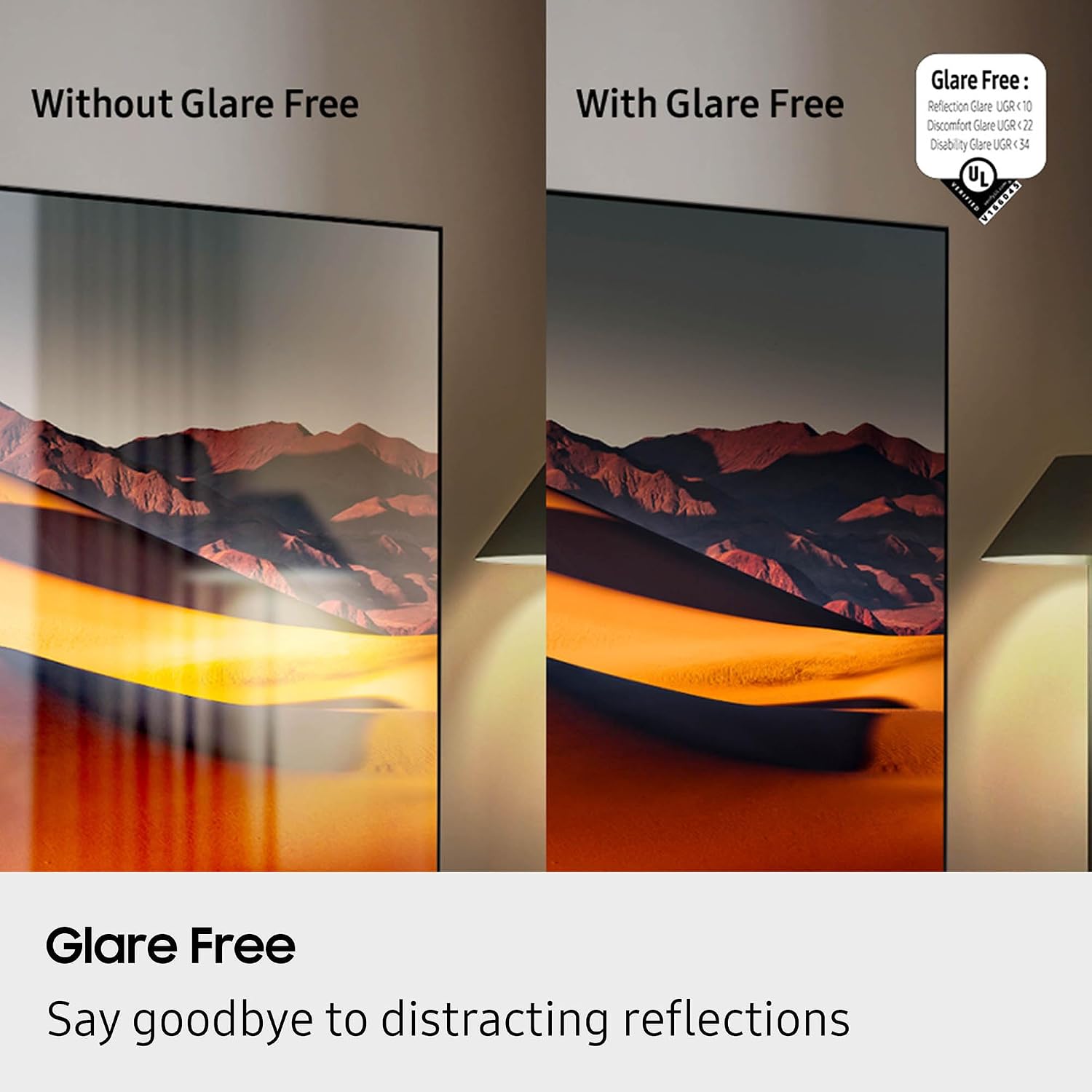
Figure 5: Glare Free technology reduces screen reflections.
3. ميزات الصوت
- دولبي أتموس: Provides immersive, multi-dimensional sound.
- كيو سيمفوني: Synchronizes TV speakers with compatible Samsung soundbars for a richer audio experience.
- AVA Pro (Active Voice Amplifier Pro): Enhances dialogue clarity in noisy environments.
- الصوت التكيفي الاحترافي: يعمل على تحسين الصوت استنادًا إلى المحتوى وصوتيات الغرفة.
- صوت محيطي 6.2.4 قناة: Integrated speaker system for a comprehensive audio field.
4. ميزات الألعاب
- مركز الألعاب: Access cloud gaming services and console games directly from your TV.
- 120Hz Refresh Rate & VRR FreeSync Premium Pro: Ensures smooth, tear-free gaming.

Figure 6: Samsung Gaming Hub for integrated gaming experience.
5. فيديو المنتج الرسمي
Video 1: An informational overview of the Samsung QN990F Series TV features and capabilities.
صيانة
1. تنظيف الشاشة
To clean your TV screen, use a soft, lint-free cloth. For stubborn marks, a non-ammonia and alcohol-free screen cleaning solution is recommended.

Figure 7: Recommended screen cleaning solution for display screens.
- Apply cleaning solution to the cloth, not directly to the screen.
- Gently wipe the screen to remove dust, dirt, and fingerprints.
- تجنب المواد الكيميائية القاسية أو المواد الكاشطة.
2. تحديثات البرامج
Periodically check for and install software updates to ensure optimal performance and access to the latest features. This can usually be done through the TV's settings menu under "Support" or "Software Update."
استكشاف الأخطاء وإصلاحها
إذا واجهت مشاكل مع جهاز التلفزيون الخاص بك، فارجع إلى خطوات استكشاف الأخطاء وإصلاحها الشائعة التالية.
لا طاقة / لا صورة
- Ensure the power cable is securely connected to both the One Connect Box and the wall outlet.
- Verify the One Connect Box is properly connected to the TV.
- تأكد من أن منفذ الحائط يعمل عن طريق توصيل جهاز آخر.
- اضغط على زر الطاقة الموجود في جهاز التحكم عن بعد أو في التلفزيون نفسه.
لا يوجد صوت
- تحقق من مستوى الصوت على كل من التلفزيون وأي أجهزة صوتية متصلة (مكبر الصوت، جهاز الاستقبال).
- تأكد من عدم كتم صوت التلفاز.
- Verify audio cables are correctly connected to the One Connect Box.
- If using external audio, check the audio output settings on the TV.
جودة الصورة رديئة
- Check the source resolution. While 8K AI Upscaling Pro enhances content, native 8K content will provide the best quality.
- ضبط إعدادات الصورة (السطوع، التباين، الحدة، اللون) في قائمة التلفزيون.
- Ensure all video cables are securely connected and not damaged.
- If using an antenna, check antenna positioning and signal strength.
جهاز التحكم عن بعد لا يعمل
- استبدال البطاريات في جهاز التحكم عن بعد.
- تأكد من عدم وجود أي عوائق بين جهاز التحكم عن بعد والتلفزيون.
- Try re-pairing the remote control with the TV if it's a Bluetooth remote (refer to the TV's on-screen guide for pairing instructions).
تحديد
| ميزة | مواصفة |
|---|---|
| اسم الموديل | QN65QN990FFXZA |
| حجم الشاشة | 65 بوصة |
| تكنولوجيا العرض | نيو كيو إل إي دي |
| دقة | 8K |
| معدل التحديث | 120 هرتز |
| المعالج | معالج NQ8 AI Gen3 |
| رفع مستوى التكنولوجيا | 8K AI Upscaling Pro |
| نظام التشغيل | واجهة مستخدم واحدة Tizen |
| الاتصال | HDMI x 5, USB-A x 3, USB-C x 1, Ethernet, RF, Wireless One Connect, Bluetooth, Wi-Fi |
| وضع إخراج الصوت | Surround (6.2.4 channel) |
| Integrated Surround Sound | دولبي أتموس |
| يدعم تنسيق HDR | HDR10+، HDR10 |
| أبعاد المنتج (العمق × العرض × الارتفاع) | 10.5 بوصة عمق × 56.4 بوصة عرض × 35.1 بوصة ارتفاع |
| وزن العنصر | 66.6 رطل |
| معيار حامل VESA | 400 مم × 300 مم |
| لون | الجرافيت الأسود |
الضمان والدعم
ضمان الشركة المصنعة
Your Samsung QN65QN990FFXZA 65 Inch QN990F Neo QLED 8K TV comes with a full 1-year manufacturer's warranty. This warranty covers defects in materials and workmanship under normal use. Please retain your proof of purchase for warranty claims.
دعم العملاء
للحصول على المساعدة التقنية، أو استكشاف الأخطاء وإصلاحها خارج نطاق هذا الدليل، أو خدمة الضمان، يُرجى الاتصال بدعم عملاء سامسونج. راجع دليل سامسونج الرسمي. website or your product registration documents for the most current contact information.
- الدعم عبر الإنترنت: قم بزيارة الدعم الرسمي لشركة Samsung webموقع.
- دعم الهاتف: Contact the Samsung customer service hotline.