
1. المقدمة
This manual provides detailed instructions for the safe and effective use of your Moukey MPS5 Portable Karaoke Machine. Please read this manual thoroughly before operating the device and retain it for future reference. The MPS5 is a versatile portable speaker system designed for various audio playback needs, including karaoke, music streaming, and public address, featuring wireless microphones and multiple connectivity options.
2. ماذا يوجد في الصندوق
Carefully unpack all items from the box. Ensure all components listed below are present and in good condition.
- Moukey MPS5 Portable Karaoke Machine (1 unit)
- ميكروفونات لاسلكية (وحدتان)
- كابل شحن USB (وحدة واحدة)
- 3.5mm AUX Cable (1 unit)
- حزام كتف (وحدة واحدة)
- دليل المستخدم (1 وحدة)
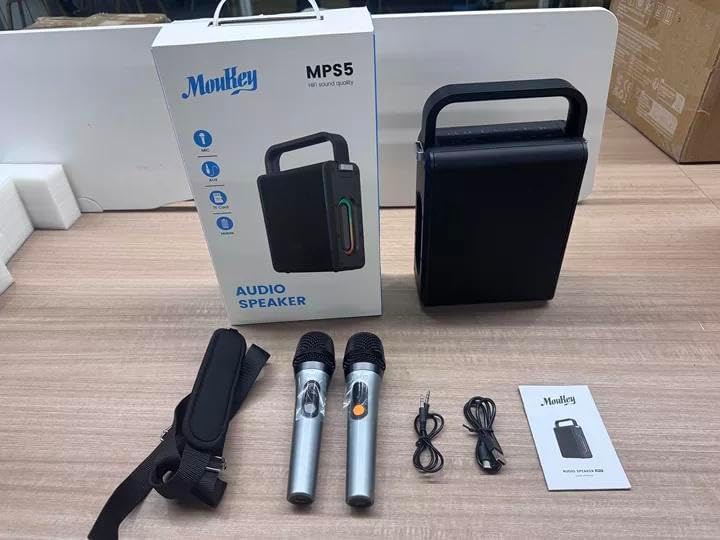
Image: All components included in the Moukey MPS5 package.
3. انتهى المنتجview
The Moukey MPS5 is a compact yet powerful portable karaoke machine. It features a robust design with integrated LED lighting on the sides, enhancing the user experience. A sturdy handle and an included shoulder strap provide convenient portability.
الصورة: الجبهة view of the Moukey MPS5 speaker.

الصورة: الجانب view of the Moukey MPS5, showing the LED lighting.
4. الميزات الرئيسية
- Excellent Sound Output: The MPS5 delivers 200W peak power (RMS 60W) through a 4-inch woofer and two 2-inch tweeters, providing full-range stereo sound with enhanced bass.
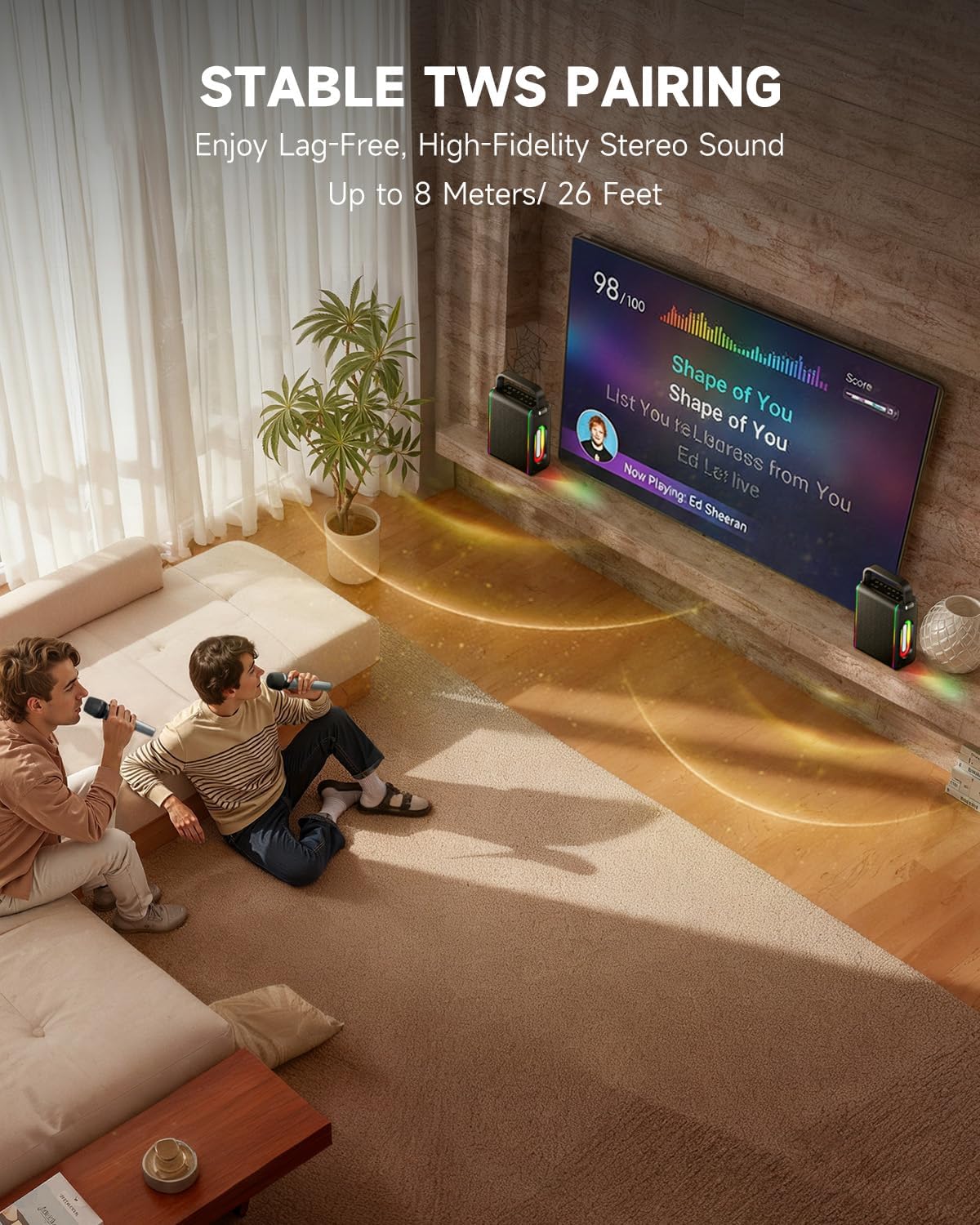
- وظائف قوية: Supports Bluetooth 5.3 for wireless connection to various devices. Also includes Micro TF card, Flash USB, MP3, and AUX IN playback options. Features stable TWS (True Wireless Stereo) pairing for connecting two MPS5 units for a wider stereo soundstage.
- عمر بطارية طويل للغاية: The rechargeable battery provides up to 8 hours of continuous music playback on a 2-hour charge, suitable for extended use indoors or outdoors.
- تصميم خفيف الوزن وقابل للحمل: Weighing only 2kg, the MPS5 is designed for easy transport. It can be carried by hand using the integrated handle or with the included shoulder strap.
- الميكروفونات اللاسلكية المزدوجة: Includes two 2.4Ghz rechargeable microphones with a connection range of up to 60 feet and up to 8 hours of use time per charge (2-3 hours charging time). Features one-tap connectivity for effortless pairing.

Image: Internal speaker components of the MPS5.

Image: MPS5 connected to multiple devices via Bluetooth.

Image: Battery life and charging details for the MPS5.

Image: Demonstrating the portability of the MPS5 with hand and shoulder strap options.

Image: The two wireless microphones for the MPS5.
5. الإعداد
5.1 شحن السماعة والميكروفونات
Before first use, fully charge the MPS5 speaker and both wireless microphones.
- المتحدث: Connect the provided USB Type-C cable to the charging port on the speaker and to a compatible USB power adapter (not included). The charging indicator light will show charging status. A full charge takes approximately 2 hours.
- الميكروفونات: Each microphone has a charging port. Connect them to a USB power source using the provided USB cable. Charging time for microphones is 2-3 hours.
5.2 تشغيل/إيقاف التشغيل
- To power on the speaker, press and hold the power button (U) on the top panel for 2 seconds.
- لإيقاف التشغيل، اضغط مع الاستمرار على زر الطاقة (U) مرة أخرى لمدة 2 ثوان.
5.3 اقتران بلوتوث
- Ensure the MPS5 speaker is powered on and in Bluetooth mode (indicated by a blue LED). If not, press the 'M' (Mode) button to switch to Bluetooth mode.
- على جهازك المحمول (الهاتف الذكي، الجهاز اللوحي، وما إلى ذلك)، قم بتمكين البلوتوث وابحث عن الأجهزة المتاحة.
- Select 'Moukey MPS5' from the list of devices to pair. A voice prompt will confirm successful connection.
إقران 5.4 TWS (ستيريو لاسلكي حقيقي)
To achieve stereo sound, you can pair two Moukey MPS5 speakers together.
- Ensure both MPS5 speakers are powered on and in Bluetooth mode, but not connected to any other device.
- On one of the speakers, double-press the 'M' (Mode) button. The speaker will enter TWS pairing mode.
- The two speakers will automatically connect to each other. A voice prompt will confirm successful TWS pairing.
- Once TWS is established, connect your mobile device to one of the MPS5 speakers via Bluetooth as described in section 5.3. Both speakers will then play audio in stereo.
فيديو: نظرة سريعةview of the MPS5 Karaoke Machine, demonstrating TWS pairing and other features.
6. تعليمات التشغيل
6.1 الضوابط أكثرview
The top panel of the MPS5 speaker features several buttons for controlling playback, volume, and microphone settings.
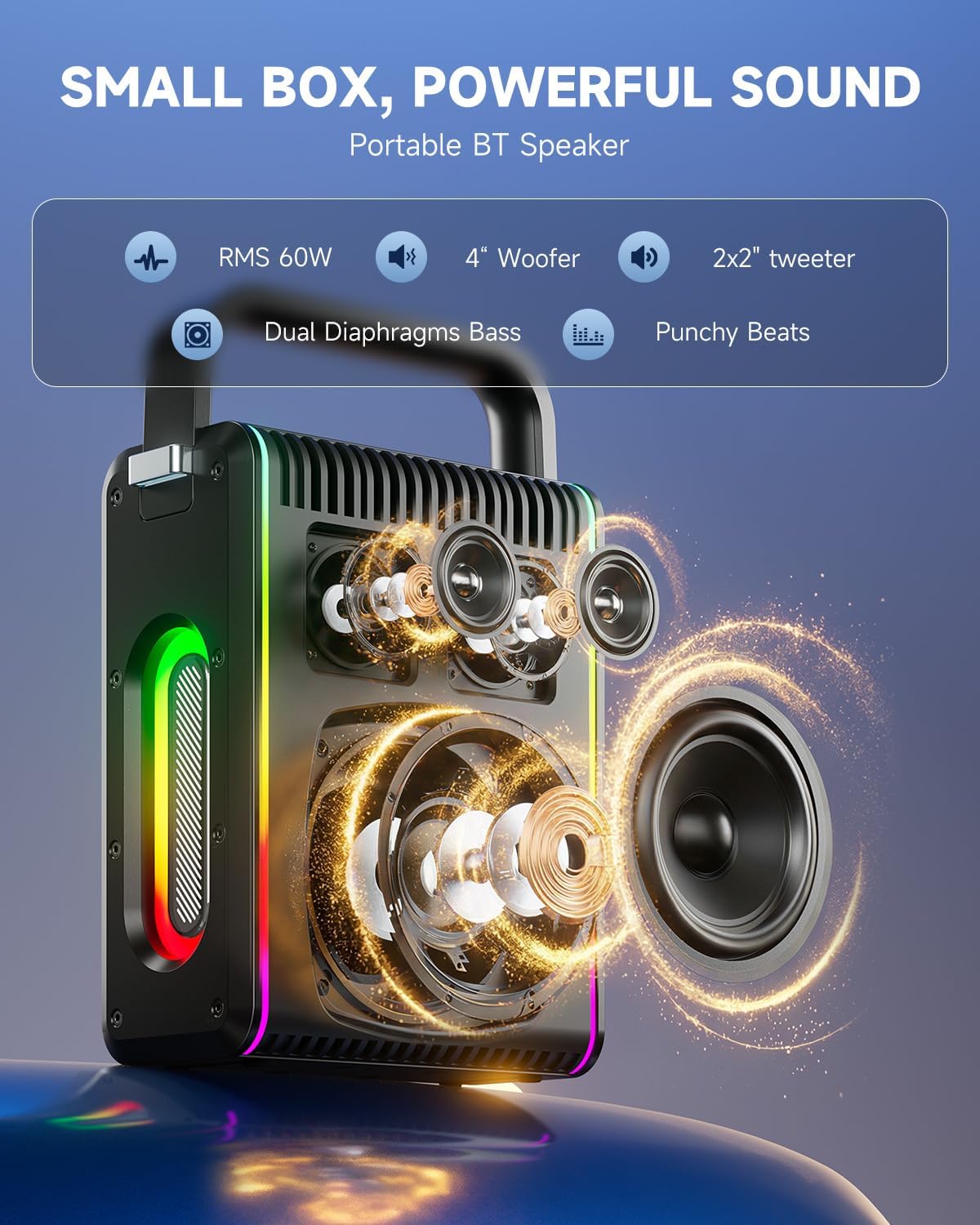
Image: Top control panel of the MPS5.
- زر الطاقة (U): اضغط مع الاستمرار لمدة 2 ثوانٍ للتشغيل / الإيقاف.
- زر الوضع (M): Short press to cycle through input modes (Bluetooth, AUX, USB, TF Card). Double-press to initiate TWS pairing.
- Microphone Volume (Mic - / Mic +): يضبط مستوى صوت الميكروفونات المتصلة.
- Echo Adjustment (R- / R +): يقوم بضبط تأثير الصدى للميكروفونات.
- تشغيل / إيقاف مؤقت (▶): تشغيل المسار الحالي أو إيقافه مؤقتًا.
- خفض الصوت (-): Decreases the main speaker volume.
- رفع الصوت (+): Increases the main speaker volume.
- EQ A/E: Short press to switch between EQ modes. Long press to toggle between original sound and accompaniment elimination.
6.2 استخدام الميكروفون
The MPS5 comes with two wireless microphones for karaoke and vocal performances.
- تشغيل/إيقاف التشغيل: اضغط مع الاستمرار على زر الطاقة الموجود على الميكروفون لتشغيله أو إيقاف تشغيله.
- الاقتران: The microphones are pre-paired with the speaker. If re-pairing is needed, ensure the speaker is on, then power on the microphone. They should connect automatically.
- Microphone Disconnect/Reconnect: Press the dedicated microphone button on the speaker's control panel to quickly disconnect or reconnect the microphones.
6.3 أوضاع إدخال الصوت
In addition to Bluetooth, the MPS5 supports several wired and local storage input options.

Image: Input ports on the MPS5 speaker.
- مدخلات AUX: Connect an external audio device using the 3.5mm AUX cable. Select AUX mode using the 'M' button.
- تشغيل USB: أدخل محرك أقراص فلاش USB يحتوي على ملف صوتي MP3 fileأدخله في منفذ USB. سينتقل مكبر الصوت تلقائيًا إلى وضع USB ويبدأ التشغيل.
- تشغيل بطاقة TF: Insert a Micro TF card containing MP3 audio fileأدخل بطاقة TF في فتحة بطاقة الذاكرة. سينتقل مكبر الصوت تلقائيًا إلى وضع بطاقة TF ويبدأ التشغيل.
6.4 إضاءة LED
The MPS5 features dynamic LED lighting on its sides. Use the dedicated LED button (if available, or refer to the 'M' button for light control if combined) to cycle through different light modes or turn them off.
7. الصيانة
- تنظيف: استخدم قطعة قماش ناعمة وجافة لتنظيف الجزء الخارجي من مكبر الصوت. لا تستخدم منظفات سائلة أو مواد كاشطة.
- تخزين: قم بتخزين الجهاز في مكان بارد وجاف بعيدًا عن أشعة الشمس المباشرة ودرجات الحرارة القصوى.
- العناية بالبطارية: لإطالة عمر البطارية، تجنب تفريغها بالكامل بشكل متكرر. اشحن الجهاز بانتظام، حتى في حال عدم استخدامه لفترات طويلة.
8. استكشاف الأخطاء وإصلاحها
If you encounter issues with your Moukey MPS5, refer to the following common problems and solutions:
| مشكلة | السبب المحتمل | حل |
|---|---|---|
| لا يوجد طاقة | نفدت طاقة البطارية. | قم بشحن السماعة باستخدام كابل USB Type-C المرفق. |
| لا يوجد صوت من السماعة | مستوى الصوت منخفض جدًا أو مكتوم. تم اختيار وضع إدخال غير صحيح. | Increase volume using the '+' button. Press 'M' to cycle through input modes. |
| فشل اقتران البلوتوث | Speaker is not in pairing mode. Device is too far. | Ensure speaker is in Bluetooth mode. Move device closer to speaker. Try restarting both devices. |
| الميكروفون لا يعمل | Microphone is off or uncharged. Microphone is disconnected. | Ensure microphone is charged and powered on. Press the microphone button on the speaker to reconnect. |
| فشل الاقتران TWS | Speakers are already connected to another device. | Ensure both speakers are not connected to any other Bluetooth device before initiating TWS pairing. |
9. المواصفات
- ماركة: موكي
- رقم الموديل: MPS5
- انتاج واتtage: 200 واط (الذروة)
- تقنية الاتصال: بلوتوث 5.3
- مدخل الصوت: Bluetooth, TF card, USB, MP3, AUX, Wired microphones
- عدد القنوات: 2
- مصدر الطاقة: تعمل بالبطارية
- نوع الموصل: يو اس بي نوع سي
- أبعاد العنصر (الطول × العرض × الارتفاع): 2.36 × 6.3 × 12.2 بوصة
- وزن السلعة: حوالي 2 كجم
- الأجهزة المتوافقة: Smartphone, Tablet, Laptop, MP3 Player, Microphone
- لون: أسود مع لمسات فضية
10. الضمان والدعم
The Moukey MPS5 Portable Karaoke Machine comes with a ضمان لمدة سنتين يسري هذا الضمان من تاريخ الشراء. ويغطي عيوب التصنيع وجودة الصنع في ظل الاستخدام العادي. يرجى الاحتفاظ بإثبات الشراء لتقديم مطالبات الضمان.
For technical support, troubleshooting assistance, or warranty inquiries, please contact Moukey customer service through the retailer where the product was purchased or visit the official Moukey webموقع لمعلومات الاتصال.