
1. علىview
The NBD K200 is a compact digital camera designed for capturing high-quality photos and videos. It features a 64MP photo resolution, 4K video recording capabilities, 16X digital zoom, and autofocus. Its lightweight design and user-friendly interface make it suitable for various users, including beginners and travelers.

الصورة: أكثر منview of the NBD K200 camera highlighting its 64MP, 4K, Beauty Mode, Backlight Portrait, Auto Focus, 16X Zoom, Smart Stabilization, and Built-in Filters features.
محتويات الحزمة
تأكد من وجود جميع العناصر في العبوة:
- NBD K200 Digital Camera Body
- 64GB TF Card (MicroSD Card)
- كابل USB-C
- حزام الرقبة
- دليل المستخدم (هذا المستند)

Image: The NBD K200 camera, USB cable, card reader, 64GB memory card, lens cleaning cloth, and camera wrist strap, presented as a complete kit.
2. الإعداد
2.1 شحن البطارية
Before first use, fully charge the camera battery. The camera uses a Lithium Ion battery.
- أدخل البطارية في حجرة البطارية بالكاميرا.
- قم بتوصيل الكاميرا بمصدر الطاقة باستخدام كابل USB-C المرفق.
- The charging indicator light will show the charging status. A full charge typically allows for over 300 photos.

Image: The NBD K200 camera connected via USB-C cable to a power bank, illustrating the charging process and highlighting its powerful battery life for approximately 300 photos per charge.
2.2 إدخال بطاقة الذاكرة
The camera supports microSD cards. A 64GB TF card is included.
- حدد مكان فتحة بطاقة الذاكرة في الكاميرا.
- Insert the TF card into the slot with the gold contacts facing the correct direction until it clicks into place.
- لإزالتها، اضغط على البطاقة برفق حتى تخرج.
3. تشغيل الكاميرا
3.1 تشغيل/إيقاف التشغيل
اضغط مع الاستمرار على زر الطاقة لتشغيل الكاميرا أو إيقاف تشغيلها.
3.2 الضوابط الأساسية
The camera features a Multi-Functional Roller Button for simplified operation.
- زر الأسطوانة: Used for one-touch mode switching and precise zoom adjustment. Roll left to zoom out, roll right to zoom in.
- زر المصراع: اضغط لالتقاط صورة أو بدء/إيقاف تسجيل الفيديو.
- زر الوضع: يتنقل بين أوضاع إطلاق النار المختلفة.
- زر الفلاش: Activates the built-in flash.
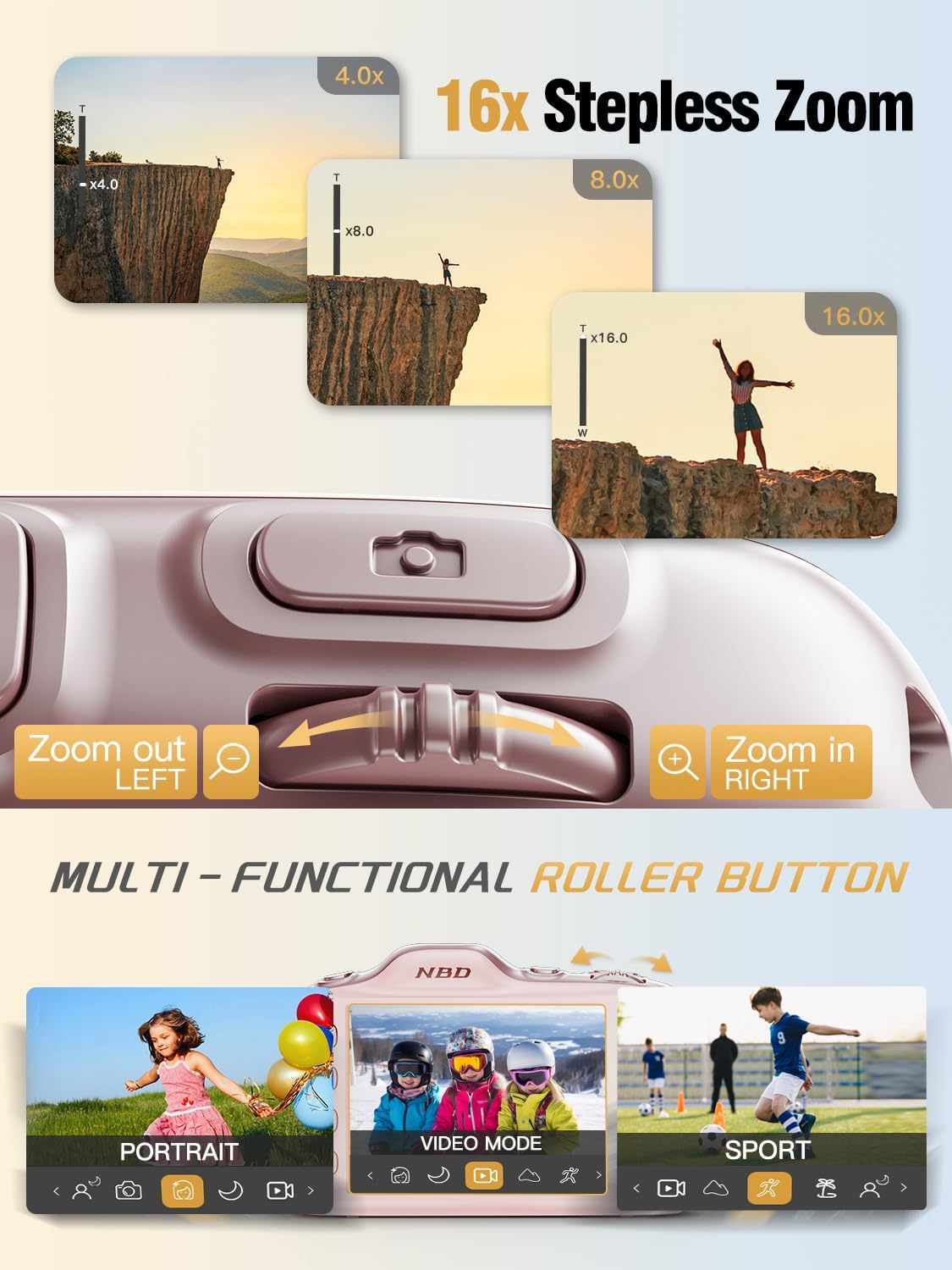
Image: Close-up of the NBD K200 camera's top, highlighting the 16x stepless zoom roller button for zooming in and out, and the mode switch for selecting different shooting modes like Portrait, Video, and Sport.
3.3 التقاط الصور
The camera features autofocus for clear images.
- Point the camera at your subject. The autofocus system will automatically detect and focus.
- Use the roller button to adjust the 16X digital zoom as needed.
- Press the shutter button fully to capture the photo.

Image: A woman holding the NBD K200 camera, with the screen displaying an autofocus frame around a subject's face, illustrating the camera's auto-focus capability for effortless portrait photography.
3.4 تسجيل مقاطع الفيديو
The camera supports 4K video recording at various frame rates (24, 30, 60 FPS).
- Switch to video mode using the mode button or roller.
- Press the shutter button to start recording. A red indicator will typically appear on the screen.
- اضغط على زر الغالق مرة أخرى لإيقاف التسجيل.

Image: A young girl running through a field with balloons, illustrating the NBD K200 camera's 4K 30FPS cinema capture capability for smooth, ultra HD video recording.
3.5 أوضاع التصوير والميزات
The NBD K200 offers several modes and features to enhance your photography.
- وضع الجمال: Enhances facial features for portraits and selfies.
- الوضع الليلي: Optimizes settings for low-light conditions, smoothing grain and balancing tones.
- الوضع الرأسي: Designed for capturing natural radiance in subjects, balancing tones and softening light.
- الوضع الرياضي: Ideal for capturing fast-moving subjects with anti-shake stabilization.
- وضع الانفجار: Captures multiple photos in quick succession (up to 10FPS) for action shots.
- Built-in Filters: Apply various creative filters like Vintage, Cool Tone, Warm Tone, Sepia, Sketch, and Japan Style.
- مؤقت ذاتي: Options for 3, 5, 7, or 10-second delays for group shots or selfies.

Image: A circular diagram illustrating the NBD K200 camera's various shooting modes, including Photo, Video, Night Mode, Portrait Mode, Burst Mode, and Beauty Mode, with example images for each.

الصورة: السابقamples of built-in filters available on the NBD K200 camera, including Vintage, Cool Tone, Warm Tone, Sepia, Sketch, and Japan Style, demonstrating how they alter image ambiance.
3.6 النقل Files
Transfer photos and videos to a computer or smartphone using the USB-C cable.
- Connect the camera to your device using the USB-C cable.
- The camera will appear as a removable storage device.
- السحب والإفلات files إلى الموقع المطلوب.
4. الصيانة
4.1 العناية بالبطارية
- قم بشحن البطارية بالكامل قبل التخزين الممتد.
- تجنب تعريض البطارية لدرجات حرارة عالية.
- استخدم فقط كابلات الشحن والمحولات المرفقة أو المعتمدة.
4.2 تنظيف الكاميرا
- استخدم قطعة قماش ناعمة وخالية من الوبر لتنظيف جسم الكاميرا.
- For the lens, use a specialized lens cleaning cloth and solution. Avoid touching the lens directly.
- لا تستخدم مواد كيميائية قاسية أو مواد كاشطة.
4.3 التخزين
- قم بتخزين الكاميرا في مكان بارد وجاف بعيدًا عن أشعة الشمس المباشرة.
- If storing for a long period, remove the battery.
- Keep the camera in its protective case or a soft pouch to prevent scratches.
5. استكشاف الأخطاء وإصلاحها
إذا واجهت أي مشكلات، راجع الحلول الشائعة التالية:
| مشكلة | الحل المحتمل |
|---|---|
| الكاميرا لا تعمل | تأكد من شحن البطارية وإدخالها بشكل صحيح. |
| Cannot take photos/videos | Check if the memory card is inserted and has sufficient space. Ensure the camera is not in playback mode. |
| الصور غير واضحة | Ensure autofocus is engaged. Check for smudges on the lens. Hold the camera steady or use anti-shake feature. |
| لم يتعرف الكمبيوتر على الكاميرا | Ensure the USB-C cable is securely connected. Try a different USB port or cable. |
| الفلاش لا يعمل | Ensure the flash is enabled in the camera settings or via the dedicated flash button. |
6. المواصفات
Detailed technical specifications for the NBD K200 Digital Camera:
| ميزة | التفاصيل |
|---|---|
| ماركة | بنك دبي الوطني |
| اسم الموديل | ك200 |
| دقة ثابتة فعالة | 64 ميجا بكسل |
| دقة الفيديو | 4 كيلو بايت (2160 بكسل) |
| معدل الإطارات | 24، 30، 60 إطارًا في الثانية |
| تكبير | تقريب رقمي 16X |
| التركيز التلقائي | Yes (Contrast Detection) |
| تثبيت الصورة | مضاد للاهتزاز |
| تقنية مستشعر الصور | CMOS (1/2.4 بوصة) |
| فتحة | ف1.8 |
| الحد الأدنى لسرعة الغالق | 1/4000 ثانية |
| نوع العرض | LCD (2.8 Inches, Color Screen) |
| وسائط التخزين | microSD (up to 64GB included) |
| File Format (Photo) | JPEG (Fine Quality) |
| File التنسيق (فيديو) | موف |
| نوع البطارية | أيون الليثيوم |
| الاتصال | يو اس بي-سي |
| وزن العنصر | 0.26 كيلوغرام (حوالي 121 غرام) |
| مستوى مقاومة الماء | غير مقاوم للماء |
7. الضمان والدعم
For warranty information and technical support, please refer to the contact details provided with your purchase or visit the official NBD webالموقع. احتفظ بإثبات الشراء الخاص بك لتقديم مطالبات الضمان.