
1. المقدمة
The AJAZZ AK029 is a high-performance one-handed mechanical gaming keyboard designed for precision and speed. It features a compact 29-key layout, magnetic switches, an 8000Hz polling rate, and 0.01mm RT precision for an ultra-responsive gaming experience. This manual provides detailed instructions for setup, operation, maintenance, and troubleshooting.

Image: The AJAZZ AK029 one-handed gaming keyboard, showcasing its compact design and dimensions (155mm length, 122mm width, 33mm height).

الصورة: أكثر منview of the AK029 gaming keyboard, highlighting its sleek design and gaming features.

Image: The AK029 keyboard being used in various scenarios, including gaming, video editing, and 3D modeling, demonstrating its versatility.
2. الإعداد
محتويات الحزمة
- AJAZZ AK029 Keyboard Body
- كابل USB-C (1.6 متر)
- كيكاب بولير
- مفاتيح احتياطية
- حزام حمل قابل للفصل
- دليل المستخدم

Image: The complete package contents of the AJAZZ AK029, including the keyboard, USB-C cable, keycap puller, spare switches, and user manual.
توصيل لوحة المفاتيح
- قم بتوصيل طرف USB-C من الكابل المرفق بمنفذ USB-C الموجود على لوحة المفاتيح.
- قم بتوصيل الطرف الآخر من كابل USB بمنفذ USB متاح على جهاز الكمبيوتر الخاص بك (Windows أو Mac).
- سيتم التعرف على لوحة المفاتيح تلقائيًا بواسطة نظام التشغيل الخاص بك.
3. تعليمات التشغيل
الوظائف الرئيسية والتخطيط
The AK029 features a 29-key layout optimized for gaming and productivity. Many keys have secondary functions accessible via the Fn مفتاح.
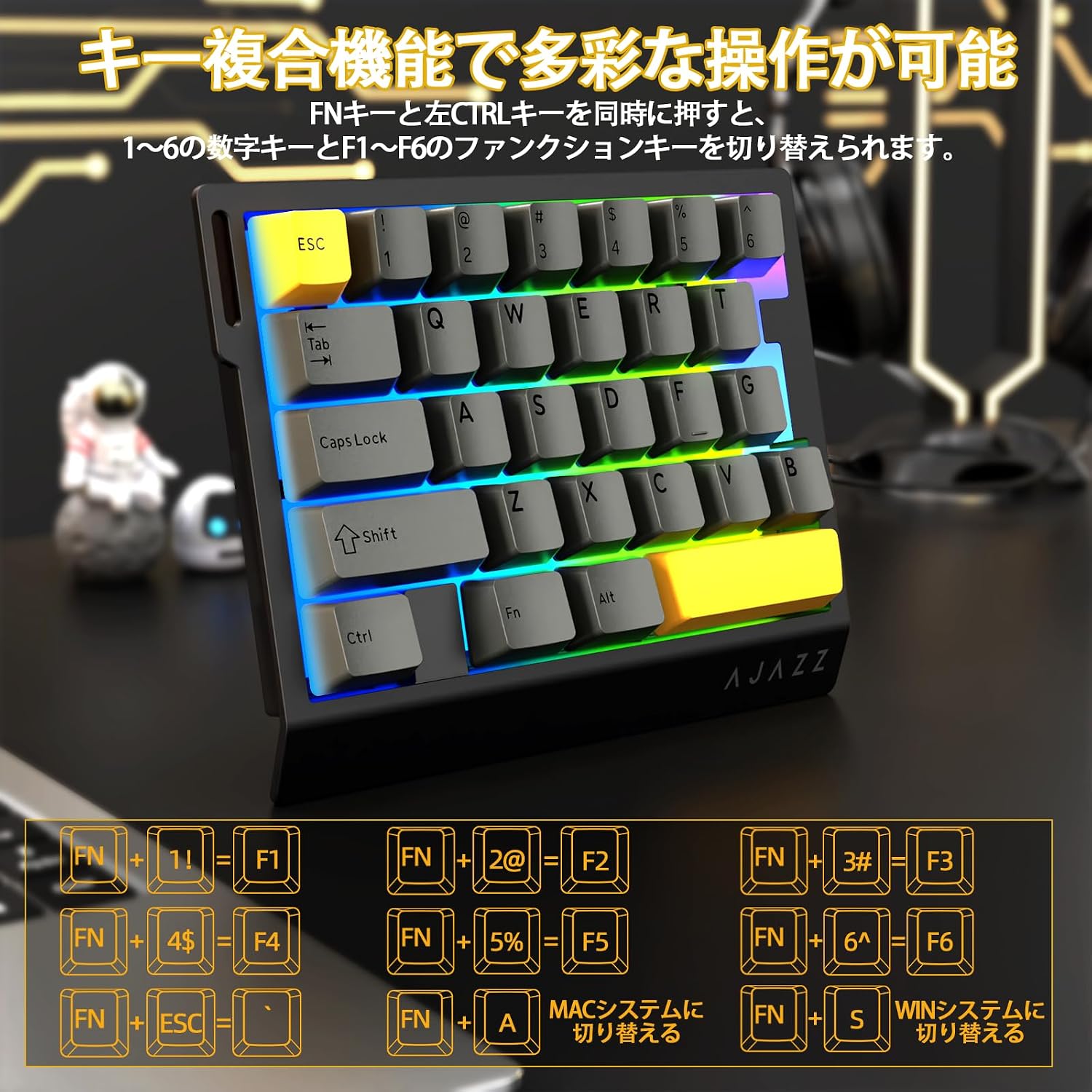
Image: Diagram illustrating the various FN key combinations for accessing secondary functions, such as F1-F6, tilde, and system switching.
- الجبهة الوطنية + 1-6: Switches between number keys (1-6) and function keys (F1-F6). Default is number keys.
- مفتاح FN + مفتاح Esc: تيلدا (~)
- الجبهة الوطنية + أ: Switches to Mac mode.
- الجبهة الوطنية + S.: Switches to Windows mode.
Note: When using Mac mode on a Windows PC, the Windows key and Alt key functions may be reversed.
أوضاع إضاءة RGB
The keyboard features vibrant RGB backlighting with multiple customizable effects.

Image: The keyboard displaying its colorful RGB backlight, which can be customized with various effects.
- FN + علامة تبويب: Cycles through 20 different RGB lighting modes.
- الجبهة الوطنية + جي: Increases backlight brightness (5 levels). Backlight flashes 3 times at maximum brightness.
- فن + ف: Decreases backlight brightness (5 levels). Backlight flashes 3 times at minimum brightness.
- FN + V.: Changes the direction of the lighting effect.
- الجبهة الوطنية + ب: Changes the backlight color.
- فن + ت: Increases the speed of the lighting effect (5 levels). Backlight flashes 3 times at maximum speed.
- FN + R.: Decreases the speed of the lighting effect (5 levels). Backlight flashes 3 times at minimum speed.
- الجبهة الوطنية + ج: Toggles side light mode (Streaming RGB constant light - Rainbow Breath - Off). Default is Streaming.
- الجبهة الوطنية + X: Toggles backlight on/off (side lights remain on).
- FN + Space (long press 3-5 seconds): Resets lighting settings to factory defaults. Keyboard lights flash 3 times.
المؤشر Lamps
- مؤشر Caps Lock: Pressing the Caps Lock key illuminates a white LED (uppercase input ON). Pressing it again turns off the LED (lowercase input).
- مؤشر النظام: The main key area lights flash 3 times to indicate successful system switching.
Web تخصيص برنامج التشغيل
The dedicated driver software allows for extensive customization of key functions, macros, and RGB lighting effects. This enables true personalization to match individual playstyles and preferences.

Image: Screenshot of the web driver interface, showing options for custom keys, lighting effects, macro management, and performance settings.
سائق Webموقع: https://ajazz.driveall.cn/#/
4. الصيانة
تنظيف
- استخدم قطعة قماش ناعمة وجافة لمسح سطح لوحة المفاتيح.
- For dust between keycaps, use compressed air.
- تجنب استخدام المواد الكيميائية القاسية أو المواد الكاشطة.
استبدال المفتاح القابل للتبديل السريع
The AK029 supports hot-swappable magnetic switches, allowing for easy replacement and customization.

الصورة: عن قرب view of the hot-swappable magnetic switches, showing the mechanism and keycap removal tool.
- استخدم أداة سحب غطاء المفتاح لإزالة غطاء المفتاح المطلوب بلطف.
- Use the switch puller to firmly grip the top and bottom tabs of the switch.
- Pull the switch straight upwards to remove it from the keyboard.
- Align the pins of the new switch with the holes on the keyboard.
- Gently push the new switch vertically until it clicks into place.
5. استكشاف الأخطاء وإصلاحها
لوحة المفاتيح لا تستجيب
- تأكد من توصيل كابل USB-C بشكل آمن بكل من لوحة المفاتيح والكمبيوتر.
- حاول توصيل لوحة المفاتيح بمنفذ USB مختلف على جهاز الكمبيوتر الخاص بك.
- قم باختبار لوحة المفاتيح على جهاز كمبيوتر آخر لاستبعاد وجود مشكلة خاصة بالكمبيوتر.
- أعد تشغيل الكمبيوتر الخاص بك.
RGB Backlight Not Working or Incorrect
- Ensure the backlight is not turned off (FN + X).
- Adjust brightness using FN + G (increase) and FN + F (decrease).
- Cycle through lighting modes using FN + Tab.
- Perform a factory reset for lighting settings by long-pressing FN + Space for 3-5 seconds.
Key Input Issues or Inaccurate Response
- Ensure the correct system mode (Windows/Mac) is selected using FN + A or FN + S.
- If a specific key is not responding, try replacing its switch using the hot-swap procedure.
- Update the keyboard firmware using the dedicated web برنامج التشغيل.
- Check for any physical obstructions under the keycap or switch.
6. المواصفات
| ميزة | وصف |
|---|---|
| ماركة | A.JAZZ |
| نموذج | AK029 |
| الاتصال | USB-C سلكي |
| تخطيط المفتاح | 29 Keys (One-Handed) |
| نوع المفتاح | Magnetic Switches (Hot-Swappable) |
| معدل التصويت | 8000 هرتز |
| كمون | 0.125 مللي ثانية الكمون المنخفض للغاية |
| RT Precision | 0.01mm (0.03mm detection increments) |
| معدل المسح | 130 كيلو |
| الإضاءة الخلفية | RGB (20 lighting modes) |
| تدوير المفتاح | التمرير الكامل لمفتاح N |
| مادة اللوحة | سبائك الألومنيوم |
| الصوت دampواحد | 5-Layer Structure (PO sandwich cotton, IXPE switch pad, PET sound sheet, EPDM cotton, silicone gel) |
| بيئة العمل | Ergonomic design with stepped curved keycaps and wrist rest |
| نظام التشغيل المتوافق | ويندوز، ماك |
| أبعاد | 155 مم (طول) × 122 مم (عرض) × 33 مم (ارتفاع) |
| وزن | حوالي 300 جرام |
| طول الكابل | 1.6م |

Image: Detailed basic specifications of the AK029 keyboard, including brand, model, connectivity, dimensions, and lighting.

الصورة: انفجرت view of the keyboard's internal structure, highlighting the 5-layer sound dampening system and aluminum alloy plate for enhanced stability and acoustics.

Image: Illustration of the ergonomic design of the AK029, featuring stepped keycaps and a wrist rest for comfortable long-term use.
7. الضمان والدعم
معلومات الضمان
The AJAZZ AK029 keyboard comes with a 1-year manufacturer's warranty from the date of purchase. This warranty covers defects in materials and workmanship under normal use.
دعم العملاء
For technical assistance, warranty claims, or any other inquiries, please contact AJAZZ customer support through their official webالموقع أو بائع التجزئة الذي تم شراء المنتج منه.
رسمي Webموقع: https://ajazz.driveall.cn/#/