
مقدمة
Thank you for choosing the Digitus DA-70919 USB-C 8K 12-Port Docking Station. This device is designed to expand the connectivity of your USB-C enabled laptop or computer, providing a comprehensive solution for video output, data transfer, network access, and power delivery. Please read this manual carefully to ensure proper installation and operation.
المنتج انتهىview
The Digitus DA-70919 docking station offers 12 essential ports to enhance your workspace. It supports high-resolution video output, fast data transfer, and efficient power delivery to your host device.

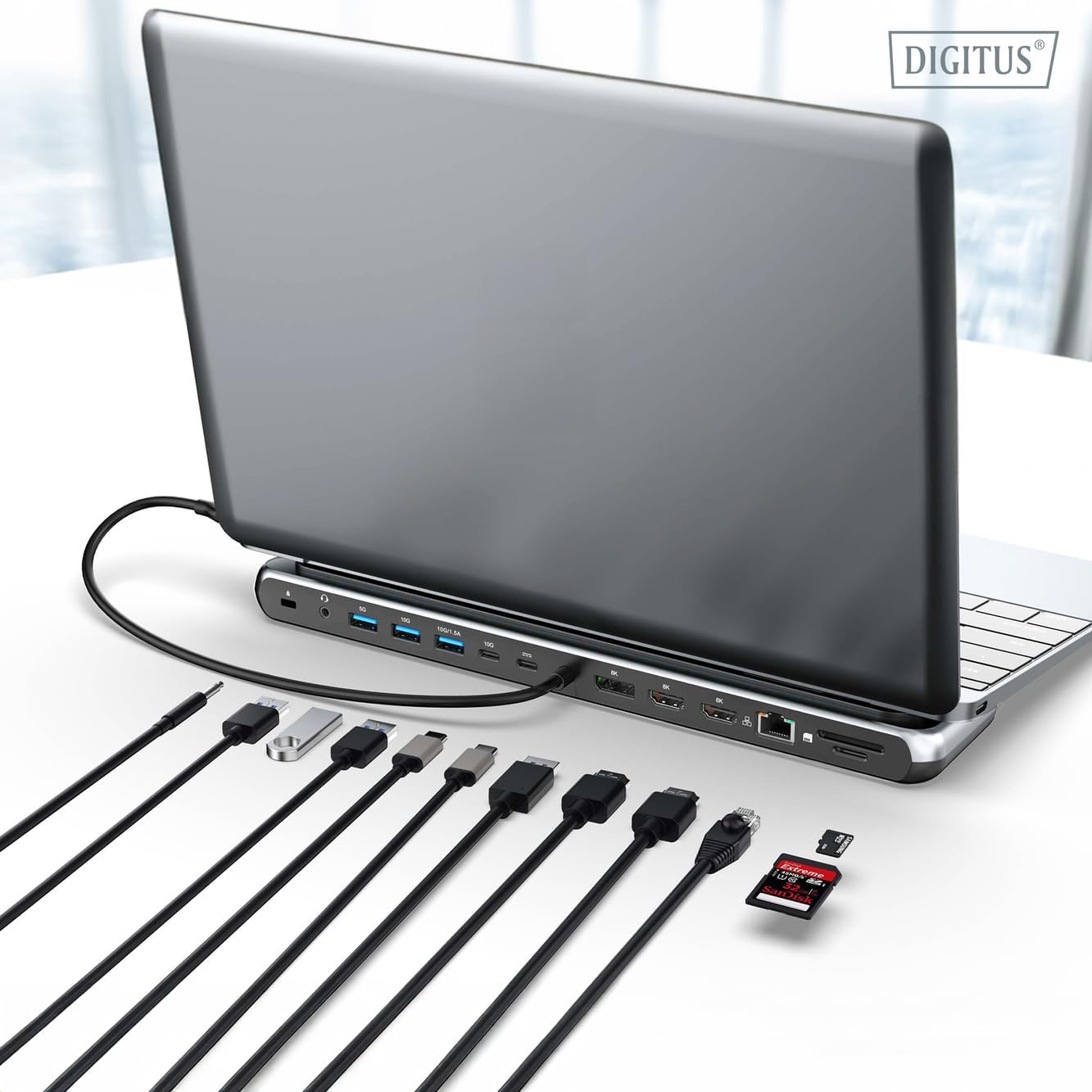
الشكل 1: Detailed diagram of the Digitus DA-70919 docking station ports and their functions. This diagram labels each of the 12 ports on the docking station, including Audio Jack, USB-A, USB-C, USB-C PD, DisplayPort, HDMI, RJ45 Gigabit Ethernet, and SD/MicroSD card slots, along with anti-theft protection.

الشكل 2: أمام view of the Digitus DA-70919 docking station showing all accessible ports. A clear view of the docking station's front panel, displaying the various input and output ports including USB-A, USB-C, HDMI, DisplayPort, Ethernet, and card readers.
المميزات الرئيسية:
- إخراج الفيديو: 2x HDMI, 1x DisplayPort (DP) supporting up to 8K/30Hz for single display, or multi-display configurations.
- منافذ بيانات USB: 2x USB-A 3.2 Gen 2 (10Gbps), 1x USB-A 3.2 Gen 1 (5Gbps), 1x USB-C 3.2 Gen 2 (10Gbps).
- توصيل الطاقة (PD): USB-C PD 3.0 port for charging your host laptop (up to 85W output).
- شبكة: Gigabit Ethernet (RJ45) for stable wired internet connection.
- قراء البطاقة: SD and MicroSD card slots with 104 MBps transfer speed.
- صوتي: مقبس صوت مقاس 3.5 ملم لسماعات الرأس أو مكبرات الصوت.
تعليمات الإعداد
Follow these steps to set up your Digitus DA-70919 docking station:
- Check Host USB-C Port Compatibility: Ensure your laptop's USB-C port supports DisplayPort Alternate Mode (DP Alt Mode) for video output and Power Delivery for charging. Without DP Alt Mode, video output will not function.

الشكل 3: Guide to USB-C port compatibility for DisplayPort Alternate Mode. This graphic explains which types of USB-C ports on your laptop support the full functionality of the docking station, specifically highlighting the requirement for DisplayPort Alternate Mode (DP Alt Mode) for video output.
- الاتصال بجهاز المضيف: Connect the integrated USB-C cable from the docking station to the USB-C port on your laptop.
- قم بتوصيل محول الطاقة (اختياري ولكن يُنصح به): If you wish to charge your laptop via the docking station or power high-demand peripherals, connect a USB-C Power Delivery adapter (not included, up to 100W recommended) to the USB-C PD input port on the docking station.
- ربط الشاشات الخارجية: قم بتوصيل شاشاتك بمنافذ HDMI و/أو DisplayPort الموجودة على محطة الإرساء باستخدام الكابلات المناسبة.
- توصيل الأجهزة الطرفية: Plug in your USB devices (keyboard, mouse, external drives), Ethernet cable, SD/MicroSD cards, and audio devices to the corresponding ports on the docking station.
- تثبيت برنامج التشغيل: In most cases, the docking station is plug-and-play and does not require additional drivers. If prompted, allow your operating system to install any necessary drivers automatically.
تعليمات التشغيل
أوضاع العرض
تدعم محطة الإرساء تكوينات عرض متنوعة:
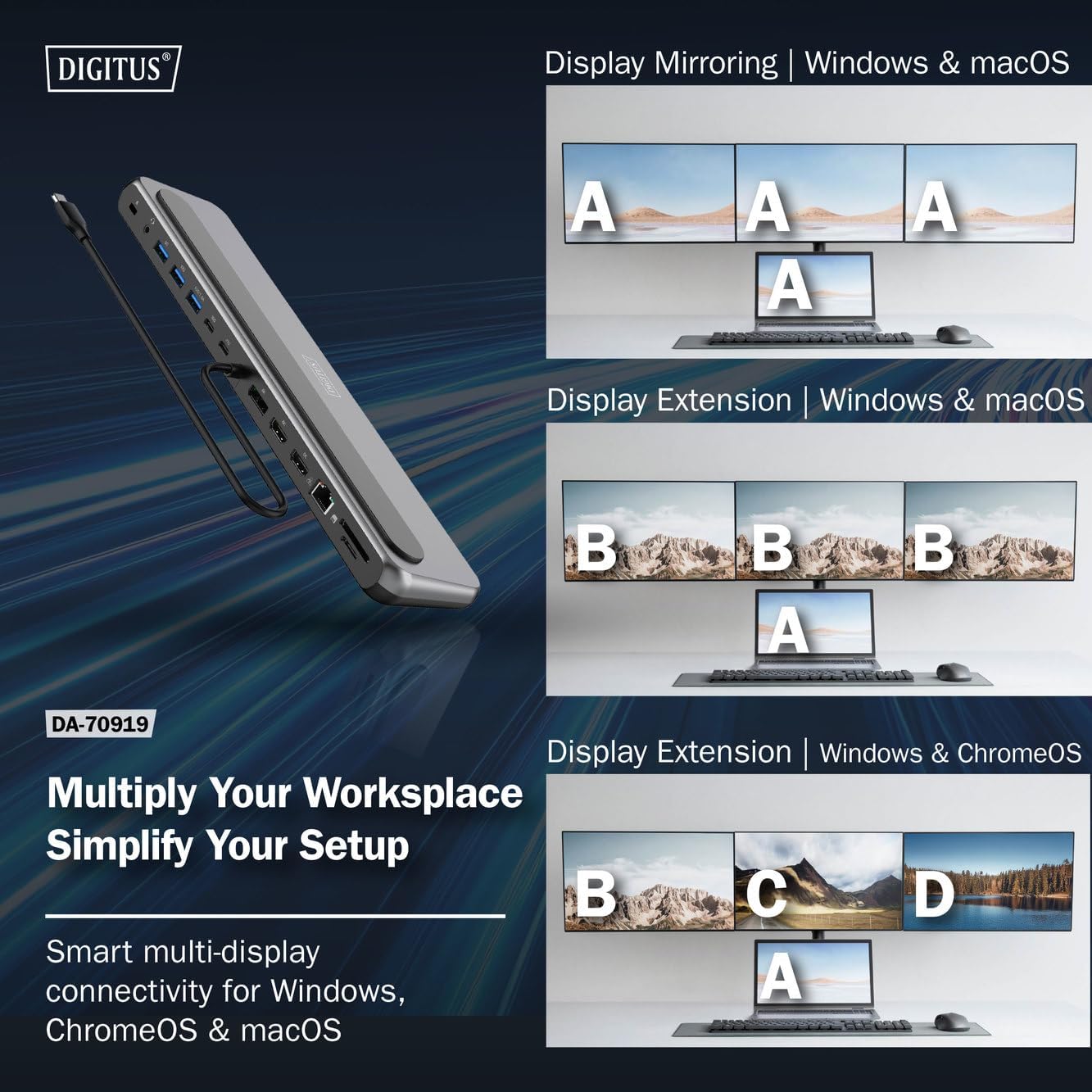
الشكل 4: Diagram showing display mirroring and extension modes for Windows, macOS, and ChromeOS. This image illustrates the various display configurations supported by the docking station, including mirroring your screen or extending it across multiple external monitors on Windows, macOS, and ChromeOS.
- وضع المرآة: يقوم بنسخ شاشة الكمبيوتر المحمول إلى الشاشات الخارجية.
- Extend Mode (Windows/ChromeOS): Extends your desktop across multiple external monitors, allowing for a multi-tasking environment. Supports dual monitors (2x 4K/60Hz) and triple monitors (1x 4K/60Hz + 2x 4K/30Hz) in MST (Multi Stream Transport) mode.
- Extend Mode (macOS): macOS typically supports extended desktop to one external monitor, with other external monitors mirroring each other.
To configure display settings, access your operating system's display settings (e.g., Windows Display Settings, macOS System Preferences > Displays).
نقل البيانات
Utilize the USB-A and USB-C data ports for connecting external storage devices, keyboards, mice, and other USB peripherals. The USB 3.2 Gen 2 ports offer speeds up to 10Gbps, while the USB 3.2 Gen 1 port offers speeds up to 5Gbps.
توصيل الطاقة
When a compatible USB-C PD power adapter is connected to the docking station's PD input port, the docking station can deliver up to 85W of power to charge your connected laptop. This allows you to power your laptop and peripherals through a single USB-C connection.
الشكل 5: Illustration of the docking station's fast charging capability via USB-C Power Delivery. This image demonstrates the Power Delivery function, showing a 100W input to the docking station and an 85W output to charge the connected laptop.
اتصال الشبكة
Connect an Ethernet cable to the RJ45 port for a stable and high-speed wired network connection (10/100/1000 Mbps Gigabit Ethernet).
قارئات البطاقات
Insert SD or MicroSD cards into the dedicated slots for quick access to photos, videos, and other files. The card readers support transfer speeds up to 104 MBps.
مخرج الصوت
Connect your headphones or speakers to the 3.5mm audio jack for audio output.
صيانة
- تنظيف: استخدم قطعة قماش ناعمة وجافة لتنظيف سطح قاعدة الشحن. تجنب استخدام المنظفات السائلة أو المذيبات.
- تخزين: قم بتخزين محطة الإرساء في مكان بارد وجاف بعيدًا عن أشعة الشمس المباشرة ودرجات الحرارة القصوى.
- التعامل: Avoid dropping or subjecting the device to strong impacts. Do not attempt to disassemble the docking station.
استكشاف الأخطاء وإصلاحها
إذا واجهت مشكلات مع محطة الإرساء الخاصة بك، فيرجى الرجوع إلى الحلول الشائعة التالية:
- لا يوجد إخراج للعرض:
- تأكد من أن منفذ USB-C الخاص بجهاز الكمبيوتر المحمول يدعم وضع DisplayPort البديل.
- Check all video cables (HDMI/DP) are securely connected to both the docking station and the monitor.
- Verify that the monitor is powered on and set to the correct input source.
- حاول توصيل شاشة واحدة في كل مرة لعزل المشكلة.
- قم بتحديث برامج تشغيل بطاقة الرسومات الخاصة بجهاز الكمبيوتر المحمول.
- لا يوجد توصيل للطاقة إلى الكمبيوتر المحمول:
- Ensure a compatible USB-C PD power adapter (up to 100W) is connected to the docking station's PD input port.
- Verify that your laptop's USB-C port supports Power Delivery.
- افحص محول الطاقة والكابل بحثًا عن أي تلف.
- أجهزة USB غير معترف بها:
- أعد توصيل جهاز USB بمنفذ مختلف على محطة الإرساء.
- Ensure the docking station is properly connected to the host laptop.
- If using a high-power USB device, ensure the docking station is connected to an external power adapter.
- مشاكل اتصال الإيثرنت:
- تحقق من اتصال كابل Ethernet بكل من محطة الإرساء وجهاز التوجيه/المودم الخاص بك.
- تحقق من إعدادات الشبكة على جهاز الكمبيوتر المحمول الخاص بك.
- أعد تشغيل جهاز التوجيه/المودم والكمبيوتر المحمول.
- قارئ البطاقات لا يعمل:
- Ensure the SD/MicroSD card is inserted correctly and fully.
- Test the card with another device to confirm it is not damaged.
تحديد
| ميزة | مواصفة |
|---|---|
| نموذج | دا-70919 |
| اتصال المضيف | منفذ USB-C (كابل مدمج) |
| مخرج الفيديو | 2x HDMI, 1x DisplayPort (DP) |
| Max. Single Display Resolution | دقة 8K (7680x4320) بمعدل 30 هرتز |
| Max. Dual Display Resolution (MST) | 2x 4K (3840x2160) @ 60Hz |
| Max. Triple Display Resolution (MST) | 1x 4K@60Hz + 2x 4K@30Hz |
| منافذ بيانات USB-A | 2x USB 3.2 Gen 2 (10Gbps), 1x USB 3.2 Gen 1 (5Gbps) |
| منفذ بيانات USB-C | 1x USB 3.2 Gen 2 (10 جيجابت في الثانية) |
| مدخل توصيل الطاقة (PD) | USB-C PD 3.0 (up to 100W) |
| Power Delivery (PD) Output to Host | حتى 85 وات |
| إيثرنت | RJ45 Gigabit (10/100/1000 Mbps) |
| قارئات البطاقات | SD, MicroSD (104 MBps) |
| صوتي | 1 × مقبس صوت 3.5 ملم |
| التوافق | ويندوز، ماك، كروم أو إس |
| درجة حرارة التشغيل | 0 درجة مئوية إلى 45 درجة مئوية (32 درجة فهرنهايت إلى 113 درجة فهرنهايت) |
| درجة حرارة التخزين | -10 درجة مئوية إلى 70 درجة مئوية (14 درجة فهرنهايت إلى 158 درجة فهرنهايت) |
الضمان والدعم
The Digitus DA-70919 USB-C 8K 12-Port Docking Station comes with a ضمان لمدة 2 سنوات من تاريخ الشراء. يغطي هذا الضمان عيوب التصنيع ويضمن عمل المنتج كما هو موضح في الاستخدام العادي.
For technical support, warranty claims, or further assistance, please contact your retailer or visit the official Digitus website for contact information. Please have your product model number (DA-70919) and proof of purchase ready when seeking support.