
1. انتهى المنتجview
The darkFlash DB330M MESH is a Micro-ATX PC case designed for high heat dissipation and optimal airflow. It features a full mesh front panel and comes with three pre-installed PWM ARGB fans to ensure efficient cooling and dynamic lighting effects. This case supports various components, offering a user-friendly experience for PC builders.
2. الميزات الرئيسية
- High Airflow Mesh Front Panel: Provides superior intake and lower temperatures compared to panoramic cases.
- Pre-installed 3x DR08 PWM ARGB Fans: Ensures powerful cooling and vibrant RGB effects right out of the box.
- Vertical Airflow Cooling: Two fan positions above the power supply direct airflow to the graphics card for improved cooling.
- تصميم مدروس: Includes magnetic dust filters on the top and panel to keep components clean.
- سهولة التركيب: User-friendly design facilitates hassle-free cable management and component access.
3. المواصفات
| ميزة | التفاصيل |
|---|---|
| ماركة | دارك فلاش |
| اسم الموديل | DB330 MESH |
| التوافق مع اللوحة الأم | مايكرو ATX |
| نوع الحالة | برج ميدي |
| لون | أسود |
| مادة | بلاستيك، زجاج مقسّى |
| أبعاد المنتج (العمق × العرض × الارتفاع) | 8.58 بوصة × 13.11 بوصة × 15.75 بوصة |
| نوع تركيب مصدر الطاقة | التركيب السفلي |
| طريقة التبريد | الهواء، الماء |
| Total USB 3.0 Ports | 1 |
| المميزات الخاصة | Built-In Fan, Dust Filter, RGB Lighting |
| Internal Bays Quantity | 3 |
| أقصى طول GPU | 305 ملم |
| أقصى ارتفاع لمبرد وحدة المعالجة المركزية | 180 ملم |
| دعم المبرد | Up to 240mm on top |
4. الإعداد والتثبيت
This section provides a general guide for installing components into your darkFlash DB330M MESH PC case. Always refer to your component manuals for specific installation instructions.
4.1 إعداد القضية
Before installing components, ensure the case is placed on a stable, flat surface. Remove the side panels and any protective films.

Figure 4.1: The darkFlash DB330M MESH PC Case with side panels and front mesh removed, illustrating the ease of access for component installation.
4.2 Component Compatibility and Placement
- اللوحة الأم: Supports Micro ATX and ITX motherboards. Install the motherboard onto the standoffs provided.
- بطاقة الرسوميات: Maximum length of 305mm. Ensure your GPU fits within this specification.
- مبرد وحدة المعالجة المركزية: Maximum height of 180mm for air coolers.
- مزود الطاقة (PSU): Supports standard size PSUs with a maximum length of 180mm, mounted at the bottom.
- المشعاع: Up to 240mm AIO liquid cooling systems can be installed on the top panel.
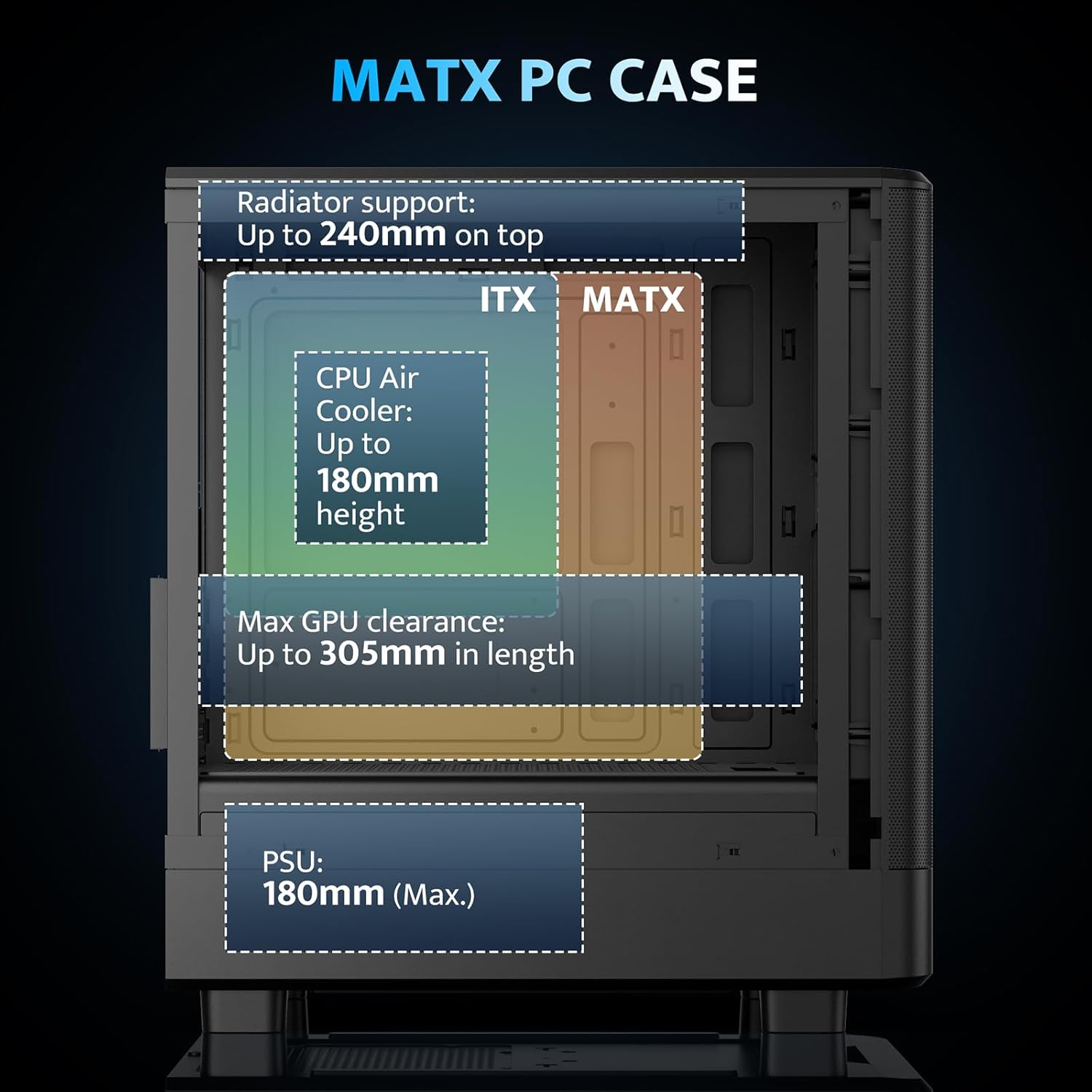
Figure 4.2: Internal layout and maximum dimensions for motherboard (ITX, MATX), CPU air cooler, GPU, and PSU.
4.3 Fan Configuration
The case comes with three pre-installed 120mm PWM ARGB fans. Two are located at the front for intake, and one at the rear for exhaust. Additional fan positions are available at the top (up to 2x 120mm/140mm) and bottom (up to 2x 120mm) for enhanced cooling.

Figure 4.3: Illustration of the pre-installed 120mm PWM ARGB fans and their placement within the case.

Figure 4.4: Optimized airflow channels demonstrating natural vertical air ducts for efficient heat dissipation.
5. تعليمات التشغيل
5.1 I/O Panel Functions
توفر لوحة الإدخال/الإخراج الأمامية وصولاً سهلاً إلى المنافذ وأدوات التحكم الأساسية:
- زر الطاقة: لتشغيل النظام أو إيقافه.
- HD Audio Ports: لتوصيل سماعات الرأس والميكروفونات.
- منافذ USB 2.0: لتوصيل الأجهزة الطرفية.
- منفذ USB 3.0: لنقل البيانات بسرعة عالية.
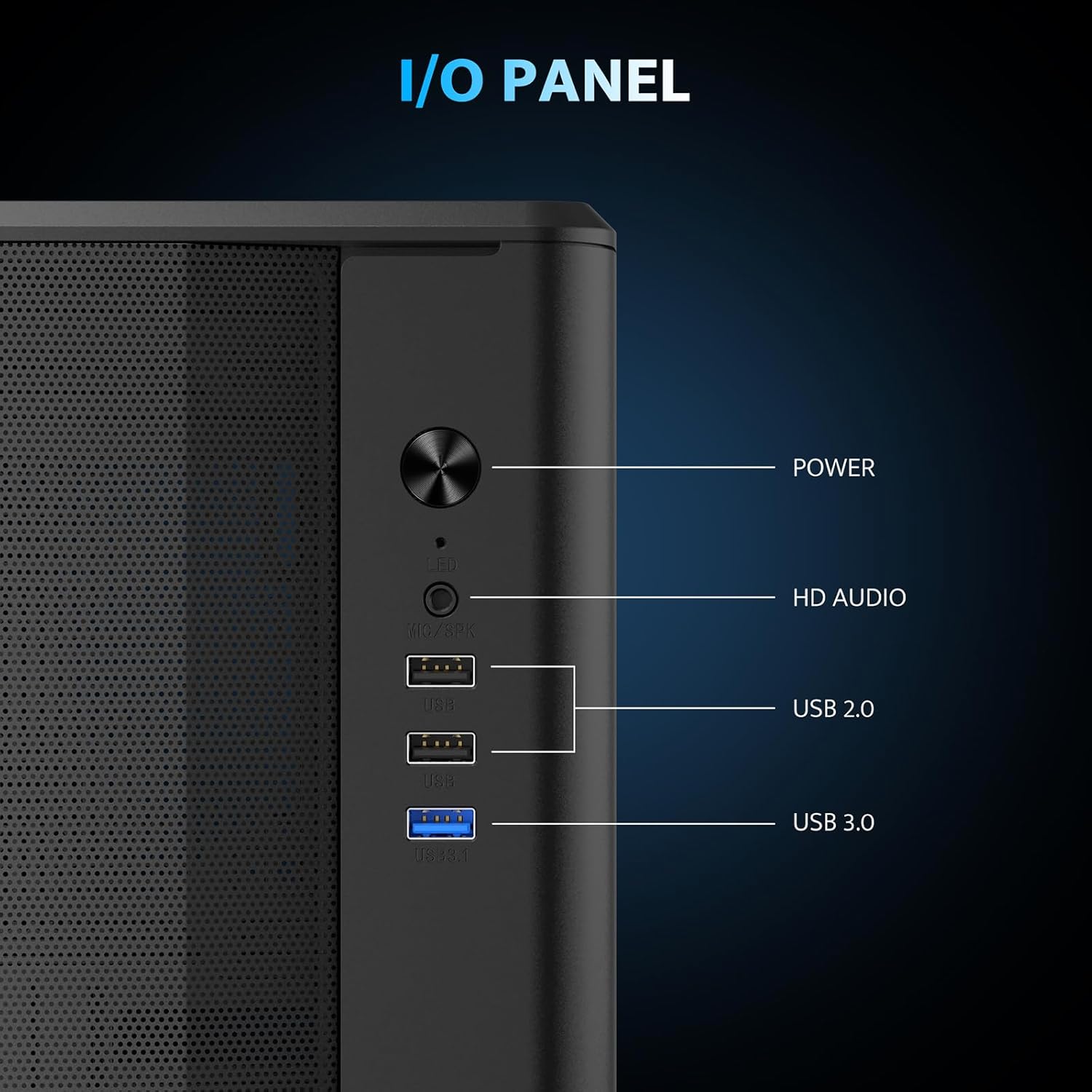
الشكل 5.1: مفصل view of the I/O panel and its functionalities.
5.2 التحكم في مروحة ARGB
The pre-installed fans are PWM ARGB fans. Their lighting effects can be controlled via your motherboard's ARGB software if your motherboard supports it. Please note that an ARGB Hub Controller is not included with the case.
6. الصيانة
6.1 تنظيف فلتر الغبار
The darkFlash DB330M MESH PC case is equipped with magnetic dust filters on the top and a panel dust filter to prevent dust accumulation. Regularly clean these filters to maintain optimal airflow and cooling performance.
- To clean the top dust filter, gently lift and detach the magnetic filter.
- استخدم فرشاة ناعمة أو هواء مضغوط لإزالة الغبار المتراكم.
- Reattach the filter once clean.

Figure 6.1: Top panel with magnetic dust filter and large cooling holes for AIO support.

Figure 6.2: High-airflow dustproof mesh front panel, which also acts as a dust filter.
6.2 التنظيف العام
Use a soft, dry cloth to wipe down the exterior of the case. Avoid using harsh chemicals or abrasive materials that could damage the finish.
7. استكشاف الأخطاء وإصلاحها
إذا واجهت مشاكل في تجميع جهاز الكمبيوتر الخاص بك، فضع في اعتبارك خطوات استكشاف الأخطاء وإصلاحها العامة التالية:
- لا يوجد طاقة: تأكد من توصيل جميع كابلات الطاقة (وحدة إمداد الطاقة بالحائط، ووحدة إمداد الطاقة باللوحة الأم، والمعالج، ووحدة معالجة الرسومات) بإحكام. تحقق من توصيل زر الطاقة باللوحة الأم.
- المراوح لا تدور/لا يوجد إضاءة RGB: Verify fan power connections to the motherboard or fan controller. Check ARGB connections for lighting issues. Ensure your motherboard's BIOS/UEFI settings or software are configured correctly for fan control and RGB.
- ارتفاع درجة الحرارة: Confirm all fans are spinning in the correct direction for optimal airflow. Ensure dust filters are clean and not obstructing airflow. Check CPU cooler and GPU cooler installations.
- منافذ USB لا تعمل: تحقق من توصيلات موصل USB من لوحة الإدخال/الإخراج الأمامية إلى اللوحة الأم.
For more specific issues, consult the manuals for your individual components (motherboard, GPU, PSU, etc.) or seek assistance from a qualified technician.
8. الضمان والدعم
The darkFlash DB330M MESH PC Case comes with a ضمان لمدة 1 سنوات. For warranty claims or technical support, please contact darkFlash customer service through their official webالموقع الإلكتروني أو المتجر الذي تم شراء المنتج منه. احتفظ بإثبات الشراء للتحقق من صحة الضمان.