
1. المقدمة
The ELEGOO ESP-32 Super Starter Kit provides a comprehensive platform for learning about electronics, programming, and the Internet of Things (IoT). At its core is the powerful ESP-32 development board, featuring a dual-core processor, integrated Wi-Fi, and Bluetooth 4.2. This kit is designed for students, makers, engineers, and hobbyists of all skill levels, offering a wide array of components and a detailed online tutorial to guide you through various projects.
The ESP-32 board is fully compatible with the Arduino IDE, making programming accessible and straightforward. With over 35 different modules and electronic components, you can build projects ranging from basic circuits to advanced IoT applications like weather stations, smart home controllers, and remote-controlled devices.

Figure 1.1: The ELEGOO ESP-32 Super Starter Kit, showcasing the main components and a sample project setup.
2. محتويات المجموعة
This kit includes a wide variety of electronic components and modules to facilitate diverse projects. Below is a detailed list of the items you will find in your ELEGOO ESP-32 Super Starter Kit.

الشكل 2.1: دراسة شاملة view من المكونات المضمنة في المجموعة.
2.1 قائمة المكونات
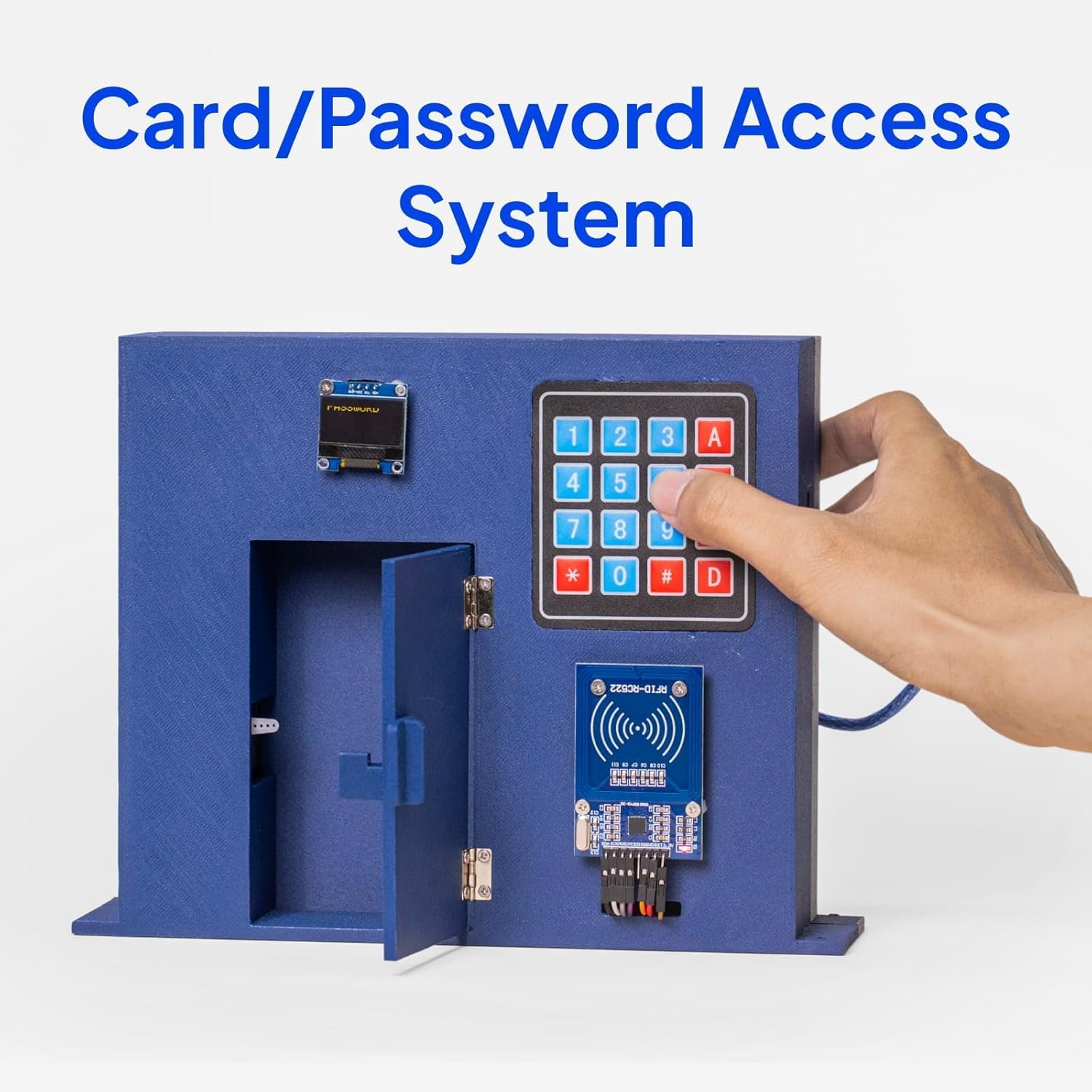
Figure 2.2: Visual representation of the kit's extensive component list.
| عنصر | كمية |
|---|---|
| ESP-32 Board | 1 جهاز كمبيوتر |
| وحدة GY-6500 | 1 جهاز كمبيوتر |
| 0.96 inch OLED Display Module | 1 جهاز كمبيوتر |
| وحدة امدادات الطاقة | 1 جهاز كمبيوتر |
| ULN2003 Stepper Motor Driver Module | 1 جهاز كمبيوتر |
| محرك متدرج | 1 جهاز كمبيوتر |
| 9V Battery with Snap-on Connector Clip | 1 جهاز كمبيوتر |
| 5V التقوية | 1 جهاز كمبيوتر |
| مستشعر الموجات فوق الصوتية | 1 جهاز كمبيوتر |
| Fan Blade and 3-6V Motor | 1 جهاز كمبيوتر |
| نشط الجرس | 1 جهاز كمبيوتر |
| الجرس السلبي | 1 جهاز كمبيوتر |
| 74HC595 IC | 1 جهاز كمبيوتر |
| L293D IC | 1 جهاز كمبيوتر |
| RC522 وحدة RFID | 1 جهاز كمبيوتر |
| HC-SR501 PIR Motion Sensor Module | 1 جهاز كمبيوتر |
| Membrane Switch Module | 1 جهاز كمبيوتر |
| زر | 5 قطعة |
| الجهد 10K | 1 جهاز كمبيوتر |
| 1 Digit 7-Segment Display | 1 جهاز كمبيوتر |
| 4 Digit 7-Segment Display | 1 جهاز كمبيوتر |
| Tilt Ball Switch | 1 جهاز كمبيوتر |
| جهاز التحكم عن بعد | 1 جهاز كمبيوتر |
| 400 Tie-Point Breadboard | 2 قطعة |
| كابل USB A إلى C | 1 جهاز كمبيوتر |
| سلك الطائر | 65 قطعة |
| Servo Motor SG90 | 1 جهاز كمبيوتر |
| IR Receiver Module | 1 جهاز كمبيوتر |
| IR Emission Module | 1 جهاز كمبيوتر |
| وحدة جويستيك | 1 جهاز كمبيوتر |
| DHT11 Temperature and Humidity Module | 1 جهاز كمبيوتر |
| Female-to-Male Dupont Wire | 10 قطعة |
| المقاوم | 120 قطعة |
| قاد | 25 قطعة |
| ليد RGB | 2 قطعة |
| الثرمستور | 1 جهاز كمبيوتر |
| Diode Rectifier | 2 قطعة |
| Photoresistor (Photocell) | 2 قطعة |
| NPN Transistor PN2222 | 2 قطعة |

Figure 2.3: The organized storage box for the kit components.
3. الإعداد
3.1 ESP-32 Board Connection
The ESP-32 board is the central component of this kit. It features a USB-C port for power and data communication. To begin, connect the ESP-32 board to your computer using the provided USB A to C cable.

Figure 3.1: The ESP-32 board with its USB-C connection.
3.2 Software Installation (Arduino IDE)
- قم بتنزيل بيئة تطوير Arduino المتكاملة: قم بزيارة موقع Arduino الرسمي webموقع (www.arduino.cc/en/software) and download the latest version of the Arduino IDE for your operating system.
- Install ESP-32 Board Support: Follow the instructions in the online tutorial to add ESP-32 board support to your Arduino IDE. This typically involves adding a board manager URL in preferences and then installing the ESP32 boards package.
- تثبيت برنامج تشغيل USB: The ESP-32 board uses a CP2102 USB-to-UART bridge chip. If your operating system does not automatically install the necessary driver, you may need to download and install it manually from the Silicon Labs webموقع.
- حدد اللوحة والمنفذ: في بيئة تطوير Arduino المتكاملة، انتقل إلى الأدوات > اللوحة and select the appropriate ESP-32 Dev Module. Then, go to الأدوات > المنفذ and select the serial port corresponding to your connected ESP-32 board.
3.3 Breadboard Usage
The kit includes breadboards for easy prototyping without soldering. The ESP-32 board is designed to fit onto standard breadboards. It is recommended to use two breadboards side-by-side to provide ample space for connections.
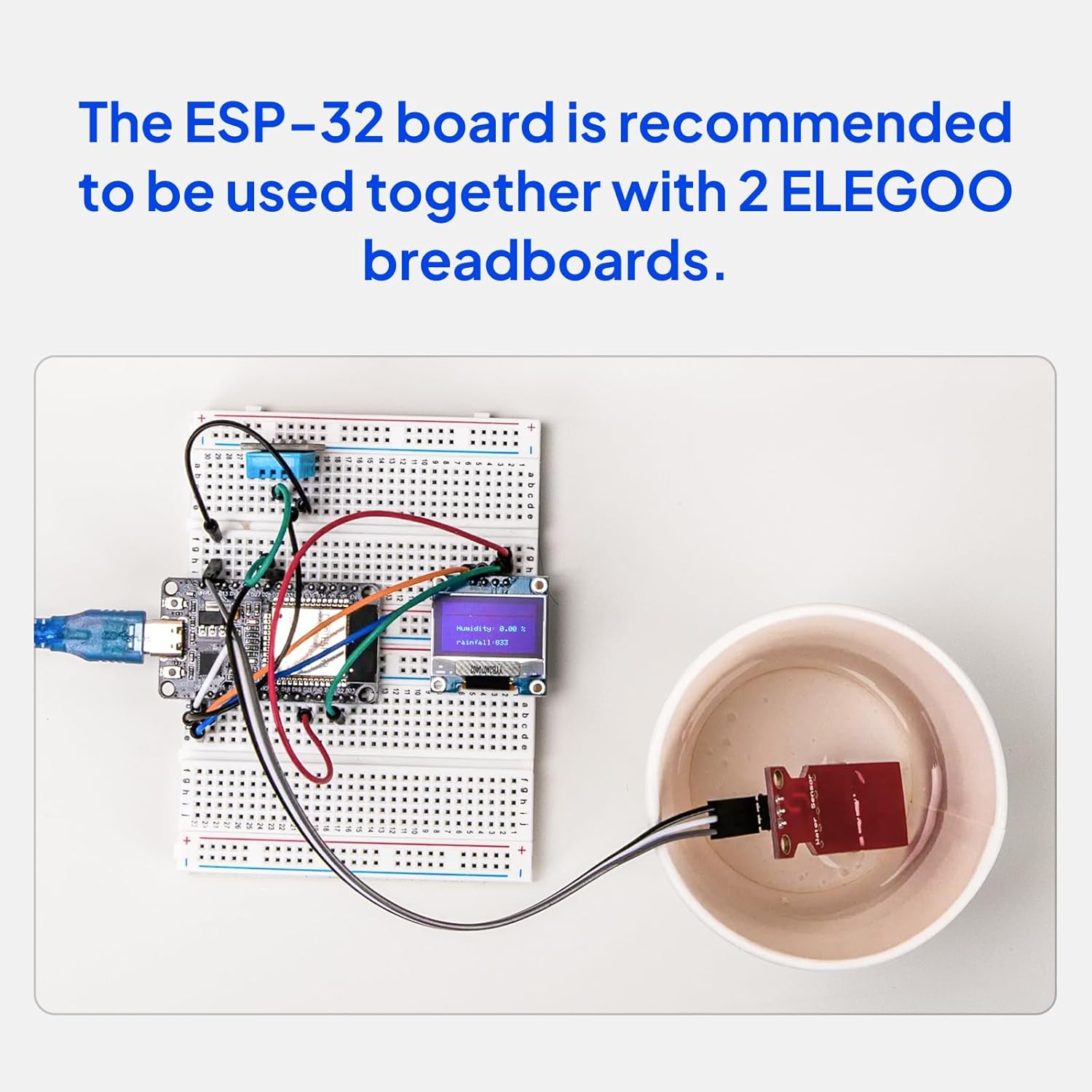
Figure 3.2: ESP-32 board connected to breadboards for a project.
4. تعليمات التشغيل
The ELEGOO ESP-32 Super Starter Kit comes with a detailed online tutorial that provides step-by-step instructions for over 30 projects. This section outlines general operating principles.
4.1 Accessing the Online Tutorial
Refer to the Quick Start Guide included in your kit for instructions on how to access the online tutorial. The tutorial includes complete code, clear circuit diagrams, and explanations for each project.
4.2 Basic Project Workflow
- Review مخطط الرسم البياني: Before connecting any components, carefully study the circuit diagram provided in the tutorial for your chosen project.
- Assemble Hardware: Connect the components to the ESP-32 board on the breadboard according to the circuit diagram. Ensure all connections are secure and correctly oriented.
- رمز التحميل: Open the provided example code in the Arduino IDE. Verify the code for errors, then upload it to your ESP-32 board.
- Test and Observe: After successful upload, test the project functionality. Use the Serial Monitor in Arduino IDE for debugging and observing output if applicable.
4.3 مثالampلو المشاريع
The tutorial guides you through building various practical applications:
- محطة الطقس: Utilize sensors to measure environmental data like temperature and humidity, displaying it on an OLED screen or sending it to the cloud.
- Card/Password Access System: Implement security features using RFID modules and keypads.
- Retro Snake Game: Develop interactive games using the OLED display and joystick module.
Figure 4.1: Weather Station project exampليه.

Figure 4.2: Card/Password Access System project exampليه.

Figure 4.3: Retro Snake Game project exampليه.
5. الصيانة
Proper care and maintenance will ensure the longevity and optimal performance of your ELEGOO ESP-32 Super Starter Kit components.
- تخزين: Store all components in the provided organized box in a cool, dry place away from direct sunlight and extreme temperatures.
- التعامل: Handle electronic components, especially integrated circuits (ICs) and the ESP-32 board, with care. Avoid touching pins directly to prevent damage from electrostatic discharge (ESD).
- تنظيف: If necessary, gently clean components with a soft, dry cloth. Avoid using liquids or abrasive cleaners.
- مزود الطاقة: تأكد دائمًا من المجلد الصحيحtage and current are supplied to the ESP-32 board and other modules. Incorrect power can cause permanent damage.
- إدارة الكابلات: Keep jumper wires and cables organized to prevent tangles and accidental disconnections.
6. استكشاف الأخطاء وإصلاحها
If you encounter issues while using your kit, refer to the following common troubleshooting steps:
- لم يتم اكتشاف اللوحة:
- Ensure the USB cable is securely connected to both the ESP-32 board and your computer.
- Verify that the correct USB driver (CP2102) is installed.
- Check if the correct serial port is selected in the Arduino IDE (الأدوات > المنفذ).
- Code Upload Errors:
- Confirm that the correct ESP-32 board type is selected in the Arduino IDE (الأدوات > اللوحة).
- Ensure no other applications are using the serial port.
- Try pressing the BOOT button on the ESP-32 board while uploading, if instructed by the IDE or tutorial.
- المكون لا يعمل:
- Double-check all wiring connections against the circuit diagram. Loose or incorrect connections are common causes.
- Verify that the component is correctly oriented (e.g., LEDs, ICs).
- Ensure the component is receiving the correct power supply.
- Test the component with a known working example from the tutorial.
- مشاكل الاتصال بشبكة Wi-Fi/Bluetooth:
- Ensure your Wi-Fi credentials (SSID, password) are correct in your code.
- Check that the ESP-32 is within range of your Wi-Fi network or Bluetooth device.
- Verify that the correct libraries for Wi-Fi/Bluetooth are installed in the Arduino IDE.
For more detailed troubleshooting and specific project issues, consult the online tutorial or the ELEGOO technical support resources.
7. المواصفات
Key technical specifications for the ELEGOO ESP-32 Super Starter Kit and its main components:
| ميزة | التفاصيل |
|---|---|
| ماركة | إليجو |
| اسم الموديل | EL-KIT-032 |
| تكنولوجيا الاتصال | بلوتوث، يو اس بي، واي فاي |
| توافق نظام التشغيل | Arduino IDE, Linux |
| ماركة المعالج | إسبريسيف |
| عدد المعالجات | 2 (ثنائي النواة) |
| تقنية ذاكرة الوصول العشوائي (RAM) | دي آر دي |
| إجمالي منافذ USB | 1 (يو اس بي-سي) |
| عدد الوحدات | 35.0 Count (modules/components) |
8. معلومات الضمان
The ELEGOO ESP-32 Super Starter Kit comes with a ضمان الشركة المصنعة لمدة عامين. Please retain your proof of purchase for any warranty claims. For details regarding warranty terms and conditions, please refer to the official ELEGOO webالموقع أو الاتصال بدعم العملاء.
9. الدعم
ELEGOO is committed to providing quality products and excellent customer support. If you require assistance with your kit, have technical questions, or encounter any issues, please utilize the following resources:
- Online Tutorial: The most comprehensive resource for project guides, code examples, and circuit diagrams. Access details are in your Quick Start Guide.
- فريق الدعم الفني: ELEGOO provides a dedicated technical support team ready to assist you. Contact information can typically be found on the official ELEGOO webموقع (www.elegoo.com).
- المجتمع عبر الإنترنت: Join the active ELEGOO online community for peer support, project ideas, and shared knowledge.